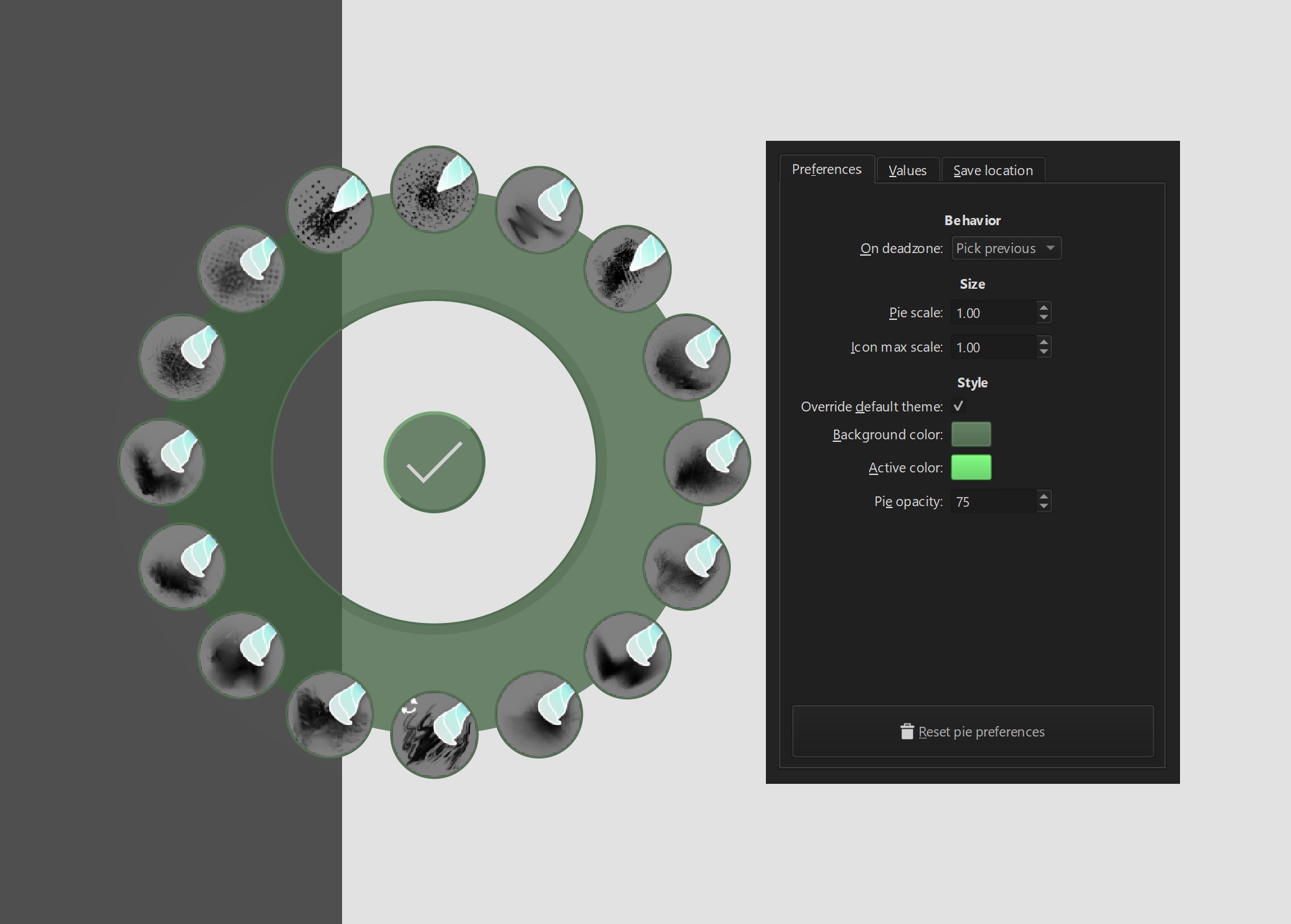
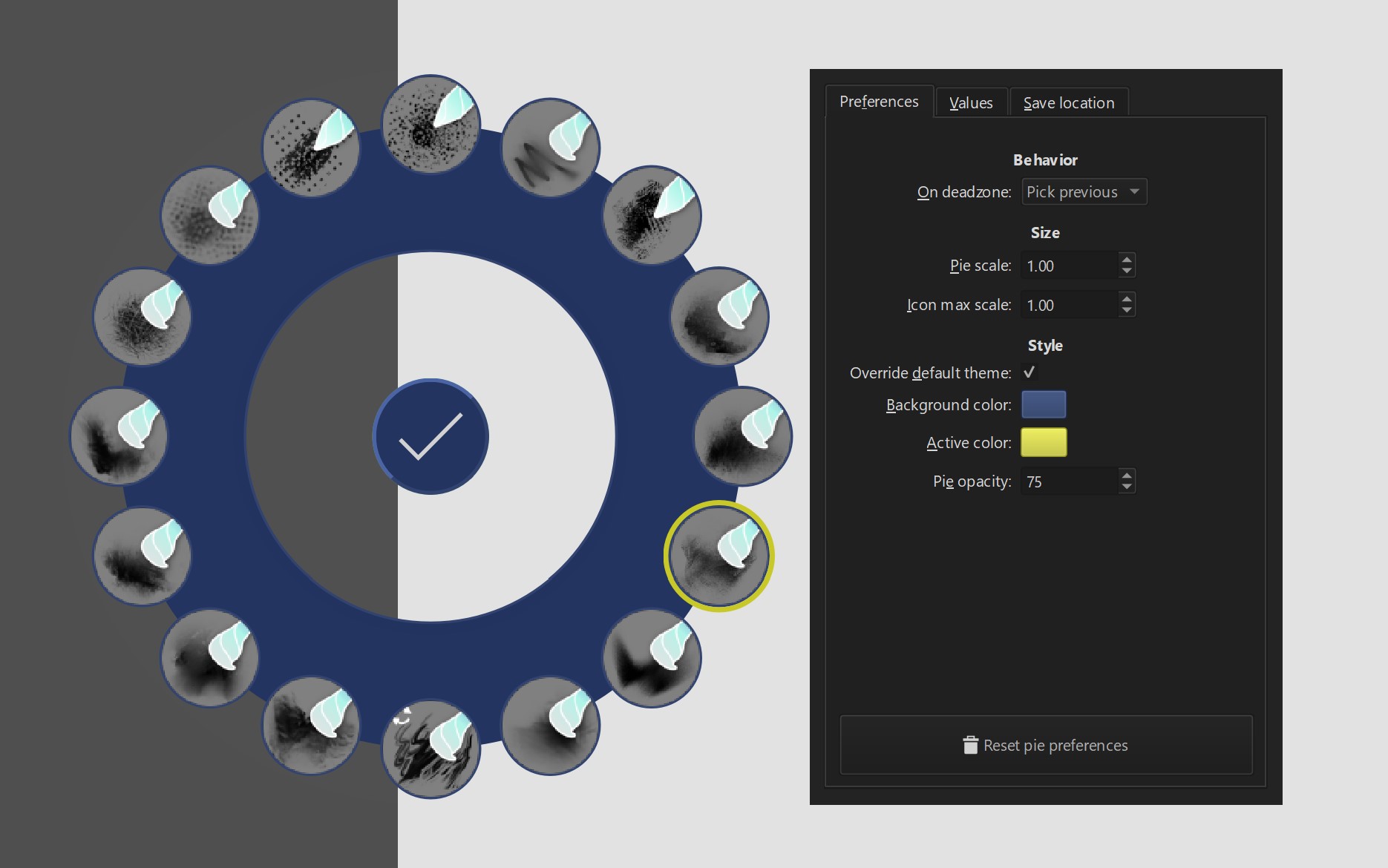
Shortcut Composer v1.6.0 - Plugin for Pie menus, Multiple key assignment, Mouse trackers and more!

What’s new in 1.5.0

This release adds new type of action: rotation selectors. They allow to easily select angle-based properties in krita, finally making it possible to rotate current brush on the go.

This update requires krita 5.2.2 or higher.

Added

  • New action: Rotate brush which rotates the brushtip of the current preset
  • New action: Rotate canvas
  • Tooltips with additional info that appear when hovering over settings
    Screenshot_20240224_190146
  • Running the plugin on krita version lower than required will turn off entire plugin and show appropriate warning window.

Modified

  • Many classes were refactored to improve the plugin architecture and allow reusing GUI elements in other places of code and other plugins
  • Migrated to Python 3.10
20 Likes

This is too good.

1 Like

Hi! Thank you so much for this plugin :yellow_heart:
I was just wondering, is it supposed to be that when you change the color of the pie, the transparency disappears?


Thanks for reporting!

I can recreate this issue. I’ll try to fix that soon and release the 1.5.1.

1 Like

hi. scroll isolated layers is a very nice and useful feature. Thanks again. Is it possible to edit this script to move layers up/down?

1 Like

You’d need to have some basic python skills to do it. You won’t be able to do that just by editing the configuration.

1 Like

Hi @wojtryb, just wanted to thank you for this plugin. It is, without doubt, a must have. I don’t know if you remember, but i wrote you few months ago because shortcut parametered into wacom pencil would not work with version 1.4+. So i was stuck on V1.3. For whatever reason, it is now working. THANK YOU!

3 Likes

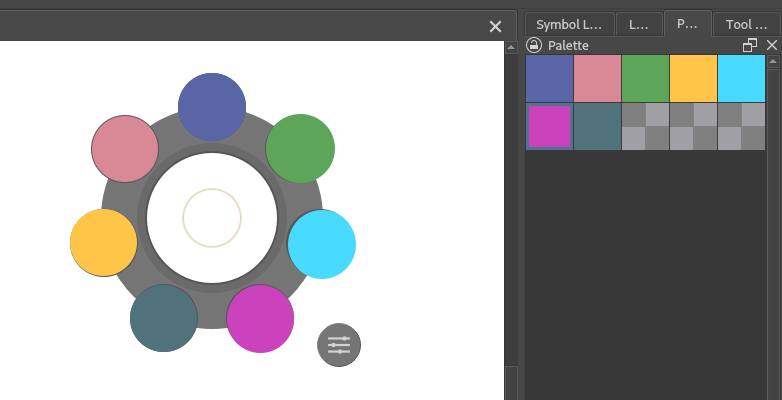
Hi @wojtryb . Thank you again for your plugin. I absolutely love it and I’m so used to its workflow that I cannot use Krita without the ipe menu anymore. I was just wondering, I use a very limited palette for my work, and I always have the “palette” docker visible. Do you think is possible to assign a created palette with a set of colors to a slot so that we can have a palette in the pie menu? Like in the image below.

Many thanks

4 Likes

Sorry I didn’t respond initially on the github discussion, but I did now:

2 Likes

Great, thank you for your reply :pray:
And once again, your plugin rocks :love_you_gesture: :love_you_gesture: :love_you_gesture:

Someone can please help me with this?

ValueError
Python 3.10.7: C:\Program Files\Krita (x64)\bin\krita.exe
Wed Mar 20 13:16:14 2024

A problem occurred in a Python script.  Here is the sequence of
function calls leading up to the error, in the order they occurred.

 C:\Users\Windows 10\AppData\Roaming\krita\pykrita\shortcut_composer\templates\pie_menu_utils\pie_manager.py in _handle_cursor(self=<templates.pie_menu_utils.pie_manager.PieManager object>)
   60         angle = circle.angle_from_point(cursor)
   61         holder = self._pie_widget.order_handler.widget_holder
   62         self._set_active_label(holder.on_angle(angle).label)
   63 
   64     def _set_active_label(self, label: PieLabel | None) -> None:
self = <templates.pie_menu_utils.pie_manager.PieManager object>
self._set_active_label = <bound method PieManager._set_active_label of <t...es.pie_menu_utils.pie_manager.PieManager object>>
holder = <templates.pie_menu_utils.pie_widget_utils.widget_holder.WidgetHolder object>
holder.on_angle = <bound method WidgetHolder.on_angle of <template..._widget_utils.widget_holder.WidgetHolder object>>
angle = 297.34987578006985
).label undefined

 C:\Users\Windows 10\AppData\Roaming\krita\pykrita\shortcut_composer\templates\pie_menu_utils\pie_widget_utils\widget_holder.py in on_angle(self=<templates.pie_menu_utils.pie_widget_utils.widget_holder.WidgetHolder object>, angle=297.34987578006985)
   40             return abs((raw_difference + 180) % 360 - 180)
   41 
   42         closest = min(self.angles(), key=angle_difference)
   43         return self._widgets[closest]
   44 
closest undefined
builtinmin = <built-in function min>
self = <templates.pie_menu_utils.pie_widget_utils.widget_holder.WidgetHolder object>
self.angles = <bound method WidgetHolder.angles of <templates...._widget_utils.widget_holder.WidgetHolder object>>
key undefined
angle_difference = <function WidgetHolder.on_angle.<locals>.angle_difference>
ValueError: min() arg is an empty sequence
    __cause__ = None
    __class__ = <class 'ValueError'>
    __context__ = None
    __delattr__ = <method-wrapper '__delattr__' of ValueError object>
    __dict__ = {}
    __dir__ = <built-in method __dir__ of ValueError object>
    __doc__ = 'Inappropriate argument value (of correct type).'
    __eq__ = <method-wrapper '__eq__' of ValueError object>
    __format__ = <built-in method __format__ of ValueError object>
    __ge__ = <method-wrapper '__ge__' of ValueError object>
    __getattribute__ = <method-wrapper '__getattribute__' of ValueError object>
    __gt__ = <method-wrapper '__gt__' of ValueError object>
    __hash__ = <method-wrapper '__hash__' of ValueError object>
    __init__ = <method-wrapper '__init__' of ValueError object>
    __init_subclass__ = <built-in method __init_subclass__ of type object>
    __le__ = <method-wrapper '__le__' of ValueError object>
    __lt__ = <method-wrapper '__lt__' of ValueError object>
    __ne__ = <method-wrapper '__ne__' of ValueError object>
    __new__ = <built-in method __new__ of type object>
    __reduce__ = <built-in method __reduce__ of ValueError object>
    __reduce_ex__ = <built-in method __reduce_ex__ of ValueError object>
    __repr__ = <method-wrapper '__repr__' of ValueError object>
    __setattr__ = <method-wrapper '__setattr__' of ValueError object>
    __setstate__ = <built-in method __setstate__ of ValueError object>
    __sizeof__ = <built-in method __sizeof__ of ValueError object>
    __str__ = <method-wrapper '__str__' of ValueError object>
    __subclasshook__ = <built-in method __subclasshook__ of type object>
    __suppress_context__ = False
    __traceback__ = <traceback object>
    args = ('min() arg is an empty sequence',)
    with_traceback = <built-in method with_traceback of ValueError object>

The above is a description of an error in a Python program.  Here is
the original traceback:

Traceback (most recent call last):
  File "C:\Users\Windows 10\AppData\Roaming\krita\pykrita\shortcut_composer\templates\pie_menu_utils\pie_manager.py", line 62, in _handle_cursor
    self._set_active_label(holder.on_angle(angle).label)
  File "C:\Users\Windows 10\AppData\Roaming\krita\pykrita\shortcut_composer\templates\pie_menu_utils\pie_widget_utils\widget_holder.py", line 42, in on_angle
    closest = min(self.angles(), key=angle_difference)
ValueError: min() arg is an empty sequence


It’s this issue. I made a proposed fix, you can try it out on development version.

2 Likes

Hi @wojtryb ! I just updated the plugin to 1.5.0 and it appears that on my self-built Krita it doesn’t work any more. The issue seems to be the Krita version check :

krita.scripting: " File "/home/hulmanen/.local/share/krita/pykrita/shortcut_composer/init.py", line 23, in main"
krita.scripting: " if Krita.version < required_krita_version:"
krita.scripting: " File "/home/hulmanen/.local/share/krita/pykrita/shortcut_composer/api_krita/core_api.py", line 154, in version"
krita.scripting: " version = Version(int(major), int(minor), int(fix))"
krita.scripting: “ValueError: invalid literal for int() with base 10: ‘2 (git 0bb43d5)’”

So since the version my Krita reports contains the git commit hash, it’s not able to do the version check. I was able to get it working by removing the version check since I know I’m running 5.2.2, but just a heads up in case you want to do something about it.

1 Like

Also, thanks for implementing the brush rotation widget! I’ll definitely be using it. Would it be possible to have an implementation without a “pie” at all? It took me a while to realize you can see the brush stamp rotate by moving the cursor outside the widget. I set the scales for deadzone and inner zone very small, but I still need to first move the cursor a bit before I can see the effect the rotation has on the brushtip, and the brushtip doesnt’ stay in place, which I would find preferable. I don’t know that we actually need the visual feedback from the pie, since we can just look at how the brush tip rotates.

Hi, thanks for reporting the bug! I’ll be releasing 1.5.1 soon, and I’d like to have this fixed there.

Could you run this in the Tools > Scripts > scripter, and tell me what is the outcome for your self compiled krita?:

print(Krita.instance().version())

For the rotation widget: I decided to have the widget, as I wanted to have those three zones: deadzone (to allow users go back to the original value), intervallic zone (to allow setting values to 0 easily) and precise zone. Those were pretty hard to navigate without any visual clue.

The problem with transparent widgets is that on Windows the original brush outline is displayed under the widget, but on Linux it isn’t, so when I want a widget, it needs some kind of indicator.

If you want to hack the widget, you can go to shortcut_composer > templates > rotation_menu_utils > rotation_style.py, and make the following change:

    @property
    def widget_radius(self) -> int:
        """Radius of the entire widget."""
-        return round(self.inner_zone_radius + self.transparent_border)
+        return round(self.settings_button_radius)

to remove most of the widget, and leave only the settings button (which ideally should go to screen corner, but you won’t get it that fast)

The other thing you could do is to remove the value indicator and leave the outlines, by editing shortcut_composer > templates > rotation_menu_utils > rotation_widget_utils > rotation_painter.py

    def paint(self, painter: Painter, state: WidgetState) -> None:
        """Paint the widget which created the passed painter."""
        self._painter = painter
        self._state = state

        self._paint_deadzone_indicator()
        self._paint_free_zone_indicator()
-        self._paint_selection()
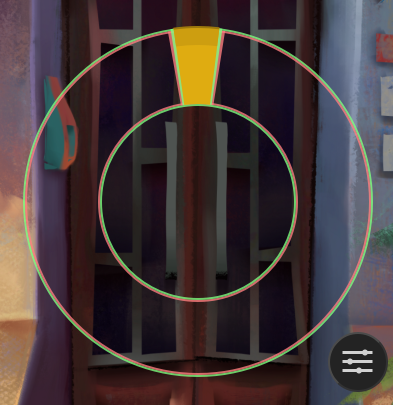
Thanks for the suggestions. Setting the widget scales really small is, I think, as good as it’s going to get here, the settings button just gets in the way since it’s right under the cursor when the widget is scaled way down.

I hacked it by setting the settings button size to 0 in rotation_style.py :sweat_smile:. Works pretty good for me now. I guess doing what I’d most prefer, namely displaying the brush outline instead of the widget and not having it move under the cursor would get pretty involved anyway :grimacing:

Maybe there is a need to create a separate, simplified action that has no deadzone or intervallic zones, no configuration. I’ll think of it.

2 Likes

What’s new in 1.5.1

Fixed

  • Prevent the occasional crash while picking label from Pie (empty label list issue)
  • Fixed Pie opacity being always 100% after changing to custom color (introduced in 1.5.0)
  • Fixed a crash while trying to detect a version of krita built from source

Modified

  • Changed RotationSelector outline opacity range from <0-255> to <0-100>, unifying it with Pie background
  • RotationSelector indicator now overlaps the deadzone outline

Note

Due to changes in RotationSelector opacity range, previously selected outline opacity in Rotate brush and Rotate canvas will require manual change. If the default value was never changed, the new one will work out of the box.

Sorry for inconvenience.

2 Likes

Krita().version() for a non-Release version may look like this:
Next: 5.3.0-prealpha (git 1a2dd97)
Plus: 5.2.2 (git 106afc8)
Beta: 5.2.0-beta2
Release Candidate: 5.2.0-rc1

Your version checker assumes the extra info is preceeded by a hyphen, but it is not for Plus builds.

1 Like

I see - thank you. The prevented the plugin from crashing there, but I’ll add support to this format in the next release

1 Like