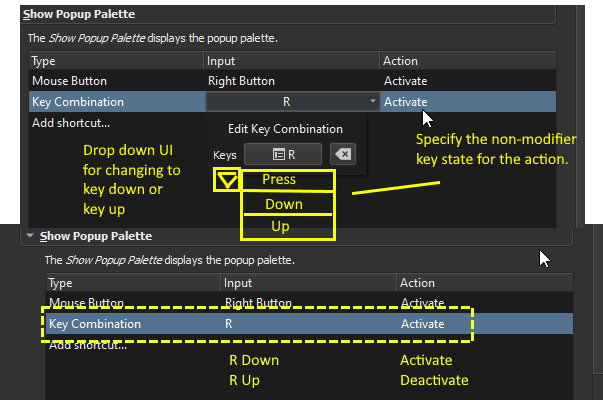
Without doubt, the popup palette is an interesting handy feature of Krita. I hope that the toggling of this popup can be done by holding a key instead of pressing it to toggle. It could just be me but I feel that it will more natural to be this way. One less key press for a common action
I was thinking about it for a long time, tried to do this with python script, but managed to do that only by some nasty change in source code. I dropped that idea as it didn’t feel as comfortable as I thought it would be.
I also started the discussion about improving the tool itself but it ended without any changes in code or feature requests. You can try to bring the discussion back
I think the suggestion I made here is a little different in nature. By adding an extra option to specify the key state to trigger the action, it is not just a code change specific to bring out the Popup Palette but a general flexibility update for the shortcut system. The “hold to trigger” mechanism can also be used on other potential features and panels. For example, in the future it could be used to hold and show the history panel, or activate a temporary eraser or anything other things that has on/off states.
The keyboard shortcut suggestion also doesn’t affect current users at all unless they manually change the setting from existing two-key on/off mechanism to a press and hold mechanism.
For those who want to test the behavior before an official update. I just made a script to do exactly the same thing BUT not work as expected if picking a brush instead of anything else because it will auto close the popup when pick a brush. The extra trigger by the script will reopen the popup unintended! Can’t do anything about it.
A compiled executable is also available in case some people just want to try it out and don’t want to install AutoHotkey. But that will required krita setting to use Shift+P as short-cut to toggle the popup and the key to hold and show the popup is set to the R. These binding can be changed when using the script version directly.
The script is specified to only work when krita.exe is active so it won’t affect you when you are typing on other apps or playing game.
The link is no longer available, so I assume you still use “r” to trigger the the hold key popup palette. This code works as intended except when picking colors because picking colors doesn’t automatically close the pop-up palette.
It’s probably doable to make it so that when you pick colors, it will close the popup palette on release, but it will need to be especially coded to match your Krita popup palette configuration. I’m not really a programmer so that’s pretty much all the help I can give.