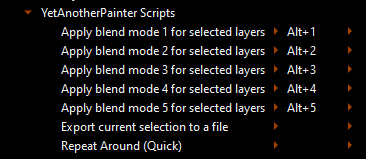
But how about layers? There is no shortcuts for the current layer’s blend mode, and we can’t assign one.
Use case: well, it’s just a QoL improvement. We all agree that layer’s blend modes are very useful, right? Having shortcuts just makes any workflow that utilizes them a bit faster.
Those Brush Blending Mode shortcuts are a small subset of all the possible blending modes.
The problem is the number of available shortcuts.
I often have difficulty getting a new shortcut that isn’t already in use and sometimes resort to removing an existing shortcut that I don’t use so i can ‘recycle’ it.
Would you want all possible layer blending modes to be availble as configurable shortcuts?
You can use multi-key sequence shortcuts to vastly increase the number of unique shortcuts and these can be useful but they have their own potential problems in use.
I noticed there’s actions to change brush blending mode but not layer blending mode. I believe it would be useful to have in order to make shortcuts for your workflow for example to add a layer and set it in darken when working with markers or multiply to make washes.
I really wanted to make recorded actions for those but I can’t do that or even do shortcuts for them so I have to manually go and change layer blending mode from my long list of favorites every time instead of using a macro. This really stops workflows where adding and merging layers is common.
In use there would be no ‘con’ apart from a massive list of keyboard shortcut actions to look through but these could be grouped into collapsed lists as they are now in the lists of blending modes in the layers docker.
If the developers did decide to do this then I supect that they’d leave the Default shortcuts as None because who’d want to spend time figuring out a suitable list of shortcuts, even if there are enough unused single key combination shortcuts to go around.
It would probably be up to the user to work out their own mappings.
Since we have favourites, how about numerical + modifier combination (for example ctrl+ alt + 1 for first, ctr + alt + 2 for second) to access the blend modes that are only in the favorite upto ten. That will make sure that number of shortcut need not be for every blend mode and still user can add the blend mode they want to use in the favourite and have a shortcut for it.
Alternatively we can also make available all the blending mode with empty default shortcut and let the user choose the shortcut for any number of them.