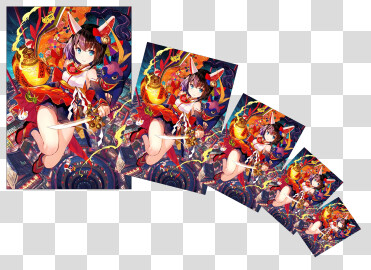
Does this copy and repeat things around the axis?
This plugin sounds interesting, I will request you to add some images and may be webm videos explaining stuff. Another thing that I would suggest is to make the license clear.
This is probably the first paid Krita plugin, and I wish you best of luck, I hope we see more paid plugins.
I tried. But API call for some reason does not work.
I will give it another shot. Maybe I missed something
So that you can tweak the image after you apply the operation, right? Unfortunately not. The transformation is applied on pixel data.
I might look into another direction - make a set of clone layers in advance and create transformation masks for them. I will see if API allows this to do.
In some extend yes. I need to think about it. Sounds like a huge feature to implement.
Thanks for feedback. I will definitely try to improve on the points you mentioned and include it in future updates.
After “Export Selection to file”,does the name of the file have any meaning? I see the date at the top. But I don’t understand the meaning behind
Then “Repeat Around” on non-paintlayer will cause krita to crash. If your attempt is successful, then the problem will be solved naturally.
If the attempt to clone the layer fails, I propose to add detection of the active layer node, and if it is paintlayer, proceed. If it is another layer, you can copy it and convert it to a paint layer so that krita will not crash
The pattern for the file name is year-month-day-hour-minute-second-millisecond.png
This way I can guarantee that even if the person will export fast the files will have unique name. And due to the nature of the pattern they will be sorted. So you can create a sequence of exports and use it elsewhere
Yes. Unfortunately Repeat Around works only with Paint Layer.
Good points, I will add checks in the next update. Thank you!
I understand, is it possible to add the width and height of the file to the file name?
In this way, we can also see the size of the file in the list without disturbing the order
Last time we talked about “Repeat last transform”. I may have found a relatively simple implementation idea.
But it must have a transform mask.(I’m not sure if there is another way to save transform data)
I envision a new docker with two buttons on it. The first one is “copy mask”, we select a transform mask and click on it and it will copy this mask.
The second button is “repeat”.We select a layer and click on the button. It will: duplicate the layer–flatten layer–paste the mask–flatten layer.
The multiple “flatten layer” is to prevent the transform mask from stalling too much.
This way we can complete a series of operations with just one transform mask. But there are also disadvantages, it overwrites the clipboard and is afraid of being overwritten. But the plugin seems to have a way to avoid it
The main thing - it does not crash when using the Repeat Around operation
And it got other usability improvements.
Additional features will be in the next update.