my smart patch tool can not working normally:(
Krita 5.0.5
From a previous topic, I believe you’re using Android. I’ve edited the topic title to say that.
yeah, haiz, but can you explain it for me? why just android? huhu, i have check on my pc too, but it still not woking
I don’t use Android or the smart patch tool.
You’ll have to wait until someone who knows about this can read your topic and try to help you.
Ok, you initially said it was Android and didn’t say it was on a PC as well.
I’ll change the title back and stop bothering you.
thank you so much, Krita was update on Jan, in the past, i use it normally, but now, it not working.
btw, thank you
For me, this tool works like ever before on Windows 10 with the portable Krita 5.0.5, and it works also on SUSE Linux Tumbleweed wit the 5.0.5 AppImage.
Are you working on a paint layer with this tool, or do you have a layer locked?
Michelist
hi, i use this tool on the only one layer, and that layer is my raw, a picture
You are saying that a previous version (which version?) worked for you but version 5.0.5 does not work properly.?
Can you provide screenshots of example images to show what you mean?
Or could you make the file available for us to test? For example via Dropbox, Google Drive, Onedrive, Ufile[.]io, anonfiles[.]com?
Michelist
i dunno exactly which version, but 5 days go, this tool doesnt work anymore
oh, sorry, i dont know how to send u a test@@

this is my problem@@ i dunno why
I think you want to achieve this, right >>

If so, then you need a clone brush, Krita’s Smart Patch Tool can’t solve this problem. Therefore, the white blob is much too big, at least it is that what my experience with this tool says to me. Or load it in IrfanView and use its clone tool, like I did with this for example.
Michelist
1 Like
I’d agree that the Clone Tool brush preset is easier to use but it’s far from perfect with detailed structured patterns.
There does seem to be a difference between version 4.4.8 and version 5.0.5 with smart patch tool behaviour:
5.0.5: The red outlined areas are my attempt to use it.
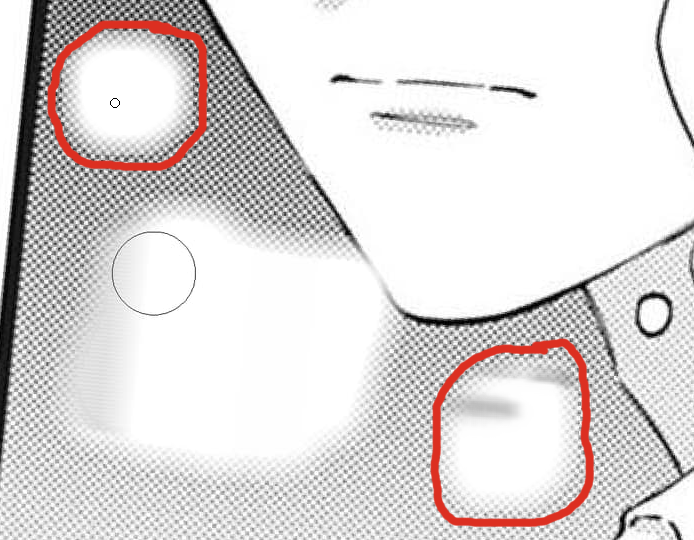
4.4.8: With the same Tool Option parameters.

It’s a bit hit and miss but the lower-right area is very good.
I tried a few more times and had variable results.
I now have tested another picture, that was very different to the one I’ve tested first, and there I can also see this issue, damn! That is crazy. The best results I can achieve here, are with accuracy at maximum and Patch Radius at 2 px and small patch sizes. Now I’m really pondering what is going on here?
Michelist
I think that a formal bug report would be a good idea because there is bad performance in 5.0.5 compared to 4.4.8.
So, @hzenmac, How would you feel about making a formal bug report at https://bugs.kde.org/
(Sign up and sign in are needed and it’s a fun experience.)
If you do make a formal bug report, please post a link to it in a reply here.
thank you, guys. i will do it
https://bugs.kde.org/show_bug.cgi?id=453024
this is the first time i use this web, if i do something wrong, pls tell me
3 Likes
hi, we have new update, 5.0.6 version, but i see the smart patch tool and clone brush is still not working normally:(