Hello everybody, I am going to make a storyboard feature this summer ( at least for the northern half of the globe ) as my GSoC project. This is a list of mockups, features and functionalities that we have planned so far:
General
There would be a Storyboard docker that would show relevant non-empty frames on the image’s timeline.
The frame would be shown as a thumbnail. User can paint on the thumbnail directly. Changes made to the frame from the canvas and storyboard docker would mirror each other.
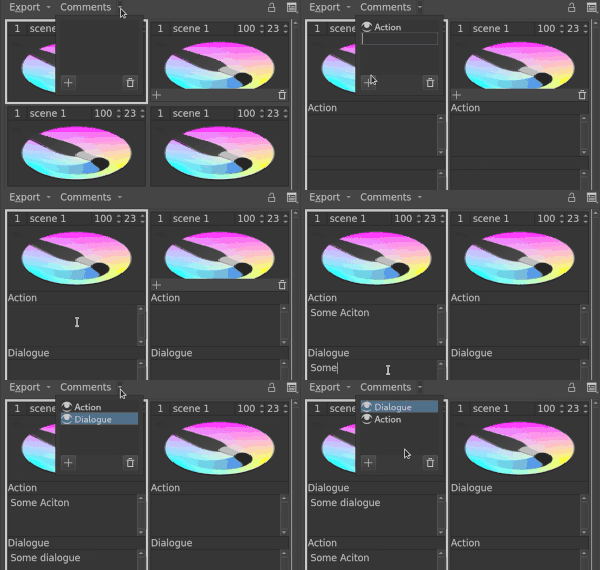
Every storyboard item has associated comments fields.
These fields can be added or deleted on a per document basis. i.e. If you add a dialogue field, it would be added to all the storyboard items.
These fields can be shown or hidden on a per document basis.
Any non empty frame would be added to the storyboard docker.
The frames of the image may be “pinned” or “unpinned” from the docker.
Interaction with timeline Docker
There would be a duration for every storyboard element. There would be hold frames after the storyboard’s frame in the timeline for the duration.
Selecting storyboard item would select the relevant frame in the timeline docker and vice-versa. Similarly with swapping. Deletion from storyboard docker would not delete the frame from timeline.
Non-empty frames can be added from the storyboard docker.
Navigation and Ordering
To customize the docker there would be two options mode and view.
3 modes : grid, row and column to choose the order in which frames are arranged.
3 views options : Thumbnails only, comment only and both to hide and show different fields.
Comments drop down list with different text fields.
Scrollbars for navigation.
Exporting
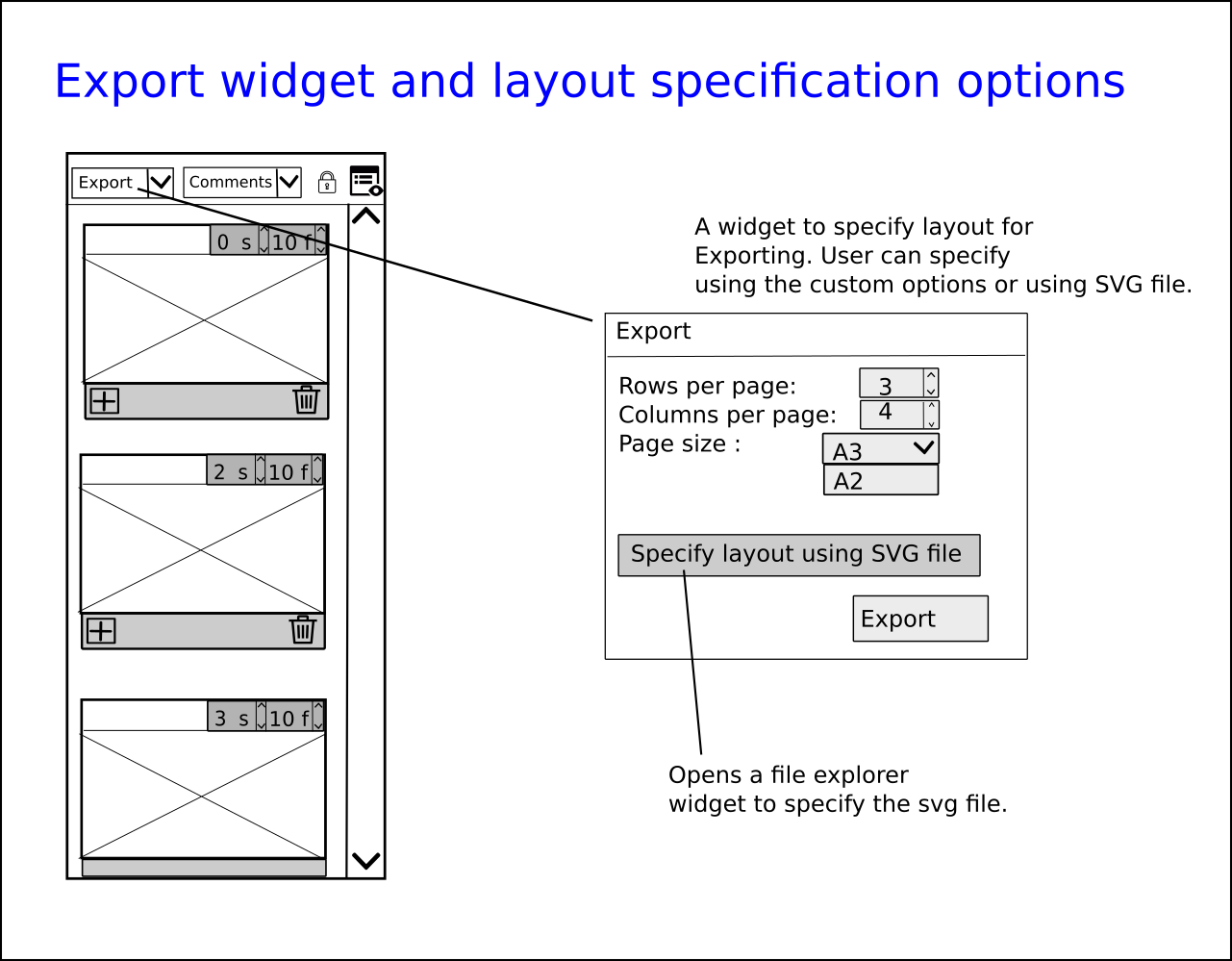
There would be options to export in SVG format or in PDF format.
To specify layout there would be options to choose rows per page , columns per page and page size.
Alternatively layout would be specified using SVG file as well.
I would love to hear your opinion, improvements, suggestions questions about this . Also there is a phabricator task here. Also the GSoC proposal here ( Jump to UX Design section for details about UI).
I’ve never tried storyboarding myself, so I won’t be much help here, but I just wanted to say, that this proposal looks very solid! - I’m sure krita will benefit from this feature a lot.
I keep my fingers crossed. Good luck
Looking good! Krita would definitely benefit from this feature I think.
At the moment my suggestions would be:
Have the option to add storyboard items before and after the selected one, accessed through a Right click of the story picture. Perhaps having the option to add multiple storyboard items, similar to how Keyframes can be added currently. This would reduce the involved effort if you needed to add a new beginning storyboard item, but could only drag a frame in front of said item to the beginning to do so.
Include a ‘Cut Number’ heading for each item, so that anyone reading the docker has a clear understanding of which cut comes after which. This prevents the possibility of confusing important shots with each other, and assists legibility if the storyboard is printed out.
Allow the Shift + Click / Ctrl + Click selection and deletion of multiple storyboard items. This would increase the speed at which iterations of the animation sequence could be made, without having to click the delete icon individually each time.
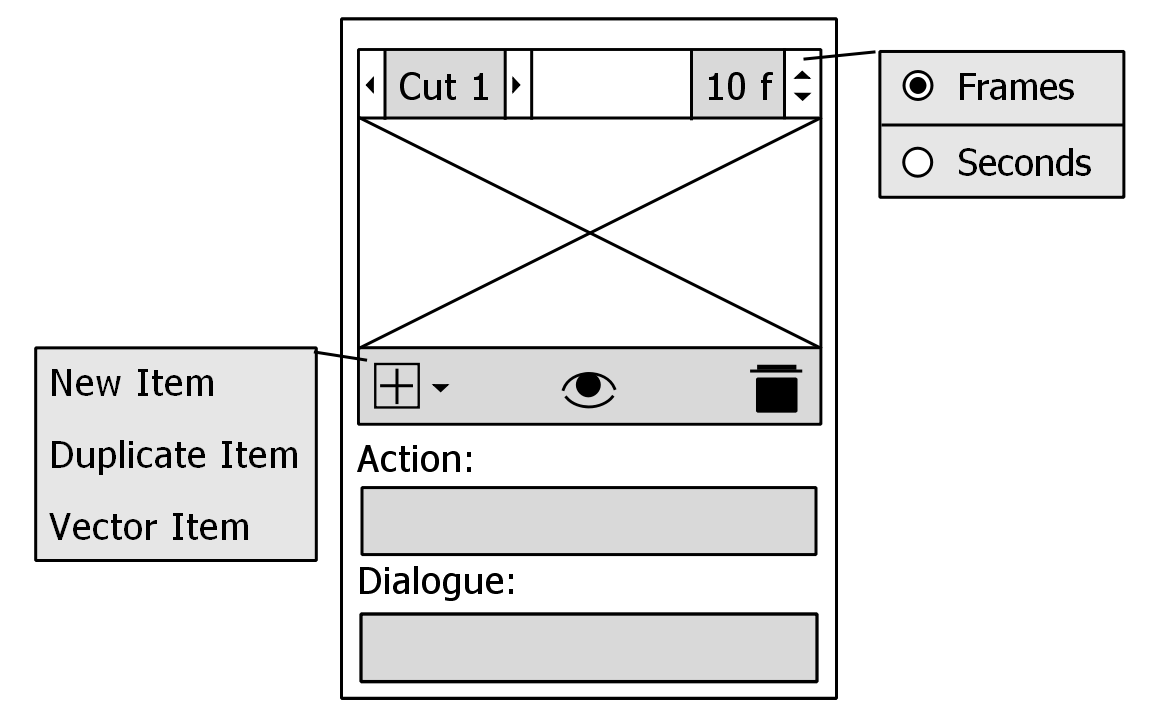
I also attempted to make a simple mockup of a possible storyboard item:
The layout basically imitates your idea, but here are some of the main change reasonings:
I believe having a set time unit of frames/ seconds displayed in the top right would help readability; the choice between either can be accessed through a Right click of the entry box. This allows the user to focus quicker on the entry, and have less confusion on which unit to type in (especially users who may prefer one unit over the other).
The top left features the ‘Cut Number’ I mentioned before, however I added left/right buttons that allow the user to move the Story Item through the Docker. I think this might be another option for users to move Items with more control, similar to how the Layer arrows work already.
For larger story boards, the feature could possibly be combined with a Right Click numerical entry in the ‘Cut Number’ box, so that a specific position in the animatic can be achieved. This reduces the need to drag items through large storyboard files, and makes the story editing process more efficient.
Under the ‘Add’ button I’ve suggested 2 more Story Item options; a ‘Duplicate Item’ would allow the user to describe small, scene specific story beats that don’t require too much change in the cut e.g. facial expression changes, villainous reveals etc.- The user wouldn’t have to redraw a majorly similar shot again. The ‘Vector Item’ allows users to input vector-specific objects: title pages, in-frame comic-book style SFX etc. This would allow users to have greater control and view of how their animatic may run, how long to animate on-screen exposition etc.
The last addition was a visibility toggle; conceptually it would allow the user to view possible versions of their animatic without specific scenes, allowing them to visualise different story beats in a non-destructive way. Toggling this option would essentially hide the selected Story Item from the Timeline, acting like a ‘Remove Frame and Pull’ function, but allowing reversal of the process at any time thereafter. I hope that won’t create create too much of a memory issue
This might be another difficult suggestion, but I hope there is also an option to include layering of the Story Items. Perhaps a projected view of multiple layers for each Item? That way you could keep a non-destructive layer for linework, motion, shading etc., allowing you to edit specific lightings/ character movements without destroying underlying layers.
That’s all my ideas aha! Thankyou if you read this all, a lot of this is just wishful thinking that will be difficult to implement, but I hope I can add an additional perspective on things!
I don’t do a lot of storyboarding myself either, but it’s looking pretty solid to me as well!
Spontaneous thought here is that there are a lot of features to get right, and in such a way that they aren’t confusing to first time users. Something like drawing directly on top of the thumbnails feels like it would be more of a if-time-allows kind of feature though. It’s my personal opinion that the focus should be on the organizational features as well having the actual canvas load each panel/frame when clicked or maybe that’s just me!
I agree with @Kapyia; the drawing on Story Items inside Docker feature wouldn’t make much of a difference to how I would create a storyboard. In my opinion such an option is less important, aside from the difficulties that might arise from implementing this.
Thank you for such a thorough feedback!! All of your suggestions are sensible and I will try my best to implement them. Some points that I want to clarify:
This makes sense. Mostly if the duration is in sec we don’t care about frames. I don’t think many people would need a duration of 2 sec and 12 frames in the storyboard, it could as well be 2 sec. Is this right?
Include a ‘Cut Number’ heading for each item
This can be done since the place is basically empty. Do you think we should make the name of the field customizable? Like if someone wants to name it as scene 1 or shot 1.
I hope there is also an option to include layering of the Story Items
Can’t this effect be achieved by the layers that for each frame? e.g. If you want some element of previous story item you can simply create an other layer, keep it empty for the duration of previous item and insert keyframes for the duration of the second story item.
This is a tough one. Keeping multiple versions of frames might be difficult. Maybe we can have a “Play Storyboard” function that can play only the frames visible in the storyboard.
Yes this is right! Best to keep it visually simple.
It would be a good idea. I believe it would also help to have the name change be consistent across all Items; I can’t see a scenario where you would change one Item name to ‘Cut’, another to ‘Shot’, in the same Docker. I could be wrong though…
In my limited experience the ‘Scene’ number can apply to multiple Story Items; a scene in a movie is comprised of multiple shots for example. Perhaps multiple Story Items can be categorised per Scene; i.e. have a separate ‘Scene’ entry at the top of the Docker, linking/ tagging the visible Items together. This would help to navigate potentially large Storyboards with multiple Scenes, and Items within them. Upon export, the range of the Storyboard can be measured through Scene numbers, acting like page numbers in PDF export. This allows you to specify which Scenes are exported, and easily create a library/documentation of different elements of your storyboard. Would this require a new file format?
Yes that sounds right, I was just unsure of how the Story Items were to be constructed .
I think what you are saying is what I meant . This would be a great feature!
I think we differ on whether toggling visibility alters the timeline. What I said was that the timeline would stay the same. We would change frames based on the frame number of the next story item.
Ok, I think I understand. The Storyboard Docker would operate as a contained mini-timeline, without influencing the Timeline Docker?
I agree, I think your suggestion to constrain it to the Storyboard Docker is good. And this prevents the computing required to reorganise parts of the Timeline Docker unnecessarily in quick edits.
it would be great to have a storyboard feature in krita! I suggest to look at other softwares to get some inspiration, in the professional animation world the king of the hill is toonboom storyboard pro (which works in the toonboom Harmony animation pipeline), another software is storyplanner (useful in a toonz and opentoonz animation pipeline, but it is not opensource). There is also an opensource software called “storyboarder”. An important feature would be to create an animatic from the storyboard, also camera movements would be great to do. A connection to opentoonz would be awesome! about seconds and frames: it SHOULD ABSOLUTELY SHOW FRAMES! Every single frame is crucial in animation!
I must say I’m not too experienced when it comes to storyboarding software, so I haven’t used any of these programs .
But converting into an animatic would be awesome! And I agree with the frames sentiment, which is why it would be good to have the option between either .
I’m in the animation industry since 1996, so feel free to contact me for any question. You could try for free the softwares I’ve mentioned above, there is a trial version, or maybe it would be enough to see some basic tutorials on youtube, so you could understand how they works. I don’t believe in krita as an animation software, there are better opensource options out there (opentoonz, which is used by Studio Ghibli and many others) but for storyboarding could be really a wonderful tool, combining its animation and drawing features, especially if it would export stuff to opentoonz (maybe you could take something from the opentoonz code?). Another important thing it’s the ability to insert e manage audio tracks.
Yes, there are ways Krita can improve its animation workflow, I personally use it for most projects I do . But for adding audio and SFX, I would export it into another program.
Definitely having a storyboard feature would be great, and I would think that better animation capabilities could be developed in future, if Krita gains a larger user base and publicity.
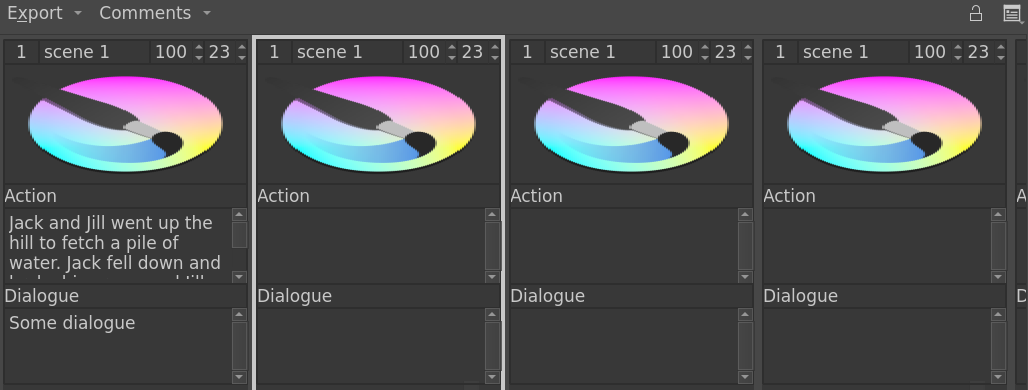
Hi, After 2 months of work, I think we have enough set of features implemented to get the storyboard docker tested. If you have a Linux machine you can help me out by testing this feature.
If you have any feedback or suggestions or ideas please do tell us. If you encounter any bugs, unwanted behaviour or any crashes tell us at the phabricator task.
If you want to see this week’s blog regarding this feature see here.
 ) as my GSoC project. This is a list of mockups, features and functionalities that we have planned so far:


 . Also there is a phabricator task here. Also the GSoC proposal here ( Jump to UX Design section for details about UI).


 or maybe that’s just me!
 All of your suggestions are sensible and I will try my best to implement them. Some points that I want to clarify:
 . This would be a great feature!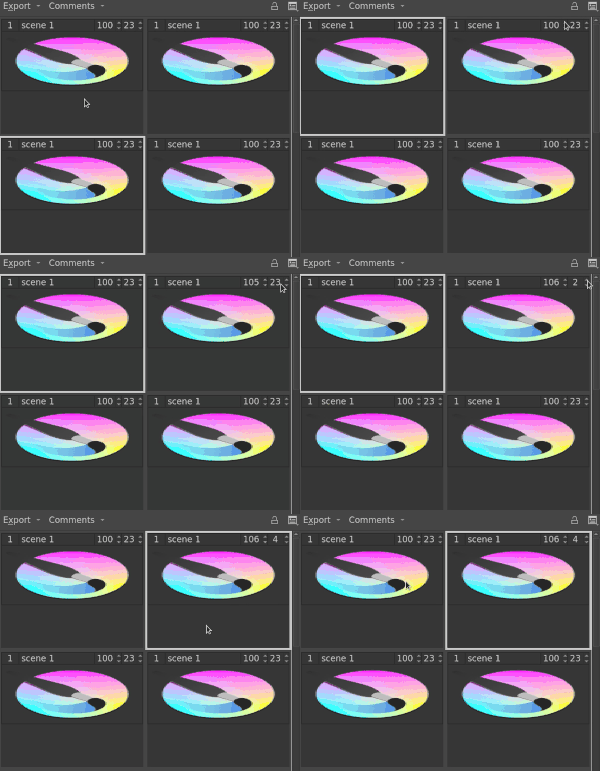


 .
. .
.