As a digital painter, and also the people i watch that are in this side they find krita intuitive. Like I manage to use this software in a span of a couple of hours and make paintings.
We already agreed there are things in need of update.
But we also discuss limitation - like any planning on update on UI atm is not going to work as the QT6 port and the new docker system will change some part of Krita / QML refresh and stuff.
And as @Takiro said that there are limitation to due to nature of QT.
Like , I said and iterate once again, we are not totally against an update/refresh in UI but there are stuff needs to be consider.
The discussion we are now doing is like wish list - for after QT6 port.
Like the team have kinda commented that a tablet UI might get revisited after QT6. The hope is that QT6 will make it easier to atleast skin krita.
I haven’t seen anybody being aggressive but I do get tired of people offering their idea in a way that suggests their “modern” tastes are superior to mine. I don’t actually care how Krita looks but I do want to be able to use it so I want icons that I can see. I don’t want bloatware on my computer either so how about building new themes as an optional download instead of forcing them on us?
I would not be so negative. No amount denouncing and sadness will improve anything. I would also not make definitive statements like this as they are not absolute truth. Because some artists do stick with it. Yeah for artists who want photoshop / CSP clone for free they would not stick and frankly they will always be better in photoshop and CSP camp. Because no amount of goodness will make them happy and we would be chasing and playing catchup which is not possible with our style and speed of development. So you either accept this and try improve things slowly or abandon the ship and go elsewhere.
That is indeed true, also for all the existing users of Krita. For example I feel really awkward when I try to use photoshop it constantly gets in my way. Who keeps colour picker to Alt key, I instantly map it to Ctrl. I am very much accustomed to M for mirror tool, pity photoshop doesn’t have the tool itself. Oh there is also no reference tool, there is also no rulers etc etc. There is also no filter masks and filter layer even the adjustment layers feel clunky and so backward like stone age. for example there is no way to use gaussian blur as a non destructive filter.
I feel we should stick to the thread rather than anecdotes and subjective opinions
I think we should put mockups and ideas so that when time comes this thread will be the go to place for picking ideas. I agree we do not know what is possible and what is not with Qt. So the mockups may be wasted efforts. But I feel some ideas will be worth using if not 100%. It will surely help. So I would personally encourage everyone to put forth their ideas
Well, PS has stopped to grow in artists direction a long time ago, now Fresco is doing that, but it’s a simple app for iPad so it probably will never compete with big programs, but time will tell.
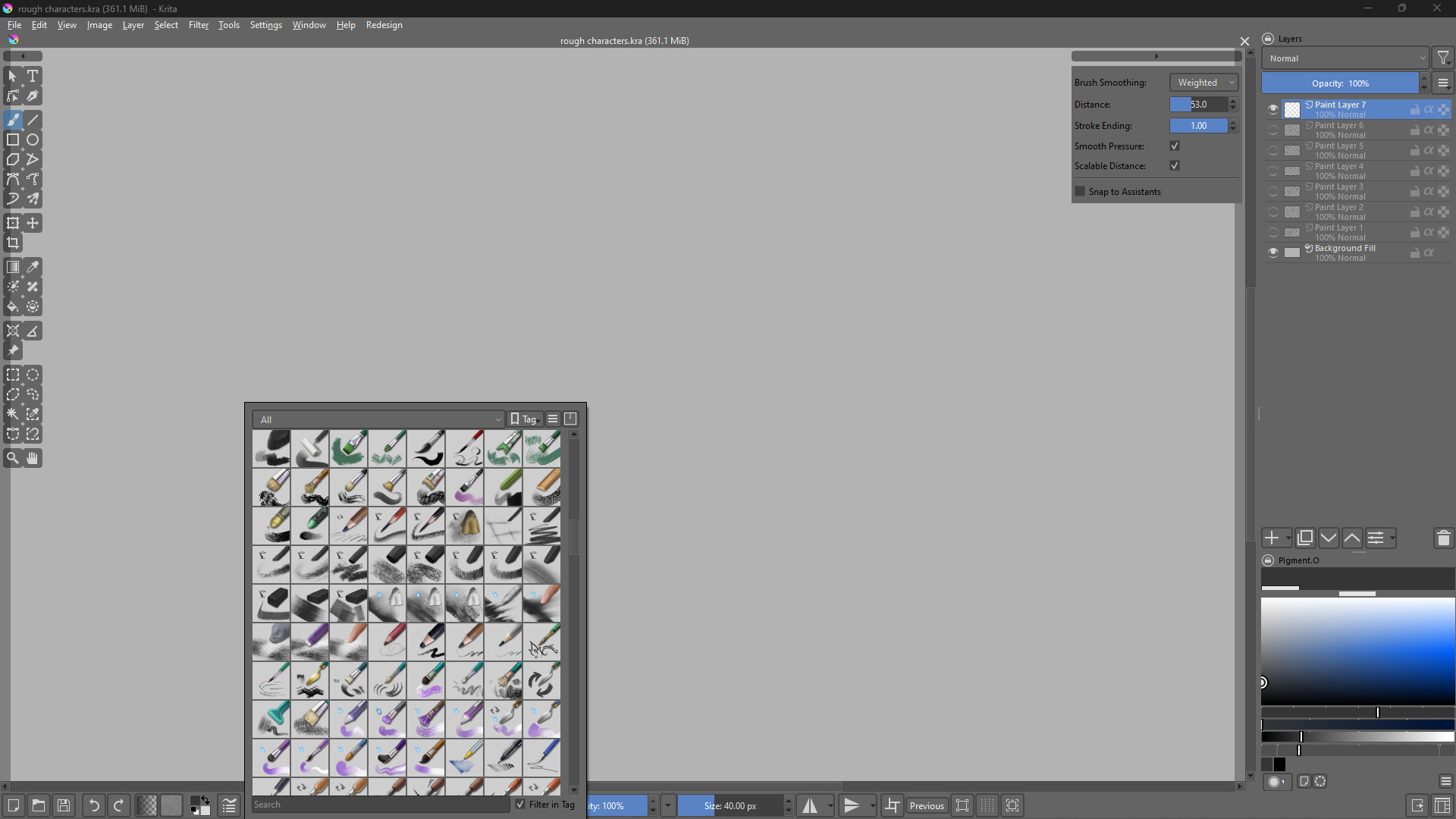
I think at least new flat brush icons should be implemented
I will generate more mockups next one will be JetbrainsXKrita with krita icons. After that I will take the other mockups from @abhifx and recreate them with penpot. So that when the time comes, the developers can go there and take the values from there if they want them.
By brush Icons you mean the little square that is the symbol for an individual brush?
I do not neccesarily agree with this, as I think the icons are fine as they are, clearly distinguishable, which seems to me the most important thing. However I can image that this is a thing that could be developed by an external contributor (like yourself perhaps). I am not sure if the icons could be changed in batch, and if this is possible and I don’t think that this should be forced upon existing users, as they are accustomed to them, so know which ones to pick.
Perhaps a toolbox could be developed that users can pick from to change the icons in a different, more modern style? Icons can already be changed per brush, as I have done when i customized a brush. Perhaps this process can be streamlined? You could also make a duplicate of the krita brushes with flat style icons and offer them as a tagged bundle to other users? I could not quite find where these isons are stored, but I amagine Krita must offer some way to access or change these?
Great thing about Krita is it is you can change any icon you don’t like. Brushes shared by other artists sometimes follow their own conventions. You can save your own presets too and give it a desirable icon.
Compared to photoshop, where brush icons look like smears or tiny smudges. Most likely I will have to read the tiny names of the brush to assess what it does.
You are free to design them yourself and offer them to the community. Because you can design them in the way you want them to be, and you can apply them to any of the existing brush presets yourself.
It may be the easiest way to “flatten” the existing ones, but you can also be creative in how to design them. The only thing to obey is the color code used to classify the brush presets. Also, you should not change the emblem icons, only “flatten” them.
And because it is being a simple modular construction system, it is even an overseeable amount of work. You can find it in Krita, via ‘‘Settings’’ >> ‘‘Manage Resources…’’ >> ‘‘Open Resource Folder’’, in the folder “preset_icons” you’ll find the sub folders “emblem_icons” and “tool_icons”, that is all you need to begin with.
That is the advantage to be in the world of FOSS, you can do so many things, by simply doing them yourself! But, if you only complain, instead of doing it, you’ll have to wait to get what you want. And if that what you get meets your expectations is the next question. But, as said, you can have influence on the answer if you are the one who did the icons …
For instance, I have put many additional icons into the above-mentioned folders to create my own brush icons with them. I wanted them, I did it, I have them. It’s as simple as that.
That way, I expanded the pool of icons to select from for myself. And I did not offer them to the community because they do not adhere to the classification rules to follow.
Right… well, in that case, maybe in a few years… when I’ll learn how to draw better and how to do it in digital… but I’m afraid by that time I’ll stop care about the whole UI thing because I’ll just get used to it
Before this idea slips out of my mind, I want the pop up pallet to change and be more like pie menu, someone actually posted a mockup for it in this forum.
In Photoshop you can use non-destructive filters fyi. But yeah, interaction wise Photoshop really is stone age software with nice new features bolted on.


 I will generate more mockups
  next one will be JetbrainsXKrita with krita icons. After that I will take the other mockups from