My only concern is that the pixel near the corner might cause some graphical glitch, but that can always be reported later if found and confirmed.
That’s the thing, that pixel is the 0/0 case and:
- it was already present in color burn but not in color dodge. Those modes are kind of symmetric so they should look similar.
- having it as before in color dodge is what caused graphical glitches (the bug I linked to).
- you can not change the algorithm just for the sake of making the gradient test look apparently nicer, there has to be some reasoning behind. Mine is given in the mr.
0/0 is a singularity so there is no defined correct answer there. The changes I did interpret thex/0cases asx/infinitely_small_numberas if the limit when the denominator approaches 0 from the positive side where taken. So even if there is an apparent discontinuity between0/infinitely_small_numberand1/infinitely_small_numberthere isn’t one, it’s just that the slope of the function would approach infinity.
2 Likes
I want to know, is it possible for these algorithms to be applied to “Masked Brush”?
All the modes with the exception of the height ones can be used in the masked brush. The reason for the height modes to not be used there is that they require a strength parameter, which the masked brush doesn’t have. If in the future that texture strength is added to it, then it could use them.
2 Likes
I would really like to see linear height added one day to masked brush. I don’t know if photoshop uses a different strength parameter with it’s dual brush linear height or if it uses it at 100%
2 Likes
So I’ve been doing some drawing on an iPad recently, and frankly have been pretty frustrated with both Procreate and Artstudio Pro’s brushes. The latter is better, but I still haven’t been able to get what I can get in Krita. That got me wondering why, because in principle I should be able to create what’s become my go-to sketching brush in either, since they provide the “linear height” pattern blending mode.
Having spent some time banging my head against that particular wall, I came back to Krita and tested things out myself. I think there’s some difference between “Linear Height” and “Linear Height (Photoshop)” that goes beyond just a difference in amplitude.
Here an example of a stroke made with a brush consisting of a bristly brush stamp combined with a texture. On top is “Linear Height” at 32% strength, with pressure mapped to strength. At bottom, “Linear Height (Photoshop)” at 3% strength.
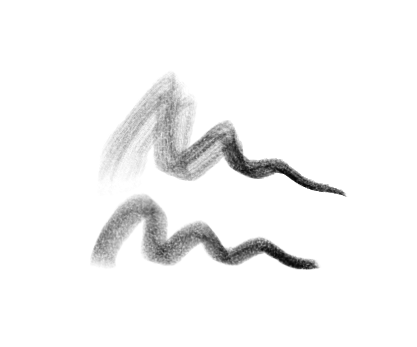
The way the brush stamp is expressed is very different! I wonder why? And also, I hope in case there’s future discussion about ditching the non-photoshop height modes, that doesn’t get done!
3 Likes
Yes, they use different formulas.
You can see how @Daishishi came about with the new height mode in the other thread where we discussed the modes. Then I created the linear variation as ps’ does with its linear height: combining multiply with height.
I also found Kritas’ height modes better, that’s why I didn’t doubt adding them.
You can see how the formulas differ in the task.
3 Likes
Totally agree on the “custom” height modes being better. I’m spoiled, now!
1 Like