I’m happy to announce that the new colorsmudge engine that I have been working on for the last several months is now ready for the final testing!
The original work has been started by @voronwe13, but in the end I had to rewrite the entire engine to incorporate these changes fully.
What’s new:
RGBA-brush mode for the colorsmudge engine. You can now use Lightness brush tip mode in the colorsmudge engine to emulate oil-paint. The brush will do both, smear the background and paint with the impasto-looking stroke.
Colorsmudge engine is now using SSE4 and AVX2 optimizations, so it became almost twice(!) faster. The optimization also applies to old brushes using the old smudge algorithm.
Colorsmudge engine now has the new smudge algorithm developer by @voronwe13. It separates effect of the Color Rate and Smudge Rate options (previously, low values of Smudge Rate affected Color Rate significantly). See this wishlist and KA-thread.
Smudge Radius algorithm is fixed and hugely optimized. In all the versions of Krita released after 2016, the smudge radius value was divided by 100. That is, when you selected 100%, the real value was 1% sampling. The new version fixes the issue.
When using new smudge algorithm and dulling mode, smudge radius now can handle the problem of “pierced” brushes gracefully, which makes brush strokes in “dulling” mode much more smooth, especially when using textured brush tips. See this wishreport and this bug
As a side-effect, the overlay mode has changed its behavior a little bit (even when using the old algorithm). Now the effect is more “correct”, that it, the painting will look almost exactly as if you painted on the merged image.
Just a warning: overlay mode is not available in “Lightness” brush tip mode (and will never be). The checkbox is not yet disabled when you select “Lightness” mode, that is a bug.
I really like the new algorithm, it’s far easier to configure and I am hoping to update my old painting pack to it.
I am occasionally having an assert: ASSERT: "d" in file /home/appimage/persistent/krita/libs/global/kis_shared_ptr.h, line 168, I am unable to tell what causes it, beyond ‘tick new algorithm’.
I am getting weird results with animated brush masks, on brushes where every option is turned off (including sensors on the opacity), except for smudge (turned up 100%, no sensors, dulling, smear alpha, new algorithm) and color-rate (turned up 100%, pressure sensor). with these options, animated masks like ‘rock pitted’ or ‘hearts’ start printing semi-transparent values on lower pressure-values.
I think the main problem right now is that we handle resources very differently in 5.0, amongst which that we now put all resources, even the bundled ones, into the local resource folder. But this creates a little confusion when switching back and forth between 5.0 and 4.4, as that one will then have duplicate resources.
While I’m asking about backups; Is there another folder I should be backing up other than the resources? I always lose my settings when I do a fresh OS install, so I assume the config files are located elsewhere?
Sorry if that’s a lazy question - I expect it’s all in the manual somewhere…
……I have been using the next version of 5.0 directly before
There seems to be no other problem except a bunch of “resourceache.sqlite” in the folder. . .
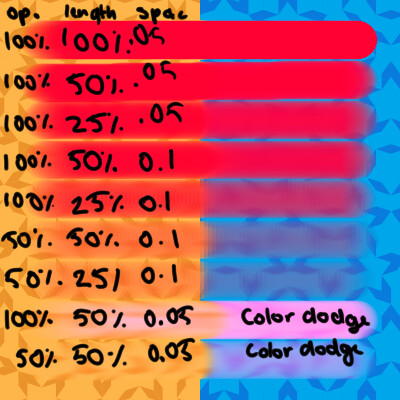
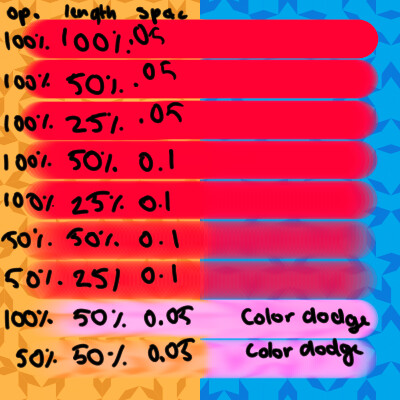
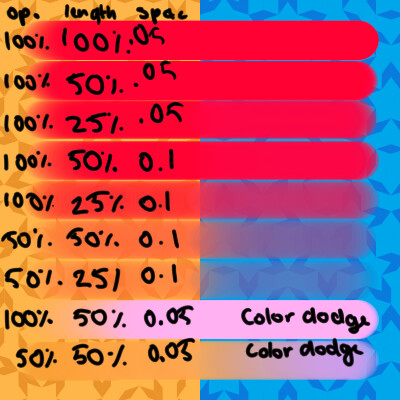
I’m going to have my work cut out updating the colorsmudge pages… Here’s an example with 50% color rate, and from left-to-right the values are opacity, smudge length and brush spacing.
Smear old:
Smear new:
Dull old:
Dull new:
The new algorithm, as stated, separates color rate from smudge length, and in practice this means that opacity doesn’t feel like it has a quadratic effect on color rate anymore.
I’m still mulling on how to explain this on the color smudge reference page without overwhelming people though.
EDIT:
The lightness map brushes are still very easily capable of smearing to black or white, which confuses me, because I thought there was a lot of work put into changing the strokes system, so self-sampling wouldn’t happen that readily?:
Also getting tiar’s problem here.
EDIT2:
Gradient mapped brush-tips also don’t work.
I found out that the lightness map tips work a little as expected when the brush has a color rate, but when there’s no color rate, the crawl-to-black happens, and even with color rate, only the smear mode works as expected, dulling mode doesn’t work with lightness mode somehow? This was doublechecked with the 16-04 appimage.
OK, getting a crash when closing an image, every single time. ASAN output isn’t very interesting here.
Fixed, though it is not related to my branch, it is some regression from the merged master
The lightness map brushes are still very easily capable of smearing to black or white
Fixed. I’m sorry, that was an trivial refactoring mistake, I’ve linked the colorsmudge source to a wrong source
Gradient mapped brush-tips also don’t work
I’ve fixed that as well.
I found out that the lightness map tips work a little as expected when the brush has a color rate, but when there’s no color rate, the crawl-to-black happens, and even with color rate, only the smear mode works as expected, dulling mode doesn’t work with lightness mode somehow?
Should be fixed now.
The only thing I haven’t checked now is the animated brush masks.
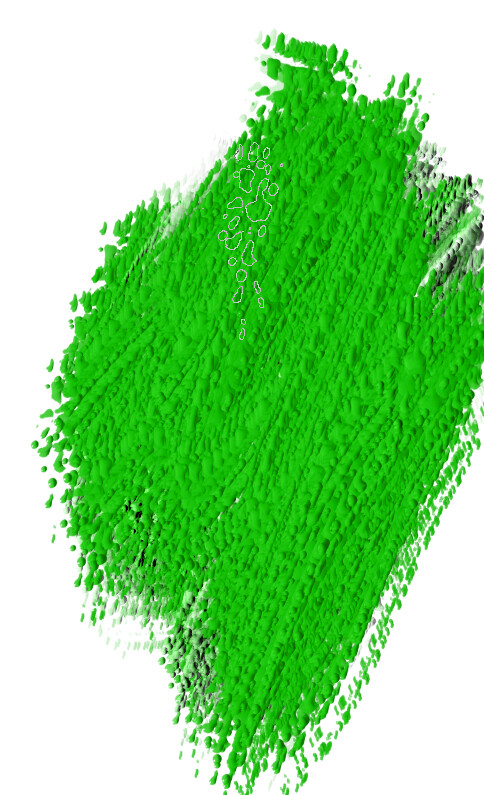
This is comparing the dragging effect. First strokes are with normal smudge brush “wet Bristles rough” and the other brushstroke is with RGBA. I show in parameters the Smudge length and I see Blur instead of Drag.
After that i tested with another brushtip and everything seems better. Why? i need to investigate. @wolthera has given me a hint in IRC channel.
This shows how lightness can be used now and also i have dragging effect. I need to test this more deeply but i think this is a great step forward. The beginning of new era of brushes