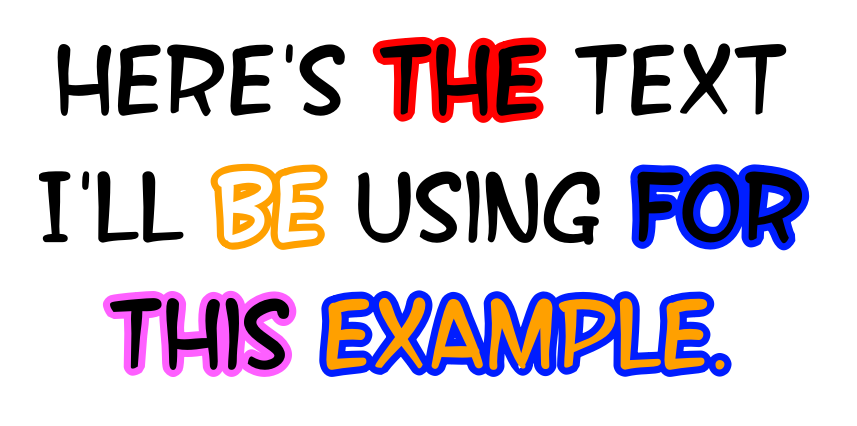
Okay. It does seem Krita is having some trouble handling individual changes to the outlines. I was just tinkering around with it, attempting to change the outline color for individual words within a single text field, and there were times where it failed/crashed (this included me going into the SVG panel to try and change them). However, I was able to manage by first selecting the text field, adding a vector border using the previous method I mentioned, and then removing the line. This seems to prime the text field for individual changes, because after I do that, I can then select whichever text I want within the field and change the color of the line as needed.
If you try clicking the canvas to use the text tool while:
- focused on a paint layer: typing does not work immediately.
- focused on a vector layer: typing works immediately.
This is an inconsistency in behavior that keeps tripping me up. I end up typing my sentence into random krita shortcuts instead of the text box.
This is a known and reported bug. To work around it until it’s fixed, you can do SHFT-INS to create a new vector layer before creating text.
Downloaded the 5.3.1 app image and the text tool is next to impossible to use. I had to go back to my5.2.1.6 version. There are a number of issues with this “improvement.” The main one is that the text space is next to impossible to edit. I found no place to add bold font. Anyhow, I could go on for paragraphs about the impossibility of using this updated tool. Not to sure why it was released.
Because there is a new docker for text properties. There you can change anything you want. Including the font size. Have fun!
Ok, I’ve updated the top post.
Here’s the most important section (from the roadmap):
For 6.1, I’ll be largely working on stablization and paper cuts. A more technical list of things is in this task on invent.kde.org, but a summary:
-
Fix QML issues (largely stuff like the resource pop-ups being cut off, and spacing issues).
-
Fill and Stroke editing support.
-
Improving PSD export. Right now we cannot export advanced text features like text-in-shape, and that’s largely a reverse-engineering kind of task.
-
Improve font handling. This is both to speed up start up times, as well as find more font resource locations, and finally make importing personal fonts possible via the GUI.
-
Make all text properties into shortcuts. For 5.3, I only tackled the already existing shortcuts and I want to extend that to all text properties.
-
Fixing various issues with text-align and text-anchor.
-
Improving text-on-path and text-in-shape UI.
The most requested feature is an on-canvas toolbar (which would contain a bold and italic button). However, we’re currently in a three… dimensional(?) technology transition, and I’m pretty sure that if I were to start working on it right away, I’d have to rewrite it again in a year or so.
The limited scope is because I am working on two other projects this cycle as well. Firstly is improving HDR support, as I finally can use my HDR hardware on Linux, and my original specialization with the Krita codebase is it’s color management code. I’ll be making a thread for that later. The other is the tablet UI. This latter one is one we’ll all be working on, as it is too large a project for a single person.
Btw, thanks to everyone who has been helping people figure out the new UI! However, if you are coming across crashes, I need the crash reports, send to the bug tracker.
You did, and are continuing to do, a great job @wolthera! Really appreciate the time and effort you’ve put into the new text tool features, and everyone else who’ve added other new features and updates  .
.
You can select the text and use the universal Ctrl + B shortcut to bolden it. If you’re not able to use a keyboard for the shortcut, open your Tool Options docker and click the Open Text Properties button. Locate the Font Style option and select Bold from the menu (keep in mind, you’ll want to do this from the Character tab, and not the Paragraph tab, to keep the bolding isolated to a selected letter or word within your paragraph). If you don’t have the Font Style option on your Text Properties, it’s probably set to be hidden. In this case, you could type “Style” into the search bar at the bottom of the Text Properties docker, and then click on it to temporarily show and use it to make your selected text bold, or you can open the Text Properties Configuration panel using the menu button next to the search bar. The panel that opens will have a list of every text feature currently available for use. Locate the “Font Style” option and set it to “Always Show”, and it will be added to your Text Properties docker (this is a persistent change, so it will stay there for good, unless you repeat those steps to remove it).
Thank you for the details. Yes the font can be made bold using the Ctl + B shortcut but there is no indication for doing this in the text properties under “font style.” The option is not hidden. The only thing indicated is “Roman.” All that aside, the new text tool docker is just very awkward and long to use. Not an improvement in any way.
Not in my opinion, but we all have our own tastes. 
We here at Anarcho Tankiesm have been using krita for everything since our inception. every logo, every edit, and every zine we have ever made, has been done with Krita. I can confidently say that this new text editor is the biggest piece of dog excrement I have ever encountered. Before, it was fine, it was whatever, it wasnt terrible, but it was usable. This new text editor has been driving me insane.
I will admit, I like some parts of it like being able to set how much width the text will appear over, and being able to angle text more precisely, but apart from that:
i have not a single god given clue how this text editor has been out for this long without a massive overhaul. Every single portion of it that relates to the basics of writing down text, is borderline unusable. why is the text color now determined by my brush? why can i not add a single setting to the new panel (WHICH I MANUALLY HAVE TO TURN ON BY THE WAY) without the ENTIRE program crashing. I appreciate the text size change, but why can I
1. make it up to 1000pt large without manually inputting, which by the way is an insane scaling to be able to go up to when the last menu only went up to 75
and
- set it to inches, where if I accidentally click a number too large my entire program, once again, crashes
I get adding a bunch of cool new fancy features for comic editors and a variety of other types of people, but the very basics of the programs text creation just dont work anymore, and its driving me to peel the skin off the bone like a tweaker undergoing withdrawals
This UI, is, on a near fundamental level, alien to anyone who hasn’t studied the documentation, and still a quantum science after the fact. I have resorted to editing everything on my rotting thinkpad that hasnt been updated. If this update is truly loved and respected among all of you, fine, I’ll downgrade my program forever and live in squalor, but I refuse to believe that any one appreciates this insanely complicated, zine distro ruining update.
Please let me know if you guys agree and if the devs have any feedback 
XOXO,
Anarcho Tankiesm
I do not.
Does it still need work? Sure (I agree with your point about being able to click on the font size bar and having the number jump immediately to that spot), but it’s far from being unusable, in my opinion. I found everything fairly intuitive, really. Though I used to create manuals for proprietary applications as a job, so maybe I’m just accustomed to discovery.
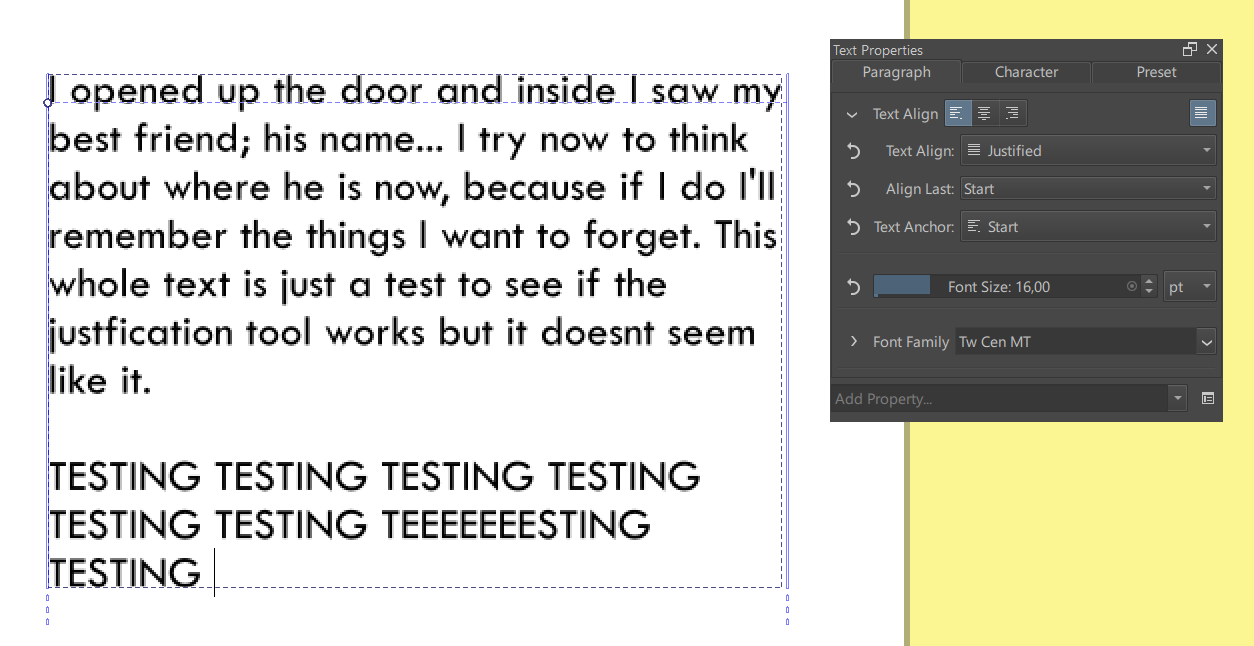
It works when you flow the text into a vector box. Maybe there’s a restriction on it, otherwise? Not sure why that would be the case, though. Would be a question for @wolthera.
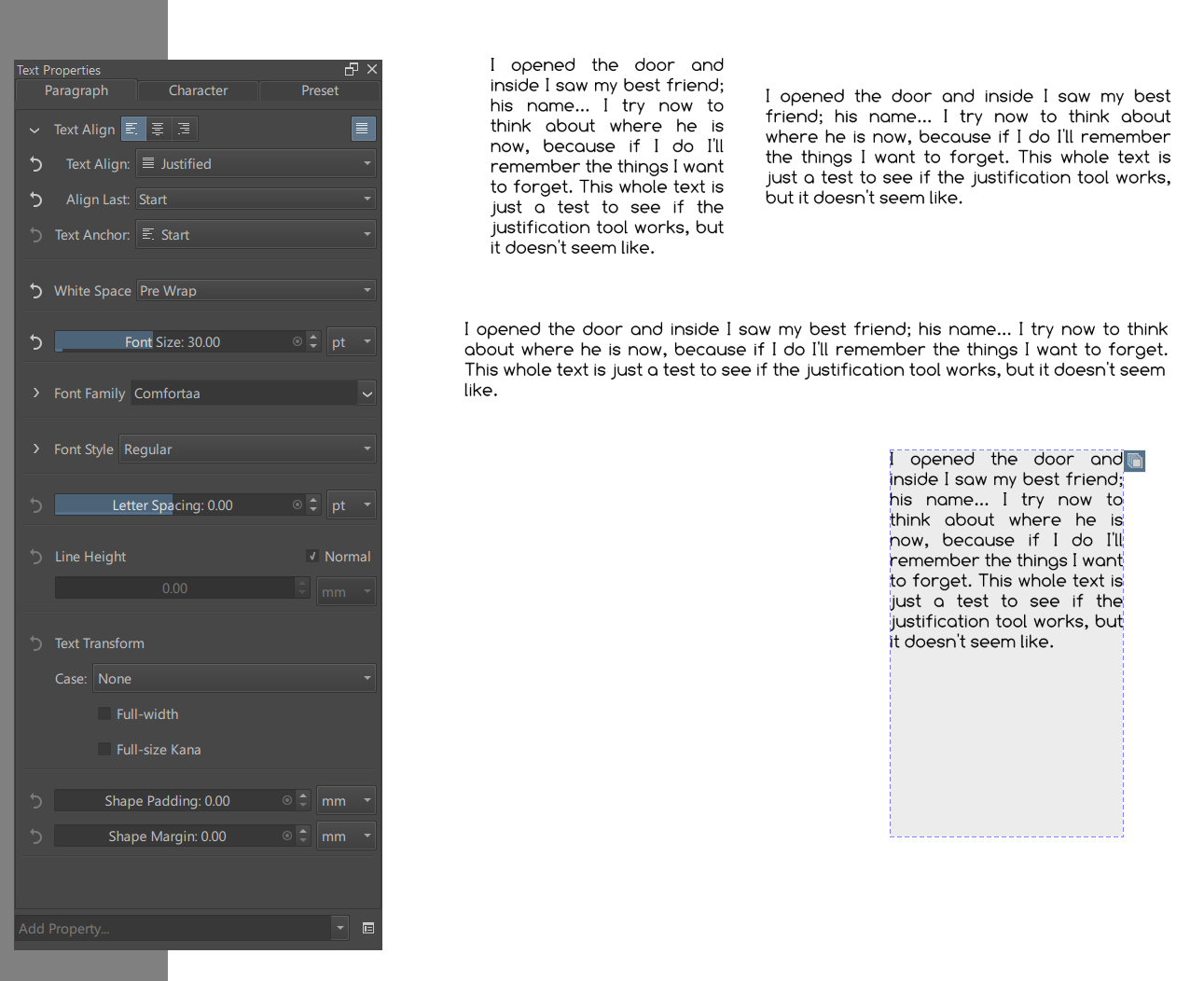
Here it is working when flowed into a vector shape:
Oh, I see. Do you know how to change the color of the vector after inserting the text?
Yeah. Select the text field with the Select Shape Tool (the one that looks like an arrow cursor). You’ll see a little box at the upper right of the text field. If you click that box, it’ll turn blue, putting the field in a state where you can change the vector. So, now you can click on the vector like you would a normal vector shape, so select it and then ether change the color of it or go to your Tool Options panel and set the fill option to “no fill”. When you’re done, click on the blue box to exit the vector edit mode.
OMG, thank you!!
I just have one more question: When I try to write two paragraphs in the same shape, the first one’s final line looks weird (all the spaces are quite big) while the second one looks normal (it’s aligned like how it would be in the right/start alignment). I’m pretty sure it’s because the ‘last line alignment’ option only affects the second one. Do you know a way to make it also affect the first paragraph’s last like, or would I need to make two vector shapes instead?

Hope y’all don’t mind me throwing in my two cents here. I just want to say that despite how buggy the text tool seems to be on android (at least in terms of selecting a font as the dropdown list is too small for the way I have my UI set up + one other thing I’ll get into in a second): I am loving the update. I love that there’s finally a way to use more creative fonts beyond whatever the hell Android has out of the box.
Aside from that: I’ve noticed that the text tool will default to “untagged” fonts whenever the app starts up regardless of whether or not you had it set to only pull up fonts with a specific tag. Is this a bug by chance?
This thread is unwieldy and nearly impossible to search. Any chance we can create a Text Tool category so we can have multiple searchable threads? I need to find solutions specific to v 5.3.1 on Linux, as the current version seems completely broken/unusable.