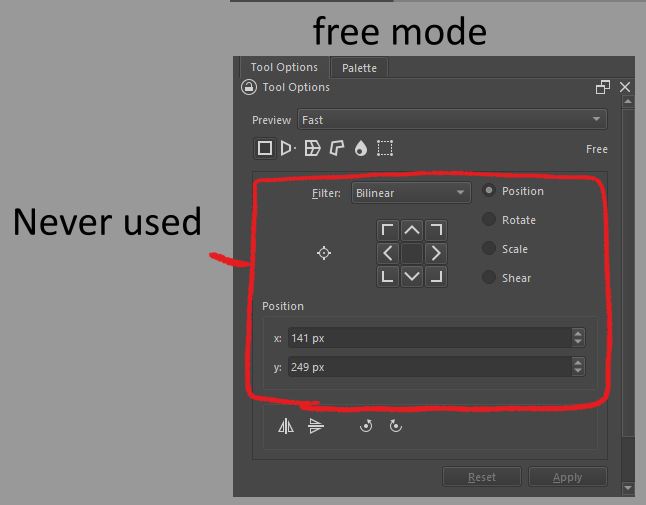
I’d like to respectfully ask if anyone ever touches any of these options, they seem entirely redundant to me, and more like a debug menu for a developer to test various types of transform functions.
Alternatively put all those options in a pre-collapsed group that can be expanded if the user wants to see these. I’m not familiar with QT so idk if this is feasible.
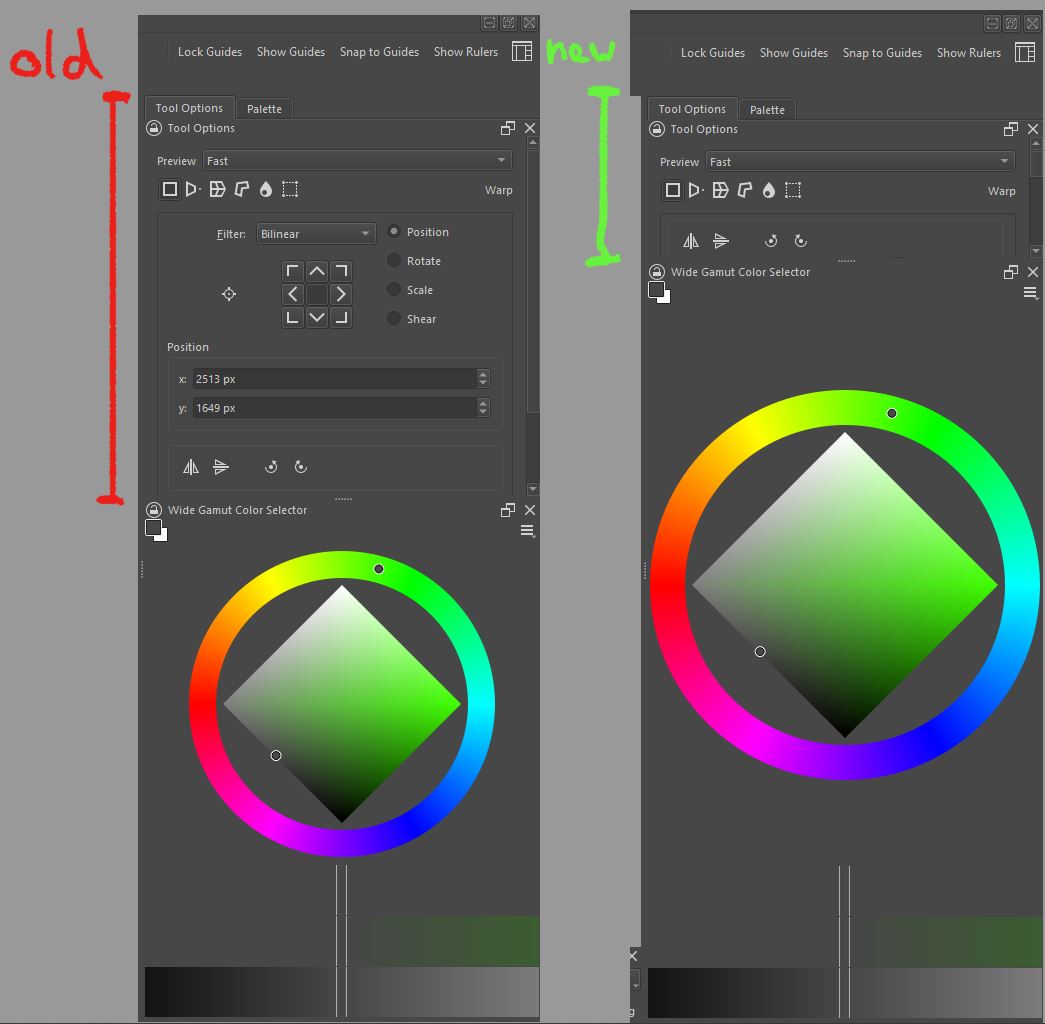
Here’s a comparison with a little editing, look at all that extra space!
Perhaps I should add, the only reason I click the buttons is because there is no hotkey… Kind of self defeating, if the hotkey for flip were added I won’t care what the UI looks like I’ll just shrink it anyway.
You can right click canvas open transform tool menu when using Transform Tool, then toggle mode.
I sometimes modify Position value to make sure movement is accurate, and I’m sure someone will need to modify the Filter to keep pixel perfect. As for other options, I never used them.
These functions can be easily accomplished using python scripts.
example:
from krita import *
Krita.instance().action('Transform tool: liquify').trigger()
If you don’t know anything about python script, try this plugin.Shortcut Composer.
It offers a convenient pie menu for Transform mode.
I agree that we need shortcuts instead of python script. Understanding how python scripts work is not easy.
Little clarification: there are no actions like that in vanilla krita.
Those you mentioned are part of the Shortcut Composer - you can only assign them and call them from python with the plugin installed
They work only because of a very nasty hack (literally clicking those buttons from python), and I regret diving into this topic, as now I have this buggy code to maintain.
By the way you can right click on canvas while in transform mode to access all those features, but
there should definitely be krita actions like that in krita.
Thanks for replying Michael, I have another question which is semi related to the topic. Is there a way of editing the layout of individual dockers myself? Perhaps you know if there’s a convenient xml file somewhere in the krita directory or appdata I’ve edited the krita5.xmlgui file previously and it seems fairly straightforward to edit for a less technical person like myself.
To manipulate the dockers, you will usually need Python knowledge. The “fix” can be an easy one*, but sometimes the nut to crack is really hard, at least if you lack the needed coding skills or don’t know anything of the language used (like me, who only can juggle around the code a little bit).
*Like the result of my edit to an original Krita docker shown in the screenshot from this topic, where I only had to edit a table in a Python file:
If I had to edit real Python code instead of a table in plain text, I would have failed to edit the docker.
But maybe you want to learn how to create your own plugins and dockers for Krita with help of the Krita Scripting School (and through that how to edit existing ones)?
Michelist
Add/Edit: LOL, I was fallen asleep editing this posting and have not noticed @Takiro posted long time before me.
 I’ve edited the krita5.xmlgui file previously and it seems fairly straightforward to edit for a less technical person like myself.