Hello, I would like to recreate this brush in Krita, it works based on speed, I could do something more or less similar but it doesn’t really work the same.
The first one looks like a ‘simple’ size decrease with speed using a round brush tip.
The second one has a different shape of brush tip?
For the first one, where did you get it from and can you examine its design characteristics in the brush editor of whatever application it’s used in?
With krita, I find that the usefully usable speed range is very small and for ‘handwriting speeds’ then it’s about 0% - 6% of full range.
That limits you to a simple straight line transfer curve.
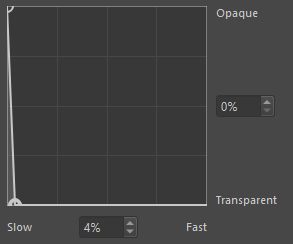
Yes, although I have updated the brush in Krita and it already looks something different, as for the original brush, it is from Clip and this controls speed:

If I deactivate the speed the brush works in reverse curiously.
Doing that detailed speed control behaviour in krita would be impossible because of the limited workable range of speed.
That is curious. Is there anything else that affects the size of the brush such as drawing angle or pressure?
In my personal experience, doing anything useful with speed control in krita is very difficult.
The situation has been discussed here and a bug report has been made:
421098 – Speed control of brush properties has an impractically large 'Fast' value.
Apparently the pressure, I was playing with it for a while in Krita but as you say it seems that it is something impossible at the moment.
So I’ve run into this issue too. And I feel like there’s something else going on more than just the scale of the sensor being off. There’s actually already a variable in the source code that caps the speed that I tried changing but it doesn’t fix much. It’s easier to see/measure this by setting only the opacity to speed.
In Clip it looks like this, note how it gets darker at the corners when shading and the corners slow you down. When doing a lifting stroke (#1) it fades, but when stopping at the end (#2) it darkens there almost completely.

Even if one makes a ridiculous curve like this in krita (note this is minus my changes but should be close to them), I cannot get the same effect.
First speed is being calculated from before the pen is set down. So the above shading in krita looks like the first square below. If I start moving before starting to shade, it looks like the second. Also note the very last stroke, in that one I sped up before touching the canvas. But not a big thing, Clip always starts at 100% but, for example MyPaint does not. Though an option for this would be nice.
More importantly note that there is no darkening at the end of the second stroke like in Clip either. Sometimes I can get it to look a bit darker, but I have to really be really trying.

In Clip this isn’t possible. Speed always starts at zero.
Now in Clip, this is named “Velocity”, not speed, so that might be in part why the lack of darkening in krita when the stroke changes direction, but the complete lack is weird. Mypaint has a speed sensor and, apart from me not understanding how to control the settings much (like the flow of the brush is very visible) it behaves similar to clip. Also only using velocity does not really explain this completely.
Krita has the MyPaint engine, so I thought, okay, I’ll try that, but I didn’t understand how to transfer the setting properly and couldn’t invert the curve for some reason (thick = slow instead of thick=fast), like the strokes were just not working, idk.
I’ll try to investigate some more when I can.
2 Likes
Oh right I did not try with the MyPaint brush engine, I will see if I can achieve something with it, thank you very much for your answer 
I’ve looked further into this and made a new post over at the dev section: Brush Speed Sensor Issues
Apart from the bug linked, there seems to be overly aggressive smoothing of the speed values.
If you happen to get the MyPaint brush engine brush working, do let me know.
1 Like
can you post a link to the CSP brush?
I think that with Mypaint’s brush engine the expected brush could be made, I was able to achieve this, although I need to continue experimenting.
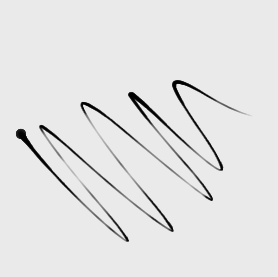
Is this brush:
1 Like
Thanks! I think my x/y ranges were just odd so I was getting weird strokes, this gives me a good starting point.
1 Like
With the brush that you linked, it looked like the brush size isn’t controlled by “velocity” but by pen pressure and a random value.
But I guess you enabled velocity control for the brush after downloading it?
Without the velocity/speed control CSP has a lot of exclusive post processing options for the brush stroke that’s almost impossible to emulate in Krita. So it can be very hard to port CSP brushes to Krita. But in my experience photoshop brushes are a lot easier to port 
1 Like
Sorry my mistake, the brush is this:
I accidentally sent another one that was not.
1 Like
Oh that confused me!  It’s very hard to recreate this brush in Krita at the moment even though it’s a simple brush. The speed control is different. I did this with my mouse
1 Like
There is another brush of the same type but in which the “velocity” effect is more noticeable:

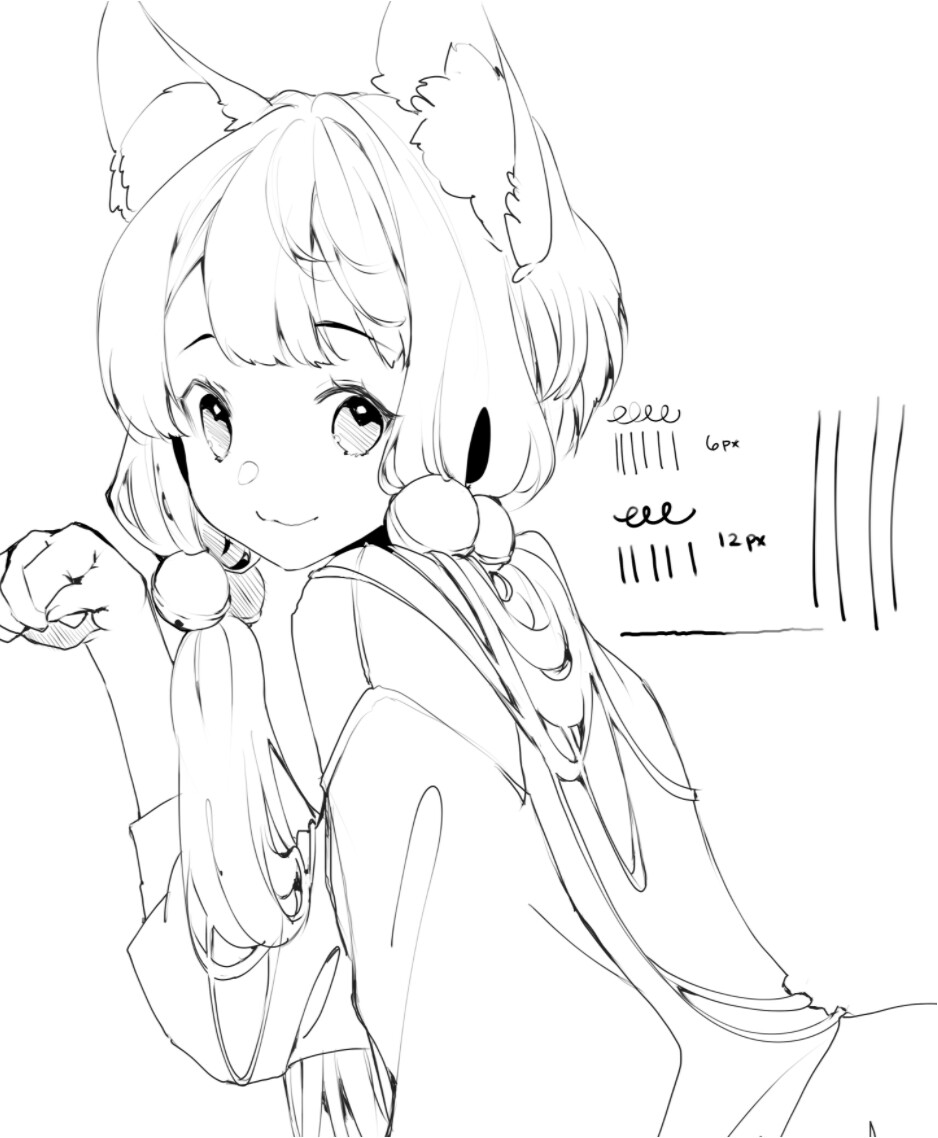
I really like the finish it gives to the lines
2 Likes
This topic was automatically closed 15 days after the last reply. New replies are no longer allowed.