Hello. I am pretty new to Krita. I am using Windows 11, and Krita 5.0 I have a problem with the Pen Pressure Icon, encircled in Red in the photo. My understanding is when it is on, your brush will use the default setting for the brushes. When it is on I get almost no color especially with watercolor brushes, and in some instances, no color at all. I am sure this is not normal. When I turn it off, then I get the selected color 100% as a flat color. How can we fix it…I should be able to adjust my brush settings, and get colors. Thanks Sydney

Hi
When it’s ON, the pressure on pen is taken in account
When it’s OFF, the pressure is considered at 100%
So according to the brush you use, and your tablet setting, you might have to press more or less on pen to get something
note: watercolor brush the most you press, the less the color is present

Grum999
Most of the watercolor brushes are essentially made to do nothing on maximum pressure, which you’ll get if you turn off pen pressure or use a mouse.
You can find mouse-compatible watercolor brushes at https://files.kde.org/krita/extras/WATERC%20stylus%20and%20mouse.zip
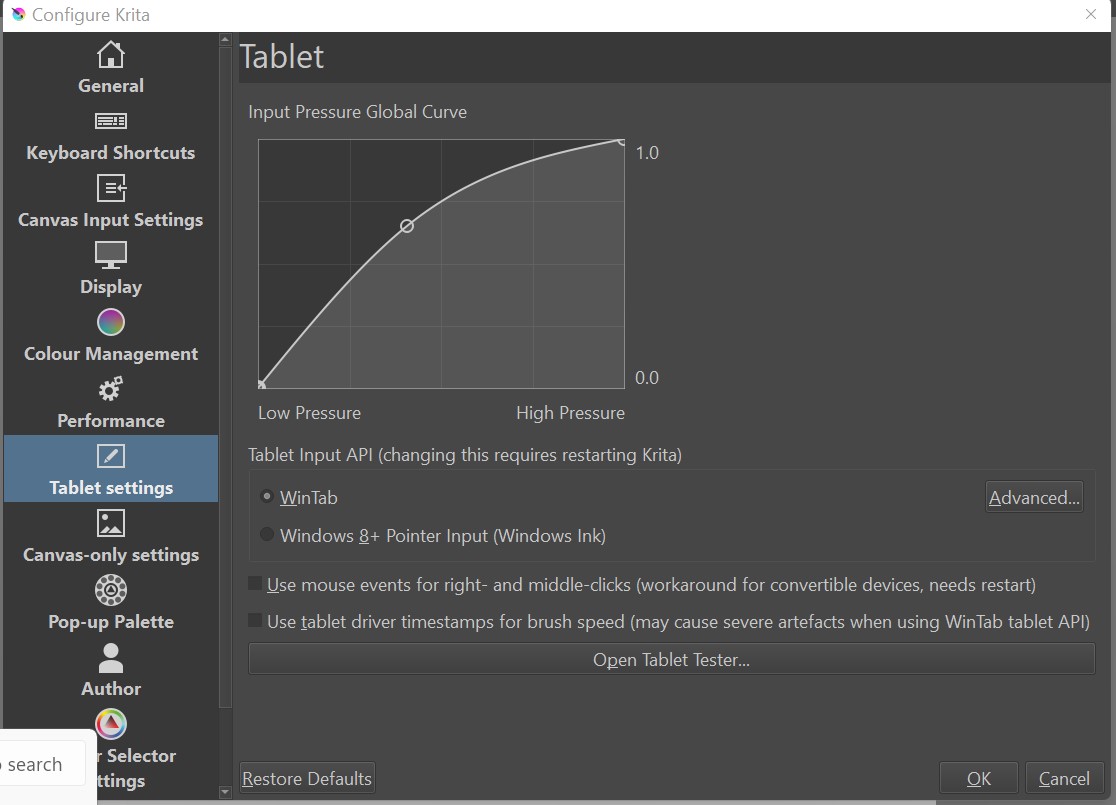
Hi Grummer. Thank you for your reply. The fact is, as I posted, I get almost no color when the pen pressure is on. After thinking about it, I went to Pref. / Tablet/ and increased the pressure there. Bazinga! Hopefully this will help others. However I think part of my issues in general is because I am using Windows 11 desktop. I do not think that the majority of software companies, have not caught up to the update. That is just me. Thanks again, take care. Sydney
I assume that you mean Settings → Configure Krita → Tablet Settings: Input Pressure Global Curve?
I have a feeling that there is something wrong with your graphics tablet settings at some point in the entire chain of control/settings and that this may become apparent later.
Use of Windows 11, instead of Windows 10, should have no effect on this, unless the update from 10 to 11 has broken the tablet driver or affected its settings/configuration files.
Hi Grum…Thanks for your comments. I am familiar with the difficulty of painting digital watercolor. I have been doing digital art, for over 16 years. The image I am posting is where I adjusted the pressure, from the preference, perhaps, it will help another, that has the same issue. Perhaps you can help with another matter. I am trying to make a thick oil or thick impasto brush. For that I would need to use the Brush editor. Any ideas? Or perhaps you have a thick oil and impasto brush that u can share.
Take care. Sydney
Sydney, here’s info on that type of brushes. Any further comments on that can be done in another new thread (so that this post stays on the topic of pen pressure).
Ramon explains about the rgba brushes:
https://m.youtube.com/watch?v=FxjCk-yTIzI – following his advice, you can then make your own.