Is this how this is supposed to work like? I just activate and draw and as you can see the results do not look very convincing.
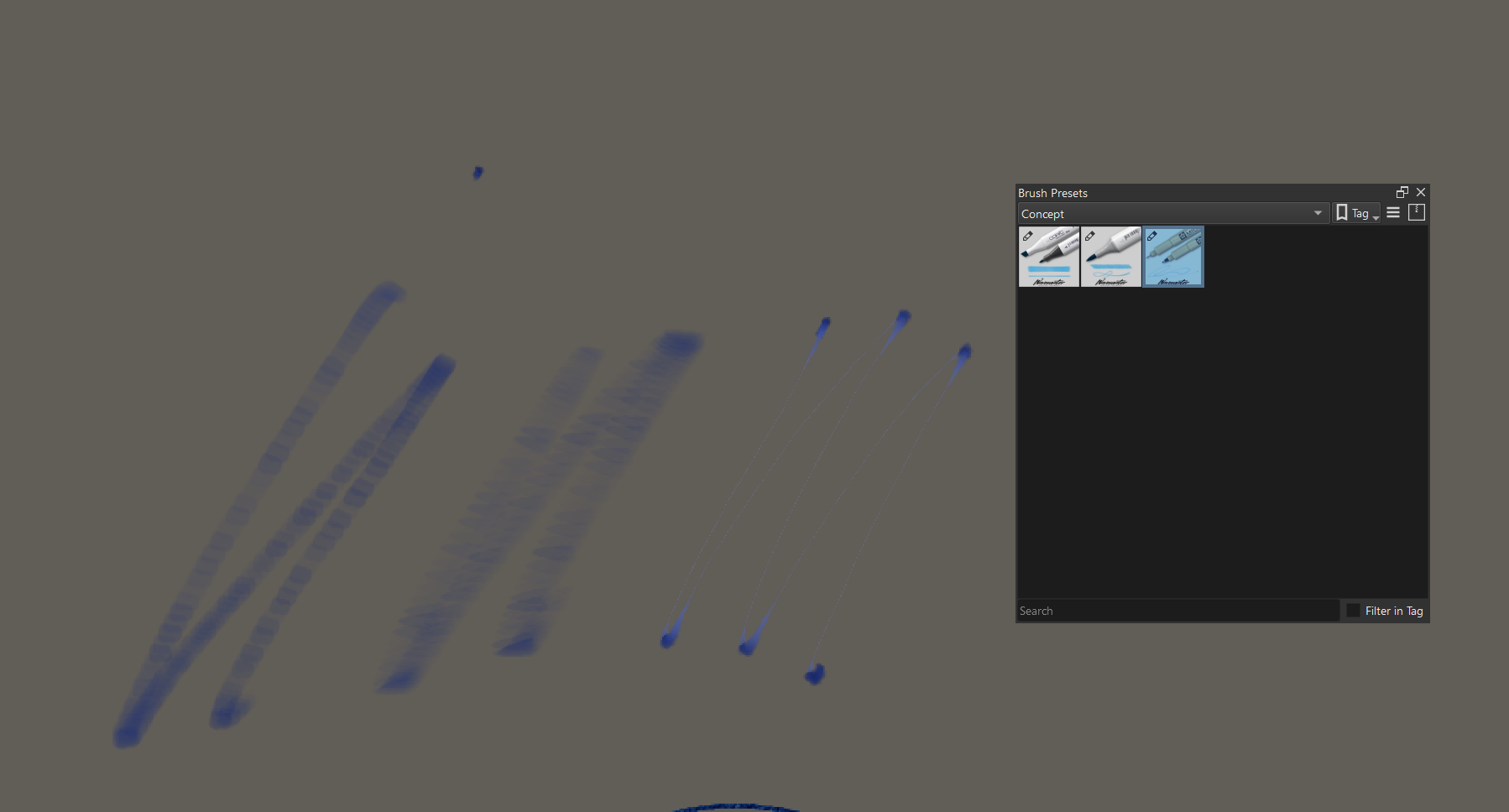
@karemuvar Are you using a tablet with a Tilt output?
If not then you need to read the comments about Tilt and make appropriate changes to the brush preset in the brush editor.
I am using a Cintiq 24, I believe it supports tilt.
Hello @karemuvar
I too have a cintiq 24 hd and all I can say is that I get the result that are showing in my video :s
First off, turn the layer to multiply to get the effect of the ink on your paper, for the rest… well, maybe the way you’ve set up your tablet settings? Did you draw that really fast or on a really big canvas with a big brush size?
I know that these settings might cause some problem with this brush, I’m sorry for that!
I still hope that you will be able to figure it out!
Take care 
1 Like
I was using a 3000x2000 canvas, and relatively small brush but nothing insane. I tested with regular brush speed which is just a regular hand move really I do not do fast stroeks.
Hey there mate!
Well damn, I’m sorry but I’m at a lost, it seems we have similar configurations and way of drawing :s
I’ve edited it a bit since i’ve posted the brush, so I’ll hit you up when I release a ew version
That’s all I can think of for now, sorry again!
2 Likes
Thanks, no worries I appreciate the effort you put into it.
1 Like
These look very authentic, you’ve come very close to the real thing with these.
2 Likes
Thanks a lot, I’m still tweaking them as I’m experimenting more on production stuff with these
ALL SO COLOR KEEP HOW JUST NEED YOU LATE GOOD KARITA 
1 Like
Woow!! thank you for making this!! I´ll def use them
1 Like
Very impressive! I would love to see more of these emulating traditional mediums, bravo!
Hey, can you please explain how to import them on krita? i downloaded them but i donk know how to import it
You have to unpack the downloaded ZIP-File “Krita Wavenwater Traditional concept beta.zip”, in there you find the bundle in a folder, it is the file “Wavenwater_Traditional_Concept_Beta_0.1.bundle”. I guess you use Windows, there you can unpack a ZIP-File in the Windows-Explorer, just do a double click on the downloaded file to open it and drag the contained folder out of it to a place you have access to, maybe your desktop or your download-folder.
In Krita open the menu ‘‘Settings’’ click on ‘‘Manage Resource Libraries…’’ and in the opening dialog click on the + Import-Button, now browse to the unpacked bundle “Wavenwater_Traditional_Concept_Beta_0.1.bundle” and select it and confirm the selection to import it into Krita. Now you have installed the bundle in Krita.
Michelist
1 Like
In the downloaded .zip file, in the ‘Krita Traditional concept beta’ folder, there is also a ‘Wavenwater marker texture.png’ file.
That can be imported with Settings → Manage Resources, then the Import Resources button.
I assume that texture file is needed for some of the brush presets but I haven’t had a close look at that.
1 Like
Hey help pls. I installed the brushes and they show up in krita but when i use them, nothing happends? There is nothing to see?
1 Like
How to do this pls?
Hello @Raven_Queen and welcome to the forum
Please note this point from above:
If you need help/advice about this, please say so.
1 Like
so I own some alcohol markers, not copics but alcohol markers, and these marker brushes are more like markers that are drying out than fresh juicy ones.
1 Like
Hello @Trope_aDope, and welcome to the forum!
Well, that’s how it is, there are tons of resources. Many are similar and yet not the same, and that’s exactly where the attraction lies in being able to select and use the ‘right’ tools with exactly the desired behavior from this offered variety. And just as in traditional art, in the digital realm we don’t necessarily always have every tool we want at hand right now. So what, then the fun begins to reproduce it differently, in order to be able to represent the desired effect!
I hope you’ll have fun in the forum! If you got time, maybe you want to look around in the forum, to see how this lovely little forum works and what our manners are?
Michelist