Wet Alpha - new blending mode

First I would have to deal with two dropdowns for choosing the blend modes combination. I should now get accustommed to the new naming schemes which will be different from other software, as I have to relearn which is alpha and which is RGB hsx modes. And then If I am using one of the combination and I want something which is possible with other combination I would have to change the blend mode combination in two drop downs. The cognitive load to use these two drop down to select a blend mode is too much hindrance in my flow of painting. I choose a blend mode and I paint I don’t need to think of the two drop-downs while in the middle of something. For example I would want one of new blend modes then I have switch two different dropdowns and come back again to older one again by switching two different dropdowns. Then there is the issue of this combination not being the same as the layer stack blend mode drop down which will confuse people more.

I hope I am explaining my problem clearly. Extra blend modes are good and it might be easy and convenient to people who know what they do, but think of a person just starting digital painting or a person coming from some other software. it might take them a while to know what these two dropdowns do. I agree they can learn but the time consuming part fo changing between two dropdowns is true right.

I am not saying don’t make new blend modes, but I feel having two dropdowns to filter out things is not a good solution.

I agree typing things for searching without a keyboard will be a problem, but that doesn’t negate a utility of search as an added help to organise.

There is one more issue of two dropdown, they take up space on the table the toolbar sometimes gets cramped up and if we have custom options in the toolbar they will be shifted more.

To give you an example how small difference in work flow make thing troublesome -
Krita has a different mechanism to clip due to how its layer stack works. And due to this there are countless users complaining about it even though it has some good uses. A small change like that can make it hard for people.

4 Likes

Actually, the chances you’ll find someone who used multiple drop-down for blending modes is close to zero, unless you count GIMP users that used alpha composition modes wherever that is. That being said, let me raise two points.

  1. There are insanely adaptable people i.e people who work in art field that demands you to adapt to one to another.

  2. Just because something has not been done doesn’t mean it shouldn’t be done. Advances in software development and it uses can only come from doing it.

It’s a fair point that you’re going to find complaints, but literally Krita is already a software with features and GUI that is more than just painters. Those that won’t use certain features aren’t going to use them. I disable brushes in Krita because I simply do not need advanced brush features of multiple ones, and has been questioned as to why I use Krita as that is the main selling point. The answer, almost all of the other features are very useful.

Edit: My quote didn’t become quote?

1 Like

I agree, and in fact I have more often defended some of the decisions that are different in krita and I say the same points you said :slight_smile: . I do not have any oppositions, I eventually adapt to whatever way is chosen at the end. I am just saying this will make my time painting slightly less enjoyable. until now I do not care for the blend modes, I have few favourites I mark them as favourites and use them from the dropdown. just like you don’t use the brushes I don’t use the blend mode that I do not need. But now I am being presented with the options upfront on the face. You can remove the brushes docker from your view can you say the same thing for this? I will have to use two dropdowns no matter what right? it is not like I don’t like brushes so I won’t have that docker in front of me.
Might be due to my edits or some glitch in discourse.

Sorry, I’m using a translator, which may have caused you a misunderstanding. I mean, the UI for the new wet mix mode, not a new brush engine. My idea is that perhaps we can add a slider that controls the ratio between the alpha in the current blending mode and the alpha in the wet blending mode, so as to control the wetness. Just interpolate between the original alpha and the wet alpha, This allows users to customize more freely.

But I don’t know about other wet calculations for alpha, so maybe this won’t work.

Actually, you don’t have to deal with two, I can add a setting that you can merge them into one if that is your preferred workflow :slight_smile:
Secondly, you don’t have to because you can ignore Transparency Mode and Color Blend Mode works like it is now, except Erase mode that you probably will use the button for anyway instead of selecting it as blend mode.

Yes you will, that doesn’t sound that hard tho :wink:

I think your cognitive load would feel much better when the task can be split into atomic parts and dealt separately. Instead of looking for huge name like “Wet-dry Lite Color Dodge” in 5x bigger list.
And practically you will most of the time switch only one of those menus, when you will switch both that would be huge workflow shift probably because you will work on completely different task that requires different workflow to be accomplished.

Yeah, you are right, Layers should also have it split for consistency it would look bad if user would have to navigate through giga menu when he wants to choose layer mode. Maybe it will need a special widget to be more compact.

I teach digital painting to people that are in different stages of understanding painting and digital painting.
I’m all hands on board to make Krita 101 for beginners, but currently our main competitors have more features than Krita (CSP) while Krita 101 competitor (Procreate) already won on start because Krita is GPL so K.O. :slight_smile:

In the world of UX there is no such thing as good solution, it’s only “best we can find util we find better”. If somebody shows me a better idea, I will go with it :slight_smile:

Don’t worry, it will be added. I just think it’s not solving many problems and is limited for many users.

It is an issue I agree, but doesn’t look like something that cannot be improved. For. Instance, why this dorpdown is so damn long… there is no such long name there… if is it can be renamed probably…

I was thinking how to solve it, my idea was to introduce an alternative workflow of Clip Group Layer it would look similar to a Group Layer but contents would be automatically clipped to the lowest layer, it would, also be compatible to export to PSD this way. This is actually one of my biggest pains because my clients usually want PSD from me and when I ask them about Krita they are confused what it is, or they already have pipeline passed on PSDs…

1 Like

I understood, don’t worry :slight_smile: I just merged in my head (by accident) your question with other users questions for exposing sliders/actions for other settings of the Brush Engines similarly how Opacity, Flow and Size are.

I yet have to check if it will work, although there are properties that can be exposed I’m not sure if it gives so much control as it seems. There is a difference why I made only Wet-smooth and Wet-smooth Lite and not more because they actually interpolate between Wet and Over and I found that 2 settings is enough one in the middle and one in 1/4 other settings were not looking that much different and useful.

I will definitely experiment with it, tho. I might change my mind.

K not geeky, just advanced
I think this is something artists will want to try to find their preferred 5-15 new blends modes our of 50+ choices and likely not revisit it for a while. Having the 50+ choices shown out of the box without first unlocking it from an advanced users area, would overwhelm new users.

Edit: area under settings could be titled Preference Laboratory

2 Likes

That is subjective. And depends on person. If people find it hard in the first try they might not invest more time to learn.

I feel like I have laid down all of my points. All of which seems non trivial or non issue based on your answers. I understand that and what you do with the feedback is your decision. Ultimately when it goes live people will either use it to the fullest and it will be a good solution or it can also be that people will complain and give feedback to us for further refinement. We can only gauge it when we test or release. I do not have anything else to say in this.

3 Likes

Need a line feed between bracket ] and text I think :slight_smile:

Grum999

1 Like

@SirPigeonz if I might add one request, please make the drop-down so that it is obvious that choice made in one affects the other one. Right it looks two different drop-down separate from one other and no way connected.

2 Likes

@raghukamath there are already alpha only modes mixed with color blend modes (behind, erase, for example). Even the current krita alpha inheritance could be implemented as an alpha blend mode (src atop destination). This is wrong, they are not of the same nature, and until now that seemed ok because there were not advanced use cases. You can see that @SirPigeonz wants to add a new way of mixing the alpha while being able to use any available color blend mode. This requires to duplicate the entries of the combo box. If there was a transparency mixing combo as he proposed, that would require to add only 1 entry to that combo. The situation would get even worse if someone decides a year from now to add a new fancy alpha blend mode because that would require to add n new entries to the combo, instead of a new one on the alpha combo. And another issue that maybe only I see right now: I’m not sure mixing the color component blend modes with alpha blending modes works well with the PS blending options,but that’s another story.
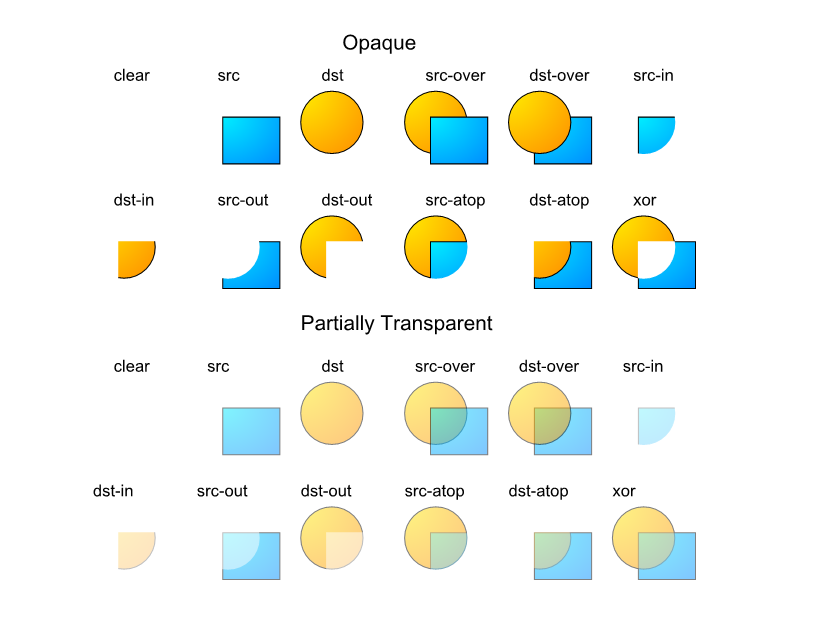
I think alpha blending can be explained better than color blending. In color blending you have to kind of know what the algorithm does, or just try all the modes until you find the one you like the most without actually understanding what it does. Alpha blending is usually (not always) more intuitive because you can abstract the algorithms as visual mixing of shapes, like this:


And don’t get me wrong, I would rather prefer there were no alpha modes exposed at all to the users. And maybe use them when appropiate like inherit alpha does or othee specific options. But sometime in the past alpha blending modes were mixed with color blending modes and now we are in this situation were several entries have to be added to the combo because the the wet mode has to work with different color blend modes. I don’t see a better solution than splitting them in two options. All ui/ux complaints seem to me just like excuses. The alpha blend mode would not be used as frequently as the color blend mode and can just be hidden for example. And the ui remains just like it is right now. The majority of users won’t even notice that a change was made.

8 Likes

This is not necesary. Any alpha blend mode should work with any color blend mode. But there are alpha blend modes, like erase (dst out in the image I posted previously), for what the top layer is just not visible so the color blend mode does not matter. But there’s no need to add complex coupling of the two options.

2 Likes

For the size issue of the two drop-down’s. >> How about reducing the size of the 2 boxes back to one box by switching between the mixing modes, make a toggle? First I select the color mixing mode, switch and then select the alpha mixing mode, or vice versa. (I think this was mentioned above, but I haven’t read it up right now.)

I once saw in an amateur-radio-software-menu such a possibility I found very smart, it depended on which side of the box I clicked to open a function chain, whether Qt also offers this? This would also make clear these options belong together, are of a similar kind, what would solve @raghukamath’s request:

Michelist

@Deif_Lou like I said in my earlier comment all my complaints seemed like non trivial to @SirPigeonz and you too think that those are excuses, then I don’t have any issue, if you think this is the way then great. I am not the one developing the options. So I won’t make any more excuses. I already also told that I do not have any point to add. I added the point to make the two drop-down related because @SirPigeonz told that having a blend mode which is not compatible will grey thing in other one. Or user has to switch to “over” mode to go to current normal blend mode. If that is not the case then great

@raghukamath i said they are excuses because for that kind of issue like having the 2 drop downs (i also don’t like it) there are usually other solutions and i think it should not be used to critique the real proposal beforehand.

Just wondering, if you really split blending modes in color and alpha, how do you intend to handle backwards compatibility?

But if you already redo the entire composite-op architecture, you may aswell implement the PS-like clipping group, which is not possible right now because of the double role of destination as sedond input. :kiki_laugh:

No I am not opposing or critiquing the addition of the new blend modes. I would love to have a good blend mode for more traditional like blending.
What I am saying is that this split makes it more time consuming to select blend modes. I may be wrong in this as I said it will become clear if it is time consuming or not when we have a testing appimage.

I imagine this scenario. I have multiply mode selected in the second drop down. Now I switch to erase mode which will be in first drop-down, after erasing I want to switch to normal mode how many clicks I need to make ? Two right? I need to switch to over and then to normal. While right now I just switch to normal, erase or multiply in one action. But as you said this is trivial and people may get used to this.

You already need two clicks. One to click blending mode option, and the other the blending mode.

The answer to this is 2 clicks. Switching to Erase should not disable the 2nd drop-down, but and the 2nd drop-down should still be enabled, but the box become gray in erase mode. If you need to switch to normal, I think clicking on it should re-enable back to over.

Backwards compatibility is another issue. That would require to increase the file version and if a file with an older version is loaded that has a layer with an alpha mode (erase, behind, etc), then set the transparency mode instead of the blend mode.

Not sure what you mean there.

But my main concern is with ps-style blending options that i’m trying to reverse engeneer (clipping layers included) because i’m not sure that we can achieve the same results as now (be compatible with current krita) if those alpha modes are used as color blend modes, because of the way the compositing has to be made.

I didn’t look at the whole compositing code in krita but for example the functions that are added for the wet modes (based on pre-existing ones) already perform the two steps separately (blend color components and blend alpha) if i’m not mistaken.