Hi, each time I create a group and correctly name it (eg. “Character”), then later I merge it to a single layer, Krita auto append the “Merged” name to my layer name(eg. the name is now “Character Merged”).
And always I feel like: “Grrr, I’ll have to rename it!” and think “One day, I should report that minor usability issue”, but then, life, bills, randomness to manage, priorities, etc… I never had time. Until today.
So, to be exact, (warning: little rant and sarcasm here) I barely understand why this “Merged” is useful at all. Following the same logic, why not also write “Undone” on the canvas when user undo, “Painted” after every brush strokes, or append “_Saved” at the end of their filename after a Ctrl+S … .
So, all in all, I find myself spending time to manualy rename my layer to remove these “Merged” very often. Are other users here annoyed by that too? Could this behavior be optional?
Well at least it prevents the classic “but where did my layers go!”
I don’t really have a strong opinion. I sometimes merge upper layer to the lower one and want to keep the upper layer’s name too (but sometimes I want to keep the lower layer’s name).
It’s kinda funny that i thought having the merged or not was already an option. I only noticed it wasn’t when i was making my apply mask plugin that the merged was always added to the name without any option to toggle.
This is the kind of thing that could be easily done with a plugin ( but this would imply never using the menu actions again, only calling the plugin) but i think it would be nice to have it as an easy option for the user to choose. I know you didn’t suggest this, but i want to make clear that i don’t think just completely removing the merged is a good option. Giving this option to the user would be the the best scenario imo
On the contrary, I would expand the possibilities, for example, for all layers that the user did not specify their own name (when the default name is used), the layer name was replaced by the layer overlay mode. When the user entered the Name, auto naming was canceled. And the manual complete deletion of the name returned the auto naming mode.
That’s what I assumed: it was designed to help beginners.
Yes, same here.
I would prefer to get Blending mode and opacity as a subtitle under the layer name (in italic, with half opacity), “a la CPS”. But extending auto-renaming is off topic, please open another wish to discuss this. Thanks.
Two thoughts:
If you were to make adding “Merged” optional, might as well make “(pasted)” optional as well.
Where in the UI would these options go? Under General->Miscellaneous maybe?
I haven’t really looked into it yet, but I’m thinking of trying to implement these myself, as it seems like it should be fairly simple. (As long as I can find a way to access KisConfig- that is, to connect the setting and the behavior.)
I agree. Maybe the merged layer name could be in italics until the next save. That at least gives experienced users a way to tell that something happened with the layer on quick glance. If that’s something worth keeping. After saving, or perhaps with a new session, it would no longer show. But I don’t want Krjta messing with my layer name.
I think I prefer having the bottom layer name as default merge name. Usually, I do some editing on top of a base layer and merge it down when I am satisfied with the result. So the layer name would be that of the base (bottom) layer.
Progress report on making “Merged” and “(pasted)” optional:
Did some coding, and I think I’ve got it figured out except for how to access KisConfig from libs/image/kis_layer_utils.cpp (where “Merged” is). I may need help with that, since it can’t be done directly.
Here’s the UI, if anyone has feedback on the wording.
Do remember about translations there… might be good to add a note to the translators that it is supposed to match the ending in the Layers docker, otherwise it could cause confusion if in a translation the strings in quotes here and the actual one in the Layers docker were different. (You can do it with i18nc("[note to translators]", "actual text")).
Good point, but I don’t think I can do that in a UI file (wdggeneralsettings.ui). Unless there’s another way to do it, maybe the wording of the option itself is enough to imply it’s supposed to match another string?
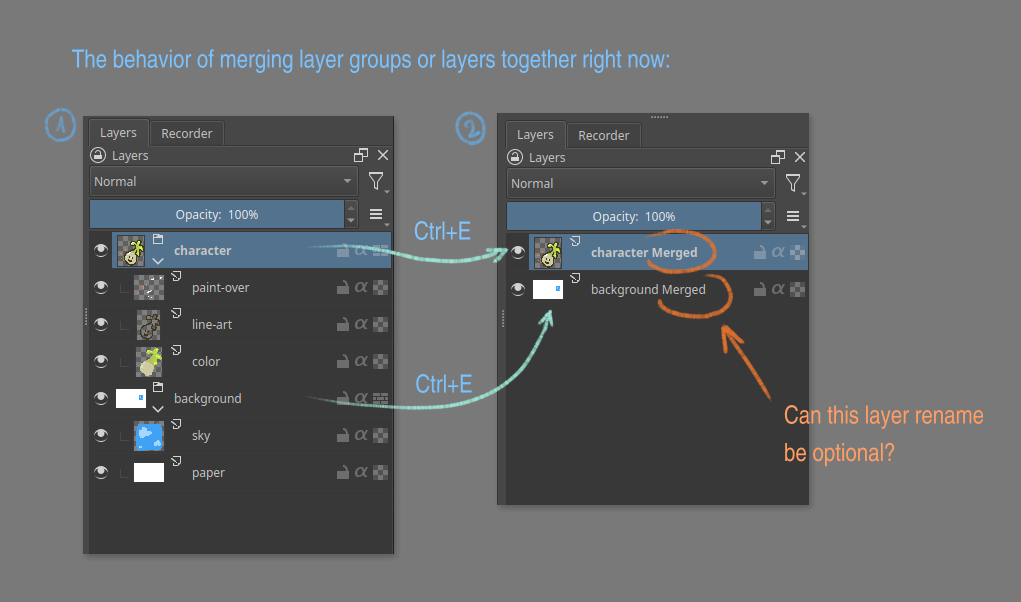
 “Grrr, I’ll have to rename it!” and think “One day, I should report that minor usability issue”, but then, life, bills, randomness to manage, priorities, etc… I never had time. Until today.
 .
.
 Yes, same here.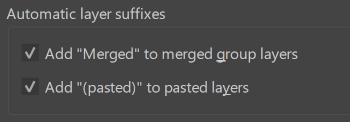

 That’s amazing! Thank you. Really, thank you!