Greetings.
I want to make a feature request which I know would improve my workflow in Krita.
It’s related to the transform mode implementation.
My request is about having a kind of chained transform which starts from the original selected image and then applies in order a series of transform sub-operations before the final
result is validated.
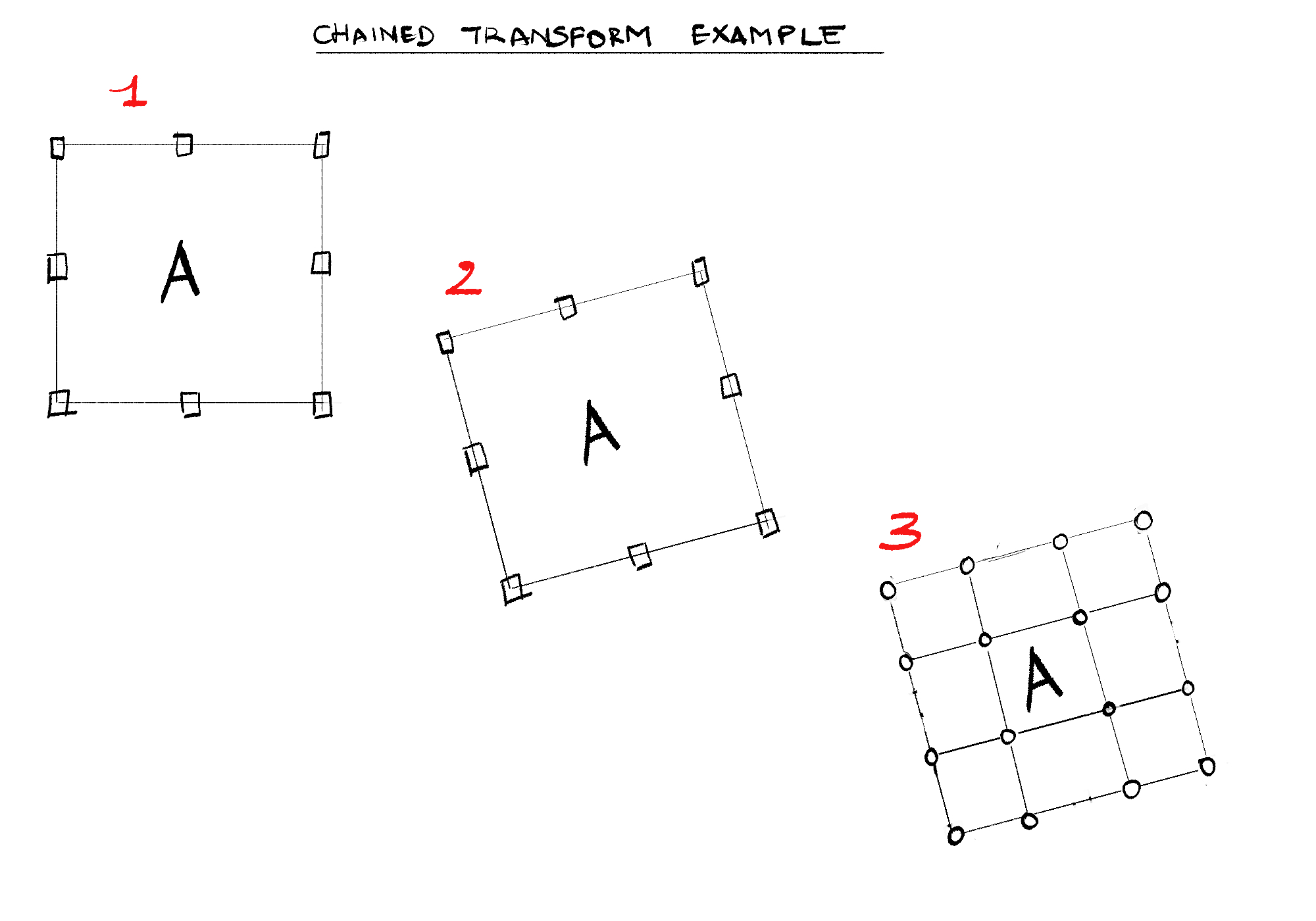
To illustrate, here’s a use case :
So basically an example could be resumed as following :
Press CTRL + T to select image data to operate on
Move and Rotate the selected data
After popping the context menu, select next “warp mode” or any other different transform operation.
Finally, press “Enter” or the validation button to finalize the transform operation.
Expectation : As you can see from the picture, the transform kinda behave like a mesh which contains the image data from the start of the operation. I believe it is better than resetting the position and all sub-transform operations running every time the transform type(example , going from scale mode to mesh mode) shifts.
I believe it’s more suitable for a faster workflow.
I end here. Thank you for taking this into account. Let’s discuss if you have some information or questions on the topic.
This is not possible unless using different transform masks, which each mask using just one type of transformation (you can already to this in Krita). This is due each of the different types of transformations using different mathematical algorithms that can not be combined. They can only be applied in sequence.
This was already discussed several times like here
But there’s proof that it’s possible without using different transform masks, at least from a UX perspective : Photoshop.
Therefore, I believe there’s a solution not requiring to use transform masks.
Also, different transforms masks are not a solution as you’re saying. I mean, show me a video of you using them to perform chained transforms. Then I will believe you.
Not going to record a video but I already showed it here
I use two transform masks to do rotation and liquify at the same time. You could even continue rotating after using the liquify mask
It’s cool that photoshop can do it but this is Krita using different algorithms. Having a all in one algorithm is maybe possible but that would probably need a complete rewrite of the transform tools.
Hopefully it’s possible thanks to Photoshop.
So, I’m just gonna wait for a complete rewrite of the transform tools if needs be.
The UX from Photoshop definitely wins in such situation. With Photoshop, it’s one transform mask for everything you need to apply, be it liquify, scale, rotate, or perspective, all together.
After I compared Krita’s way to handle the problem with what you just pointed out, it became even more to distinguish which is best. So I’m wishing Krita to have it in a near or distant future, which means, +10 for the all in one transform algorithm.
I mean, don’t you want that to happen in Krita as well ?
Aside from the entire Krita team only having about 3k as monthly budget (less than a single developer earns when working in the industry) compared to Adobe who probably spends millions on development, Krita doesn’t aim to be an all purpose image editing tool but an application just for painting and drawing. Because of this features not directly for drawing or painting are usually not priority, this also applies to the transform tools.
For me the transform tools were always good enough but that’s because I simply paint. I rarely need more than one transformation at a time or when I do it doesn’t bother me to press enter before switching to another mode. But my personal opinion doesn’t matter.
Feature requests like yours have been made a few times already but discussion always showed that this is currently not in the scope of the project and too much work to change. At least that’s what I remember. I could be wrong but I remember @tiar once mentioned it in a similar topic.
And transformations that are more than just resizing or rotating are not trivial to implement or change in code.
I use Krita for many years and when I remember correctly the more advanced transformations were not even coded by the core team but were Google Summer of Code contributions.
All I’m saying is that this part of the app can be improved. But maybe it was a bad idea to request this, especially given that it’s not a so trivial thing to implement. And also because Krita currently needs better financial and human resources. And also because of the main goal of the software.
The situation is not that grim, thankfully, besides the donations there is income from Windows Store and Steam and it adds up to some amount around I guess 25 thousand? The pay is still not comparable with what a developer earns in the industry but 3k monthly would be a starvation rate if one tried to divide it for 9 developers.
For the transformation request - @novames00 are you expecting better results or do you just want it easier/better UX/UI wise?
I can’t speak for @novames00, but one major limitation/issue with the current approach is that you cannot (always) perform transforms sequentially on the exact same pixels.
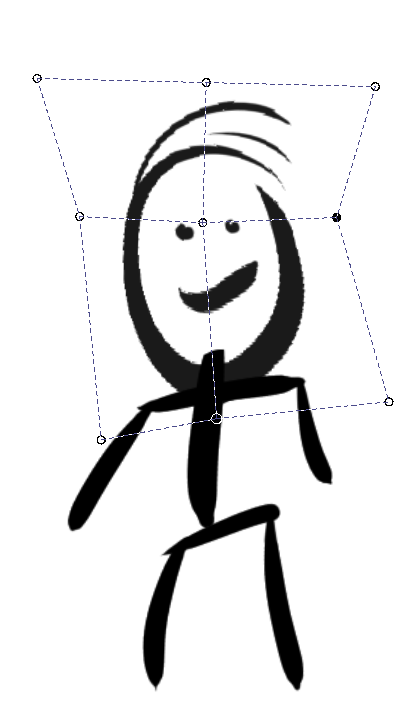
Every time you press enter, you essentially get back a new selection with the applied transform, and that transform may include pixels not selected originally.
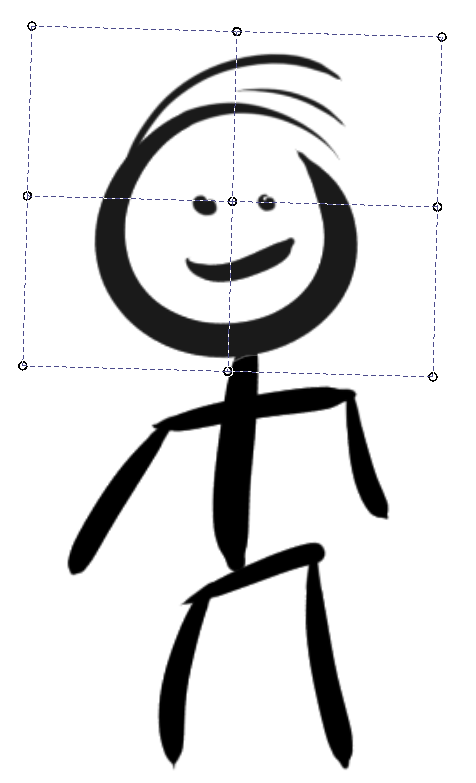
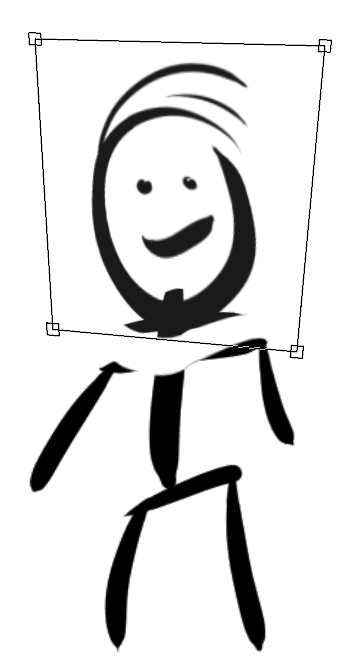
I uploaded a simple drawing to illustrate what I mean. As you can guess, it’s not a real example but rather just a quick example to show the “problem”. Here I used a warp transform to elongate the face of the stick figure. Then I pressed enter to apply the transform, and selected the perspective transform to change the perspective. As you can see, the perspective transform now includes part of the shoulders and neck that were not part of my original selection.
It’s true, this is not possible even with transform masks because they don’t seem to use selections. But it could be easily worked around by cutting and pasting the selection to a new layer and then do the transforms on that layer. Not perfect but just a few extra clicks or key presses.
Yeah, that’s how I am dealing with it currently, but it adds quite a bit of friction that could potentially be avoided.
As a “simple*” workaround to automate this, I could see the transform tool automatically cut and paste the selection into a new temporary layer (not necessarily visible to the end user), apply all/any transforms and then merge back into the original layer. Having said that, I realise this is probably anything but simple to implement . And quite obviously this is not a high priority issue, just quality-of-life improvements.
However, the fact that the transforms are different algorithms does not seem like a real limitation/blocker. Each transform just operates on a selection of pixels and returns a selection of pixels, so (in principle) one should be able to chain them by storing intermediate results in a temporary buffer, which is transparently used as input to the next transform. This might be quite a difficult task to code in practice, but you don’t really need a single algorithm that does everything to achieve chaining.
I think how much of an improvement this would be for a user depends on how you use Krita rather what you use it for. Many (if not most) comic artists on Twitch make heavy usage of transforms, especially when doing layouts. Given that comics is a stated usecase for Krita, it’s a bit unfair to just dismiss this as “all purpose image editing tool” functionality. I believe it’s rather fair to just put it forward as a feature request and let the core developers decide if/when it’s worth the time to implement it, based on their schedule/priorities.
I remember Paint Shop Pro did it that way and called it a floating selection, Gimp too I think. It was a temporary layer that would be merged back after applying it or could be converted to a new layer.
But, it’s obvious that it goes towards easier/better transform capabilities UX/UI wise. It’s targeted towards a better workflow mostly. Not something like “better results”. What do you mean by that ?
I don’t know… Feels like coding way too tricky things just so others can be more lazy to even press a key once.
To me this is just a workflow issue from the user. If you want to transform several times constantly you should use another layer instead of the original.
Looking forward to news regarding this feature.
I’m fed up with having to type “enter” everytime I want to switch between transform operations.
And the fact that switching from one operation to another, resets my transform operation, is counter productive. My question for now would be : can we expect this to come in Krita 5 ?
For me, I use multiple transform mask because of concept art. That’s where transform masks really help. Especially in designs of single subject with textures.
No, we can’t. Even though I’m going out on a limb here. I am sure of that, even I’ve nothing to do with the development of Krita, don’t know of anything that’s planned for the near future, I’m sure you can’t expect this. Maybe in 6 or 7, but never in 5.
It seems like you don’t have a clue about the problems of developing and integrating such.
I do not think it will be in Krita 5. As developers are now busy in stabilising what has already got in 5.0. it is a big release with lots of new feature and to top it there is a new resource management system.
This feature needs more work from what I understand. pinging @dkazakov just to inform him about this request.
 but 3k monthly would be a starvation rate if one tried to divide it for 9 developers.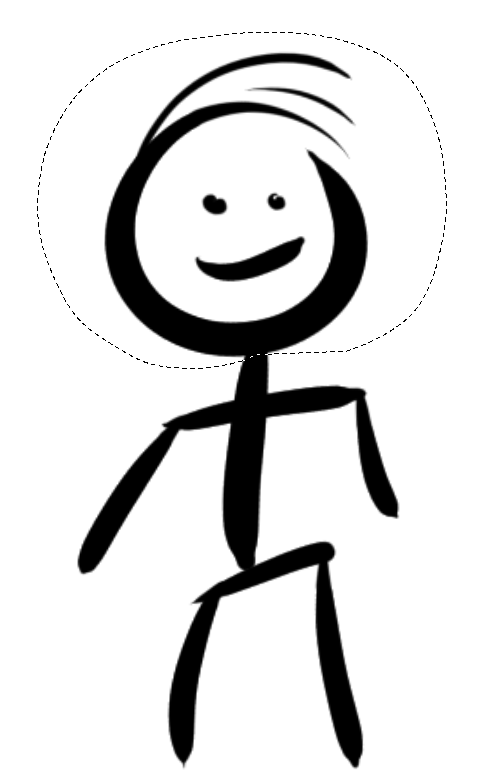
 . And quite obviously this is not a high priority issue, just quality-of-life improvements.