basically, i only use like maybe 7 or eight tools on average. it would just be real convenient for me if i could just drag them to be where i want so id save a little time mentally on goin outta my way to find and click the one i want. normally this isnt a problem i just use keybinds but im on a temporary set up right now and its just easier to click the tools. itd just be a helpful little feature for some edge case scenarios that in theory doesnt seem impossible to implement.
On the one hand, Krita has already implemented the new plugin Workflow Buttons in the Krita NEXT versions, so the current 5.3.x series, which will allow you to freely put together tools and more. It is presented here in short, and it will be a stock feature of Krita.
But, on the other hand, you can also use the plugin Quick Access Manager, it gives you more than you asked for.
I’m not sure if the first plugin will fulfil your request entirely, but it may be exactly what you are looking for, in which case your request can be closed. Unfortunately, the second plugin is only available for Krita’s desktop versions and cannot be considered a complete solution to this request because it is not usable by Android users. And that although it offers all you ask for.
Michelist

I’m pretty sure that to configure that it’s on the same place you configure the upper bar (like, where the size and opacity sliders are)
I’m just unsure of what’s the location/name of it in English

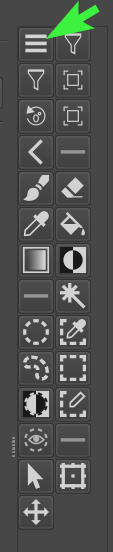
Because of @LIAM’s post above, I just installed the NEXT from today (krita-x64-5.3.0-prealpha-8201b89c), and it has a bug, the hamburger menu from the Workflow Buttons plugin is missing, so you can’t call the settings.
@LIAM, you just discovered a bug, can you please report it in the KDE-Bug Tracker? Please set its status as “reported”, so that we can confirm it then.
Here is my template created as an aid to create bug reports:
If you want, then you can report it as a bug via the KDE-Bugtracking System at https://bugs.kde.org/.
To report a bug, you must register at https://bugs.kde.org/ to gain access to the “KDE bug tracking system”, i.e. “KDE’s bug tracker”. Keep in mind that the e-mail address you use there must firstly be existing / valid and secondly that it can be viewed by any visitor to the site. But the likelihood of your address falling into the hands of spammers there seems to be very low, because the address I used to register with them, I’m using exclusively for access to the KDE bug tracking system and have not had a single spam mail in my mailbox in the years I have been registered there.
You can read what a bug report should look like under Reporting Bugs in the Krita manual (the input mask looks slightly different today), or the User Guide on KDE.ORG, which I like less. Please use the drop-down menus to select the software, i.e. Krita, the version number, the operating system and try to narrow everything down as much as possible using the drop-down menus available there.
Here you’ll find the mask to report bugs in Krita, you can open it when you are logged in into your account (if not logged in it will detour you to the start page):
https://bugs.kde.org/enter_bug.cgi?product=krita
It might be a good idea to include the link to this topic in your bug report so that the developers can read your findings here.
And after completing the bug report, i.e. after you have sent it, please publish the link to the bug report here in this topic.
Michelist
I tested krita-x64-5.3.0-prealpha-2813acf7.zip from 2025-11-26 on Windows.
It works for me, but maybe because I already made a buttons toolbar in the past.
Maybe you can try to edit the kritarc file.
The configuration data in my kritarc is at the end of the file.
I tried the following:
Deleted the data that sets the custom buttons and only left the minimum configuration.
These are the two lines at the end of kritarc:
[workflowbuttons]
settingsButtonPosition=1
This is how the custom toolbar looks then (on my system the bar is docked already - position and size will be different on your systems):
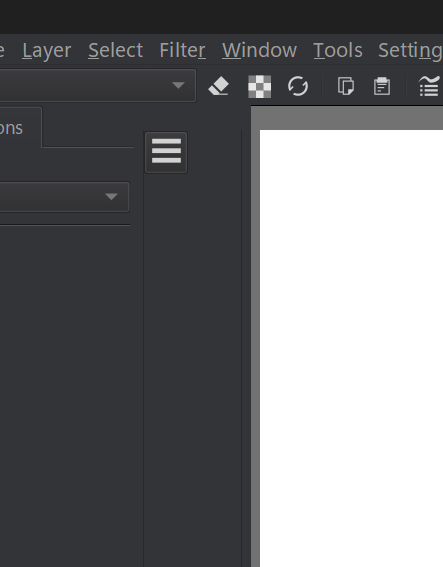
Maybe that helps as a workaround.