It seems you have too many plugins installed to see it in the list ?
Is it the reason? Should I uninstall some?
I mean it seems to be taking the entire screen space
1 Like
You’ll see the error if you hover over the zen_picker greyed-out line in the Python Plugin Manager. Make a screenshot of that error.
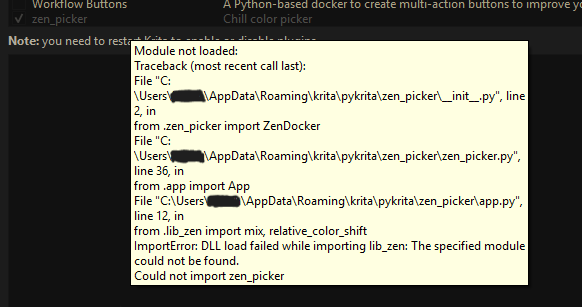
Sorry for posting this that late, but I fell asleep yesterday evening while writing it and had not the time this morning to complete it.
You are probably having two misconceptions here:
-
You try to install old plugins made for Krita before the big changes in Krita 5.3.x & Krita 6.0.x without updating those plugins to be able to run on these new version(s). But Zen Picker may run on 5.3.x. →
-
Here I guess you forgot something, → you had to manually uninstall the non-working Zen Picker, with which you had issues before, first. Here, I guess you simply installed it into your manually installed Zen Picker and now have a “code-mix” which may be behaving bad.
For point 1: This works for a lot of plugins for Krita 5.3.x, but by far not for all plugins for Krita 5.3.x, there are some plugins that stopped working, and when their creators do not update them then they will be gone for future versions of Krita if no one updates them.
And we have lots of plugins for Krita where their creator wasn’t seen here in the forum nor at GitHub (or wherever else they published their plugins) for years. If these coders are still alive, use Krita, have interest to update their plugin, is questionable, especially when you see that there are user questions in their topics that the creator did not answer for ages.
For Buli Notes, @Grum999, its coder has archived all his plugins, they are officially abandoned. But you and anyone else are allowed to update them, if you know what you are doing go on, but I guess that most of those plugins won’t get any new updates. (It may be a good idea to therefore have an older version of Krita on your PC which allows using these older plugins, if these offer a functionality you urgently need. So you can use the older version.)
For point 2: To manually uninstall a plugin you need to delete the belonging folder in the sub-folder pykrita. You can reach this folder via Settings > Manage Resources... where you have to click the button Open Resource Folder which will then open the resource folder in which you find the folder pykrita, there you have to delete the Zen Picker folder (perhaps two in this case) and the zen_picker.desktop, then you must restart Krita two times before you can install the plugin you have downloaded from me.
But as I already wrote in my post above, it can work for you, but there is no guarantee that it will, because I can not say in which way the claim of @xanderjakeq, that the plugin must be compiled on your own machine, is true or not. I do not think it is true, because I have compiled this on my old notebook and use it on my workstation now, but perhaps it has to do with the processor architecture or manufacturer, for me both PCs use Intel CPU’s.
Michelist
I asked Ai to how fix this, turned out that if lib_zen.pyd is missing that’s the root of the issue. but it’s in the file so I opened it to take a look and I’m not sure if it supposed to look like this:

it’s way too long and all of it is a bunch of nonesense
But lib_zen.pyd is in the plugin I uploaded. Here I strongly suspect that you did not follow my explanation, and then you must not wonder yourself why it is not working.
Additionally: Yes, the content of lib_zen.pyd looks a little weird in a standard text editor, simply because it is an executable file, that is not Python code, it is a compiled Python EXE if you want to call it that way.
And as I said in my former post: You first have to remove all Zen picker folders and the file zen_picker.desktop from your pykrita folder in Krita’s resource folder %APPDATA%\krita\ and then restart Krita two times, before you can install the plugin from my cloud, but if you don’t follow my explanation from above then you must wonder that it does not work.
And to check that my claims are true, I just uninstalled the plugin the way I described above, restarted Krita twice and then installed the plugin anew without the issues you describe.
Michelist
I really did, but I’ll try again and give you the updates.
Important is to remove the folder (or perhaps folders in your case) that have zen picker in their name out of pykrita and the *.desktop file from it too.
Restart twice.
Install anew via Tools > Scripts > Import Python Plugin from File... and selection of zen_picker.zip from wherever you have saved it to, confirm the question with the OK or YES-Button (can’t remember it right now) and restart Krita again. In theory, it should now work for you.
By the way, I really hope that you are not in c:\Program Files\Krita (x64)\...\...\pykrita\, because there you have nothing lost and only can damage Krita!
Michelist
hello, sorry for the late respond,
I did exactly what you told me to do but still the issue isn’t fixed : (
but somehow the plugin Restart Krita successfully worked, earlier it wasn’t working with Zen picker
Then I really don’t know, and only @xanderjakeq can help, but it seems they lost interest in this.
By the way, you only tried to install the plugin from me, or did you additionally try to follow @xanderjakeq’s description, because you only would need the plugin from me, nothing more. But for an unknown reason it won’t work for you.
Okay one idea, you said the AI told that lib_zen.pyd was missing, can you check if your Antivirus deleted it, perhaps even removed it from the plugin? But if that is not the case I’m out.
Michelist
1 Like
I installed from you + I tried with Antivirus off but it seems isn’t working.
But it’s alright, thank you so much for helping me a lot till this point, and sorry for bothering you with this plugin 
It is not your fault that this plugin was created in such a strange way, I can not really believe it must have been designed this way, because we have so many color plugins that must not be compiled first. But okay, I can be wrong.
Michelist
I literally have not encountered anything like this, which makes me question a lot of things about it. I have faced plugins that had extra folders that were packed wrong, or plugins who’s auto update stopped it from working offline. But in my years of plugin hoarding, I have never met one that required I put in so much effort just to get it to maybe “work”. With the OP’s radio silence for so long, and the solutions that “worked” only working in certain instances or even being flagged for viruses, I am left with even more questions, all of which set off little warning bells.
All in all, regardless of intent, It’s not very user friendly, and I could not at all recommend it to the average artist in it’s current state. So hopefully there are some updates in the future that clear things up.
In between the Virus search engines have investigated deeper as it seems, which is usual, because the initial claims of several engines are withdrawn since the time of release. But yeah, this is the most “interesting” plugin I met so far. And I do not believe, it must have been made this complicated, but as @xanderjakeq said, they wanted to do it in RUST, although most is python, and they did it.
Michelist
I remember it took me about an hour to get the plugin working on Windows, haha. Anyway, in case anyone doesn’t want to go through all that trouble, here’s a precompiled Windows build I just uploaded to GitHub.
4 Likes
You’re a legend!! TYSM
1 Like