ABR Brushes in Krita, is there ANY way to get them in?

I know it’s technically impossible and all reading I’ve done says so but then i stumbled on a YT vid that says if you convert the abr brushes to otx then the brush will work?

i know it’s not recommended to use a brush from photoshop or whatever but there’s this one very specific brush that i wanna use (I’m in a figure drawing online course and they recommended a brush) but it’s in ABR and krita doesn’t work with abr files
rare krita L

any help? or must i live brush-less?

Great news! No need to “live brushless.” There are many hundreds of Krita brushes available to you.

In addition to the full range of brushes included in every Krita installation, check out the Resources category for more bundles you can add in: Brushes and Bundles - Krita Artists

In terms of using ABR brushes, use the search function at the upper right of the screen and you will find many posts on the forum dealing with this very question. You may find a solution that suits you.

1 Like

You should then provide pictures of brushstrokes made with this brush and state its purpose if a specific use is required. Ask your teachers for pictures of brushstrokes made with this brush on canvas.
There are so many brushes for Krita that there will most likely be something similar. @sooz estimate was very low, I own well over 4500 brushes for Krita, so no need to live “brush-less”, but lots of need to get to know your Krita well!
Because the time you’ve known Krita and since you’ve been using Krita (you’ve been a member of the forum for almost three years), you don’t seem to have used it to familiarize yourself with Krita and the world of Krita.


Who writes it is technically impossible does not seem to know the facts!
It is not technically impossible, it is just very, very complex to implement this in Krita.
In order to implement it, the ABR format must first be 100% reverse-engineered in the form of a brush engine for Krita, which enables Krita to read the contents of an ABR file (ABR stands for Adobe Brush Resource Archive) and “display” the brushes it contains. You could say to offer Krita the brushes in a “language” that Krita understands.

ABR is a format that describes functions of brushes, these descriptions can be read by ABR-Brush-Engines that translate it into the stroke magic we see on canvas. What we have are the ABR’s, what we need is the translator who can make Krita understand the ABR-Language.

What is reverse engineering? This is the development of a function started at the end of the development, i.e. from the finished software, or a part of a finished software, here the brushes contained in an ABR file, to develop a software, that would then be the ABR brush engine for Krita, which has the same functionality as the original, here the brush engine of Adobe Photoshop.

The problem with this is the fact that we don’t know “the look” of the Adobe brush engine and that we are not allowed to go and disassemble the brush engine in order to gain access to the program source code of the Adobe brush engine (a legal problem that would not deter hackers, but Krita is “not a bad guy”). Well, disassembling is not a panacea and does not work miracles, because, if you are lucky, it only delivers a (sometimes gigantic) amount of undocumented program code in a form that is difficult to read even for professional programmers.

This means you have to start from scratch, flying blind, to develop software (the Adobe Brush Engine for Krita) of which you only own one part (the brushes!) with which this software does its work (makes strokes on the canvas). And that’s what makes this task, while not impossible, a tremendously time-consuming job. And you’ve probably heard that labor is a paid commodity, so we have a tremendous amount of (time) effort that can be accomplished with paid labor, but who has the money to pay the programmers to do the work?

As said above, it is not impossible, but it will be most probably extremely expensive. In principle, it is no different from the task of reconstructing the digestive tract of a living being on the basis of the food eaten and the resulting excretions in solid, liquid and gaseous form.
Okay, the brush-engine will be easier than this example, but not easy.

Does the video say “it will work in Krita”, or where should this OTX-Format work?
And who has this converter to convert ABR into OTX, or is this converter a converter that has to be developed first, so, is it only a non-existent brainchild of this YouTube video?
Also, since when Krita can read OTX? At least the Krita manual has not a single occurrence of these three letters in that constellation.

And why don’t you post the link to this video of a person that claims OTX would be the solution?
I don’t know this OTX-Format, but it is at best nothing more than another brush-format (or whatever OTX is) that needs a brush-engine capable of translating it to a language Krita understands, enabling Krita to “write the words”, you paint with them, on canvas.
I can only think, at this moment, without access to this video, that if this really would be a way, then we would already have heard of it. Why does someone with such knowledge not get in touch with the Krita developers and posts this as video on YouTube instead of sharing the knowledge with those for whom it seems to be meant?

Sorry, I have to sleep now.

Michelist
3 Likes

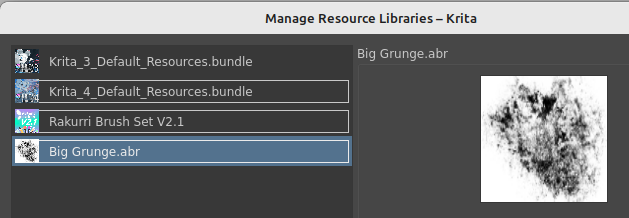
@A_User I may be completely doolally, but I believe it is possible to import an Adobe .ABR brush tip into Krita and use it as the basis for a new brush.

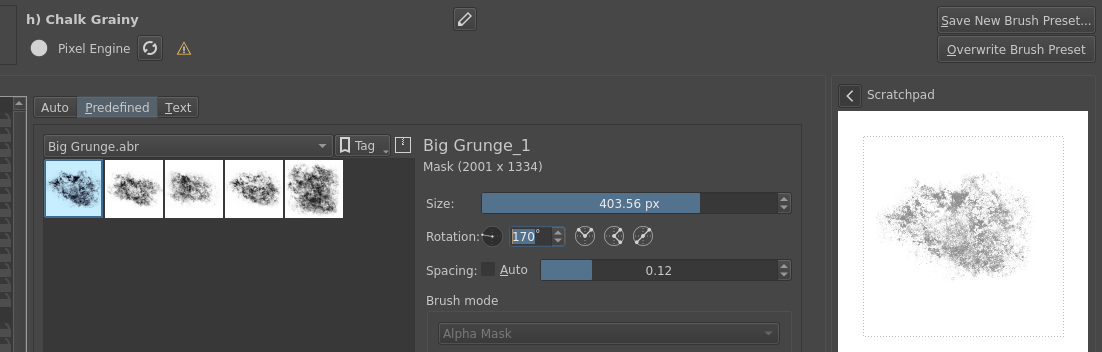
Here is an ABR called Big Grunge displaying its array of tips. each of which can then be attached to a krita brush “handle” and tweaked into a new brush to suit your needs.

2 Likes

You may be completely doolally but you are not wrong about this. The brush tip image is the only part of a .abr brush that can be ‘extracted’ and brought into krita.

3 Likes

@mugwah: The issue is that you have to recreate the full behavior of each brush from an ABR in order to have these available in Krita with the behavior they show in PS.
And there is the next issue, if you don’t have PS at hand, you can not find out which of the contained brush-tips of that ABR you need to create the brush you want, you are flying blind in the fog.
There is no easy way to have the exact brush you want to have out of an ABR, the way most easy is to search for a brush that is similar to the one you want. But therefore we would need pictures of strokes of said brush, then it is usually relatively easy to find a brush that has the needed abilities.
But if you take the question of @A_User serious, then it is about using that ABR in Krita, respectively a brush out of that ABR, and not a recreation based on a brush-tip you first have to know to be able to begin the recreation with.
And actually, I doubt that @A_User would be able to recreate the brush they need right now, because then they would most probably do it already.

But with the plethora of ABR’s out in the WWW, it would be wonderful to have an ABR-Brush Engine in Krita. The hindrances to get one I described above. But if such an engine would be integrated into Krita, like the MyPaint-Brush Engine a few years back, then you can use every ABR in Krita without the burden to recreate anything from nearly scratch - at least we have the brush tips.

Michelist

2 Likes

I concur, @Michelist …at least we have the brush tips.

That .png smudge they could replicate with many of Krita’s existing brushes. But… to give that brush a personality requires just a little effort and knowledge. Effort to understand the brush engines. Effort to create a brush that behaves in a manner that the artist may require, rather than an instant, PS knock-off generated by a conversion algorithm.

1 Like

Sorry about dead-posting, but this is a little too dramatic :slight_smile: The part about writing a brush engine is a lot of work indeed. But general reverse-engineering of ABR brushes is not just doable, it has been done before, and more work can be done again. I was part of such an effort years ago and wrote a spec for brush dynamics in ABR. If there is a demand for this, I could try to locate my old work and do some new work as requested.

2 Likes

There was actually recently a person who started working on it again.
They tried to make scripts that translate from .ABR from PS, and the CSP brush format. I don’t think they went too far in that, though. If you could point out your previous work, it might indeed be useful.

(Though of course 100% replication of PS brushes would require a new brush engine most probably… or at least ensuring that Krita ones encapsulate all of PS parameters).

2 Likes

So far, I’ve managed to locate these two documents:

  1. Initial, unfinished spec: Reverse engineering dynamics in ABR files - Google Docs

  2. A mapping of Ps features to Krita features based on the final version of the spec, from 2013, by Yuri Fidelis: Krita - ABR Mapping Table - Google Docs

3 Likes

Hello there.
You can look at the exported parameters from the tool we made. It also exports brushtips.
Photoshop looks problematic, but CSP is pretty clear cut.
Problem will be translating and converting a set of parameters to a completely different set of parameters.

You can look at the ongoing procreate to Krita attempt (by Freya Lupen) here:

Currently we’re manually translating ps brushes to get a conversion list that makes sense, but so far, it’s not been good.

1 Like

Once I saw that ABR Mapping Table doc, I started writing a conversion script based on it (based on my Procreate conversion script). Very basic skeleton draft here: abr_to_kpp.py

It would need some dictionary of the ABR params as input. After that it’s “just” a matter of filling in the gaps.
I don’t have any ABR brushes, so I can’t properly test that myself.

2 Likes

Alright, that last issue should be dealt with now. Sent you some brushes to work with.

We’ll touch up the script as well. We can probably figure it out while it’s a script too.
We need to somehow manhandle quite a few parameters that don’t have a match, and normalize the translation because the value ranges are also different. Also, we’ll have to handle multiple brushes, since .abr files are often a bundle of brushes.

1 Like

As others have said, it is probably wiser to try out the brushes Krita has installed already to see it it fits with the kind of brush you are looking for. Then there are many amazing brush packs available by David Revoy, Ramon Miranda, Rakurri and many others that are free to use.

When I started using Krita more regularly I also ran into the problem of having experience with other brushes in other programs, and the brushes not feeling quite right or quite the same. the best thing I did is actually diving into some brushes that were in the right direction and started tweaking them, trying out the various parts of the brush engine. It is overwhelming at first, but by this you learn a lot and now I basically created nearly all the brushes I use myself exactly how I like to work.

This may not be the fastest or easiest solution, but it will pay off in time, I promise!

2 Likes

I always thought how Gimp its able to load abr files brushes, its there any way for having the same feature development for Krita, because there is a record how Gimp find the way for porting at least the path for the Abr files into Gimp.

WIP Brush Conversion Scripts: .brush, .abr, .sut to Krita .kpp

Michelist

2 Likes