Allow the toolbox to customize and brush preset tags to set shortcuts

Sorry, I didn’t make myself clear in the previous content, which caused ambiguity. I have rewritten it now.

Allow the toolbox to customize and brush preset tags to set shortcuts.

  1. Allow users to fold the less frequently used tools in the toolbox into one location. For example, add a box icon to the toolbox, where less commonly used tools can be stored. Clicking it will expand those less frequently used tools for users to select and switch to.

This can save display space for small-screen devices, such as Android tablets, small-sized pen displays, and small-sized laptops.

  1. Allows setting hotkeys for brush preset tags to switch between brush preset tags.

  2. Different brush preset tags independently remember the last used brush preset.
    This will improve efficiency for users who want to assign different brush preset labels to different painting workflows and have a keyboard available.

  3. Allow adding brush preset tags as tools in the toolbox.
    On Android tablets, users can directly use a non-drawing finger to tap the toolbox on the side of the screen to quickly switch brush preset tags.

  4. Allow users to customize the icons of tools in the toolbox with their own images.
    Let the brush preset tags added to the toolbox take up less display space instead of showing a long row of text.

  5. Allows users to adjust the position of tools in the toolbox.

If Krita has all of the above, in addition to making Krita more user-friendly, it can also help reduce the difficulty for users of other software to switch.

For example, the user wants an independent eraser tool like in Photoshop.
Users can set the shortcut key for the eraser brush preset tag to ‘E’, then place it on the toolbox, and customize it with an icon they like. Although this is not a true standalone eraser tool, the interactive experience is very similar.

For example, if a user wants to place a set of brushes in the toolbox as a tool, like in CSP. Once the functions mentioned above are completed, it is possible to achieve a similar experience by adding the same tag to a set of brush presets and then adding that brush preset tag to the toolbox.

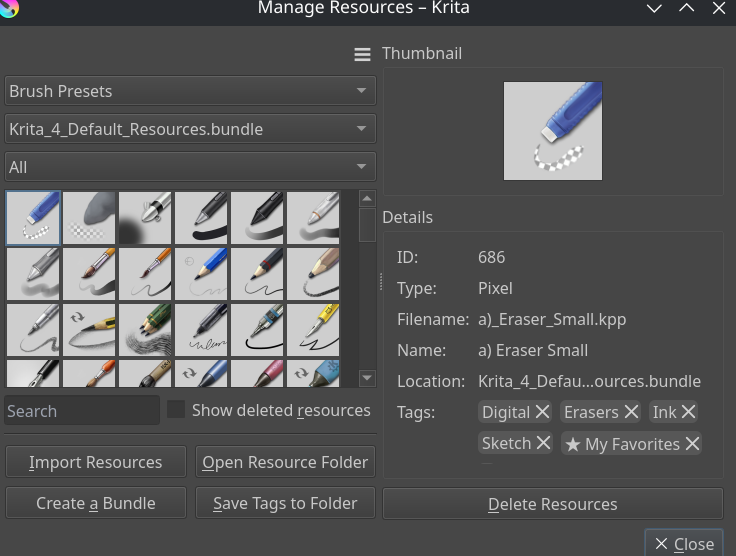
Have you checked the new actions for “Select Eraser Preset” and “Select Brush Preset”? You can assign them to B and E and use as if they were two different tools.

You can also use “Toggle Eraser Preset” assigned to E and use like it is in Krita, but using a whole new brush preset for eraser.

I think the first set of actions is 5.3.x only, and the second one is already in 5.2.x. But both are pretty new.

i thought they are a feature request similar to this? Its not that like the one from the Eraser separate tool? its similar to this one

Strange, I have no memory of the two new features about the eraser that you mentioned. Were these two written in the documentation or in the update news?

I tried the new eraser feature you mentioned, but I still think the method I suggested is more intuitive. For example, in situations without a keyboard (Android tablets, Windows tablets, and other devices without keyboards), graphical interaction has more advantages.

Moreover, if the functionality I mentioned above is implemented, it would also allow for a more flexible way to organize the toolbox. For example, brush preset tags other than the eraser could also get shortcuts and be placed in the toolbox. In addition, placing the eraser brush preset tags in the toolbox also makes it look more like a standalone eraser tool.

‘Improving software interaction’ ≠ ‘wanting an independent eraser tool’

But you reminded me, I might have been too ambiguous in what I said. Let me think about how to modify this feature request.

You are missing, that there has to be a way to assign tags to a preset.

Let’s think that through…
We already have an eraser preset and a brush preset. If I look at magma for example, they have 5 presets, but why should Krita stop at 5?
Eraser and brush preset remember the last tool and brush they used. The popup palette with the selected tag and the brush history should be separated for each preset ( there should be a feature request for that from me for the tag separation )

If that is done, we should remove the name eraser and brush preset and call it tag preset, which defaults to the “brush” and “eraser” tag.

To make the preparation of shortcuts possible we have to settle for a defined number of presets. So let’s start with 5 for the beginning. (I don’t know if it is possible to tell Krita, hey I want to have 10 presets. So restart and prepare the actions to switch between them. )

We then need a way to assign a tag to the preset.
Maybe use the popup palette tag selection for that.
The user is on the first preset and would open the popup palette and select the tag for preset #1, then he would switch to the next preset and select the preset and select the tag there. Etc.

We would need an action to circle through the presets forwards an backwards. That way we could press B several times and switch between pencil, pen and soft brush, mimicking csp and it’s tools.

Furthermore the user could then configure a toolbar to trigger the separate presets. Or circle through. Did I forget a use case? Btw. bush history is in my opinion not really necessary as you can switch your brushes with the popup palette and choose the brush there. It is the same number of steps. Change to preset, recognising it is the wrong brush, opening the popup palette and selecting the previous brush… Ok maybe one step more. But with visual feedback :winking_face_with_tongue:

FyI, CSP can assign shortcuts to specific tools/tool groups. Do you mean something along those lines? Asking out of curiosity!

I don’t understand what you’re saying. Aren’t brush presets always able to have tags added?

You know how in CSP you have the pen tool and the pencil tool and the watercolor tool etc. If you press 1 time b for brush, you have the pencil tool and when you press B a second time you have the pen tool selected and then you press B again and you are back to pencil or something like that. It has been quite some time when I last used csp…

So one key for multiple tools, where you circle through. If we had tag preset we could assign the tags we want to have and circle through them.

Brush preset with the resources is different from presets while drawing.

You know some wacom pens have an eraser at the end, don’t you? When you draw in krita with the tip, you have a brush preset. When you turn the pen and use the eraser of the stylus, Krita uses a different preset and you automatically have an eraser.

This can be triggered for users with no eraser at the end of the stylus with the action @tiar mentioned.

But Krita does not stop there. When you use the eraser preset, you can select any tool, like the selection tool, and then switch back to brush preset. Draw, toggle the eraser preset, select and then switch back to brush preset.

So in my mind you have 2 slots at the moment. Both are currently used for brushes. One has the normal brushes you always use and the other has the eraser tool preselected. How you use them is your choice.

And when you say you want tags to be assigned to short keys I thought that maybe it would be similar to the presets you have while drawing.

I think trying to solve the issue of “brain compatibility with other programs” by doing things differently to other programs is a fool’s errand. Coming up with fancy ways that Krita could be different goes in the wrong direction, other programs solve it with a separate eraser tool or eraser tool slot, so if we wanted to let users stumble into Krita with the expectations from other programs, we ought to solve it in a way that they are able to discover.

Otherwise, the edited post is now kind of a jumble of different features. 1, 5 and 6 are toolbox customization in general, which is valid because I’m sure nobody uses all the tools. 2 and 3 would be relegated to obscure customization options. 4 is a bit weird, since the toolbox is for tools, but there might be a useful idea in here of some kind of “tool preset” or something, and I think there actually has been prior work in that regard. But it’s also in the realm of obscure customization, it goes in the totally opposite direction of the discoverability issue.

I feel like what you are talking about regarding brush presets is different from what I mean by brush presets.

The one you are referring to is ‘eraser mode.’ It is not a type of brush preset; it sets the current tool to erase blending mode.

This is not to be deliberately different, but precisely to make Krita stronger while reducing its differences with other software to lower the difficulty for users of other software to switch.

In order for users to discover it, we can also add the eraser brush label to the toolbox as default, and set the shortcut key to ‘E’.

I don’t know if you have used CSP, but CSP does not have a real separate eraser tool.

CSP’s eraser tool is essentially a set of brushes, but CSP does not use tags to organize brushes; it uses groups, and the default shortcut key is ‘E’.

CSP uses this kind of interaction design so that their users don’t feel a huge difference compared to pressing “E” in PS, which is also why I’ve never heard CSP users say they need a separate eraser tool.

I don’t know if you have used CSP, but CSP does not have a real separate eraser tool.

It’s got an eraser button in its toolbox and E is bound to toggle it by default. Drawpile works similarly, it also doesn’t have a “real” eraser tool, it’s just smoke and mirrors. But it quacks like an eraser tool, so users who think of it that way will see what they want.

In order for users to discover it, we can also add the eraser brush label to the toolbox as default, and set the shortcut key to ‘E’.

You can also accomplish this by binding E to “toggle eraser slot” by default and replacing the eraser mode toggle in the toolbar with that action. This doesn’t need re-implementing through tags.

And I doubt the default will change, it’s a toss-up as to what users prefer. It might even be situational, I personally use a separate eraser when sketching because I don’t want to scrub for ages with my weak sketch brush, but I use the erase mode toggle when painting.

Actually, being able to experience something closer to an independent eraser tool is incidental; it is not the main point of this feature request.

The initial version of this feature request that I wrote emphasized the wrong points, diverting everyone’s attention from the feature request itself to other things, so I rewrote it.

It’s a natural result of the toolbox becoming more customizable to the point where you can set brush preset tags, rather than doing it specifically to be closer to an independent eraser tool.

From my observation, there have indeed always been people who want a separate eraser, and they are dissatisfied with all the currently available options.

Actually, I had written an almost complete response to your multi-feature request from last night, but then I fell asleep just before I finished it. When I woke up and looked at this thread and all the replies that had been posted in the meantime, I wanted to incorporate them, but when you suddenly completely rewrote your opening post, I extracted the one part that hadn’t been seen here before and am now posting only this fragment taken out of context:

That Toolbox customisation thing can already be covered, at least in part, by the Workflow Buttons plugin.¹ In part because I currently don’t know if it allows adding single brush presets, I don’t think it can, but I may be wrong. So it may be already existing, but it can also be that it would have to be extended. Let us assume the latter.


That is not wrong, but all these approaches to create an eraser tool that behaves like that from PS are kicking the users in the back who love the Krita eraser. So, for me, the only acceptable way would be to have that optional. Why? Because I hope that this constant nagging about Krita’s eraser will stop then and doesn’t steal “my Krita eraser”, because I don’t want to see it being sacrificed for an eraser I dislike.²

Michelist

¹ I do not know if you have noticed or tested it so far, but Krita now allows you to build your own Toolbox using the Workflow Buttons plugin, which is a Krita stock feature, so it is nothing you have to install, it already ships with Krita:

² I cannot understand that people can switch cars, phones, TV sets, or stereos without nagging their manufacturers to rebuild their products because the users former manufacturer made this or that different, but when it comes to Krita, then it has to adapt to other software to maybe make users feel comfortable who only want to have a free PS clone and are by no means willing and able to adapt to Krita.

And I’m sure this never-ending nagging can only exist for one or two reasons.
Reason one: Krita seems to have so many advantages over PS when it comes to painting that they would like to have and use Krita, but no one ever stood up and paid a developer to implement this oh-so-important thing so it can be merged into Krita and make that part of the artist’s world who wants that smile again. Hopefully that ends this discussion once and for all.
Although, why isn’t anyone pestering Adobe, Celsys, and whoever else out there to make their eraser work the same way as Krita’s? :upside_down_face: Then, in the future, no one will have to worry about how Krita’s eraser works… :zany_face: …they’ll know it. :wink:
Probably those companies will show you the finger.

Reason two for some will most likely be the money they have to constantly feed into the pockets of these corporations.

I think that if everyone who has spoken up for this eraser tool here and elsewhere - which seems so indispensable to these artists - had chipped in between €50 and €100 (or even just the annual fee they have to pay to the proprietary software companies they apparently hate to support so they can break away from them and switch to Krita and save their money) instead of continuing to throw money down the throats of Adobe, Celsys, and the like, then this feature could have been programmed a long time ago.

I like the idea of feature crowdfunding :thinking: