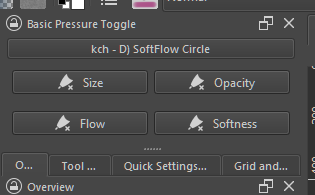
Im trying to make a simple personal plugin that turn off the pressure from one of this [one at a time] by a toggle button - instead of turning off all the pressure as the [ disable_pressure ] action does.
*simple as in 4 buttons and nothing else much. just to get my foot on doing plugin.
There is no good way to toggle Enable Pen Settings checkbox, soo … here is a bad way
from krita import (
        Krita,)

from PyQt5.QtWidgets import (
        QApplication,
        QFrame)


def walk_widgets(start):
    stack = [(start, 0)]
    while stack:
        cursor, depth = stack.pop(-1)
        yield cursor, depth
        stack.extend((c, depth + 1) for c in reversed(cursor.children()))


def get_brush_editor():
    for window in QApplication.topLevelWidgets():
        if isinstance(window, QFrame) and window.objectName() == 'popup frame':
            for widget, _ in walk_widgets(window):
                real_cls_name = widget.metaObject().className()
                obj_name = widget.objectName()
                if real_cls_name == 'KisPaintOpPresetsEditor' and obj_name == 'KisPaintOpPresetsEditor':
                    return widget


brush_editor = get_brush_editor()

# print QObject tree of brush_editor (for currently selected brush)
for widget, depth in walk_widgets(brush_editor):
    indent = depth * '  '
    cls_name = type(widget).__name__
    real_cls_name = widget.metaObject().className()
    obj_name = widget.objectName()
    text = None
    try:
        text = widget.text()
    except AttributeError:
        pass
    info = f'{indent}{cls_name=} {real_cls_name=} {obj_name=} {text=}'
    if obj_name == 'checkBoxUseCurve':
        # this is intresting, underline it
        info = ''.join('\u0332' + i for i in info)
        # toggle it
        widget.setChecked(not widget.isChecked())
    print(info)
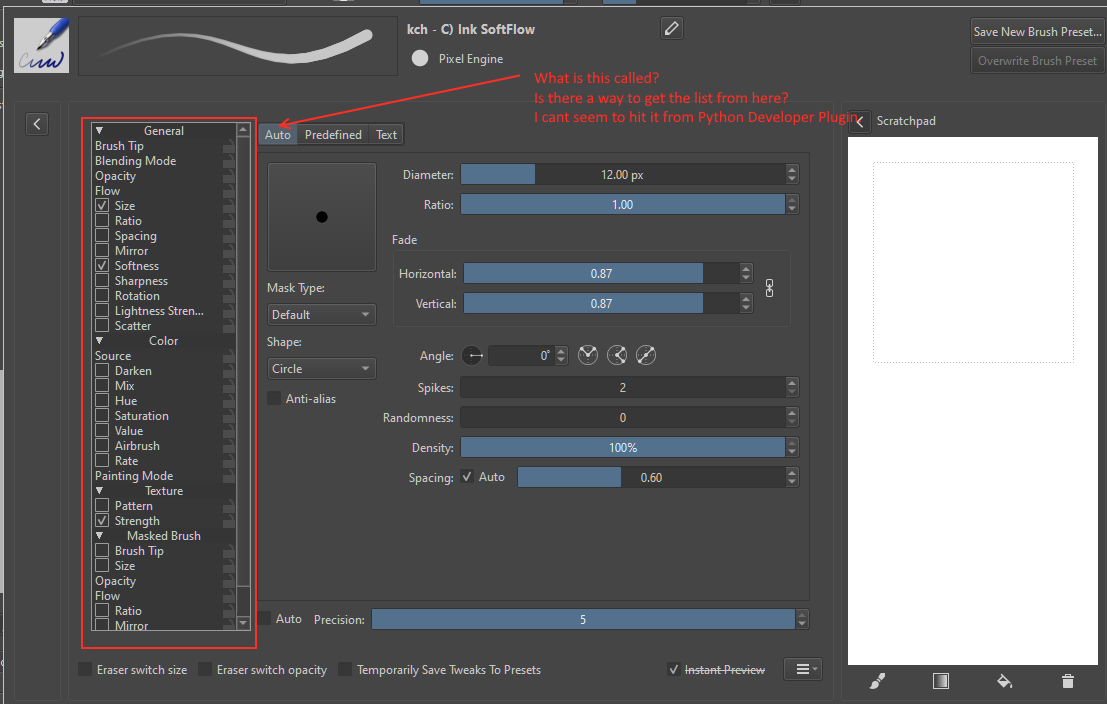
and is there a way i can differentiate from which node the checkBoxUseCurve belong?
If its for size, opacity or flow. I want to be able to know which and toggle them individually
from krita import *
from PyQt5.Qt import *

qwin = Krita.instance().activeWindow().qwindow()
w = qwin.findChild(QWidget,'brush option widget')
model = w.findChild(QWidget,'qt_scrollarea_viewport').parentWidget().model()

for rowNumber in range(model.rowCount()):
    mi=model.index(rowNumber, 0)
    if mi.flags()&Qt.ItemIsUserCheckable:
        if mi.data(Qt.CheckStateRole):
            state='Checked'
        else:
            state='Unchecked'
        print(rowNumber, mi.data(), "-->", state)
        if rowNumber==25:
            model.setData(mi, Qt.Checked, Qt.CheckStateRole)
Or Qt.Unchecked to force uncheck
But here it start to be very weird tweak, because you have to manage current brush engine (list is not the same) and after you might need to manage options… And if this window is be updated (new brush engine, new option for an engine, UI layout reviewed…) the tweak might be broken
To use for personal usage I think
But for a plugin it could tricky to maintain
its for specific personal usage turns out its quite tricky.
4 buttons and at this point i might give up on accessing softness.
im too scatterbrain to maintain a plugin.
tbh i wish individual pressure toggle is accessible via action atleast for the main three [opacity, size and flow]
at this point if i really want it - its probably by building my own krita [if i ever learn to ]
This ^ just for specific one without opening the brush editor.
Right now if you use the toggle [which i have in my toolbar] all pressure influence are remove.
To deactivate i need to open the brush editor and select that property , then uncheck the box.
The difficulty might be to determinate which checkBoxUseCurve to check/uncheck as there’s one checkbox with this identifier per brush property, but it seems complicated to determinate how to match brush property (size, opacity) to the corresponding checkbox…
Looking order of stacked widgets, it doesn’t seems to match to position of brush property type in list…
Now problem is that view fails to change visibility of widgets when view.setCurrentIndex(index) is called.
Maybe there is some public pyqtSlot that can be called using slots name, that would force KisCategorizedListView to register change in currently selected index.
but this is too much hacking for me :D. but hopefully this some how helps you forward.
from krita import (
        Krita,)

from PyQt5.QtCore import (
        QItemSelectionModel,)

from PyQt5.QtWidgets import (
        QApplication,
        QCheckBox,
        QListView,
        QFrame,
        QWidget)


def walk_widgets(start):
    stack = [(start, 0)]
    while stack:
        cursor, depth = stack.pop(-1)
        yield cursor, depth
        stack.extend((c, depth + 1) for c in reversed(cursor.children()))


def get_brush_editor():
    for window in QApplication.topLevelWidgets():
        if isinstance(window, QFrame) and window.objectName() == 'popup frame':
            for widget, _ in walk_widgets(window):
                real_cls_name = widget.metaObject().className()
                obj_name = widget.objectName()
                if real_cls_name == 'KisPaintOpPresetsEditor' and obj_name == 'KisPaintOpPresetsEditor':
                    return widget

def dump():
    editor = get_brush_editor()
    option_widget_container = editor.findChild(QWidget, 'frmOptionWidgetContainer')

    for qobj, d in walk_widgets(option_widget_container):
        indent = d * '  '
        is_visible = None
        cls_name = type(qobj).__name__
        meta_cls_name = qobj.metaObject().className()
        obj_name = qobj.objectName()
        text = None
        if d < 5 and isinstance(qobj, QWidget):
            is_visible = '👁' if qobj.isVisible() else '    '
            try:
                text = qobj.text()
            except AttributeError:
                pass
            print(f'{indent}{is_visible} {cls_name=}, {meta_cls_name=}, {obj_name=}, {text=}')


def set_checkBoxUseCurve(name, new_state):
    editor = get_brush_editor()
    option_widget_container = editor.findChild(QWidget, 'frmOptionWidgetContainer')
    current_view = None
    for view in option_widget_container.findChildren(QListView):
        if view.metaObject().className() == 'KisCategorizedListView':
            if view.isVisibleTo(option_widget_container):
                current_view = view
                break
    if current_view:
        current_settings_widget = current_view.parent()
        s_model = current_view.selectionModel()
        model = current_view.model()
        target_index = None
        for row in range(model.rowCount()):
            index = model.index(row)
            if index.data() == name:
                target_index = index
                break
        if target_index is not None:
            # there is something strange in views selection model???
            # ToDo: selection is not applyed??
            s_model.clear()
            s_model.select(target_index, QItemSelectionModel.SelectCurrent)
            s_model.setCurrentIndex(target_index, QItemSelectionModel.SelectCurrent)
            current_view.setCurrentIndex(index)
        # now correct option is selected & current. find visible check box
        for check_box in current_settings_widget.findChildren(QCheckBox, 'checkBoxUseCurve'):
            if check_box.isVisibleTo(option_widget_container):
                check_box.setChecked(new_state)
                break

# dump()
set_checkBoxUseCurve('Rotation', True)
I use your code to create a docker. I manage to make simple one that works so far.
I will probably add some things that will notify me about the current state of the brush toggle - so far it works. with exemption of resetting the size of the brush.
the upper button was suppose to load the current state of " checkBoxUseCurve" of a selected brush.
[its not working XD very well]
the rest are toggle buttons;
So far the issues im trying to fix;
It does not work properly when you just open app krita.
— It toggles the icon in the button but the check box is not toggling.
— it starts working after opening the brushpreseteditor and pressing one of the button to see it uncheck once. after that it works with the rest of the brushes without opening the brush editor
—there are times the checkboxusecurve is toggled uncheck but pressure is not turning off / with or without brush editor open.
As noted in your code , for some times it does not seem to select the view.
It works so far for my need.
Edit: still investigating XD i got too invested to this. I feel like im missing some sort of an enter or click trigger.
As i read it seems that the .select and selectCurrentIndex only transfer the selection but dont trigger the click signal. it seems the click signal is the one that switches the view.


 just to get my foot on doing plugin.

 i see.


 turns out its quite tricky.