Since we aren’t allowed reading minds, it would have been great if you had described what you did, or to give us the links to those “previous” posts whose advices you followed, since that would allow us to see what you’ve tried so far. Right now we only know you have an issue and were not successful in solving it.
Before we begin, and as I just described in another topic, reinstalling Krita is a waste of time (at least in above 99.99% of all cases) because →
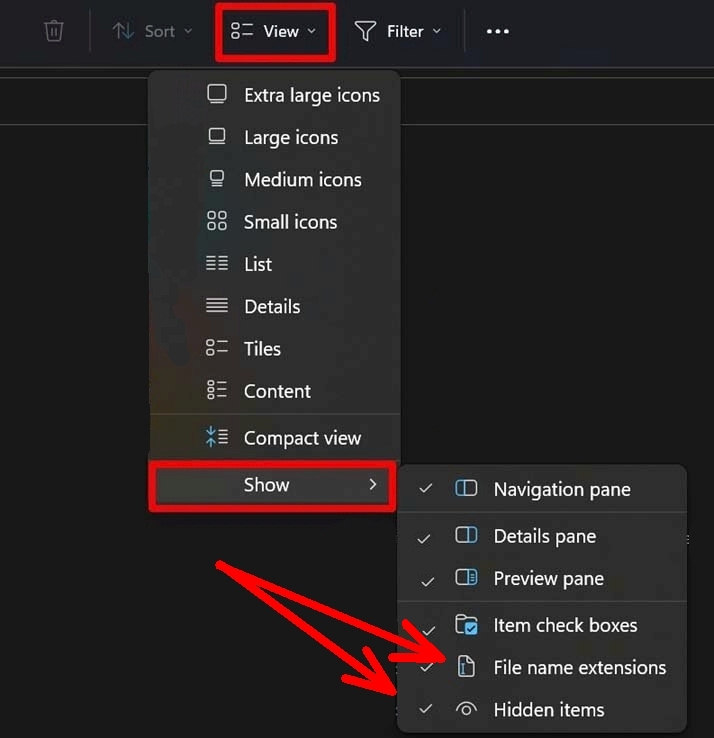
Before you begin you need to make two settings in your Windows Explorer, so Windows will not revert your changes because it believes to know what is good for you. After setting these hooks Windows will no longer silently revert changes to certain files users try making (and can’t see that Windows has reverted their settings before they set these two hooks).
Please set these two hooks at least for the time you try solving your problem, when you have solved your issue (or give up doing so ):
Now to your issue, it sounds like the one that is reported more often recently (quote from the same topic):
So, not knowing if you took my following quoted hints as advice to try solving your issue, these two tips helped me both to solve the issue you describe, let’s hope they’ll do it for you too:
Tip 1:
If that doesn’t help try the next tip.
Tip 2:
If that did not help either, then my bag of possible ideas to solve that issue is empty more or less. At least with those tips that are easy and quickly done. Because what you can also try is to reinstall Windows from scratch. The reason behind that is that I had to reinstall Windows recently and after that reinstallation of Windows Krita did not throw that error on me, so I guess a fresh installed Windows can be a possible cure.
 Hello @Kalebbased, and welcome to the forum!
 ):
):
 try the next tip.