Can not save to WebP "Error occured"

Linux Mint 20.2 Linux Mint
Krita 4.4.8


Whenever attempting to save to WebP, I get a generic error message… Any libraries I have to update? Because I’ve had a bad past with Appimages haha… If there’s anything I’ll have to update, tell me.

(I also can not open WebPs if this adds to the case.)

:slight_smile: Hello and welcome to the forum @VocalFan !

You could check with your package manager if the “libwebp” including dependencies is installed.

Michelist

I installed “webp” and “libwebp-dev”, tried closing and reopening Krita, still errors when saving.
sudo apt install webp
sudo apt install libwebp-dev

I’m puzzled because 4.4.8 doesn’t Render to WebP, it only does WebM.
The 5.0.0-beta5 will Render to WebP and WebM.
WebP has the advantage that it will loop continuously.

If I try to ‘force’ 4.4.8 to make a .webp file, I get a different error message.

As for the appimage, I’d recommend it and also recommend that you download and use ffmpeg from here:
https://johnvansickle.com/ffmpeg/releases/ffmpeg-release-amd64-static.tar.xz

Usually version compiled and deployed through package repositories contains more bugs as in appimage as Krita use a patched version of Qt that are not provided by distro package managers.

Also, they can deploy the wrong version of Qt (Krita is not compatible with Qt 5.15 for example…)

Not sure what happen to you with appimages, but sure that you’re version of Krita might not be fully functional…

Grum999

ffmpeg version 4.4.1-0ubuntu1~20.04.sav0 Copyright (c) 2000-2021 the FFmpeg developers
  built with gcc 9 (Ubuntu 9.3.0-17ubuntu1~20.04)
  configuration: --prefix=/usr --extra-version='0ubuntu1~20.04.sav0' --toolchain=hardened --libdir=/usr/lib/x86_64-linux-gnu --incdir=/usr/include/x86_64-linux-gnu --arch=amd64 --enable-gpl --disable-stripping --enable-gnutls --enable-ladspa --enable-libaom --enable-libass --enable-libbluray --enable-libbs2b --enable-libcaca --enable-libcdio --enable-libcodec2 --enable-libflite --enable-libfontconfig --enable-libfreetype --enable-libfribidi --enable-libgme --enable-libgsm --enable-libjack --enable-libmp3lame --enable-libmysofa --enable-libopenjpeg --enable-libopenmpt --enable-libopus --enable-libpulse --enable-librabbitmq --enable-librubberband --enable-libshine --enable-libsnappy --enable-libsoxr --enable-libspeex --enable-libsrt --enable-libssh --enable-libtheora --enable-libtwolame --enable-libvidstab --enable-libvorbis --enable-libvpx --enable-libwebp --enable-libx265 --enable-libxml2 --enable-libxvid --enable-libzmq --enable-libzvbi --enable-lv2 --enable-omx --enable-openal --enable-opencl --enable-opengl --enable-sdl2 --enable-pocketsphinx --enable-librsvg --enable-libdav1d --enable-libzimg --enable-crystalhd --enable-libmfx --enable-libdc1394 --enable-libdrm --enable-libiec61883 --enable-nvenc --enable-chromaprint --enable-frei0r --enable-libx264 --enable-shared

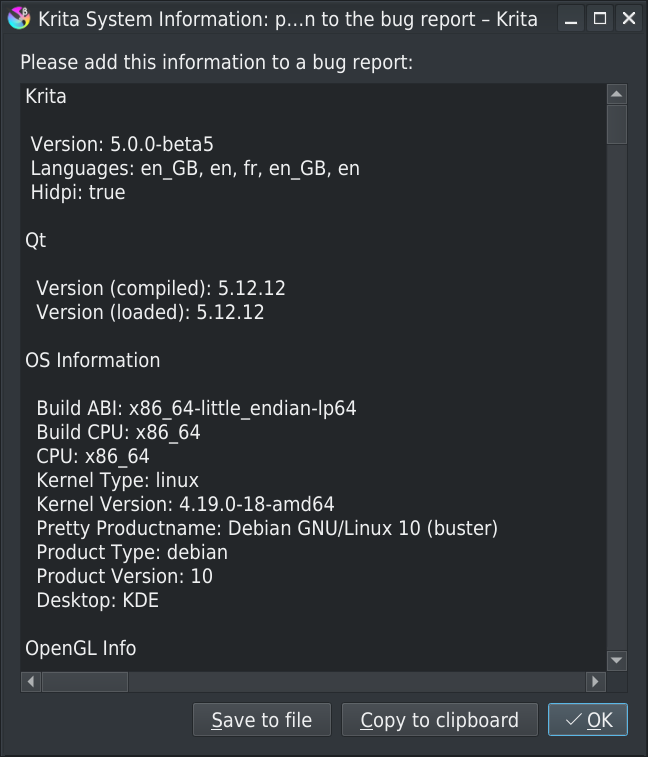
How would I see the QT version I have?

In menu Help > Show system information ofr bug reports.

Grum999

Qt

Version (compiled): 5.12.8
Version (loaded): 5.12.8

@VocalFan I’m don’t understand the meaning of your reply above.
Using the 5.0.0-beta5 appimage and that ffmpeg package, I just made a .webm and a .webp animation that played well in my Chromium, Palemoon and Vivaldi browsers.

Simply saying I already have the latest FFmpeg. Plus I can’t use an earlier version, breaks my emulator.

Your ffmpeg was built by Ubuntu. Your krita 4.4.8 was built by Ubuntu.
Your arrangement is not working.
The 5.0.0 beta5 appimage and the standalone (not installed) ffmpeg from the download link I gave do work (on my Debian system).
It will cost you nothing but a little time to try them, if you want .webp output files.

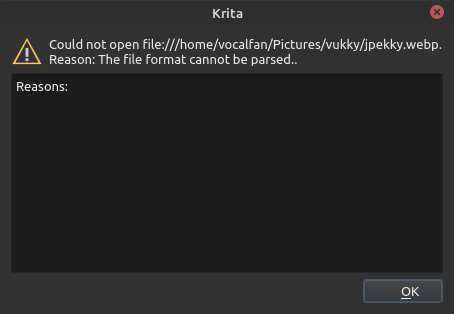
Appimage can save… But I can’t load the WebPs!

When you say “load”, do you mean they won’t play in a browser?
Can you upload/post the .webp file here in a reply?

…No, load in Krita. Sure, I’m exporting to use on a website, but if I want to edit other images that are only WebPs, I can’t.

You can only open .webm files in krita. I don’t know why you can’t open .webp files.

All WebP format are not (yet?) supported for import in Krita.

On my side I have some error messages with animated WebP files:

I’m using (my) BuliCommander plugin to import animated WebP files:

Notes

  • Plugin is still in development, on big WebP file import, there’s no progress bar, and you have to wait for complete loading without any information :sweat_smile:)
  • Plugin might be a huge gas plant just to import a file but it does the job :crazy_face:

After import, animation is available in Krita:

Grum999

@Grum999 Nice! :slight_smile:


Tried using your tool. Even a static webp doesn’t load with Bulicommander

Wow!
Really fast to load/install plugin! :slight_smile:

But this dialog box is not a dialog box from my plugin… :man_shrugging:
I never saw it and I’m not sure to understand how it could happen.

Are you sure to have opened the file with the BuliCommander plugin?

Can you share the webp file?

Grum999