I am constantly use flat brushes. It is not so handy open brush editor each time I need other mode. Now I need have two presets of same brush for each mode.
Is it possible to add shortcut (/ toolbar button / widget) for this operation?
I am constantly use flat brushes. It is not so handy open brush editor each time I need other mode. Now I need have two presets of same brush for each mode.
Is it possible to add shortcut (/ toolbar button / widget) for this operation?
You can do Switch to Previous Preset with the ‘/’ key which is a fast and convenient way to switch between any two brush presets.
I mean switching rotation modes, not brush presets.
Yes, but if that can’t be done, you can make two different versions of the brush preset (one with drawing angle, one with tilt) and use ‘/’ to switch between them.
This trick doesn’t work fro me since I always need to switch between main (usually hard flat brush) and blend brushes to control an edges…
You can use the ten brushes script to alternate brushes
There’s a dedicated plugin made as a workaround:
Maybe it can help you.
Grum999
@Zoldyako, I use “Three slots brushes” (actually made it 10)…
Thanks, @Grum999 I will try it.
I have about 10 flat brushes with various tips. So, for each one I need minimum 2 types (tilt and drawing angle) and maybe +1 type without control — summary it goes out >20 brushes. Besides main hard brushes I also have semi-hard, soft, blending, effect and common brushes…
So, shortcut that directly switches between modes obviously help to reduce amount of presets.
Strange… why my new feature suggestion is now in the “beginner question” section? Does this shortcut already exist just I can’t find it?
I moved it to this category as the original post didn’t feel as a feature request to me. Maybe you could elaborate more on how this should work?
What should happen to the curves? Should they get replaced or stored separately? What should happen if a preset uses both of these, and what if none? How this action should be named so that a user who find it, knows what’s it for? Are there any other common combinations that should get their shortcuts? Is something like this needed by anyone else? Maybe it’s a bit too specific and other solution to your problem (like exposing those variables to python) would solve more problems across the community.
I don’t think a one-line request like this is too useful for a developer who would decide to implement it, as there are many unanswered questions here. Implementation requires some decision making and guessing what problem it solves. There’s no guarantee a feature implemented this way would even be useful to you, due to possible miscommunication.
I can move it back to feature requests category if you really want, and are willing to write a wishbug for it, but I believe some more exploration and research could boost this requests chances of getting to Krita.
Wow, wow, wow… Actually never use curves in “Rotation” parameters, so I didn’t thought so deeply… Hmm and I never met a brush that use both tilt direction and drawing angle. I think 99,0% digital artists (I am talking about not only Krita’s artist) never use such complicated things (moreover those curves for rotation exist only in Krita, so new Krita users hardly will think in that way), they just need rotate brush tip with stylus direction, automatically from stroke direction, manually changing numbers or widget or doesn’t rotate at all.
I read in other posts that from plugin (python) you can’t access directly to brush parameters.
Yep. That’s why I posted here to see the reaction of cummunity. In case only I have interest in this function I would not even bother to think about to post it in “feature request” at bugs.kde. For example “Pattern Scale” that we have in toolbar was added bcs artists including myself discussed it here (and it even didn’t exist in bugs.kde). And I use this function a lot.
Fast switching between tilt and direction already is urgency from other non-Krita artist, so Sergey Kritsky made a plugin that allow it do in Photoshop (and couple really useful other plugins that Adobe had to do long ago but didn’t).
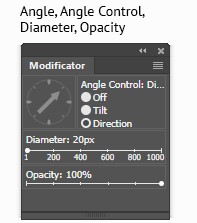
It is widget but I would prefer shortcut.
May be turning off/on at once color dynamic (hue, sat, value – no any dynamics in all those settings / settings where predefined in brush preset). In sketching stage and in “latest details” stage color dynamic usually interferes. But for those purpose I have couple brush, so it is not have any importancy. And “Modificator” plugin also does it.
Thank you! Now it looks way more like actual feature request and start for a discussion about controlling brush rotation, so I’m moving it back there 
yes, by exposing I meant allowing python scripters to use those things. This requires some work on actual code of krita, so this would be a feature request too I guess.
This could be a useful place to use key sequence shortcuts:
The ‘S’ key isn’t used as an existing shortcut so the key sequences
(S,Q) (S,W) (S,E) (S,A) (S,D) (S,Z) (S,X) (S,C) would be a set of ‘associated’ quick and easy to type shortcuts for these functions, if it’s quick shortcuts that are needed.
I would like to add that not only switching the brush rotation from drawing angle to tilt direction makes sense. also tilt direction to rotation is a good idea. I also need a lot of presets because I like to switch the rotation of flat brushes from: drawing angle to tilt direction or rotation (if you have an art pen with rotation and not only tilt).
I need three presets for every flat brush:
brush rotation by drawing angle
brush rotation by tilt direction from pen
brush rotation by rotation from pen (art pen)
It is an offtopic but I am have some interest in art pen. Could you answer some questions?
I work with the Cintiq. And yes, the art pen is thicker than the regular wacom pen, but it feels good to me. I use the art pen as my main pen right now and the rotation only to rotate the brush tip for flat, rake, spatula, palette knife or fan brushes. It gives me more control. But you don’t really need it, it’s just easier to control with rotation than with tilt. The main function is to rotate the tip while painting in the same stroke, it gives a nice effect. I sometimes press buttons unintentionally when I’m rotating, but during a painting stroke a pressed key does nothing, it only works if you press it before the painting stroke. So that’s not an issue at all. At least for me with my keyboard shortcuts that I use on the pens. (shift for change brush size, right klick for popup palette).