How about: Eraser setting toggle switch to use “Last Used Eraser” (this setting should use brushes tagged as “Eraser”) as the eraser or toggle the switch to “Active Brush Preset”.
This may have already been mentioned though.
Actually, you can do it already.
- Switching to “Eraser blend mode” is default thing in Krita
- “Freehand brush tool” with eraser or not is “Three slot brush” plugin: two slots for any preset (brush, eraser or move tool), and third the same but force switching to “Eraser blend mode”, and all slots remember last used preset independently from each other. In case you need more than 3 slots the plugin can be easy redone to any number you need - I use 10.
1 Like
I think we can go with an implementation that is still eraser as a brush but with shortcut key;
-
a key that calls one of the dedicated eraser brushes - either tag as eraser or added to the eraser slots.
-
an icon in the toolbar that loads this array of brushes or an off shoot of brush preset that loads all the assigned eraser brush only. / tag as eraser
-
anything in this slot is force to be eraser mode.
-
the key remembers which of the eraser brush is your last used brush.
-
an eraser icon in the toolbox that is basically #1.
to add on the idea [it seems editing post is currently limited here due to slow mode so a reply it is. ]
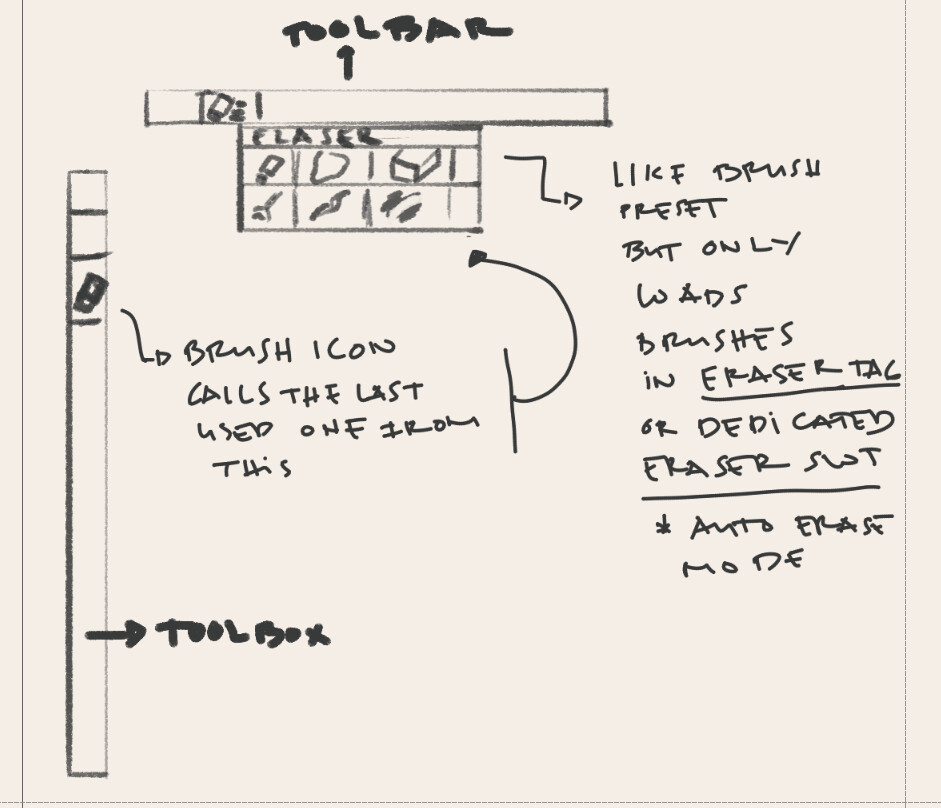
5 Likes
My thoughts are that ten brushes is a bit of a cheat sheet but works for these cases. While the 3 slots plugin was crafted for a single artists nerds for a blender project so not for everyone.
But the thing you got to understand is that the eraser is a blending mode. That is why you have layers that do the same.
Having a dedicated tool for it is also redundant. But as @CrazyCatBird pointed out there is a button to active it. Much like tools are. It is just where it should be because it is not a tool but a blend mode which makes it much more maleable.
If you perfer just make a brush preset that is a eraser that your happy with and use it. The end result is the same.
I say this to anyone thought. You should be using shortcuts either way it is more productive. Either E or 10brushes will be the same thing. If your worried with a little button you can make one too. But you will just adding more buttons for the same on different locations.
As for Photoshop, the eraser tool is kinda problematic as you constantly have to adjust it when you switch to it unless your happy to only 1 eraser style for each project. It is a huge hurdle compares to just hitting E for the same feel or just swapping into another brush that is erasing that you can setup a shortcut also. The eraser tool in PS is not an example for any software, at most legacy that worked but is not a golden standard. Also you should note that PS has a tool entry needlessly for every engine they have, and that is not cute.
And as a big generalist I should say that learning new software should be taken first before requesting clone features that have alternatives do the same exact thing for the same workflow.
3 Likes
This is a really good contribution. If the desired workflow can be achieved through a plugin, I don’t think anyone would mind (as long as it will continue to be maintained in future versions of Krita).
That aside, I was thinking, what if the Ten brushes script would be improved to a 2.0 version, which accommodates for:
-
Assigning tags to slots, in addition to brushes
This means that tags would optionally serve to replace a specific brush (as all Ten brushes are specific brushes) by all brushes that share the same tag (e.g. blender, eraser, marker, watercolour, etc.). This mode should remember the last used brush for the tag. That way, the ten brushes would either be specific brushes or types of brushes.
This would effectually replace the three brushes script by a more customisable and feature rich plugin, that is able to accommodate many new and desired possible workflows, whilst retaining the current workflows. -
Assign Ten brushes 2.0 to Canvas input settings > Tool invocation
To be able to assign any of the brushes to a sub-tool it would need to be under the Canvas input settings, just like hold “V” or “Shift” (depending on the Krita or Photoshop preset) to draw straight lines. -
Assign Set Eraser Mode to Canvas input settings > Tool invocation
To retain the current workflow for changing a brush (but there’s more to it as I understand from @raghukamath comment) to become an eraser, the current “E” tool, it should also be possible to assign this to tool invocation under canvas input settings. -
Optionally: add icon to the toolbar for any Ten brushes 2.0 preset?
To access the eraser (or any of the Ten Brushes 2.0, there should be a checkbox in the Ten Brushes 2.0 panel, which if checked, adds an icon to the toolbar for slot 1-10. This icon could just be a number or if there are icons for tags available, it may be able to load any of the tag icons (blender, marker, watercolour, eraser) icon in the toolbar. Arrangement to be discussed. -
Optionally: re-nameable slots
To make configuration of the Ten Brushes 2.0 easier, users should be able to rename each of the brush slots so the particular brush or tag are reflected in the keyboard shortcuts name and canvas input settings (basically: rename “Activate brush preset 1-10”).
Together, 2 & 3, a brush could be recalled using a modifier key (e.g. hold Ctrl to erase) or any alphanumerical key. The basis should be fairly simple, the optional settings are, I think, more challenging to add and not necessary to fulfil this feature request.
So basically I am arguing to add new functionality to Krita, without taking away any of the existing paradigms. With that in mind, the added customisability I propose here, should suffice for this feature request, which essentially entails assigning the eraser brush tag to the E hotkey, right?
4 Likes
This thread unfortunately is getting a bit overloaded - mainly because of the slow mode activation, which is very unproductive for this discussion. The initial feature request was very simple (not necessarily from a programming standpoint, but from a functional standpoint). The plugins that are available now, will not help to implement the desired result. Maybe rewriting the Three Slots plugin, which comes closest to a solution, will work. But instead of working around the feature it would be best to have the tool implemented in the core features. People coming to Krita from another software will search for an eraser tool and if there is one, they will instantly know what to do and carry their work routine into Krita. For productivity, this is quite important. The fact that there is an Eraser switch as well, makes it all the better and the user has both options to chose from for an even better workflow.
I will create a final reply later, after my lockout period has expired and I have some time. I will use some images and flesh the feature out once again. I hope this will prevent more duplicate suggestions. After that it’s up to the developers, if they find it worthy to implement.
3 Likes
I don’t think slow mode has anything to do with it. If anything slow mode makes you post less which is opposite of overloading. I activated slow mode because people were getting carried away and attacking each other instead of debating based on the work-flow and practical points. Things like "You have not contributed anything to the discussion " doesn’t help.
See that is exactly the purpose of slow mode. You think thoroughly and reply with logic and supporting points.
Moreover it has happened before too. A photoshop user comes and argues for feature related to photoshop. Other Krita users start to argue the feature based on its merit and not because it is in photoshop. Then the photoshop user who made the post starts talking in circles and repeats the same point again and again saying it will help photoshop user coming to Krita.
Yes we all know it will help them and that is well established the first time the photoshop user made the statement, what the other krita users expect is what more does it offer for Krita. Can it be implemented in a better way, can it be integrated in krita along with Krita’s existing functionality, will it hamper their own workflow? That is the questions Krita users ask here. But photoshop users have the habbit of worshipping Phoptoshop and demanding a copy of it for free from volunteers hence the salty replies (I know I am generalising but 2 years on this forum has made me make this statement). If they have anything other than saying “photoshop has it and it will help photoshop users” then it is welcome and will really be constructive in making a feature which is better than what photoshop or any other software has to offer.
8 Likes
I agree that it seem redundant. its there with a bit of setup. the underlying thing is there.
we have the slotting ten brush, preset and tag and erase mode.
I think that the bit of setup thing is the big roadblock here.
to me the E key is what i want it to. I love it as it is.
But i can see that a “tool” that combines the brush slots ala three slots/ tag with force erase blend mode for anything called by the key [whichever brush was remembered] and a way to assign a key shortcut for this “tool” will be useful for those that need it.
The tenbrush v2 discussion is also interesting.
2 Likes
The summary of this feature request is
- Make a separate dedicated freehand brush tool which only erases, with any of the chosen brush presets.
- De-couple the erase mode status of this tool from the erase mode status of other tool such that switching to gradient or fill tool after using this tool should not keep the erase mode active.
- Add the ability to assign shortcut for this dedicated brush tool.
- Make this brush tool remember last used preset for it. This should be decoupled from the normal freehand brush tool since currently the current brush preset is shared across painting tools. which means this dedicated brush tool for erasing should also have its own brush history.
So basically in one line – Make a duplicate brush tool with its own shortcut and brush preset history and ability to erase from any brush.
3 Likes
Some clarifications …
*) If it is acceptable, that a brush preset that is is created with the eraser switch toggled on, is called “Eraser” and can be accessed by the programmers that way, that there’s no need for a dedicated too. The Three Brushes addons must use something like that to identify an eraser.
*) No need for decoupling I guess. Although I’m not sure what exactly this entails.
*) Sort of. While “tool” basically just refers to the button that would have to be created.
*) Yes. Remembering the last “eraser” preset is key. Not sure if the rest is necessary.
@raghukamath Should the Ten Brushes 2.0 proposal be split off then? Since it is not part of your summary?
1 Like
I removed the slow mode as per your request, I hope the discussion doesn’t turn into personal attack or heated debate any more.
Currently if you use a eraser brush and switch to gradient tool the erase mode stays on and the gradient you make erases. This has been also discussed and there is request to make it not do that from what I remember.
1 Like
There is no need I think, ten brush was a possible solution there can be other solutions too, What solution to take and implement depends on the developers. I was summarising (from what I understood by reading) what the original request was about
Thanks for turning the slow mode off. But I hope this discussion will be over soon, as this was looked at from all possible angles already.
As for the decoupling. If the eraser toggle is on when you go to the Gradient tool, that’s fine. It can stay like that and I don’t see a need for a decoupling. I’m not sure if we are talking past each other here.
The issue arises when people will activate eraser tool by clicking its icon, the erase mode will be turned on, then they will switch to freehand brush tool and it will erase too. then user will be confused and will ask why their brush tool is behaving like an eraser tool.
2 Likes
Sorry. I can’t follow you. This might be because of some wordings. Let’s call the eraser button that exists in Krita now “Eraser Toggle” (which it actually is) and the suggested feature “Eraser Tool”.
So when a user enables the Eraser Toggle and then goes to Gradient, Line or whatever - that’s fine. But this is not connected to the Eraser Tool. The Eraser Tool will switch to the most recent Eraser preset that was selected from the Brush Presets. There’s nothing else about it. And whenever a user picks a new brush from the preset list, that can be categorized as an eraser, the internal memory of the Eraser Tool updates it’s variable and that brush becomes the new “go to” eraser.
The momentarily eraser workflow should not be impacted by this addition. If somebody doesn’t care about it, they will not know it’s there. But those who care, can use it. And I’m sure - many who convert to Krita, will.
What I am saying is that this new “eraser tool” should not be linked to the status of the erase mode. Activating the “eraser tool” should not activate erase mode. If it does that then when you switch to normal brush tool your brush preset will still be in erase mode like it does now. So even if this eraser tool is using a brush as eraser, the eraser mode should not be linked to the global erase mode of rest of the tools.
Also another point to add is if we have eraser tool which can turn any brush preset in to an eraser like Photoshop then there will be no need to eraser presets, because you can use any brush hard or soft or pencil brush in eraser mode while you have this tool active
P.S. After mentioning this points I believe what we have now is far simpler work-flow. This is my personal opinion and you may not take it into account for this debate and thinking that I am dismissing your request or anything.
4 Likes
This is the angle im taking this.
we have the brush presets so I guess the eraser tool will switch the internal blending mode of this brushes to eraser blending mode while being used under the eraser tool [which i think the tree slot already does with their eraser slot], that wont affect the global eraser toggle.
things sound complicated but i think its far simpler, … Slots for assigned eraser brushes (optional - practically its brush preset tagged as eraser), and a tool/key that will remember the last used one and will turn the internal brush blending mode to eraser mode of the selected brush if needed .
Yes I think I get it. It is basically as if the eraser toggle button at the top moved to the toolbar and make it a tool which remembers last used brush preset separately from the main brush tool.
1 Like