Feature request for dedicated Eraser Tool

Awesome proposal. I checked and it looks great and would include the solution to my request. Even without a dedicated toolbar button this should work very well. It does even more than I thought of - but as long as it’s sound and straight-forward, the more features the more users might find a use in it. Maybe even I can optimize some routines based on it.

A little note. As it was mentioned before, maybe a little checkbox would make sense that decides if brush/eraser changes while being in a non-brush-tool (Gradient, Line etc.) should be registered or not. Some users might find either of those situations preferable.

@Daishishi and @Grum999 … let me know if you need any more information, feedback or if it should ever come to it - testing. :fist_right: :fist_left:

I did not read it like that. I think @Daishishi meant, that the Tool is only useless in the context of the request, not in general.

3 Likes

Sorry my words sound rough and angry. I used the word ‘useless’ for shock value, yes. It was to convey the ‘take home message’ for that first point. However, I also tried to convey that it was meant really only on this circumstance and request.

I was trying to avert people from @AndreasResch initial proposal that he don’t really want a Eraser Tool, like Krita define a proper tool. Only a way to record the last Eraser preset, and another way to record a ‘normal’ brush preset.

Sorry again, cheers

6 Likes

All suggestions seem to have a glaring issue under the right conditions. That make them irritating at some point. The type of stuff that sounds good but when you create and actually use it will be trashed, or at least I would.

This should be plugin only for sure because of it.

Would I not be easier to pin brushes to the toolbar like zbrush does and enable them to have a shortcut? Be them be an eraser or not. To me that sounds like a better solution for this case and still remain freehand compatible.

2 Likes

That still doesn’t cover the use case for activating the last used brush within a tag though. Or then you should be able to add brush tags to the toolbar, which comes at the cost of sacrificing part of the workable interface. Unless, like Ten Brushes, it is more of a docker. One that could act as a toolbar if needed.

1 Like

Started to work on plugin, with help of Maou…
A first version should be available in few days

Grum999

11 Likes

Great news. Thanks so much.

I have thought about it last night and here are some ideas that you could consider or ditch - depending if they make sense in general. Those are based on ideas from you guys that were posted above.

For each slot there could be …
*) A checkbox to activate/deactivate the slot (in case it saves processing power)
*) A dropdown where you can choose, which brush selection should be memorized. For example … All Brushes (including Erasers), Brushes, Erasers, Smudgers only, … )
*) A checkbox like (Ignore triggers from tools other than the Freehand Brush)
*) A checkbox like (Switch to Freehand Brush tool when triggered)

Those are just from the top of the head. So there might be flaws in those thoughts. Only practice can determine if they really make sense.

And I think the shortcuts will still be assigned via the shortcuts section, like for Ten Brushes.

1 Like

Take your time, though I am really looking forward to the result! Nothing beats the opensource community! :muscle:

I have two more thoughts to add to @AndreasResch’s, if you could incorporate these that would be neat. I don’t know your approach though and whether the api allows for these:

Is it possible to support custom tags for brushes to be memorised?

Please also consider placing options in the Canvas input settings, so modifier keys/ temporary keys could be used to switch brushes.

1 Like

Currently there’s no slots, I don’t really like the idea of “slots” and it’s harder to code; the plugin allows to manage from 1 to N brushes, user choose what he want.
After, I’m not sure that having 43 brushes in plugin settings make sense :sweat_smile:
But why not, I won’t judge how people will use it

Each brushes can have specific settings; currently I’ve 3 options

  • Ignore “erase” mode ON/OFF (idea is, when brush is selected from plugin, the E is deactivated; and reactivated if brush is selected from an another source)
  • Keep user settings ON/OFF (idea is, if user modify size/opacity/… for a brush selected from plugin, to let plugin memorize or not this next time brush is selected from plugin; if brush is selected from an another source, default Krita’s rules are applied)
  • Default color (for non “eraser” brush; allows to set a default color to a brush selected from plugin)

A brush selected from plugin have is own properties (size, opacity, …)

  • If brush properties (size for example) are modified in Krita, the plugin will keep the properties that has been defined but when you go back with brush from usual Krita’s interface, last brush properties defined through Krita’s interface will be restored

These are ideas and what will be really implemented will also depend of what can really be made through API - I already know that some of them will be tricky to implement

I suppose what I’m doing could be a comprise between usage of an eraser tool (have one or more dedicated brushes to erase that are not impacted by properties made on brushes used to paint) and a much larger customization

For other options and/or improvement, I’ll see later what can be implemented (first, I have to finish what I’ve started before starting to implement additional things)

Here’s a current screenshot of configuration windows:

  • A window with list of brush (they can be ordered and tested)
  • A window to define options per brush

Toolbar will be updated with a new button-menu icon.

  • Clicking on icon directly activate the last used brush
  • Clicking on right button will popup the list to select brush to activate

Please take in account these screenshots are taken from an early development version; I still have many work to do on it, things can change in user interface with released version

The plugin is implemented to provide an alternative to current brush usage.
Even if there’s no limit to number of brushes managed by plugin, it’s not a replacement of current system.
I really think, maybe 3-5 to 8-10 brush maximum make sense with this plugin, and I’m not sure adding things to tag/filter brushes would be really useful… :thinking:

A plugin can be added to shortcuts configuration, but canvas input settings is not opened through API.

How to activate/deactivate brush through plugin with keyboard will be see in a second time; there’s possibility to add shortcuts that’s sure.

For extra usage of keyboard, even if there’s solutions, I need to think more about that (this implies some tweaking and I’m trying to avoid tweak when it’s possible - adding something in toolbar is already a tweak but not a ‘big’ tweak that can broke system; starting to tweak keyboard could easily broke default behavior in Krita…)

Grum999

4 Likes

This already looks very promising!

One thought that immediately came up is that alongside the button in the toolbar, there could be a shortcut to open the window as a pop-up?

It is more that I was thinking, that maybe this could be used to activate the last used brush of a certain category (tag). So the last used eraser/ marker/ watercolour/ favorites, etc. you name it. Maybe some would use it to add tags, such as “Slot 1”, “Slot 2”, etc. so that would make it a very flexible brush management system as well for more advanced usage.
It could also be a future consideration for after the initial release though, that is, if you think it is worth the effort. :innocent:

I see, maybe getting access to the Canvas Input settings through the API could be filed as separate feature request, I’m sure it’ll be helpful for addons.

Yeah, I can see some keyboard shortcut conflicts emerging, but if the plugin associates the shortcuts to its own category (like Ten brushes) it’ll at least be clear as to where users would need to make some modifications. This is usually also the case for Blender addons, so to me this is not something to worry about as much. A small disclaimer would suffice for me. :yum:

1 Like

This is exactly how imagine the offshoot of brush preset thing. You added things i never thought off.
quite exciting development.

[even though i probably not gonna use it] you have done tremendous job. Do pet the kitty for me.

3 Likes

This looks way more sophisticated than I was expecting. Great work.

Not sure what the “Erase Mode” exactly does. Do you mean that that the traditional erase toggle that is in Krita now, is deactivated? If so, I’m not sure if this would be used a lot and is worth the effort. Why not leave the user the old method available even if they picked the brush via the new shortcut? But if you have already implemented it, you might as well keep it in there.

If there are no slots, how are the individual brushes accessed via a hotkey then?

I think what that toggle does is that the brushes will ignore whatever the state of the traditional krita global eraser toggle - and will use its own. So that when you use the same brush not under this eraser tool plugin it will retain whatever state it was before entering the eraser tool and can go back to that without triggering the global eraser mode.

@Grum999 plugin - i think can use not only the standard eraser brushes that krita already has but also all the other brushes there is. So under this plugin with the ignore eraser mode toggle the global eraser mode status will be ignored and will not be triggered whatsoever.

Though i think eraser mode is a confusing term but i cant think of better alternative. :sweat_smile:

Yes

I agree :sweat_smile:

That’s an option, per brush defined in plugin.
User can choose to keep the “eraser” mode.

The idea for this plugin is more to have an alternate method to use brush, allowing to have something similar to “other software eraser tool”.
If you choose an eraser from the plugin, I consider that’s because Krita’s “eraser” mode doesn’t match the need.
Also, if you activate the eraser mode for a brush (click on button or press default E key), Krita will memorize this.

Example:

  • Working with b) Basic-1 brush
  • Press E
    => the b) Basic-1 brush is now an eraser
  • Switch to b) Basic-5 brush
    => normal drawing mode
  • Switch back to b) Basic-1 brush
    => the b) Basic-1 brush is still an eraser

With my plugin you have 2 option per configured brush:

  • keep user modification
  • ignore eraser mode

In this situation, according to how options are checked or not, here is what is expected:

keep user modification Ignore eraser mode Result
X X can’t change eraser mode but modified size/opacity/… are kept for next time brush is selected
X can change eraser mode and last eraser mode state will be kept for next time brush is selected
X can’t change eraser mode and brush default definition (from plugin) will be applied next time brush is selected
can change eraser mode, brush default definition (from plugin) will be applied next time brush is selected (then “eraser” mode is deactivated)

Also note that for an “eraser” brush, the “eraser mode” doesn’t change anything

Not a problem :slight_smile:
I’m extending the idea to have something that could also fit my need.
Not easy to fit needs of everyone but with something that allows configuration, if it can cover 50% of needs of 100% people :slight_smile: or can cover 100% of needs of 50%? :thinking: :sweat_smile: cover something :slight_smile:

Any brush can be set in plugin yes
You can also define the same brush multiple times, with different options (one b) basic-5 for example with default blue color and another one b) basic-5 with default red color)

I need to dig how to do that, but I’ve different idea.
Here an example of mapping (I didn’t check if already used or not, but it will be possible to change it)

  • CTRL+Esc exit plugin selected brush and go back to default current Krita’s brush, whatever the brush selected in plugin was
  • CTRL+F1 select brush “1” from plugin; unselect and go back to default current Krita’s brush if already using brush “1” from plugin
  • CTRL+Fn select brush “n” from plugin; unselect and go back to default current Krita’s brush if already using brush “n” from plugin
  • CTRL+< select previous brush from plugin
  • CTRL+> select next brush from plugin

The thing is, I have to study in detail how shortcuts can be managed.
If possible I would like to let user being able to define shortcuts at brush level, as an option.
But shortcut keyboard mapping will probably be the last thing I’ll work on for the plugin (I have to implement UI + brush switch before)

:heart_eyes_cat:

Grum999

5 Likes

Additional examples


Case 1

Plugin defines this brush:

  • b) Basic-5
  • Opacity 100%
  • Size: 40px
  • Keep user modification= ON

Workflow:

  • Working in Krita with b) Basic-5 brush
    – Modify opacity to 85%, size to 80px
    – draw
  • Switch to b) Basic-5 brush from plugin
    – Brush opacity is set to 100%, size to 40px
    – draw
    – Modify opacity to 60%, size to 10px
    – draw
  • Exit brush selection from plugin
    – Current used brush restored to b) Basic-5 opacity to 85%, size to 80px
  • Switch to b) Basic-5 brush from plugin
    – Brush opacity is set to 60%, size to 10px (has user modification are now defined as default for plugin)

Case 2

Plugin defines this brush:

  • b) Basic-5
  • Opacity 100%
  • Size: 40px
  • Keep user modification= OFF

Workflow:

  • Working in Krita with b) Basic-5 brush
    – Modify opacity to 85%, size to 80px
    – draw
  • Switch to b) Basic-5 brush from plugin
    – Brush opacity is set to 100%, size to 40px
    – draw
    – Modify opacity to 60%, size to 10px
    – draw
  • Exit brush selection from plugin
    – Current used brush restored to b) Basic-5 opacity to 85%, size to 80px
  • Switch to b) Basic-5 brush from plugin
    – Brush opacity is set to 100%, size to 40px (default defined in plugin, as user modification are not kept)

That’s the idea
So now, you can have eraser brushes instead of b) Basic-5 used in example, and I think it would fit the need of “eraser tool”
(note: the brush a) Eraser Circle is defined by default by plugin, no need to configure it for whom just want an eraser tool :slight_smile: )

Grum999

1 Like

This is a lot to take in - much more complex than what I was thinking off. But there might be users who will use such a setup. I guess I will use the simplest version of the plugin - basically only the part that is responsible for remembering the brushes and the switching part. Although maybe there’s something in there that will come in handy in some special cases.

I somehow like how Krita remembers the size/opacity changes of a brush, even when you switch to another brush and back. But along those lines I will propose an extension of the brush preset window (several actrually) where when you select a brush in the preset window while holding an additional key (ALT, CTRL or SHIFT), the brush will reset to it’s saved state.

But for now I’m excited to see what your plugin can do.

Sorry for being Off Topic, but this topic is marvelous!

I can’t imagine such a development with Photoshop with the best will in the world, especially not with this speed.
Looking at this topic, especially its “discussion phase”, I rather suspect they would have closed such a topic early in their user forum. It is just speculation, though.

And probably not a line of code would have been written yet!
:joy:
I think this is what is then called the “power of open source”! :+1:

Please keep up the good work, you are a great community!

Michelist

7 Likes

Like in Krita you are depending on plugins in Photoshop if you want to get some innovative tools and extension. So if you are lucky and the developer of such a plugin has a lot of time and is motivated, you might get quick changes as well. But usually, as people are busy, this takes a while. What @Grum999 does here is top-notch. To wait for Adobe to come up with something innovative and useful - especially for digital painters - is a lost cause. I’ve waited for years now for Adobe to expand the brush engine, but all they do theses days is add useless photo filters and fix bugs from previous updates. They have the worst management, quality control and support that I know. Compared to that, a user-driven project like Krita is way better.

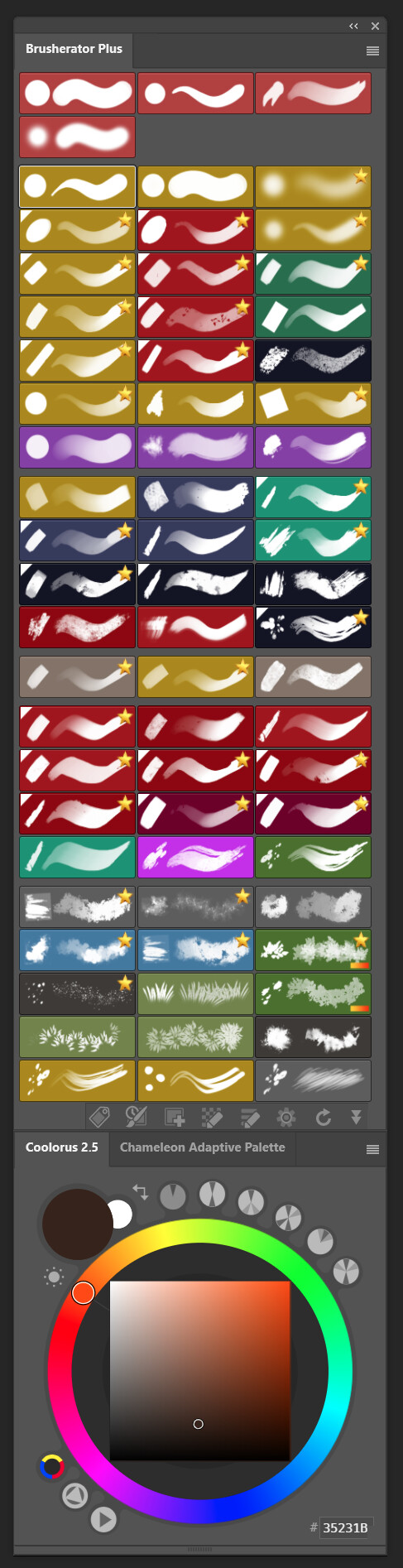
In Photoshop I actually also use a plugin for my brush management. It’s called Brusherator and its programmer is a really great guy. This is how my brush preset window there looks now - Photoshop would never allow me to have anything like that.

2 Likes

If I understand it correctly,this implies you can use one brush and define 3 sizes: 40, 80 and 200 px each to a different slot, so there would no longer be the need to have 3 individual brush presets? In that case a rotation parameter may be interesting to remember too (for various angles, set it along stroke direction, etc) but the latter should probably be in Krita by default.

I also like the idea of resetting brushes to their default Krita preset state. But what would be the use case for switching back to the default Krita mode if I may ask? And wouldn’t a reset cover this?
I am asking so you could avoid adding code only to have it work like the default (which could also be achieved by not using the plugin at all), but I may be missing something here… :sweat_smile:

E: Is brush rotation actually available in the api? Then it may be more useful to set brush rotation per brush or globally with a shortcut + gesture with a HUD for feedback (or key sequence such as r15, r30, etc). Then it won’t complicate this request even further.

1 Like

Hey.

I’don’t have the same brushes saved with different sizes. For me it’s much faster to drag-resize the brush. In PS usually when you switch to another brush it always goes to the default settings. However when you switch to the Eraser and back to the same brush, the changes are still there - only brush-to-brush changes cause the reset. Meanwhile I got used to that, but I actually might like the Krita-way better, where the brush keeps its changes until you actually reset it to its default state manually. The only issue at the moment is, that the resetting has to be done via the brush settings. This could be much quicker via the brush preset window, which is already open. Like I suggested by either an additional special key (ALT, CTRL …) or via the drop-down menu. The first version would be great as it seems that the special keys to nothing in the brush preset window at the moment. Probably the ALT key would be best, as the SHIFT and CTRL keys might be used at some point for multi-brush-selecting (which would also be great for tagging etc.).

In PS my brush presets are saved at the state that I might use most often (size, opacity, masked brush etc.). But sometimes while painting I adjust some of these settings. Resetting that brush just quickly takes me back to that " most often used" state. In PS by now I have to quickly switch to another brush and back - which works but is not very intuitive either.

As for the brush rotation. I actually wanted to program a plugin for PS that lets me adjust the most often used brush settings (opacity, flow, rotation etc.) in a small window. But unfortunately the PS API doesn’t have those variables and functions exposed. But for Krita that might be an idea for a separate plugin. A little docker for quick brush adjustments. At the moment I still have to move my hand up to the top of the screen to do so, which is quite a movement on a 27" Cintiq (not to mention the 32"). If I had a little docker in the area of the color picker (which is where my painting hand is closest to) - that would make another great little addon.