Unfortunately, no…
Grum999
Unfortunately, no…
Grum999
That is the Brush section of the Tela plugin, and it has SOF memory that you need to activate but it is totally independent of any item, it is just a save state. Before you request yet another plugin to be made just for you. Also @AndreasResch I should say that with so MANY requests your in a prime position to start learning too.
Those are just ideas and they shouldn’t be just for me. If there are developers out there who think this would be a great addition overall, they could give it a go. Otherwise it stays an idea. Unfortunately there’s no time for me to learn Python. The little time slot for programming that I have I will use to maintain my PS plugin.
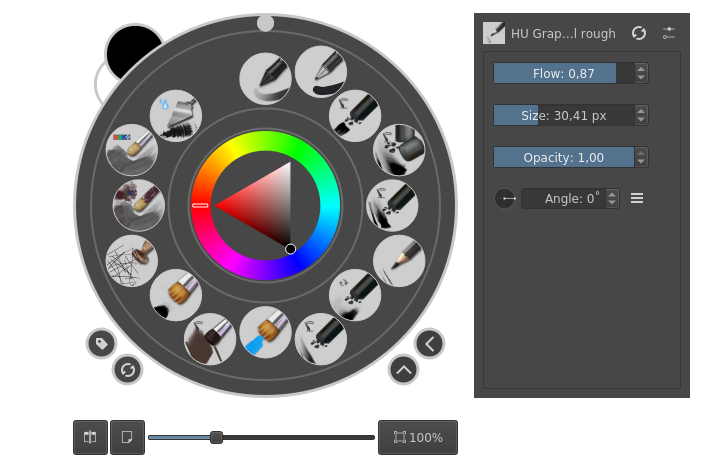
I think you can reset any brush that you have in the pop-up palette from the settings available there.
edit: This thing:
Right next to brush size you can reset the brush in the UI.
Great. Thanks for the info. That will come in handy,
You can just press the reload button at the toolbar to reset the brush to original preset in krita now.
That makes it 3 ways to do it easily.
I have been reading new updates to this thread for days, many interesting ideas, plugins and tips shared here. 
Right now my ‘go-to’ solution is the “10 brushes” plugin (quoted in this discussion frequently). It’s perfect for my needs to switch to an eraser preset while drawing. But setting this plugin is long, hidden and not user friendly for new Krita user. So, I understand the concerns and wishes of this thread (that’s why I follow it).
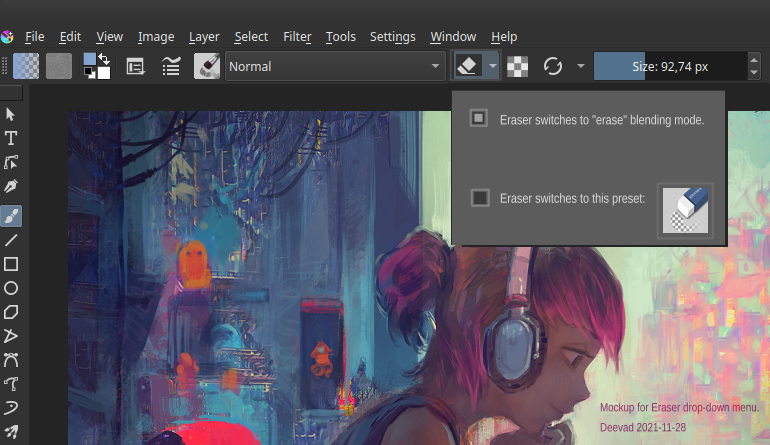
My personal wish would be something like this mockup under. I still love the switch to blending mode “erase” while painting, and also the switch to a predefined Eraser while drawing. It would use “E” for both.
I personally think this is the cleanest and best solution to this by far!  It feels like it belongs in Krita and less disconnected like a plugin would feel, and it is very simple in a good way, adding very little extra to the UI
It’s a good idea and definitely something that could be implemented into the core code. However, it’s not a solution to the original feature request. And what @Grum999 is working on right now, serves a different purpose as well. But why not include both features.
You can even assign a shortcut for this under “Settings” >> “Configure Krita” >> “Keyboard Shortcuts” under “Krita” >> “Painting” >> “Reload Original Preset”.
Michelist
Hi
Practically finished my plugin 
Here’s a short preview.
No sound, no comments (no time for that, and I’m really bad for that!); in synthesis, it shows how to configure the default brush (an eraser) to get something similar to the “other software dedicated eraser tool”
Used here in 2 modes:
→ Brush selected from plugin doesn’t change settings for brush in Krita…
I suppose the video is easy to understand even without comment, can’t provide a full video of complete functionnalities 
There’s no limit to the number of brushes that can be defined in plugin: from 1 to N
Shortcuts can be configured from plugin interface and Krita’s configuration settings:
The only thing about this and for what I (currently) can’t do anything is, when brush is created for the first time shortcut can only be configured from plugin interface; on next Krita’s restart, brush will be available in Krita’s settings
In all case you don’t need to restart Krita to apply shortcut (on a newly created brush or one that already exists…)
I still have to:
And I know I’ll have in a second time to:
Not sure to be able to finish everything tomorrow, but I plan to publish a first release wednesday 
Grum999
That’s some sophisticated plugin - damn. This basically replaces Ten Brushes as well, right? The video looks interesting and is easy to understand.
Of course I’m rather interested in the “Last selected” option, which was the start to all this. Will the eraser (including the thumbnail) always be replaced when this option is used? So basically a slot where there was an eraser initially, will become an “eraser” slot, right?
I never used it
But I took a look on plugin UI, and yes my plugin might cover most of Ten Brushes plugin functionalities.
Something I just saw, the Ten Brushes allows also to activate freehand brush automatically when a brush is selected; it would be easy to add this interesting option to BuliBrushScript plugin
The option for “Button selection mode” works like this:
If First from list is checked
– The icon in toolbar will always be the first brush defined in list, whatever the last brush from list that has been selected
– Clicking on icon (rather than on down arrow on right side) will then always activate the first brush in list
If Last selected is checked
– The icon in toolbar will always be the one from last selected brush in list
– Clicking on icon (rather than on down arrow on right side) will then activate the last brush that has been selected in list
Here a small video to see the difference:
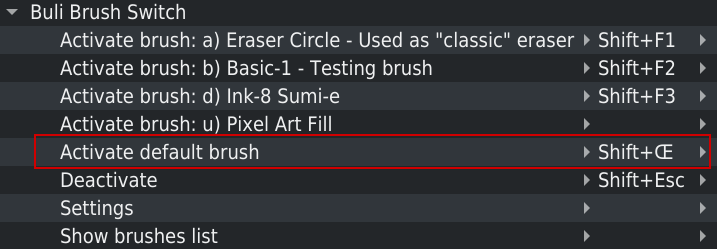
In Krita’s shortcut menu, it’s possible to define a dedicated shortcut for brush visible in icon:
Here, the SHIFTΠshortcut will activate the brush from icon, whatever the shortcut has been assigned to the brush
Grum999
After you wrote this I had to check and I’m actually stunned that this isn’t in the core code. I drew a rectangular selection, selected a brush from the preset list and I’m still in the selection tool. Is there an option somewhere that I have overseen? If not - pleeeease add this to the plugin - this slows down painting quite a bit.
I’m not sure having this is systematically a good option.
You can choose to draw with a brush with other tools than freehand brush.
And you can’t have ALL options available in core to try to fit all possible case and workflow.
I personally prefer to have a lighter software, completed with plugins to get some additional options, than something where you have everything
I’ll add it in the todo list of plugin; the priority is to prepare a minimum of documentation and publish a first release, otherwise if I spend my time to add feature before plugin is released, he’ll never be published
Grum999
The switching should of course only occur when you’re in a tool that does not use brushes. The sequence “select then paint” is used very often. With how it is now it takes two steps to paint with a new brush after selecting. This can be tedious when you paint all day long.
Looks great, I dig the UI, settings and renaming of brushes that propagates back to the keyboard shortcuts. Good job! I’m eager to play with it to see how it fares compared to Ten brushes and default.
Fortunately for switching to the brush tool, it’s open source, so you can have a look at how it is implemented for the Ten Brushes plugin ;).
I don’t need to take a look in Ten Brush plugin to understand how it’s made.
@KnowZero excellent plugin Python Plugin Developer Tools in less than 10s allowed me to get the command:
Krita.instance().action('KritaShape/KisToolBrush').trigger()
Grum999
Plugin is published
Grum999