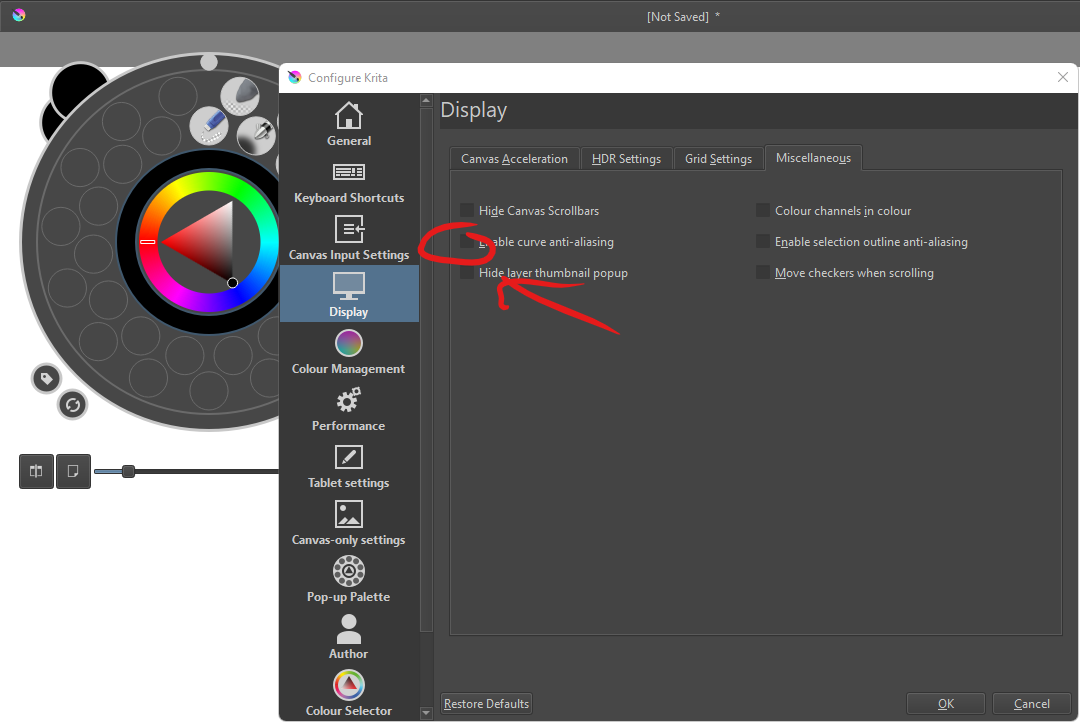
Somebody help me please…
When right click on Krita 5, Win11 64 bit, it will be force closed without any notif.
I’ve tried:
- Reinstall without Uninstall
- Uninstall and Install
- Test on Portable Version
And now i use Krita 4 and it smooth.
Somebody help me please…
When right click on Krita 5, Win11 64 bit, it will be force closed without any notif.
I’ve tried:
And now i use Krita 4 and it smooth.
Hi
Seems to be the same problem than here?
Grum999
No Sir, its not.
I can use Krita 5, i can use brushes for drawing but when right click. It will be force close without any notif.
So sad for this, but i can use Krita 4 and its normal.
Oh ok, sorry.
it wasn’t clear 
Same case than this one then?
Grum999
I dont know Sir. But i dont think so!
Because, I didn’t change this setting.
If you can go in menu Help > Show system information for bug report
And copy/paste information here, it could help to determinate if it the same case or not…
Grum999
Okay thank you Sir. I really wish I could use Krita 5.
Thank a lot your help Sir. But it’s 4:46am here and I’ll try that later because I only use my handphone to make this question.
Sorry for my English.
No problem 
Grum999
It wasn’t changing the setting that caused the problem.
They tried changing the setting to stop the problem but it didn’t help.
i’ve had this problem recently, how about setting the graphic accelaration’s preferred renderer to auto or software renderer because for me the pop-up palette (where its shortcut key is right-click) or small color selector docker are the ones causing the crash and not the pop up size
Sir this is information:
Krita

 Version: 5.0.0
 Languages: en_GB, en, en_US, en
 Hidpi: true

Qt

  Version (compiled): 5.12.12
  Version (loaded): 5.12.12

OS Information

  Build ABI: x86_64-little_endian-llp64
  Build CPU: x86_64
  CPU: x86_64
  Kernel Type: winnt
  Kernel Version: 10.0.22000
  Pretty Productname: Windows 10 (10.0)
  Product Type: windows
  Product Version: 10

OpenGL Info

  Vendor:  "Google Inc."
  Renderer:  "ANGLE (Intel(R) HD Graphics Direct3D11 vs_4_0 ps_4_0)"
  Version:  "OpenGL ES 2.0 (ANGLE 2.1.0.57ea533f79a7)"
  Shading language:  "OpenGL ES GLSL ES 1.00 (ANGLE 2.1.0.57ea533f79a7)"
  Requested format:  QSurfaceFormat(version 2.0, options QFlags<QSurfaceFormat::FormatOption>(), depthBufferSize -1, redBufferSize -1, greenBufferSize -1, blueBufferSize -1, alphaBufferSize -1, stencilBufferSize -1, samples -1, swapBehavior QSurfaceFormat::DefaultSwapBehavior, swapInterval 1, colorSpace QSurfaceFormat::DefaultColorSpace, profile  QSurfaceFormat::NoProfile)
  Current format:  QSurfaceFormat(version 2.0, options QFlags<QSurfaceFormat::FormatOption>(), depthBufferSize 0, redBufferSize 8, greenBufferSize 8, blueBufferSize 8, alphaBufferSize 8, stencilBufferSize 0, samples 0, swapBehavior QSurfaceFormat::DefaultSwapBehavior, swapInterval 1, colorSpace QSurfaceFormat::DefaultColorSpace, profile  QSurfaceFormat::NoProfile)
     Version: 2.0
     Supports deprecated functions false
     is OpenGL ES: true
  supportsBufferMapping: true
  supportsBufferInvalidation: false
  Extensions:
     "GL_CHROMIUM_color_buffer_float_rgb"
     "GL_EXT_read_format_bgra"
     "GL_ANGLE_framebuffer_multisample"
     "GL_EXT_robustness"
     "GL_EXT_texture_compression_s3tc_srgb"
     "GL_ANGLE_depth_texture"
     "GL_OES_compressed_ETC1_RGB8_texture"
     ""
     "GL_EXT_texture_rg"
     "GL_ANGLE_robust_client_memory"
     "GL_ANGLE_program_cache_control"
     "GL_OES_depth32"
     "GL_EXT_blend_minmax"
     "GL_EXT_debug_marker"
     "GL_ANGLE_texture_compression_dxt5"
     "GL_NV_pixel_buffer_object"
     "GL_KHR_debug"
     "GL_ANGLE_instanced_arrays"
     "GL_OES_element_index_uint"
     "GL_EXT_draw_buffers"
     "GL_EXT_shader_texture_lod"
     "GL_CHROMIUM_copy_compressed_texture"
     "GL_OES_standard_derivatives"
     "GL_EXT_frag_depth"
     "GL_OES_texture_float"
     "GL_OES_texture_half_float"
     "GL_OES_get_program_binary"
     "GL_OES_mapbuffer"
     "GL_CHROMIUM_color_buffer_float_rgba"
     "GL_EXT_discard_framebuffer"
     "GL_OES_texture_half_float_linear"
     "GL_EXT_map_buffer_range"
     "GL_OES_texture_float_linear"
     "GL_ANGLE_request_extension"
     "GL_OES_rgb8_rgba8"
     "GL_EXT_occlusion_query_boolean"
     "GL_NV_pack_subimage"
     "GL_NV_EGL_stream_consumer_external"
     "GL_EXT_texture_storage"
     "GL_OES_packed_depth_stencil"
     "GL_CHROMIUM_bind_generates_resource"
     "GL_EXT_unpack_subimage"
     "GL_ANGLE_pack_reverse_row_order"
     "GL_ANGLE_texture_usage"
     "GL_EXT_color_buffer_half_float"
     "GL_CHROMIUM_copy_texture"
     "GL_EXT_texture_compression_dxt1"
     "GL_ANGLE_translated_shader_source"
     "GL_ANGLE_framebuffer_blit"
     "GL_OES_EGL_image_external"
     "GL_OES_EGL_image"
     "GL_ANGLE_lossy_etc_decode"
     "GL_ANGLE_texture_compression_dxt3"
     "GL_EXT_texture_filter_anisotropic"
     "GL_OES_texture_npot"
     "GL_EXT_disjoint_timer_query"
     "GL_EXT_texture_format_BGRA8888"
     "GL_ANGLE_client_arrays"
     "GL_OES_vertex_array_object"
     "GL_EXT_sRGB"
     "GL_NV_fence"
     "GL_OES_surfaceless_context"
     "GL_CHROMIUM_sync_query"
     "GL_CHROMIUM_bind_uniform_location"

QPA OpenGL Detection Info
  supportsDesktopGL: true
  supportsAngleD3D11: false
  isQtPreferAngle: true

useBufferInvalidation (config option): false


Hardware Information

  GPU Acceleration: none
  Memory: 7860 Mb
  Number of Cores: 4
  Swap Location: C:/Users/Reaxct Xo/AppData/Local/Temp

Current Settings

  Current Swap Location: C:/Users/Reaxct Xo/AppData/Local/Temp
  Current Swap Location writable: true
  Undo Enabled: true
  Undo Stack Limit: 200
  Use OpenGL: false
  Use OpenGL Texture Buffer: true
  Disable Vector Optimizations: false
  Disable AVX Optimizations: false
  Canvas State: OPENGL_SUCCESS
  Autosave Interval: 300
  Use Backup Files: true
  Number of Backups Kept: 1
  Backup File Suffix: ~
  Backup Location: Same Folder as the File
  Backup Location writable: false
  Use Win8 Pointer Input: false
  Use RightMiddleTabletButton Workaround: false
  Levels of Detail Enabled: false
  Use Zip64: false


Display Information
Number of screens: 2
	Screen: 0
		Name: \\.\DISPLAY1
		Depth: 32
		Scale: 1
		Resolution in pixels: 1366x768
		Manufacturer:
		Model:
		Refresh Rate: 60
	Screen: 1
		Name: \\.\DISPLAY2
		Depth: 32
		Scale: 1
		Resolution in pixels: 1920x1080
		Manufacturer:
		Model:
		Refresh Rate: 75
Sir… its solve my problem, just try uncheck this option.
But now, i cant add more brushes there.
@Artuko @AhabGreybeard try this
Sorry guys, i dont know why, but just now it works but now it force close again
On the Display: Canvas Acceleration tab, you could try turning off Canvas Graphics Acceleration to see if that helps. It would make zooming very slow if you did (and possibly other things as well).
I’ve tried it, but not work for me. Very frustrating and i would totally use Krita 4.
One more thing you can try is to rename your resources folder so that a fresh new one is created when krita starts.
Go to C:\Users\Reaxct Xo\AppData\Roaming and you will see a folder called ‘krita’.
Rename that to ‘krita-previous’ then start krita.
The newly created ‘krita’ folder will not have any resources that you may have imported earlier or ones that you may have created yourself before.
I have the same problem, did you manage to solve it somehow? I’ve already tried to do some things that were suggested in the post and it didn’t work.
@Wurlple Were you able to try @AhabGreybeard’s idea in the comment immediately above your comment?
@sooz I’m trying to do it right now! But it didn’t work, it closed without any notification after I pressed the right button to open the palette
Krita needs to be closed before you remove ore rename files.
This bug report:
https://bugs.kde.org/show_bug.cgi?id=447868
arising from this topic:
involves a graphivs driver crash, due to a very old system.
This is a complicated one.