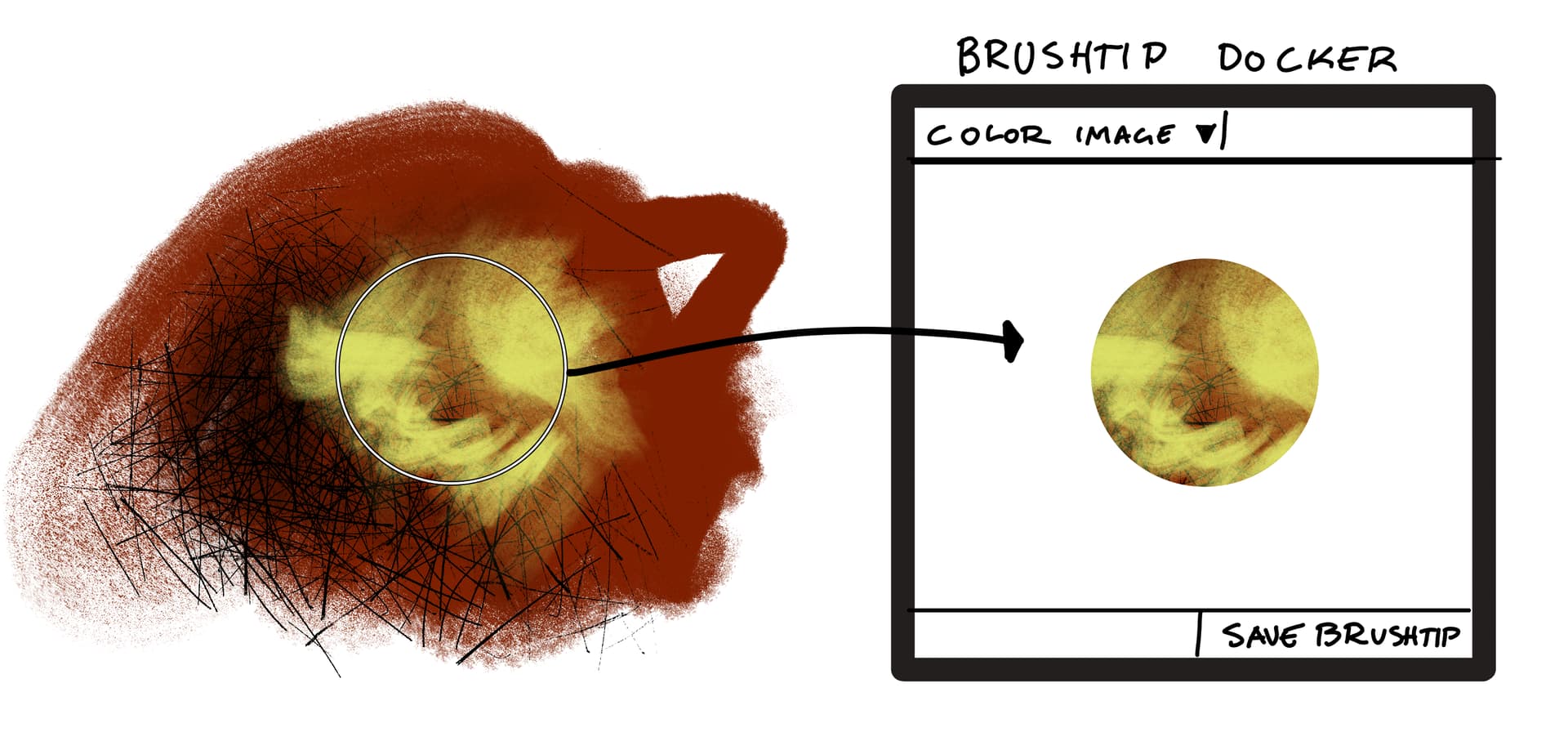
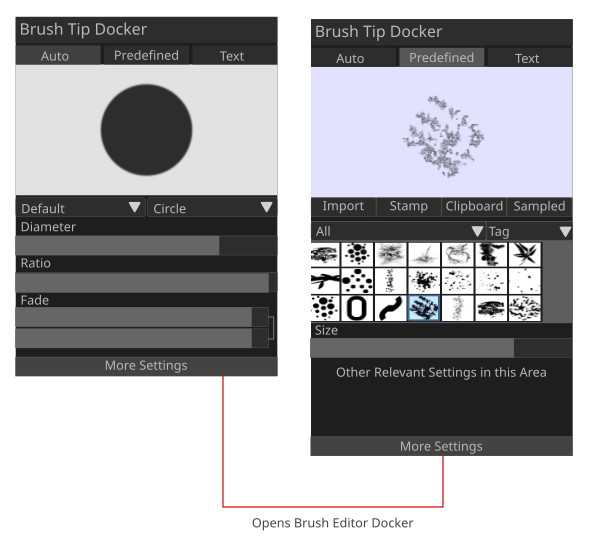
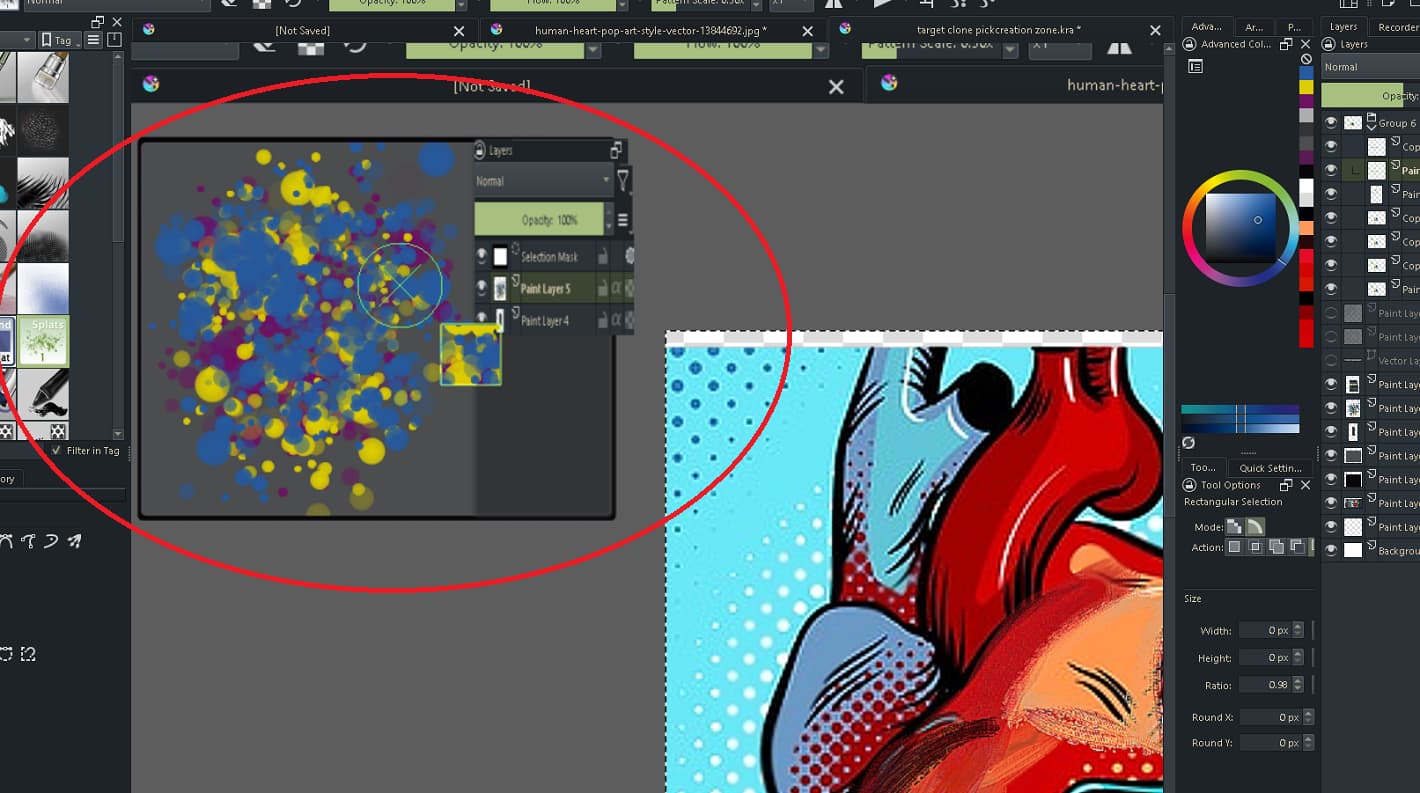
So with a shortcut, a sample is taken from the current canvas and added to the brushtip docker. The sample taken is immediately added as the new brushtip for the current brush. You can change the mode of the brushtip in the docker - Color image, lightness map, alpha mask etc. You can also edit the tip in the docker by painting on it. Any changes are immediately applied to the brushtip currently in use. This brushtip is purely temporary, unless the user chooses to save the brushtip into their library.
You could also just create a brushtip directly in this docker, by painting or pasting in an image. This should streamline the process quite a bit compared to the current system, because you wouldn’t need to go through the iterative process of making a bitmap, saving that as a tip in the docker, testing it out, making changes and saving another version of the tip etc. You would simply see the effect of any changes right away, and when happy, would then save a permanent brushtip if you wanted to.
Obviously this is a pretty rough outline, there are a lot of complications that arise…
What should the outline of a sampled brushtip be? I was thinking it should be the alpha of the brush that is active when the sample is taken, but since I also want to immediately update the brushtip, that’s a bit complex. Maybe there needs to be an “activate” button.
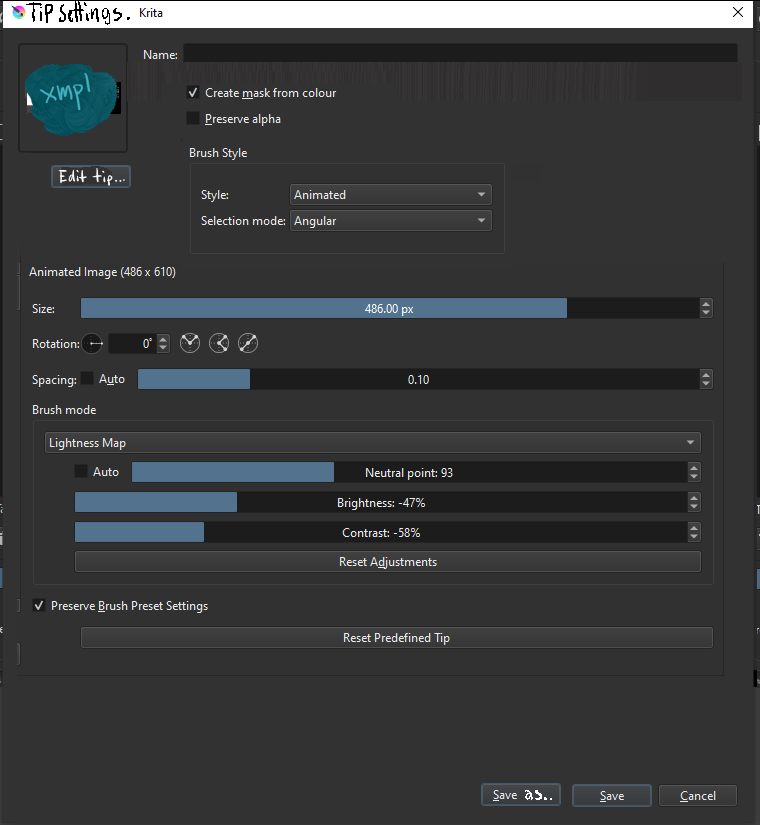
You’d need to have all the tip settings like spacing etc. here.
The bounding box of the brush has to be determined somehow.
To support animated brushtips - which would really benefit from this IMO - you’d need to have layers…
You’d want to have pretty much all of the usual tools available - transforms, selections, filters etc.
The idea itself is wonderful, I like it very much, but, as you already mentioned, the problem will be to implement something like this in code.
It would definitely be “nice to have”!
First of all - wonderful idea. I’d love some way to test brushtips without saving lots of their copies in my library. I’ve been thinking since then about possible problems and their solutions. Now it seems, that we wanted a bit different things, but that’s great - here is our ideas merged. Maybe something will be of any use.
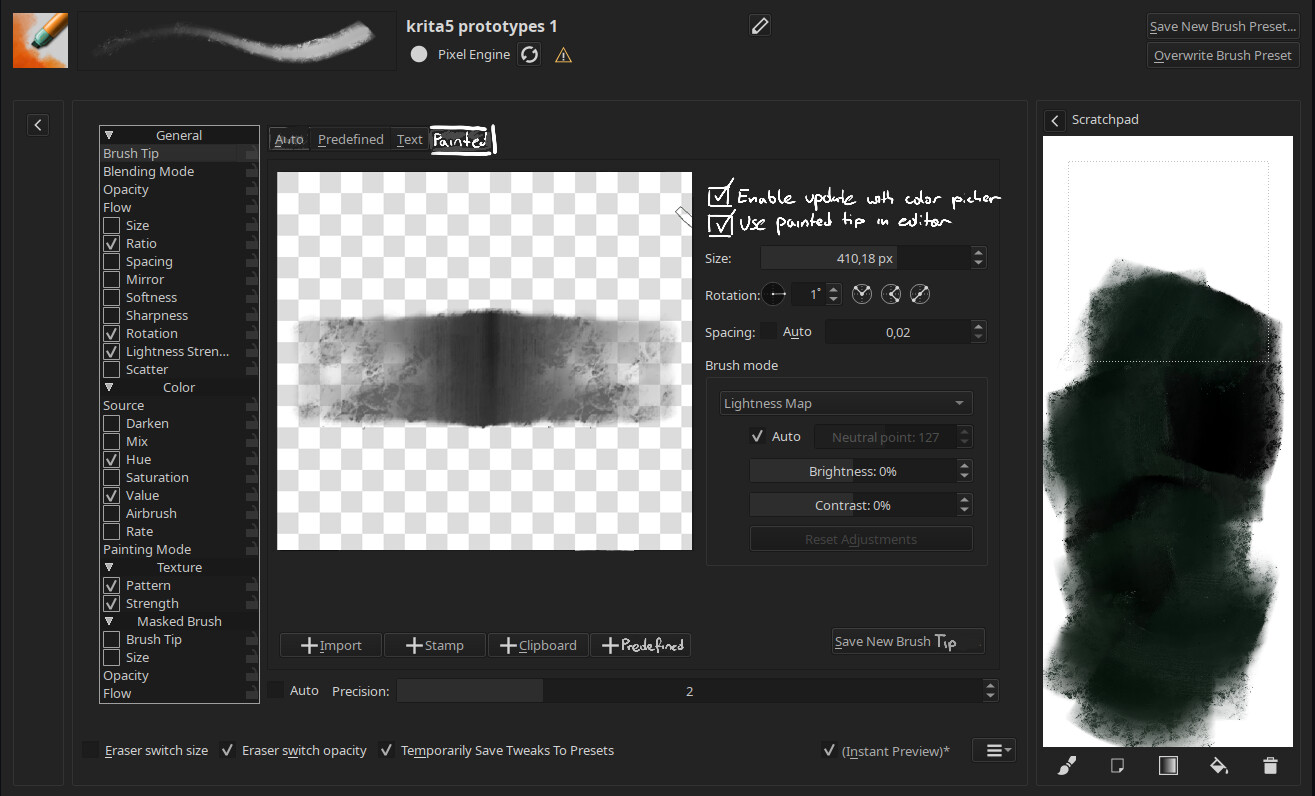
Docker is cool, but I figured out, placing it in the brushtip editor would have some advantages. There are already a lot of dockers in krita, and features are easily lost there. Brush editor already has lots of stuff that would be useful here, space, forces user to explicitly select this type of brushtip over current one…
Enable update with color picker - that’s basically your idea, which I didn’t thought of at first. When enabled, ctrl instead of picking color, copies RGB to existing alpha of the brush displayed in this editor, resulting some kind of clone brush (is this what you requested or I didn’t get the gist?)
Use painted tip in editor - here is my biggest concern with the whole idea of painting a brushtip. It creates this recursion when any change changes the tip you draw with, causing painting there a little bit hard there. Forcing the user to click “update” is against the whole idea of immediate “edit and use”. I’d rather want to use previously used predefined tip there, but that may not be so easy in terms of programming (I believe), as this predefined tip is kind of gone once you pick this “Painted” category…
+Predefined - apart from loading a file, stamp and clipboard to the editor for instant edit, predefined would load last used predefined brushtip to the editor, enabling instant changing.
Save new brush tip - kind of self-explanatory. This way you save what you save in editor to your library once you’re sure you want to keep a brushtip.
So yeah, let me know what you think. But docker or not, this is a huge request, so I don’t expect to get anything like that anytime soon. But it’s a nice idea
Layers are not necessary, gih created in gimp can tile patterns in one layer. I think the layer is just a form, the pattern inside is the content
If there is such a docker, I hope that all the patterns in gih can be observed like csp, and can be edited separately
The reason for making this was that I and a friend had a lot of annoyance over having to constantly change settings for the tips of the brushes, even as we used the same settings most of the time.
Being able to get where we want, and then easily tweak either the tip or the settings a bit, would be wonderful over always having to redo the process.
Either way a way to change things, and save these changes, faster would be greatly appreciated.
I was working on a proposal for temporary brush tips and it was brought to my attention that this thread was already started. I think the two ideas could potentially be merged to create an awesome function for quick brush changes.
I like this a lot. It definitely needs to be a docker imo.
I would also like to be able to update the brush tip in realtime by mimicking the direction you move your cursor, like clone brushes do.
Its essentially a clone brush but with a focus on finetuning (color, filters, brightness) the area you are cloning from.
Being able to save a docker and have your favorite ‘clone area window’ presets to choose from would also be nice.
In recent post I mentioned something similar that is on my ToDo list:
The part about using copied pixels in the clipboard to create new Brush Tip. Initially I imagined it similarly to @wojtryb mock-up, but docker is a possibility.
I was also thinking about making something like Tip Collections those would work like one Brush Tip but actually would be few separated Tips with some meta data file that allows to use them as a union. They could be then used to create, in simple manner, animated brushes either using each tip in a sequence, or randomly, or maybe other behaviors.
I will probably make feedback and brainstorm thread when I will be close to working on this.
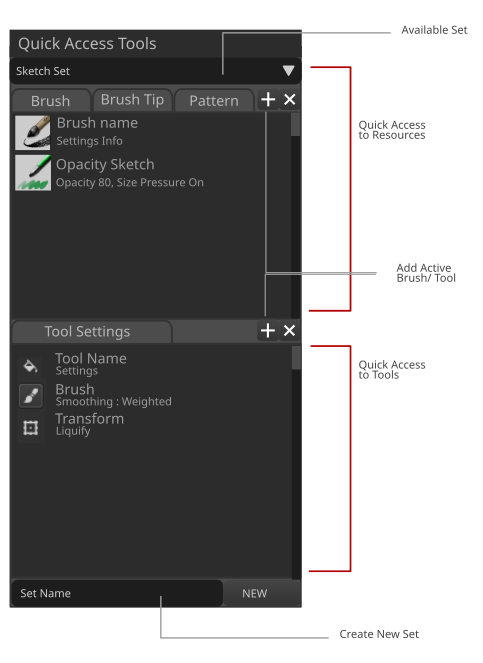
You will see that in my mockup, a Brushtip quick access tab is present.
What I mean is - I also want to have a quick way to make them, store them and switch to them as I draw.
I think the brushtip docker should be able to do the following;
Ability to quickly create your own simple shape brushes [ this are the round and square ones ]
– give access to quick edits.
Ability to add and edit image to be used as brush tip
– give access to relevant options on the fly.
– How many times do you want to change the lightness and intensity of the tip while working?
Quickly change brush tip. [Ordinary to Image to Image brush tip]
Quick creation of new tips [Sampled, Import, Animated, From Image, etc…]
Like i think this would give more power to RGBA brushes.
sample an area - with current tip , sample get added to brush tip list as RGB. Quickly edit RGBA settings
And what if the functions would be put into the brush editor and will be made available through a docker too? So you can do in depth edits in the editor and quick edits in the docker?
id like to have a designated area to paint in to create something worth picking from with clone brush
For this zone you can create a new layer from visible of the main canvas. When doing so it’ll ask you where on the main canvas you’d like to show in the clone pick zone. (Like a popup of the entire visible main canvas would show and you’d pick a square area you want)
It could even have a button that says select area from your clipboard or import image (in case you want to print screen). (Along with import image you could also save these as pngs or as files with a new extension .cloz (clonezone) of something and it saves all the layers you made).
also when the clone brush collides with the zone’s edge it could just keep moving change direction. or even loop but looping might not be seemless to the other side, like pacman.
Maybe regardless of what direction your brush moves on the main canvas the clone brush won’t go in the same direction but it will follow the distance traveled. And you could maybe create a path for the clone part to follow
Edit: I also think it would be cool if when you cursor is inside this zone that shortcuts apply to it. If you press hide layer it his the layer for that zone not main piece
My idea is very similar it was just to give the clone brush an extra selection where when you draw beyond that selection it starts from the opposite again. So I second this! This would really help me out a lot. I freaking hate resetting the clone brushs source position every couple strokes. Sometimes I even have to reset it every stroke. Limiting the area the clone brushs source works with is soooo important. I don’t get why nobody has implemented such a thing yet.
Works with me. I’m happy with any enhancements to the clone brush, so I’m good with doing that if it’ll help get the devs to notice this. I think our ideas are very similar and so can be grouped.
Why a new docker though? Why not enable painting on canvas with the brush editor open?
Then you can collapse the scratchpad and possibly mimimise the brush editor UI and you would be able to easily tweak and save a brush afterwards.
The main thing that should be added then is to sample a tip fron the canvas and use your brush tooks in the editor to (if necessary) edit the brush tip.