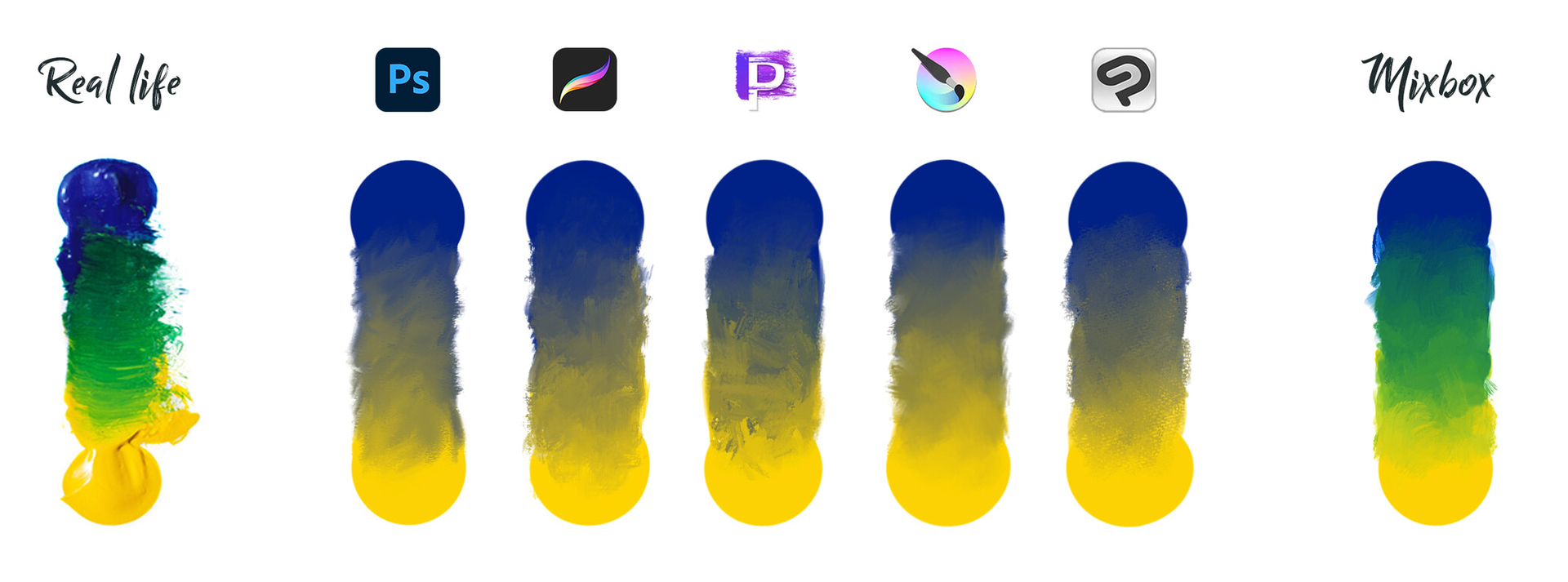
I’ve come up with an alternative to Mixbox for pigment-based color blending. For an idea of what that is, please refer to this image from the Mixbox website:
I wanted to know if this sort of thing would be useful in Krita / if there’d be any interest, or if it would be a waste of time because nobody would merge something like it.
Then, I wanted to ask, if the answer is “please make a merge request,” whether anyone would have suggestions as to how this be done: one advantage my algorithm has over Mixbox is that it’s not inherently constrained to sRGB. I have no idea how color management and such works w/rt implementation within Krita. Is there a particular bit of code in Krita that serves as a standout reference for a color-profile-aware brush blending mode?
Regarding pigment-based blending, it’s a long topic, but the following resources may be helpful.
A version that applies not only to brush blending modes but also to layer blending modes was distributed several years ago. While many people are likely interested, it hasn’t been integrated into Krita’s mainline.
I can’t read C++, so I can’t explain the internal structure…
Regarding your row of examples, I must inform you that real life yellow and blue paints don’t blend in the way that you are showing. The green that you are trying to make is closer to a combination of cyan and yellow pigment. Mixbox seems to show the same erroneous blend, so unless this is corrected in your aforementioned alternative, I am afraid that it would be more of a liability than an asset.
tl;dr: The interest is there but the license of mix box and the patented algorithm made it impossible for Krita to implement, even if there were developers with time to work on it.
Well, the idea of having spectral blending is nice in general, but… there are a lot of “buts”
in general, professional digital painters are already accustomed to how digital paints are mixed, so they are not so much interested in a new system, especially given that it gives huge speed penalties
the mixbox blending does not really implement real-life paints; well, it does, but only for a few specifically selected pigments, so if you are accustomed to a different set of pigments, it will look off to you
the mixing of blue and yellow is only one “hyped” pair, the rest of the colors should mix “in an expected way”; I don’t know about mixbox itself, but our previous implementations had issues with that
the algorithm should be stable enough to support incremental paints inside our colorsmudge brush (unless you want to implement a separate brush for that), our previous implementations had issues with that
the best implementation so far is this one, but it has some issues with color mixing stability and expected behavior for different (non-yellow-and-blue) pairs.
You might be able to get the results you want by using these rgba brushes that I made: RGBA-Mix brush it seems to work best with bright colors and Parallel mode as well as paying attention to how much pressure you use. But maybe it won’t do what you want.