Krita deleted 12 hours of work

Type of device: Desktop PC
System: Windows 10

Description of the issue: Exactly as the title says. I’m working on a simple animation, I finished the sketch of all my frames and then accidentaly moved the timeline, and when I put it back, everything I worked on so far all day was deleted. EVERYTHING, I tried to Ctrl+z to see if I accidentally moved something, but when I put the command, it went back the steps I took before those 12 hours. I saved my program 3 hours ago, so I didn’t lose much, and I also had the auto-save, so I was able to open that file and continue, BUT why did this happen? It couldn’t just have gotten that far back, the memory wouldn’t save all those steps back. This is obviously a bug, and I’m super scared that would happen again with more complex projects. What if I get deleted days of work accidentally? The auto-save is to avoid that instead of adressing the issue?

Why does this happens in the first place? And why can I do to avoid it happening again?

So far, whenever work is being deleted the cause was always the same. The same file was open in another tab and then when closing Krita and the “unsaved content” warning pops up, it is for the other other tab they forgot about and has still the old state, then hit save and it then writes the old content to the same file, effectively deleting all the progress. Could this have happen to you?

Otherwise it’s hard to tell what happened if you don’t remember.

3 Likes

Hi! Ouch, sounds really bad!

It would be great if you could share your Krita version number and try to reproduce the same situation on an empty file (just add a few random scribbles, frames, etc. to have something to work with). The idea is to try to repeat it, so that it can be debugged and understood what really happened.

2 Likes

The autosave is not intended to be used by you for that purpose but it was lucky for you that you were able to figure out it could be used in that way.

The purpose of the autosave is to allow recovery after a crash when krita will detect the existence of the autosave file and offer to open it for you.

If you save/close/quit krita normally then the autosave file is automatically deleted because it’s assumed that it is no longer needed.

Do you mean that you moved the frames along the timeline?
A more detailed description of what happened will be needed.

1 Like

:slight_smile: Hello @Chara_Dreemurr and welcome to the forum!

What you can do to create a safety cushion is to activate the setting ‘‘Create a Backup File on Saving’’ in Krita under ‘‘Settings’’ >> ‘‘Configure Krita’’ >> ‘‘General’’ in the ‘‘File Handling’’ tab, you can leave the options ‘‘Backup File Location’’ and ‘‘Backup File Suffix’’ below this as they are or adjust them to suit your requirements, and then specify the number of backups you want to keep under ‘‘Number of Backup Files Kept’’.
Here, for example, I have selected 6. However, this only creates a buffer that grows slowly each time you save your file manually.

This means that to ensure security and to minimize the amount of work lost, if any, you should take advantage of another Krita security mechanism.
For this Krita has the two options ‘‘File’’ >> ‘‘Save Incremental Backup’’ F4 and ‘‘File’’ >> ‘‘Save Incremental Version’’ CTRL ALT S, each has its pros and cons, and you have to decide for yourself for one of them (or use both?), here I, as well as one of the longest working developers for the Krita project, use ‘‘Save Incremental Backup’’, others use ‘‘Save Incremental Version’’.

If you get into the habit of regularly pressing the corresponding shortcut, e.g. every 5–10 minutes, you will build up a very secure “safety net”.
The only disadvantage is the memory requirement of both variants, but, depending on how large or short this is in your case, you can delete all or all but the last of these backups at the end of each session, but never before you have checked both the last saved project file AND the backup file to be retained for function/integrity. Or you can collect all backups and only delete all (remaining) backups at the end of a picture/project when you are sure you have completed it. I do the latter. If you opt for ‘‘Save Incremental Version’’, I recommend swapping the shortcut with that of ‘‘Save Incremental Backup’’, because pressing F4 once is quicker than the three-key shortcut.
Now you just have to train yourself to do this and make it a habit so that it is “burned” into your muscle memory.

Both mechanisms (‘‘Create a Backup File on Saving’’ & ‘‘Save Incremental Backup/Version’’) consequently used together make happenings like the one you faced far less frightening.

Michelist

Add/Edit:
I think it’s a good idea to add a screenshot of my settings here as a hint for those who feel unsure about these settings, perhaps wondering if they have interpreted me correctly:
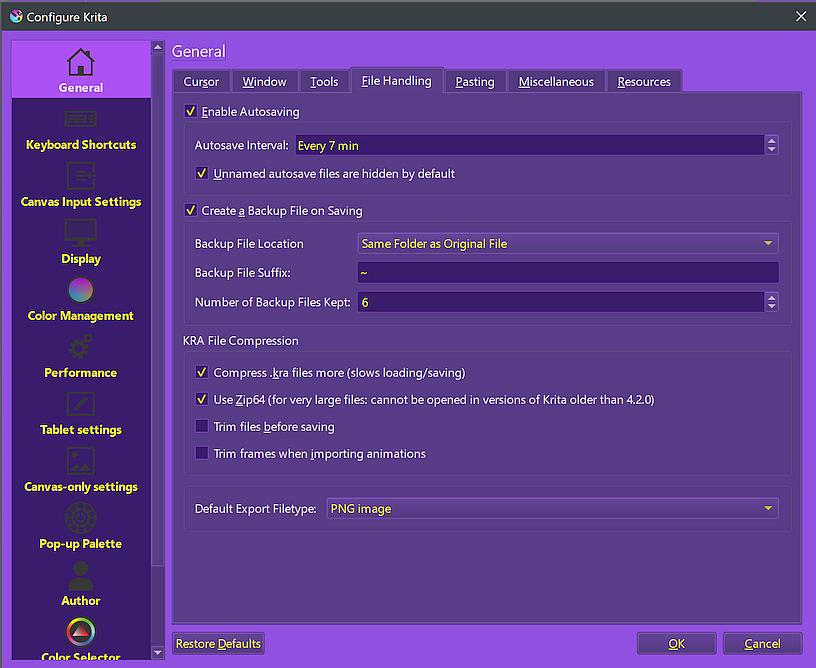
2 Likes

This happened to me once as well, but I moved the frames from the timeline using the storyboard tool (because I was working on one) and when I moved the frames around, the file got corrupted. There was no longer any drawing in any of the frames. Ctrl Z didn’t work or anything like that. And the autosave file didn’t exist because it had just started and hadn’t saved properly. I wanted to die and I had to start over about 4-5 hours of work. I love Krita and it is a free program that offers incredible possibilities, but this error is not often talked about, which seems catastrophic to me and I think it should be better documented

1 Like

If you haven’t so far, you may want to vote for the newest feature request:

But one thing always stays in the realm of you, the users. Make backups of your work, do it as often as possible! It must not be Krita it is enough if an excavator cuts the power line or a car/truck rams into a transformer box / transformer house on the side of the road because of an accident. If you don’t have an uninterruptible power supply, and most don’t have one, your work is gone too.

Michelist

1 Like

No, that didn’t happen to me. I do remember perfectly because I made this account the moment it happened, since I was kinda mad and wanted answers, but it literally happened what I said. I saved the file 3 hours before it was deleted and I worked for 12 before, never opened the same project twice, I literally… just moved the timeline, and then it was a light pause and boom, gone, everything before those 12 hours

5.2.2 is my version, also, I tried doing it but nothing happens, I guess is because the new file doesn’t have a lot of information. BUT!! Someone else just said they had the exact same problem, so is not only me. This is my first time using Krita so I’m kinda bummed about it

THANK YOU SO MUCH! I knew it couldn’t possibly be just me.

I’m not an animator but I see (maybe) a common thread from this post and several others over the past few months. It seems when users make changes via the storyboard, there can be a loss.

That was my first instinct, to open the auto-save, since when the lights go out, SAI2 offers me a recovery point, so I just figured it was the same thing… and it kinda worked the same, so that’s very cool, maybe you guys can integrate a recovery option inside the program, to make things easier and avoid confusion for other people.

Also, no I didn’t move the frames. Krita allows you to move any panel you want anywhere, so when I was trying to make the timeline bigger, I accidentaly got it out of its original spot, and then happened what happened

Thank you so much for your suggestion, I will definitely do that when working on other bigger projects, because I plan to make larger films and I definitely don’t want my progress gone. I still would LOVE if you guys could check on that bug, because someone a few moments ago said that they faced the exact same thing, and honestly, my PC only has like 50 gb left that I wouldn’t like to spend a lot of those on backup files, even if it is temporarily, since even if it’s a solution, I don’t think it should be a necessity

1 Like

We’re mostly just volunteers here, trying to help people on the forum.

1 Like

I do agree on backing up my work on my own and I’m gonna do it, however… I don’t know if is the best place to say it, certainly not when is about comparing programs, and I’m new to this forum, BUT maybe you can make it work like SAI2 does? I’m transitioning from SAI to Krita, and the program creates a recovery point every few actions, but you can only see it when opening the program and going to the “recovery” button. It gives you back everything and it detects when the program crashes, like when the lights go out, and of course, there’s no extra file in the desktop, so there’s no misleading. Of course, that’s just my opinion, and idk if there’s an specific reason why you keep the recover file there, I just think it could be cool.

I see, the name “good helper” sounded weird to me. I just joined the forum so I had no idea LOL. TYSM for your answer

So this involves the Storyboard facilities and it’s not about moving ‘ordinary’ painted animation frames on the Timeline?

Hi

Storyboard is buggy yes, trying to reorganize frames from story board can generate lose of frames, I already experimented it :sweat_smile:

Concerning the lost related to “moving the timeline”, I can’t tell there a bug or not, but I think a precise explanation about what has been done to be able to reproduce and understand the problem could help.

Also, what “moving the time line” exactly means? :thinking:
What has been lost?
Only content from a layer? Content for all layer?
All layer deleted?
All frames deleted?

Grum999

2 Likes

That bug shouldn’t be better documented - it should be fixed. Dataloss is worse than a crash because from a crash, you can usually easily recover with the autosave.

It’s still not very clear to me what exactly happened to you or to @Chara_Dreemurr . Can you both please write step by step what did you did just before you ended up in this situation? What dockers (panels) did you touch, what did you click on? Can you try to repeat it in Krita on some project that you already saved (so without worrying about losing any work)? And really, step by step, meaning, very detailed instruction if you can remember.

4 Likes

Hello! Of course! I started the sketch for the animation 12 hours before that, I just had a little ball moving telling me where the frames where supposed to go, then I continued drawing for hours making the body and the head, all of it as a frame by frame animation (this is important because I made a LOT of actions) and I used 3 different layers for each part, body, eyes and hair, and then I hit “save” for the last time, and 9 hours had happened already. I continued drawing for another 3 hours and when I wanted to make the Timeline docker bigger, to be able to see my frames better, I accidentally got the panel out of its spot, then a light pause happened and boom! I was back to the phase of the little ball I started with, and of course I just had that one layer, and no matter what I did, like Ctrl+z, nothing returned, in fact, the little balls started deleting themselves as if I just drew them, and that’s when I decided to open the auto-save file and got all my work back.

This is the only project I had since I just started using Krita. I can try to recreate it again.

1 Like