Hello @Chara_Dreemurr and welcome to the forum!
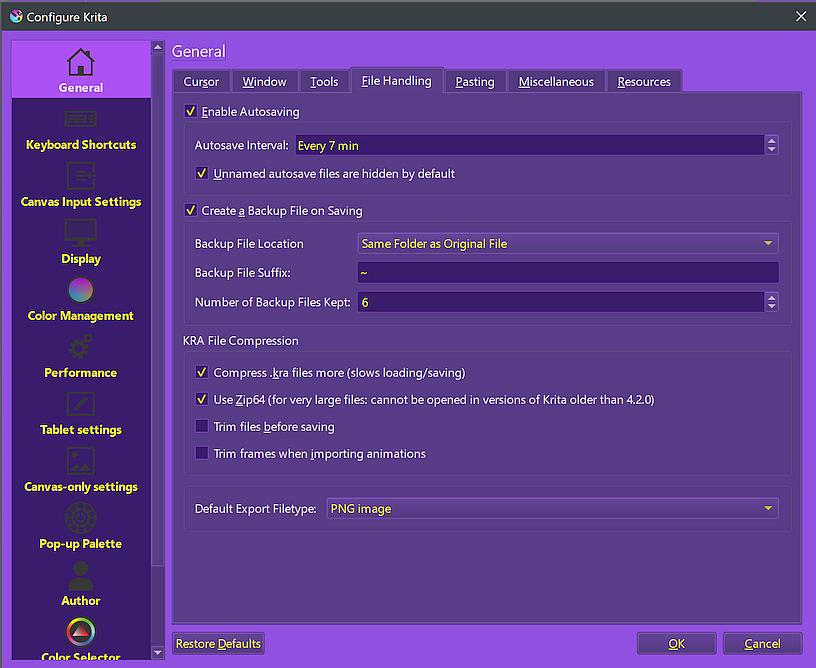
What you can do to create a safety cushion is to activate the setting ‘‘Create a Backup File on Saving’’ in Krita under ‘‘Settings’’ >> ‘‘Configure Krita’’ >> ‘‘General’’ in the ‘‘File Handling’’ tab, you can leave the options ‘‘Backup File Location’’ and ‘‘Backup File Suffix’’ below this as they are or adjust them to suit your requirements, and then specify the number of backups you want to keep under ‘‘Number of Backup Files Kept’’.
Here, for example, I have selected 6. However, this only creates a buffer that grows slowly each time you save your file manually.
This means that to ensure security and to minimize the amount of work lost, if any, you should take advantage of another Krita security mechanism.
For this Krita has the two options ‘‘File’’ >> ‘‘Save Incremental Backup’’ F4 and ‘‘File’’ >> ‘‘Save Incremental Version’’ CTRL ALT S, each has its pros and cons, and you have to decide for yourself for one of them (or use both?), here I, as well as one of the longest working developers for the Krita project, use ‘‘Save Incremental Backup’’, others use ‘‘Save Incremental Version’’.
If you get into the habit of regularly pressing the corresponding shortcut, e.g. every 5–10 minutes, you will build up a very secure “safety net”.
The only disadvantage is the memory requirement of both variants, but, depending on how large or short this is in your case, you can delete all or all but the last of these backups at the end of each session, but never before you have checked both the last saved project file AND the backup file to be retained for function/integrity. Or you can collect all backups and only delete all (remaining) backups at the end of a picture/project when you are sure you have completed it. I do the latter. If you opt for ‘‘Save Incremental Version’’, I recommend swapping the shortcut with that of ‘‘Save Incremental Backup’’, because pressing F4 once is quicker than the three-key shortcut.
Now you just have to train yourself to do this and make it a habit so that it is “burned” into your muscle memory.
Both mechanisms (‘‘Create a Backup File on Saving’’ & ‘‘Save Incremental Backup/Version’’) consequently used together make happenings like the one you faced far less frightening.
Michelist
Add/Edit:
I think it’s a good idea to add a screenshot of my settings here as a hint for those who feel unsure about these settings, perhaps wondering if they have interpreted me correctly: