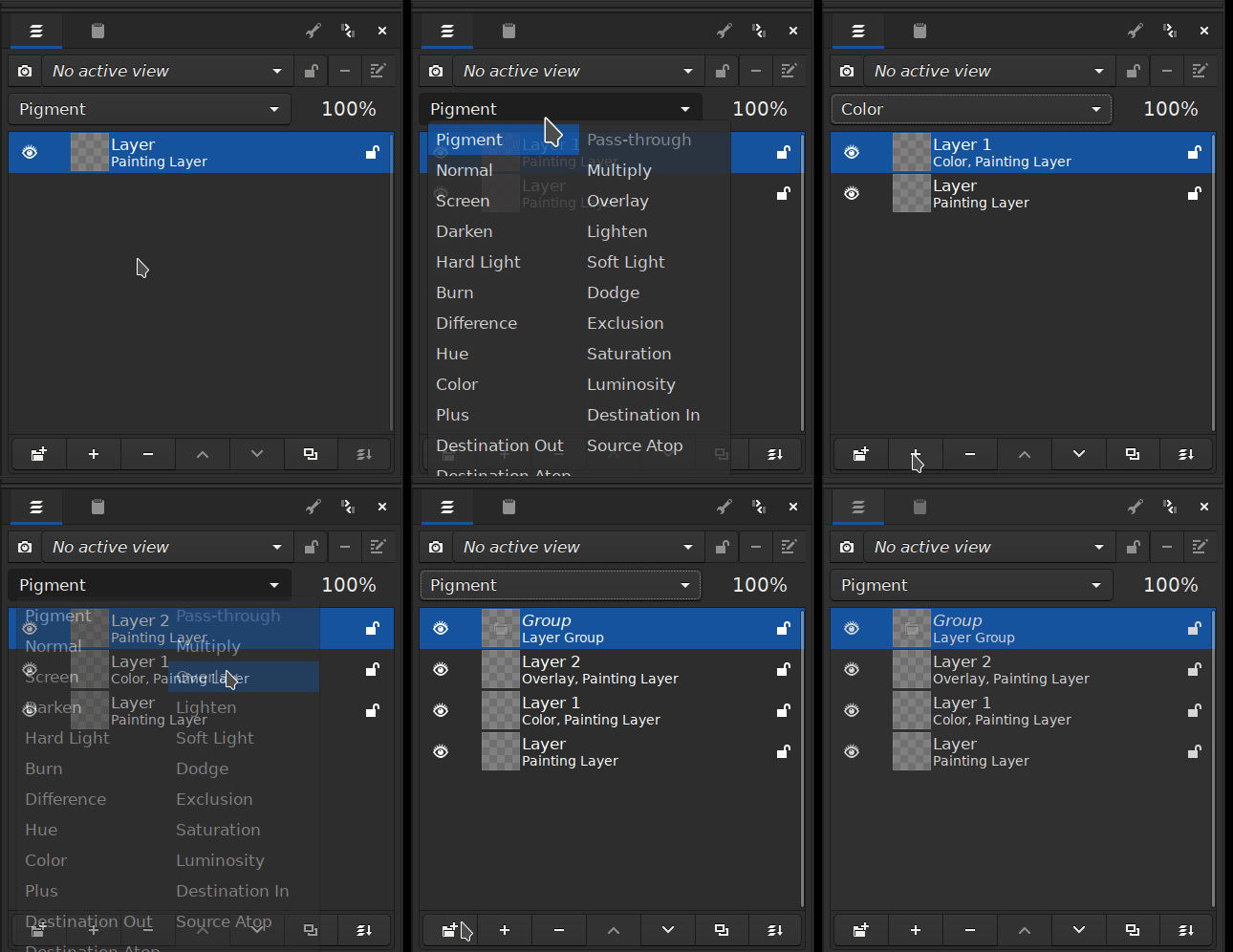
That would be great, useful for bigger artworks! Though, I would love for it to be toggleable, as it looks so clean without the extra information like it is now!
Thank you so much Scott! I appreciate it a lot
Thank you all for reading, discussing and supporting the feature request
There is another thread going on right now that includes also showing blending mode and opacity in the layer area. You could check it out there. This thread is a bit more simpler and just what to call the default layer name.
It’s the ‘layer’ part of the name that’s redundant so it should be ‘Paint X (Layer)’
However, it’s the right side of the name, that gets cut off if the name is too long (or the docker is too narrow) and I think most people would rename a layer at the left side at least, for clarity of reading.
In many ways it doesn’t matter as long as they’re different.
For the masks, that’s a good idea so you could then have ‘Mask X (Transparency)’ and ‘Mask Y (Filter)’ etc.
How many option are we going to make , I see this every time in the discussions if there is no consensus we then ask for an option . It is like this that it becomes repulsive for normal users. At this rate we would have a toggle for everything in the UI.
The name can be paint layer X, clone layer X, Group X, Transparency mask X etc. It states what it is precisely and even new users can understand it. If someone works with lots of layer and groups then it is most probable that they already know how to manage their layer stack and know that they can rename it or color tag it for ease of use. No amount of name length reduction is going to help when someone who has so much layers and groups nested that even one -two letter layer name gets hidden. The layer name truncation due to length is a problem of indentation and spacing, it is not a default naming problem, so we shouldn’t try to solve the length issue by reducing the name length.
In terms of getting cut off, I think the word “layer” is probably the least useful word out of all of them that could get cut off if needed. We could maybe order things a bit different based off importance. You could say the type is the most important, then the number, then the word layer. We could do something like this
Paint 3 layer
When I see some examples online of people with a ton of unorganized, unnamed layers, they are pretty much always a bunch of paint layers. I think the unique number that gets generated is too important to be put at the very end.
With the names now being unique, do you think new layer types should start at 1?
Unique number (current):
Paint 1
Paint 2
Vector 3
Group 4
Group 5
Start at 1:
Paint 1
Paint 2
Vector 1
Group 1
Group 2
I think that it makes more sense, as we have made 2 Group layers, not 5. But on the other hand it is nice to know exactly what “layer-number” a layer is, it makes them even more unique in a way.
I am not sure which of these I like better, but I think I am personally leaning towards “Start at 1”.
I agree! I really like how it is in the testing package, with the simple “Paint 3”.
Though, I do understand if we need “layer” in the name for clarity for new users. I think new users will get it, but I am not sure, as I am not one myself.
I would guess the Docker’s name being “Layers”, is enough for people to know that the layers are layers.
I think “Paint 3 layer” could work, but I think “3 Paint layer” sounds better, and if it gets cut off, some parts of the word “Paint” is likely to remain. That way the numbers will be neatly lined up to the left of the layer name:
1 Paint layer
2 Paint layer
3 Group layer
4 Vector layer
Thank you for doing this so quickly
I’ve had a look at it and there are some points I’d like to raise.
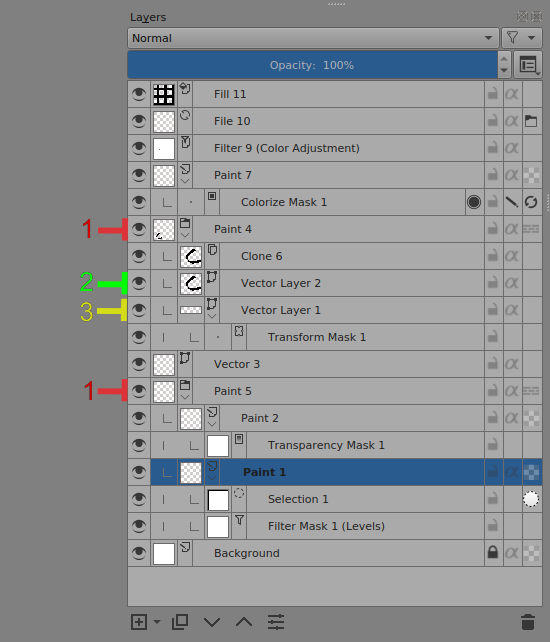
I’ve made an annotated screenshot where I tried to include everything.
It’s not the best possible example or a ‘good looking’ example but I think it has everything. (But see Additional Note at the end.)
Notes are:
A group layer is given the name Paint X. This is obviously a simple oversight.
A vector layer created by the Calligraphy Tool is given the name ‘Vector Layer X’ which I think is fine but it’s different to a manually created vector layer which is called just ‘Vector X’
A vector layer created by the Text Tool is given the name ‘Vector Layer X’ which is true but it would be nice if it could be called ‘Text X’.
Additional Note:
I couldn’t get a global selection layer with any Windows .zip package.
Is this a Windows thing or is there an option for it which I don’t know about or have forgotten about?
I was wondering about ‘Paint 1’, ‘Vector 1’, etc and it would be nice and structured at first, especially for new users or beginners to digital painting.
After a short time I think most people would rename their layers to be meaningful to the subject of the image and maybe even remove the words ‘Paint’, Vector’ etc.
For the numbers on the left idea, the text parts won’t align neatly after 10 layers and I doubt that anyone will remember the significance of a number.
Again, as an initial well structured and good looking thing for new users it may be a nice thing.
Thank you for bringing this idea up in the first place - it’s a good one
I agree that sometimes too many options in the UI can make the end user feel confused. That’s kinda how I felt with all the options the brush engine until I learned how to use it more
I see that we still have no agreement about word “layer” in the layer’s name. As far as I can see the idea to truncate it came from the intention to add more properties (e.g. blending mode) into the layer’s line.
Since we don’t have these additional properties in the layer’s line, perhaps we could accept a compromise roadmap:
Compromise Roadmap
Implement “Paint Layer N”, “Group Layer M” and “Filter Layer L” notation for now
Whether N, M and L numbers will be taken from the same set or from different sets is yet to be discussed
When we implement more properties in the layer’s like, e.g. opacity and blending mode, then we will reconsider the question again.
About additional properties in layer’s line
Personally, I don’t think it is a good idea to show words “Normal” and “100%” in the layer’s line. I believe this extra info (if available at all) should be visible only when it has non-default values. Like it is done for the “Layer Styles” button on the layers. We show this button only when there are at least some styles attached to the layer.
Our layers docker is already very heavy with information and adding more visual info should be considered carefully.
I feel the opacity label should go after the layer style - partly from a visual perspective, but also because I think the style label is more useful when scanning for a specific layer.
Well, this was quite a surprise how everybody had their own idea on how those layers should be named, and they were so different from each other Paint, groups and filters seems like an ok solution for now - I guess any differentiation is better than current state, with no difference at all.
About additional properties - I’m also against adding those so much “in your face”, as then we have a lot of information in a layer, which can make it hard to read. If anybody wants to talk about that, there is this nice thread for that (lots of UI threads lately, I know). I even made there a mockup that maybe would fit the idea of “showing only non-default values” and not overcrowding layers with text, which makes them unnecessarily wider. (for now, only about opacity, though I have some ideas for showing layer styles without being so distracting)
@Mythmaker I think this was also mentioned in the thread I linked. I’m sure those big and bright “100% Normal” texts are not going to happen
Honestly, if you want layer names to have any meaning, you name them yourself anyway.
Having groups, filters and masks have their type in the default seems useful, but the rest I don’t care.
And before we start to cram even more information in the layer docker, am I the only one regularly annoyed about the tiny look-alike icons for layer types?
The fill, paint, vector and filter layer icons are all kind of the same “sheet of paper” icon with just some tiny detail added to an already tiny icon. Having those stand out more would already make a lot of custom naming/color labeling unnecessary to me…
That doesn’t make sense to me - the proposed changes increase the information aiding in the identification of a layer; That has meaning above the current implementation.
Ideally you’d rename them yourself to something more specific - that’s a good habit. But if you’re not experienced with layers, or just being lazy, I feel this would still be a useful degree of automation and doesn’t stop you renaming them.
I agree about the layer icons - they’re probably too small to be much use. You’d have to increase the spacing between layers to address that - so decreasing the compactness. I’m not sure which I prefer…
Ok I was mostly annoyed by the debating whether it should include the word “layer” and where, how to count them etc. it doesn’t add any real information either way in my eyes, it’s all debating personal preferences.
Naming the type at least is information, but gived the icon is supposed to tell you (which it kind of fails to) even that is basically redundant information, not adding any actual meaning to the layer but working around another shortcoming.
I just noticed that in mypaint, it adds a few of the properties of the layer such as the blend mode under the layer name and changes the name of the layer to “group” layer when you make a new layer group. Also it only adds the blend mode property when you change it from the default blend mode. The layers might still look too “crowded” this way though.


 , I see this every time in the discussions if there is no consensus we then ask for an option
  . It is like this that it becomes repulsive for normal users. At this rate we would have a toggle for everything in the UI.