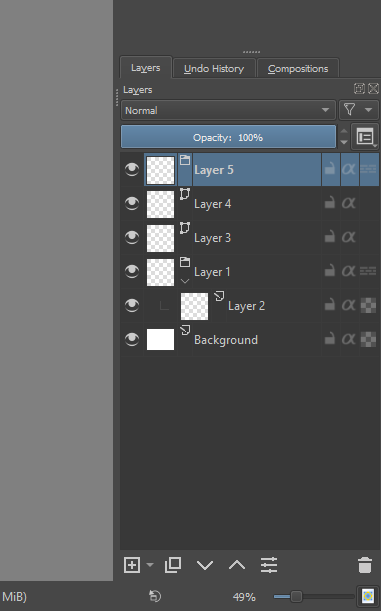
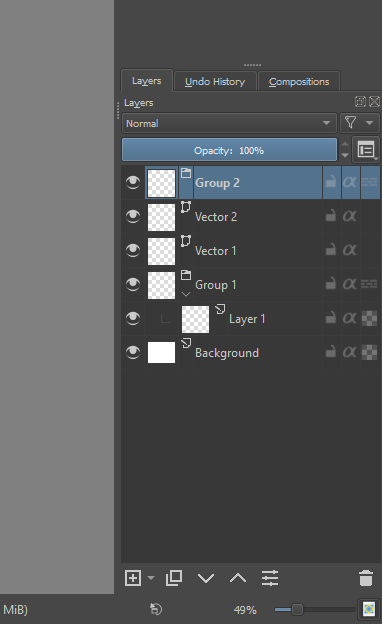
When I create new layers, they are called “Layer 1”, “Layer 2”, “Layer 3” and so on.
But when I create a Group Layer after that, it is called “Layer 4”. I wish it was called “Group 1” instead. That would make it much clearer what it is, so I don’t have to rely on the tiny icon.
What I want:
When I make a new layer, I want the name of the new layer to reflect what kind of layer I made, so that I don’t have to rename it, or strain my eyes differentiating tiny icons.
How I want to use it:
I want this feature to save time, as I like to rename layers so that I more easily can see what type it is. If they were named reasonably from the start, I would not have to rename for instance group layers.
I just made a pull request for this change. I wasn’t sure about renaming the “Paint” layer to say that, but it might be good if we do so we are more consistent. Here is the request with a screenshot.
Right now there is a bit of conversation on whether we should include the word “layer” in the default name. I am not sure if people have opinions if it is one of these
I’m used to short names, so “Paint Layer 1” feels way too long comparing to current “Layer 1”. It would feel clamped with lots of these long names that couldn’t be fully displayed when in groups.
Personally I would rather think about choosing between current “Layer” and “Paint”, as it’s quite obvious that the default layer is the paint one. Just “Paint” feels the best though, as it’s short, and meaningful.
To me Paint 1 just reads really weird, which is why I would prefer to show the type of the layer as well: group, layer or mask. The alternative for me would be to only have a distinct string for group, layer and mask.
I would prefer “Paint Layer X” over “Paint X”. Just “Paint” sounds weird. I’m not sure why but I don’t feel the same way about “Vector”, and for sure not about “Group” (they can stay one-worded). However the mention of the length of the name is I guess important.
I think in case of Filter layers and masks it would be useful to write: “Filter Layer X”, “Filter Mask X”. Local selection could be just “Selection”, Transparency Mask, since it doesn’t have any layer counterpart, can be “Transparency”, I think.
And yes, another option would be this:
for group layers: “Group X”
for masks: “Mask X”
for other layers: “Layer X”.
Alternatively, something that would be just enough for me, would be to have all those three above but for vector layers use “Vector X”. It’s less consistent but it will make the distinction between paint layers and vector layers clear in addition to differentiating between group layers and standard layers.
Since I’m writing while @Mythmaker added a new comment: I would like “Raster X”. I hope it wouldn’t be too confusing for users though.
Yes, after some thinking “Paint” isn’t that meaningful.
How about all those one word names (Group, mask, transparency, vector, fill) and current “Layer” for painting layers. I know it isn’t consistent in this one case, but we all got used to the name “layer” - so it shouldn’t be confusing to current users, and anything other than that would be nicely different from it (all those names read quite well).
Isn’t it the case that everything is a layer (of some kind)? If so then the word ‘layer’ itself is redundant in all cases.
A use of ‘Vector X’ and ‘Paint Layer X’ could itself cause confusion. They are both layers of the type that you can ‘draw stuff on’ so why should there be a distinction?
The use of ‘Raster X’ would be technically correct but may confuse new users who ‘just want to paint stuff’.
My vote would be for ‘Paint X’ and drop the word ‘layer’ from everything.
‘Paint’ is a noun and a verb. In the expression ‘Paint layer’, the word ‘paint’ is used as a functional adjective, like ‘oven cleaner’ or ‘dog food’.
Or ‘group layer’, ‘file layer’, …
The text tool does create a vector layer if you use it on a paint layer so naming that as ‘Text X’ should be possible.
The calligraphy tool also creates a vector layer in that situation (which I’d say should be called ‘Vector X’)
Could you compromise with something like “Layer X (Paint)” and “Mask X (Transparency)”? Groups could remain as just “Group X” since that makes most sense.
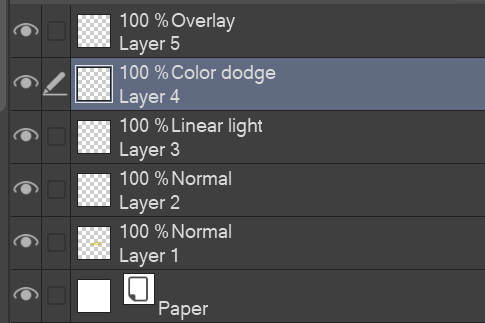
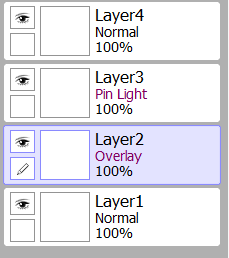
Can I add something to your request too? It would be nice if you could see what blending mode each layer is set to without having to select the layer. Like having the name of the layer’s blend mode next to the layer somehow . This would be really helpful when I’m trying to color a painting from greyscale. I often have multiple layers that’s set to color/overlay/soft light.
Examples of what this look like in other programs.
 And should be easy to do, too.

 It would be nice if you could see what blending mode each layer is set to without having to select the layer. Like having the name of the layer’s blend mode next to the layer somehow . This would be really helpful when I’m trying to color a painting from greyscale. I often have multiple layers that’s set to color/overlay/soft light.