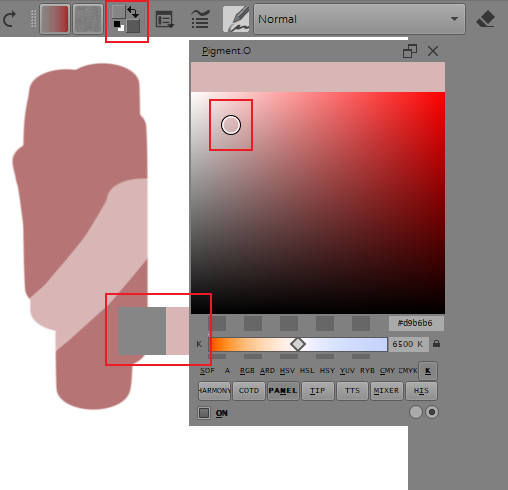
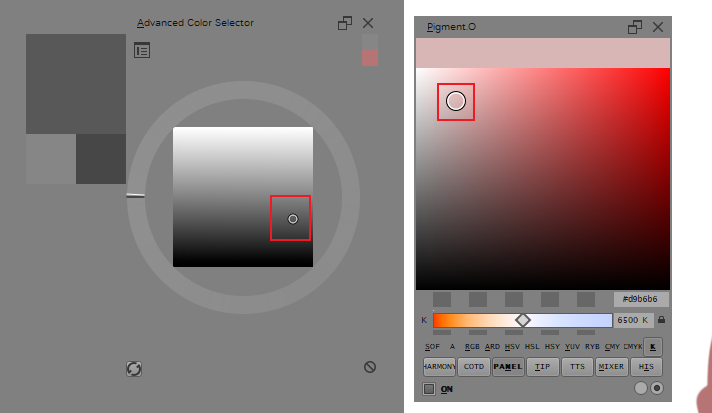
Unsure if it’s supposed to do this, but the active color does not seem to line up for me?
I could just have some sort of setting wrong, but I am not sure. it is set to ON.
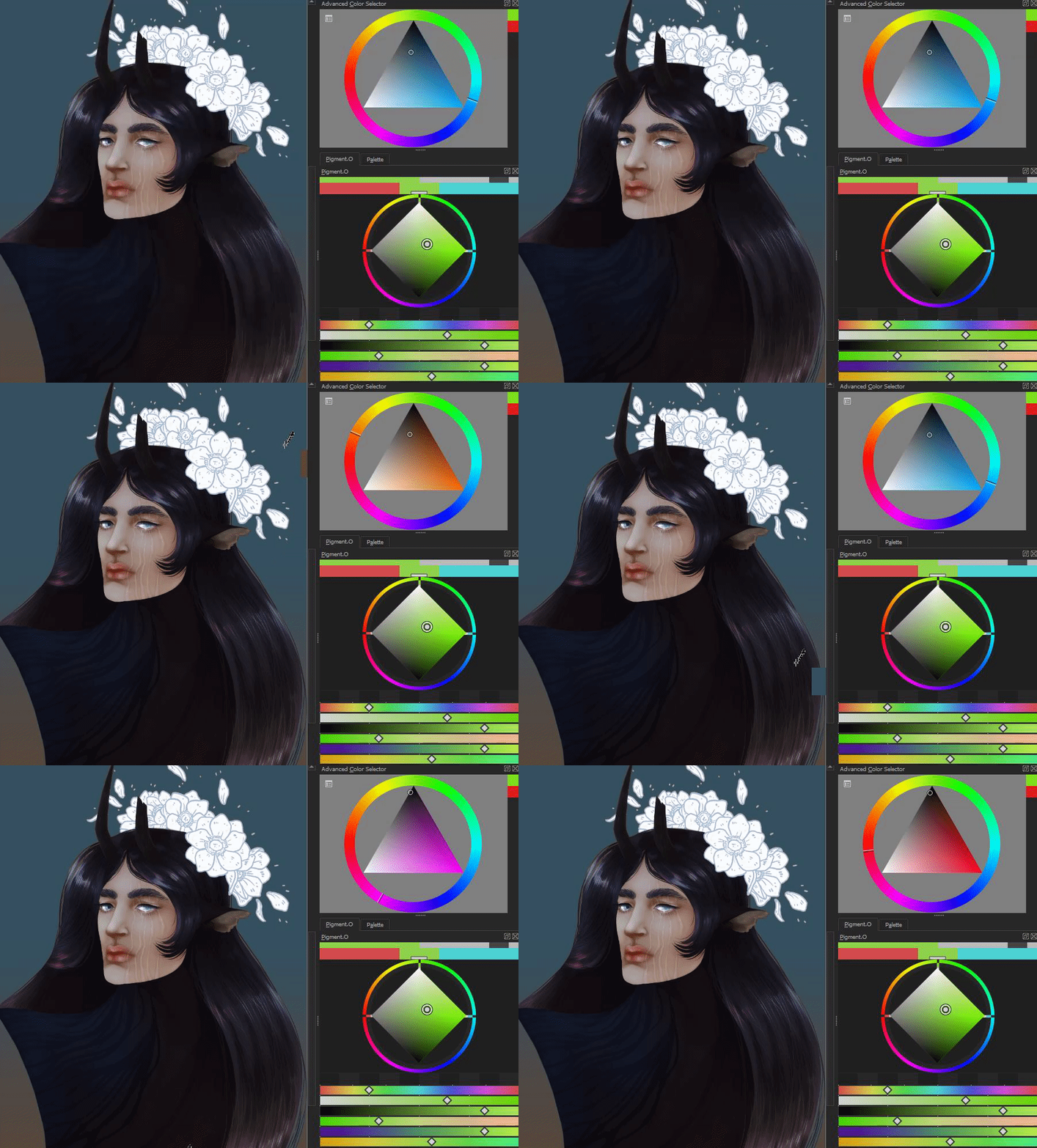
Unsure if it’s supposed to do this, but the active color does not seem to line up for me?
I could just have some sort of setting wrong, but I am not sure. it is set to ON.
@Sylvanticus
Activating the Luminosity Lock deactivates reception of colors from Krita. This happens because if you pick colors like that the color you will have is not the color you will picked so I de-associated them.
Just turn it off and it will align again. The luminosity lock is indicated by the top right gray square.
from googletranslate:
hi
Last week, I mentioned the problem of the slow speed of the plug-in. Several of my friends unpacked the .py file and found that this is not a bug or a performance problem.
The value of “check-timer” is very large, so there is a one-second delay. When set to 20, everything is smooth
Why not set it as the default setting? I think this will bring a good experience to users. Is there any hidden problem?
No it will not.
Not everyone has a computer good enough handle that. I have had complains where 1 second was too much to handle. I set 1second as a hard limit to not pass so it would not abuse the system but even so that is why I made the ON/P>K/OFF as a extra percaution for no win cases. Checking Krita’s colour is a bottle neck.
1 second is enough to remain fairly responsive without burdening the computer with unnecessary workload. As a user you can adjust it to your computer but for users at large I will use a longer time so it avoids lag issues. As just a color picker it should not strain your computer resources but try and be as light as possible in the background. Pigmento is already heavier than it should but in Python it can’t be lighter to my knowledge.
Hi,
If you’re interested, rather than polling every X seconds for a color, here a small tweak to let the plugin react only when a change is made to a color.
The trick is to check for PaintEvent on the color button:

And if color has been changed, to emit a signal
Here the code:
ColorCatcher if the class you might want to use
from krita import *
from PyQt5.Qt import *
from PyQt5.QtCore import (pyqtSignal as Signal)

class QFilledColor(QWidget):
    """Just a widget to display a filled rect with a color"""
    def __init__(self, parent=None):
        super(QFilledColor, self).__init__(parent)
        self.__color=None

    def setColor(self, color):
        self.__color=color
        self.update()

    def paintEvent(self, event):
        painter = QPainter(self)
        if self.__color:
            painter.fillRect(event.rect(), self.__color)

class ColorCatcher(QObject):
    """Catch change on color button, and emit signal if color has changed"""
    fgColorChanged=Signal(QColor)
    bgColorChanged=Signal(QColor)

    def __init__(self, parent=None):
        super(ColorCatcher, self).__init__(parent)
        self.__inUpdate=False
        self.__fgColor=None
        self.__bgColor=None
        self.__tweakWidget()

    def __tweakWidget(self):
        """Search for color button, and install event filter"""
        def searchSubWidget(item):
            if item.objectName() == "WdgDlgInternalColorSelector":
                item.parent().installEventFilter(self)
                return self
            elif len(item.children())>0:
                for w in item.children():
                    found=searchSubWidget(w)
                    if found:
                        return found
            return None
        return searchSubWidget(Krita.instance().activeWindow().qwindow())

    def inUpdate(self):
        return self.__inUpdate

    def eventFilter(self, source, event):
        if self.__inUpdate:
            # avoid recursives call if connected method are changing colors
            return
        if isinstance(event, QPaintEvent):
            activeView=Krita.instance().activeWindow().activeView()
            if activeView:
                color=activeView.foregroundColor()
                if color and color!=self.__fgColor:
                    self.__fgColor=color
                    self.__inUpdate=True
                    self.fgColorChanged.emit(color.colorForCanvas(activeView.canvas()))
                    self.__inUpdate=False

                color=activeView.backgroundColor()
                if color and color!=self.__bgColor:
                    self.__bgColor=color
                    self.__inUpdate=True
                    self.bgColorChanged.emit(color.colorForCanvas(activeView.canvas()))
                    self.__inUpdate=False

        return super(ColorCatcher, self).eventFilter(source, event)

def testing():
    def fgColorUpdated(color):
        fcFg.setColor(color)
    def bgColorUpdated(color):
        fcBg.setColor(color)

    dlg=QDialog(Application.activeWindow().qwindow())
    dlg.setModal(False)
    dlg.resize(QSize(400,400))

    layout = QVBoxLayout(dlg)

    fcFg=QFilledColor()
    fcBg=QFilledColor()

    layout.addWidget(fcFg)
    layout.addWidget(fcBg)

    colorCatcher=ColorCatcher()
    colorCatcher.fgColorChanged.connect(fgColorUpdated)
    colorCatcher.bgColorChanged.connect(bgColorUpdated)

    dlg.show()

testing()
And a running example:
Note: it doesn’t work if color button is not visible (fullscreen mode or if user have removed it from toolbar)
Grum999
Thank you for the example I will test it out for sure. I just can only do that in a couple of days for real. There is stuff here I never seen before so I don’t know what they are even.
I read it on the side and I am must say I am always a bit hesitant to use eventFilter and when I have used it I am relluctant. EventFilter is like the Qtimer but for each cycle it can flood things really easily and can make Krita slowdown heavily. To avoid this I have used a dirty policy to ensure things don’t scale up.
Also reading item from a widget is a bottle neck and should be avoided and I have come to the design of only doing it once until a change is made. But it is not as tight of a bottle neck as reading Krita’s color for sure. But if the item is not visible I dunno how it will freak out and with different windows active.
The limitation of having to read from a visiable widget is a bit sucky because I need to use what I have and toggle in and out with the EventFilter and Qtimer. So the Qtimer will not be avoided fully.
Overall I have a bad feeling over this path because I have no control over the dirty state of Krita. The thing is with 1 color space working things go fast but once more color spaces are added there are alot more calculations being done for the same moment of update. If this reacts too fast to the change it might start doing too much to be handled. Linux machines are especially prone to fall under this issue. I have some checks that literally if your Linux machine I stop updating until you release your button so it only updates once and not continuously like i was doing in real time. But if the change comes from Krita there is not much I can do to check that even and if I did would void the whole purpose of this.
Events is the way Qt works.
The event filter is just a way to catch an event on an another widget.
After, if you do dirty thing with it, it’s another story. Doing things that eat CPU is clearly not recommended in this case, especially in paint event…
In my case, I check the event type (only react when the paint event occurs) and emit signal only if color has been changed.
I’ve made the choice to emit a QColor, but the ManagedColor can be emitted instead to avoid multiple conversion and let connected method doing the conversion if needed.
Yes, I agree, as indicated it’s a tweak, and tweaks are in general like dirty things
The best solution will be a signal emitted directly from Krita’s API but it doesn’t exist.
Here it’s just a way to let the plugin doing things only if there’s things to do.
Yes I know.
After I’m not sure that many users remove to color button from toolbar.
But in fullscreen mode, it’s possible to keep docker for example, and then in this case I agree the trick doesn’t work anymore
Note: if button is not visible, there’s no pain event and then, filter event just filter nothing because there’s nothing to filter.
And in this case there’s no signal emitted when color is changed.
I don’t have this kind of problem on my side with Linux 
Anyway, it was just an example about another possibility than timer polling.
But not a perfect solution I agree.
Grum999
I really appreciate what you did @Grum999 I am just unsure I know doing a timer pool to be very ugly but without changing Krita I donno how other ways would be better. but if I change krita might as well do it inside krita  I am not proud of it at all.
If your curious how to test pigmento Linux clamp just place th advance colour selector or any other and click and hold on the sphere in the OBJ panel. In windows colours will update in krita in real time while in Linux it will only be applied in the case be when you release your mouse. If you lift the rule out you will notice a difference in performance.
I’ve made some change to test:
Made change from Advanced Color Selector and from my own Color picker (the one I made for BuliNote)
Made change from Pigment.O
Doing another comparison, just moving the hue slider:
Tried to do some tests on windows, but currently for an unknown reason the VM is running slow, so doing performance tests on windows in this condition is not relevant.
I’ll do it later.
I took a quick look on Pigment.O source code, I think you can do many optimization to speed up execution and probably it’s possible to improve and simplify things to got an easier maintenance 
But for someone that have started to learn how to code last year, that’s already good 

Grum999
Wow! Linux is really able to handle all that? on my Linux machine it really does not. It even goes with little lag with the OBJ panel open.
I can take another look into the slider code, that section went though a lot of different iterations.
Well the inner structure was not by design but made by trail and error because if it were for me I would have organized it different. It is bigger than it should but it makes shorter paths to the objective. I did what I could to make it as organized as possible considering the UI.
I am still a bit fearful not everyone will feel the same performance increase, I will do it but i think there will be complains  at least it is possible to work.
On my old computers, Linux is faster than windows 
Looking here the results I got with a modified Pigment.O (using ColorCatcher instead of timer):
So yes the problem might probably be located in how sliders have been implemented in Pigment.O
I don’t have time now to dig this, I’ll try to take a look on it next week.
Also, there’s a very bad error message in console about painter initialization.
QPainter::begin: Painter already active
I’ll try to check this too.
I know, but believe my experience, using short path will need, at the end, more time for everything:
I can’t guarantee that performances increase will be the same for everyone but usually, even if only 50% of users perceive a real gain in performance, that’s already a good thing 
Grum999
Hi
I took a quick look about this error message.
The way QPainter() are initialised is not correct in most cases.
Example, most of QPainter are used like this:
painter = QPainter(self)
painter.begin(self)
[...]
painter.end()
There’s 2 way to create and use a QPainter:
In first case, this is enough:
painter=QPainter(self)
[...]
=> call to begin() is made automatically when QPainter is instancied and call to end() is made automatically when QPainter is destroyed, no need for explicit calls
In second case:
painter=QPainter()
painter.begin(self)
[...]
painter.end()
=> As paint device is not provided when QPainter is instancied, call to begin() and end() must be explicit
I’ve removed all begin/end calls where QPainter is instancied with a paint device: error message is not displayed anymore
Grum999
Ok , found and fixed the problem
I’ll explain problem with the HUE slider as example, with SIGNAL_VALUE but it’s the same for all sliders (and other signals like SIGNAL_HALF, SIGNAL_MINUS…)
In the declaration of signal connection, you’ve this:
# Channel HUE
self.hsv_1_slider.SIGNAL_VALUE.connect(self.Pigment_HSV_1_Slider_Modify)
self.layout.hsv_1_value.valueChanged.connect(self.Pigment_HSV_1_Value_Modify)
=> That’s Ok
Looking at Pigment_HSV_1_Slider_Modify, we have an update of spin box:
self.layout.hsv_1_value.setValue(send)
Looking at `Pigment_HSV_1_Value_Modify we have an update of slider:
self.hsv_1_slider.Update(self.hsv_1, self.channel_width)
Now, problem is, if you update the slider, you’ll update the spinbox, but spinbox will update the slider, and slider will update spinbox, and spinbox will update slider, and…
The ping-pong could be infinite.
But fortunately, the spinbox widget will stop to emit change once the value set is the same than actual defined value.
But you still have a ping-pong between signals with unwanted calculations and painting updates.
One solution is:
def Variables(self):
    # [...]
    self.__sliderUpdating=False
Pigment_XXXXX_Slider_Modify set the variable to True/False before/after changing value for spinboxdef Pigment_HSV_1_Slider_Modify(self, SIGNAL_VALUE):
self.__sliderUpdating=True
# [...]
self.layout.hsv_1_value.setValue(send)
# [...]
self.__sliderUpdating=False
Pigment_XXXXX_Value_Modify exit immediately if change is triggered by slider:def Pigment_HSV_1_Value_Modify(self, SIGNAL_VALUE):
if self.__sliderUpdating:
# already updating, exit
return
# [...]
self.hsv_1_slider.Update(self.hsv_1, self.channel_width)
# [...]
Example without fix:
Example with fix:
Now, looking the code implementation, it will ask some work to fix problem everywhere 
Concerning reason why on your side you don’t feel any lag in Windows, I can’t give you any explanation.
Can’t say that the problem is Linux; if there’s a difference, it’s probably more in Qt implementation that something is not managed in the same way between Windows and Linux.
Anyway, for me problem here is more about how it has been implemented in plugin than the system on which the plugin is used (but hey, I’m coding from practically 40years now so I’ve a little bit more experience about all of this…  )
)
If you have problem to implement proposed fix or want a peer review, don’t hesitate to ask
Grum999
Update:
Corrections
I did a update considering your suggestions @Grum999 .
For the speed up updating situation I just set it too 30ms for it’s check. This because loosing sight of the color widget would void it whole so to the previous method and swapping would create extra issues so I decided to try and improve this one. Also I disabled the Linux restrictions and I feel it will be bad so it is only commented out if needed.
Considering the faster rate of checks I did the best I could to lighten up all the sliders graphically by stopping to use StyleSheets and instead use Vectors only for Display. The thing is that StyleSheets despite slower are reliable and I have been holding onto them until now. So it does the same with less and lighter calculations I feel.
I did tests going from Krita to Pigmento and the other way around and both seem to be pretty responsive. However just as before closing any Krita color picker will increase responsiveness much more as it reduces lag overall for Pigmento.
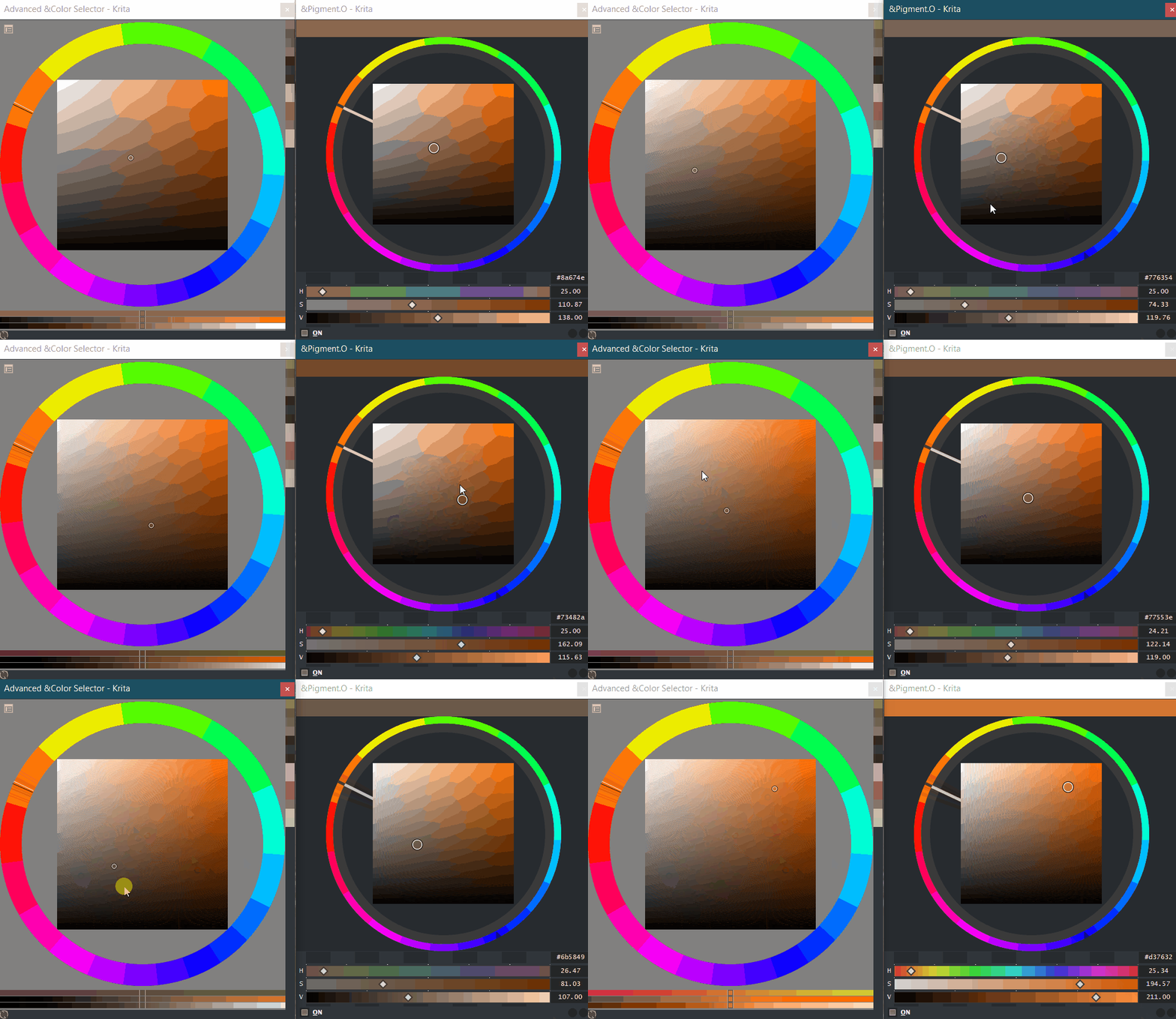
As I fixed the Slider display I also changed the UI file so it is more modular on the slider section which made me redo the menus a big deal in order to ensure proper measurements so the cursor display was correct.
Also I changed the display of the Mixers and fixed a bug where upon starting Krita, black on YUV or CMYK with just one color on the gradient the empty side would not be black but green or white because black is not (0,0,0) but using it would work perfect. I only detected it because I changed a bit the display method of the mixers when incomplete.
While i was there I shuffled the mixers around in order to be easier for them to swap interpolation methods in the future because I know there are more interpolation methods out there for colors.
For the infinite loop of the widget signals I had code to Block the unwanted signals before updating them on Pigmento_Sync however if lag is felt maybe it was not working so well. I tried to see if there was some leakage by locking it up more but I had no speed increase. So I thought that changing the status of the widget to send signals or not was perhaps too taxing and your suggestion to use a variable of control to be better and try and now it goes by much faster as it does not try to change PyQt5 and instead does the check only on Python realm. I ended up with this:
def Pigment_RGB_1_Slider_Modify(self, SIGNAL_VALUE):
    if (self.sync == None or self.sync == "rgb_1_slider"):
        self.sync = "rgb_1_slider"
        ...
and upon Mouse Release I do to allow a new input slider or of value:
self.sync = None
By using this control variable I ended up distributing if to the widget functions and not have them on the moment of sync of channels. So now the Sync of channels is much more simple.
I fixed the Painter redundancy ( QPainter::begin: Painter already active) as you told me to and now it is not crying all the time. Thank you. I really thought I would not be able to ever fix that one. Your explanation to me was much more understandable that the ones on the resource page. I had gone thought it before but I did not understand what was the difference.
Overall I think it is reacting much faster but not as fast as yours but I feel it might still do the job, but the difference does not set usable from non usable but just having to wait less to see the effect happen. I am still tense as in it pushing things to far concerning others so I am curious about that.
Color History
Also I was painting the other day and my mind crossed over a thought of something I thought I would never do and was against it as it seemed useless at the time. But now I did it. It is a little section that shows the color history change within Krita not inside Pigmento. Considering the faster performance you can get the picker tool and slide it across an image and it will sorta sample that line you draw with the picker. So that is that I can’t it imagine to be very important though. I might still re think this somehow.
Hello, I seem to have found some problems. When I use the transparency mask, Pigment. O can’t pick up the color on the mask, and if I change the color in krita’s color picker at this time, the color of Pigment. O won’t change either.
thank you. it was a index out of place.
try to download it again and see if it is working it should be good now.
Oh yes I forgot to say that it has BT.2020 now available when i did the last update.
It should be the new method for this year forward.
Thank you!
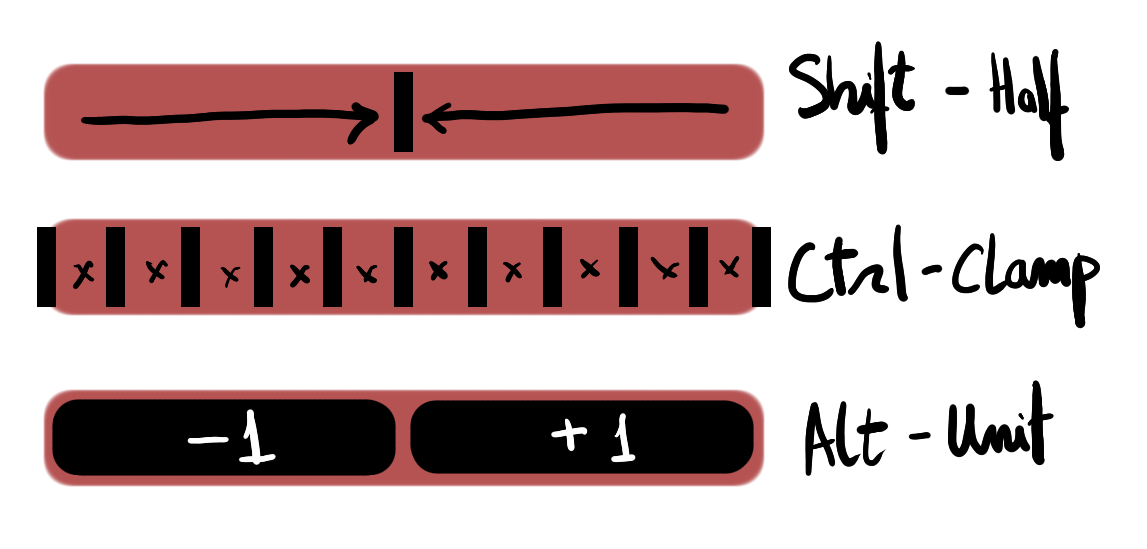
This is a small diagram tip on how the modifier keys react with the sliders in case you never read the manual.
The only difference is when doing the same to Hue sliders that will react different but same idea:
Thank you so much for adding the color history function!!!  I used to have to keep going back to the advanced color wheel docker to access the color history. And the speed is absolutely great! The only thing I would like is to be able to do is change the colors in the color picker with just one click instead of two clicks. Like in the advanced color docker.