Blender 4.1 should work fine.
See the post above for projection/ texture painting. Blenders and smearers kinda work if you enable overlay mode in the brush settings and disable all lighting effects (viewport shading set to flat texture) so that pixels of the model in Krita appear the way they are in the underlying texture.
The other plugins linked above have better support for texture painting, as this plugin is mainly intended for using 3d models in your 2d illustrations not to speed up your 3d workflow.
3 Likes
I’m afraid something’s up with this and the newest version of Krita 5.2.5, Krita just freezes up when attempting to start or connect to Blender.
2 Likes
Same here, it worked like a charm before! Krita 5.2.5, Blender 4.2 LTS
[Blender Layer] Connecting to krita on port 65432…
[Blender Layer] Connected
[Blender Layer] Exception while communicating with Krita
timed out
[Blender Layer] Disconnected
Edit: Okay, I tried 5.2.6 as well—same behavior. I reverted to 5.2.4, and it’s smooth as silk. I love the plugin too much, so I’ll stick with that for now. Thank you for this amazing addon!
1 Like
Running 5.2.6 and Blender 4.1.1 and having the same issue.
1 Like
I tried to run the plugin on Mac OS M1/ Krita 5.2.6 / Blender 4.2.2
Here, this plugin doesn’t work : either Krita is loop-running forever or quit suddenly if I try to drag@drop .blend file on krita, or I get a localhost ‘Errno 17’ on port.
I tried to change versions of Krita, port and did all as advised. It still never worked. Sorry : I gave up and uninstallled both py blender script and Krita plugin.
Krita 5.2.6 crashes for me too.
so I assume that the script is simply borked until further notice.
I hope the script can be fixed soon-ish since using a 3D model as an animation BG can be a real game changer.
Similar issue here on Arch Linux PC. I tried to start up a server and connect to an open Blender window. The first time, Krita froze completely. After killing and reopening the application from both the Arch build and the AppImage, both now give the Errno 17. It says the ‘file’ already exists, but I can’t seem to find the file to delete it.
Hello, it’s me again! I recently received a message that seems to be a disconnect between Krita and Blender. What to do?
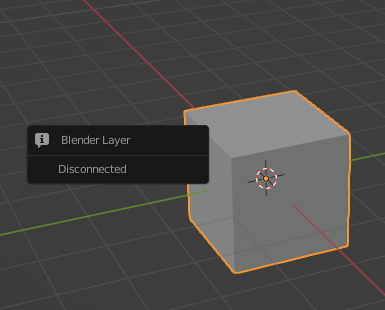
it doesn’t seem to work for the latest version of Krita  Krita connects to blender, opens a Blender window, then disconnects from Blender and Krita freezes.
1 Like
@CherryCthulhu @Evil_Bot @Bowen @Janusstark @Feldiarts @SeaBassTen10 @Marylands @FinessenceSL
The bug with Krita 5.2.5/5.2.6 should be fixed now 
Reinstall the plugin to update.
Due to a change in Krita’s api it’s apparently no longer possible to quietly update the layer while also drawing, so if you’ve been using live mode, you might experience some problems now. Leave a comment if that is a use case someone actually uses  , and I will try if I can find a workaround.
The Disconnection and Errno 17 message sounds like a secondary issue caused by the above problem, updating and changing the port or just waiting for a while should fix it.
10 Likes
thank you for the update, live view also works fine for me (Krita 5.2.6 Blender 4.1)
1 Like
It works like a charm now, thank you so much for making and maintaining this tool, it’s invaluably useful! 
1 Like
Thanks so much for your work on this plugin! I really appreciate you taking the time to fix that bug. It means a lot!
2 Likes
Thank you so much ! 

2 Likes
Hello @MotionStreamStudios and welcome to the forum 
29 days ago, people said it was working with krita 5.2.6 and blender 4.1.
Can you say which version of krita you are using and which version of blender?
Also, which operating system and version are you using?
It would be useful if you could give a description of the events and actions that lead to the crash that you’re having as well as any error messages and/or informative screenshots.
1 Like
Use the main version instead. There is no need to go for the dev version.
1 Like
Way to make it work on Linux? (I have the steam version, and the steam version of blender installed too, but whenever I try to open the steam version of blender, it doesn’t)
Try a different version? I mean Blender and Krita are free so just downloading it from the main Page or any of the app stores isn’t that big of a deal. Important is that you link the right executable in Krita.
Just wanted to plug in my experience with the plugin!
Using Linux mint, I had some problems initially. Broken pipe stuff. Hadn’t touched it for a couple months before trying again.
Changing the port number down one did the job, buuuut my problem is where to find the settings is never mentioned (tucked in the corner of the docker). I only discovered it looking up the issues page. I think it should be noted somewhere where to find it in the getting started page.
So, after actually finding these settings and changing the ports. Connects straight away. Amazing!
And for the curious who stumbled on this in your searches, it works great with Bforartists!
Thanks for the plugin!
as a side note: you think you could make the plug-in work with Cycles rendered view? not a must but certainly a nice to have.