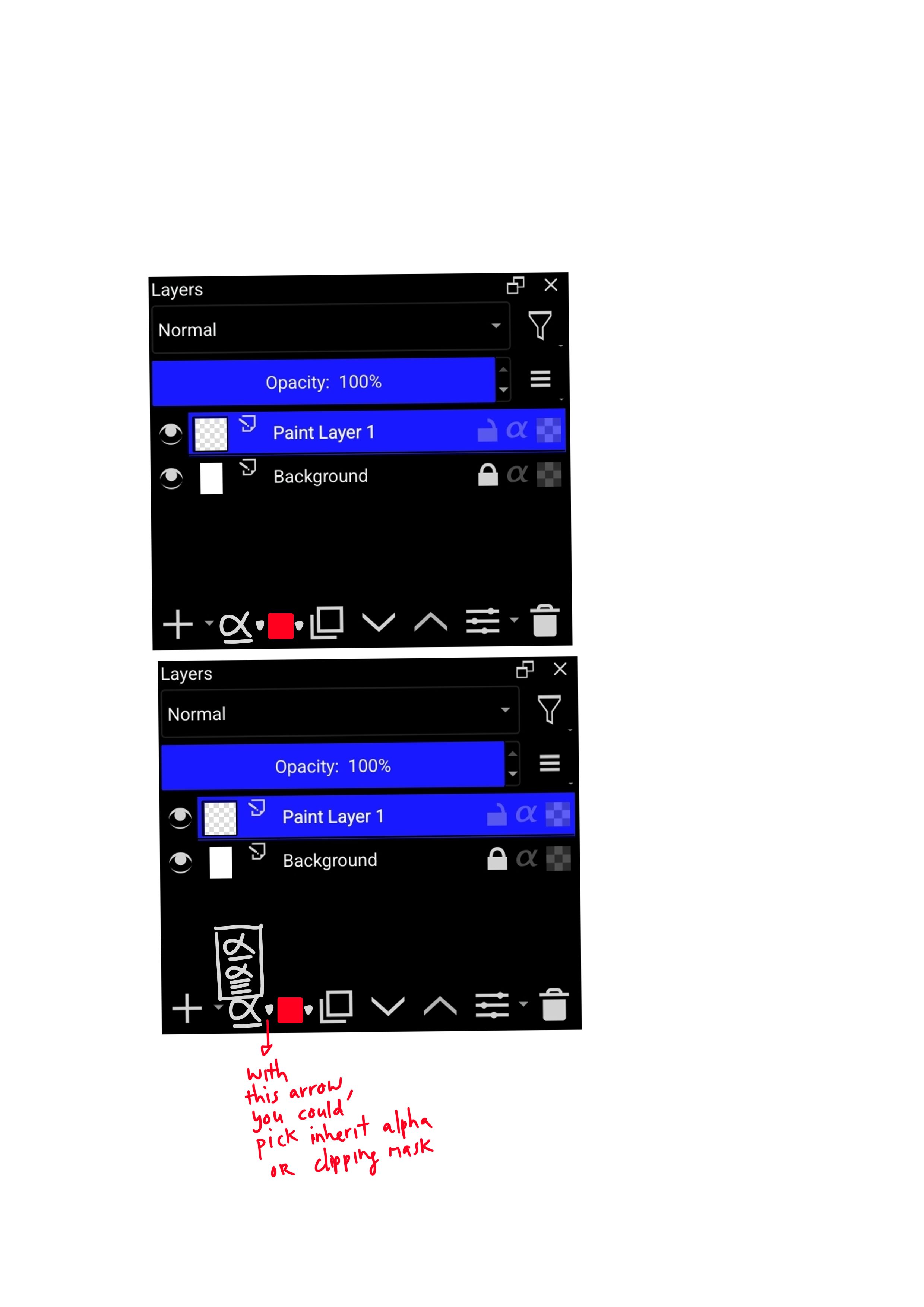
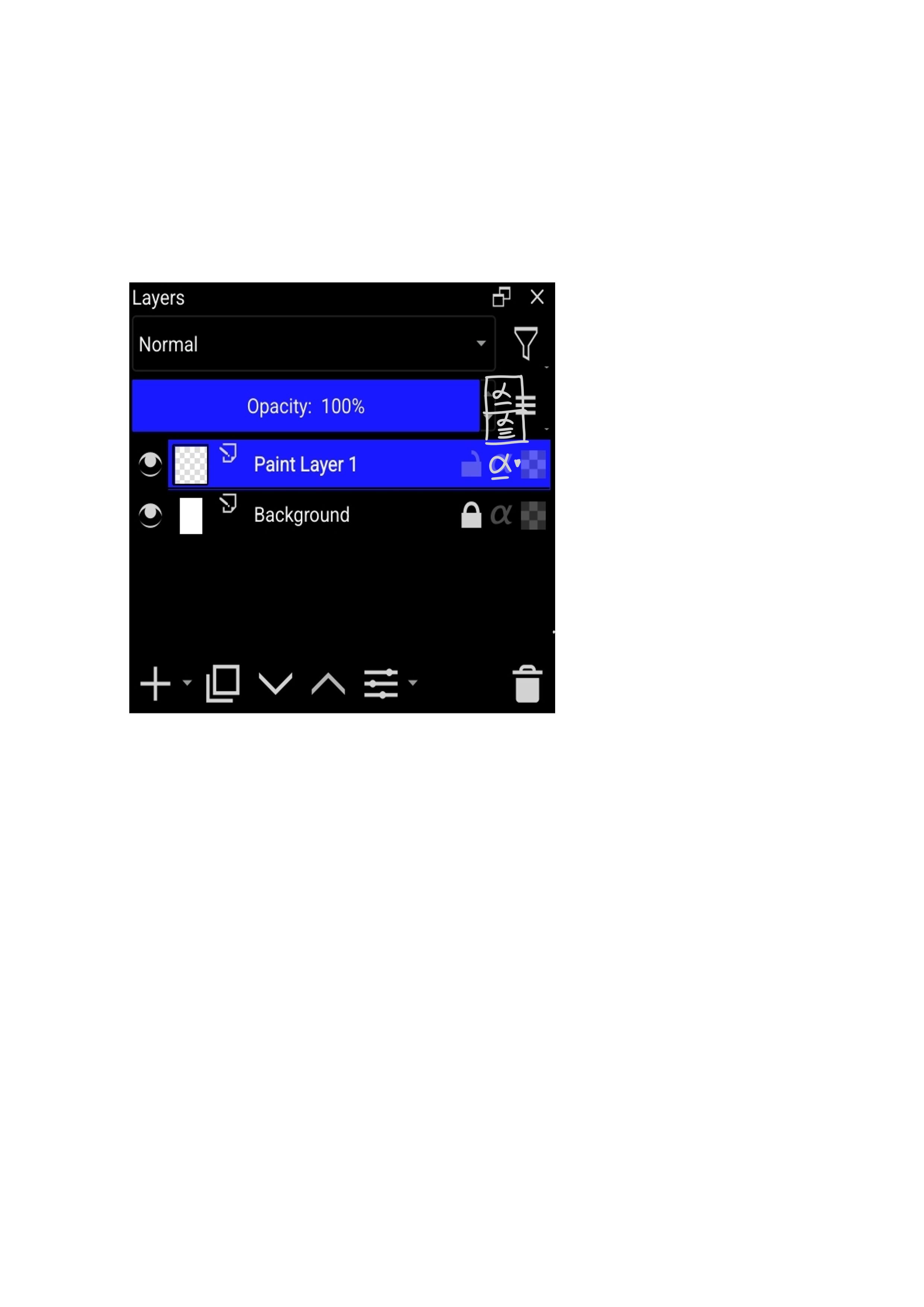
If you take into account the “pass through” option for groups and the “onion skinning” option for animations, I feel like it’s a bit complicated since they’re not universal…
But reducing the opacity slider is a good option in my opinion, it doesn’t seem to need that much space. The options for Blending modes can also be scaled down, as in mr
Two more icons can be placed here because docker has reached the minimum width.
We are just brainstorming. I think it is important to put on the table different alternatives, different approaches used by other programs, etc., then analyze them and make a final decision.
Just to be sure, as it seems to be obvious to everybody, but I don’t have much experience with other software.
When two layers are one on top of the other, both in this new “inherit from one layer” mode - they both inherit from the same base layer? Or do they recursively clip to each other?
Which is the “industry standard” solution? Should we take into consideration the “other” solution, or at least the possibility that the interface could be extended even further in the future, with even more clipping options?
I believe they clip to the same base layer in other programs. Which makes sense, otherwise it would be nearly always limiting the area more and more. It might be what you want but the other case is easier to understand.
The ‘industry standard’ is the most flexible, you can both clip multiple layers to one mask and mask layers recursively. This approach can be mixed at will. So you can mask a mask as well.
Not trying to derail the discussion, but taking the risk of it
Here a suggestion for those who want to ‘test’ clipping mask first hand. The site Photopea.
It is a Photoshop Web App clone, it has layer management and clipping mask.
For any Krita user (like me) who don’t quite get the whole Clipping Mask idea, this might be an easy and straight-forward tool to understand the proposals here.
In case we are talking about testing competitors, the Affinity suite has a generous 30 day free trial. The clipping works the same for vector and pixel, so I would advise to give Affinity Designer a spin (vector shapes are really easy to manipulate for this purpose) and you’ll see how it works (you can use my post with gifs and vids as reference for dunctionality to test).
On the note of testing other software medibang, firealpaca are free to use and also have clipping masks also CSP has a trial too.
I definetly disagree with this, UX/UI is one of the most important topics to be discussed and its not a quick thing to decide. In a way this will be the thing that will have the most impact on the users not just us here discussing it but everyone else outside this discussion. it needs to be well thought.
In the end how pratical to use a tool weights more than what it does, if we add it and make it difficult to use is no different from not implementing it imo. As users will always gravitate to what is faster and easier to use.
Another point is i dont think anyone implementing this would want to implement the ui and then redo everything cause it was bad in the end so i thinking we taking time and discussing the possibilities is much better than just rushing things.
Holding down the mouse button while hovering and then selecting is terrible. and has the aggravating part of reducing accessibility some people have pain holding down the mouse button for a while(and to prove my case i have seen people in the past trying to find ways to not needing to hold down the mouse button while drawing in krita due to pain), and even if you say “well most will be using a tablet” i will tell you as someone who has been helping the community through the past 3 years that that’s incorrect.
Besides even if using a pen this action feels unnatural.
Honestly i dont like the idea at all feels too complicated for you to just choose a mode. or turn it on and off. Why do you need to hold while hovering to choose a mode? why not just giving a down arrow with the options to click and leave the main button to turn it on and off at the mode selected?
We have no means to know that now how people will use it, i do think people will favor more on over the other, but if we are giving the option of a hybrid workflow we need to take into account the scenario of people having to change the mode at some points and then changing back, and if people need to navigate through menus to change it it wont be the best work workflow. I dont think they necessarily need to be next to each other but it needs to be accessible otherwise we will have the same issue with color labels that are hard to access when they should be quick to be accessed.
I kinda think deif_lou idea of having a toolbar post 149 is actually interesting kinda what i have been trying to do with plugins. Though he brings good points:
Having to select the layer first to then change a property might be a downside to some people. Personally i dont think it would affect me but dont know about others, though i wonder in what use case people need to remove the alpha inheritance from multiple layers that wouldnt involve also selecting the layer to make tweeks.
Though i also agree that we are reaching a point with too many buttons so maybe some being on the toolbar might be a good compromise for some new things.
It might take a bit of space for layers but if we made that configurable maybe people can use it for things that speedup their process. like adding a button to add a mask to a current layer or setting buttons to create different layers and masks. Anyway i dont want to derail i just want to show that maybe that can add some value. Even if it reduces the area to show the layers,i think its a good compromise.
Also as Reptorian and TheTwo noted we have space on the bottom part for a button.
So far i like both Reptorian and Deif_Lou options:
Reptorian idea of adding the button to choose the mode on the bottom part seems accessible enough and wouldn’t take anymore space. (post 126) to summarize the behaviors with a few tweaks of mine:
One click changes the mode and the icon reflects it, we can have the arrow on the side to show the names but i feel like most will use just the one click
Clicking on it while having a layer with a clip mask will change the mode
This would define the default mode when activating any
A modifier click on the alpha symbol changes the clip mode (example: ctrl+click)
The major change i would make is:
Changing the mode wouldnt show any changes on the innactive alphas of the layers (i feel this is too distracting and might be a bit confusing)
Deif_Lou suggestion of having the toolbar (post 149) is super interesting to me cause it opens up for a lot more functionality to be added that could be beneficial. While using programs that have that approach (csp and firealpaca/medibang) and didnt feel any slowdown with needing to select a layer to change the options.
Would now be a better time to start a separate thread,
talking about UI/UX of the Layer Panel and Toolbar in respect to the following incoming/planned changes?
Inherit Alpha / Clipping Mask
Layer subtitle
Assistant Layer / Mask
Mostly on potential placement of buttons/ icons and toggles.
I for one don’t want the panel to be any more wider than it is now.
I’m fine with it getting taller by a bar or two.
Hi, i make a mockup combine with tiar and thetwo ideas.
So in the description i made a 2 extra slot occupied for clipping mask/inherit alpha and label box.
I imagine that people who pick clipping mask will stick to its ability and people who accustom to use inherit alpha might not want to use clipping mask. So i make 1 slot that you can pick with the arrow, whether u want to make it clip or inherit. So when for example u pick clipping then for just a click it always be clipping mask. You can pick inherit again with the arrow. ( i forgot to put in the picture, like in tiar’s idea, when u make a layer into clip or inherit, the right side of the layer also have the clip or inherit symbol).
No colour highlight for me, it really going to confuse me with colour label. I also dont want indentation because it mix with group layers, arrow is ok but i think with the symbol light up on the right side of a layer is already good enough.
There are lots of words and ideas in this feature requests that i may get and may not get. This mockup i made is just want i think is nice for me and sorry if what you meant is different from what i understand u guys wanted.
Later thoughts:
now that i think about it again, is it possible to just put the clip/inherit arrow option in the alpha symbol on the right side of the layer immediately, so no need to make another slot below like i did?
If its possible, it will be neater. Like this:
Making the button a dropdown within the layer row itself reduces space even further and would make it harder to read layer names. So I would prefer not to go that route.
But the dropdown button is only for a while to pick between the clip or inherit. After u pick. It is just a one time click of a button of the one u choose. For the last pic i gave. It really just the same place where the alpha symbol is , just that u can pick either clip or inherit and it still just 1 click. I dont see any waste space at all, unless u dont understand what i meant.
Sure, but to make it a dropdown, you’ll have to display the arrow next to the inherit alpha icon, which makes the whole thing wider. And I already think it is pretty wide. That’s why I would like to be able to hide these icons in case I have alpha lock & inherit alpha disabled and the layer unlocked. The icons can display when either inherit alpha is enabled, alpha lock is enabled or the layer is locked.
This can be achieved by moving the buttons to the top. So here’s my mock-up.
The idea behind the dropdown on the inherit alpha button is that it you can set it to whatever inherit alpha/ clipping mask mode you prefer. From then on, you click the button and it activates this for the selected layers.
You can see that removing the icons for layers that don’t have anything enabled makes it much easier on the eyes to identify when things are/ aren’t enabled. In addition, there’s much more space to display the names of nested layers.
Note that the inherit alpha icon may not make sense in this context, but it’s more about the UI here.
@Hologram, I like the mockups, although I would put the blending mode combobox and the opacity slider on one row and the buttons on another.
The problem with putting the clipped layers “inside” the clipping layer is that I don’t think you can maintain the inherit alpha as it is right now (inherit from all below).
Is the content of paint layer 1 with gray bar clipped to content of paint layer 1 without gray bar? I would say placing the layer which is going to be clipped below makes it confusing for existing users of krita as wellm as users from other software. As far as I know all other software show the layer which is going to be clipped inside other on top.