That’s exactly what the Smudge Length option controls. You can think of paint being in two places: the brush and the canvas. Color rate controls the mix of paint on the brush, being a ratio of the selected paint and the paint that was picked up from the canvas. Smudge Length controls how much paint is actually picked up from the canvas onto the brush (I think of it as how “wet” the paint is). At least, this is how the new smudge algorithm works. Setting smudge length to the lowest setting will mean that virtually nothing is picked up from the canvas, regardless of what the color rate is set to.
4 Likes
The smudge length doesnt work completely like the “extend color” feature. In Clip Studio Paint there’s three options to adjust the color blending, “Amount of paint”, “Density of Paint”, “Color Stretch”.
“Density of Paint” (How transparent the color is) is equivalent to Krita’s “Color Rate” and “Color Stretch” (The length the color stretches over the surrounding colors) is equivalent to “Smudge Length”.
There’s not really a equivalent to “amount of paint” (Extend color) in Krita.
In Clip Studio Paint “Amount of Paint” is:
Configures the amount of paint for the drawing color. Amount of paint is the ratio for mixing the RGB components of the drawing color with the ground color (color already painted on the layer). The bigger value is, the higher percentage of RGB values of drawing color.
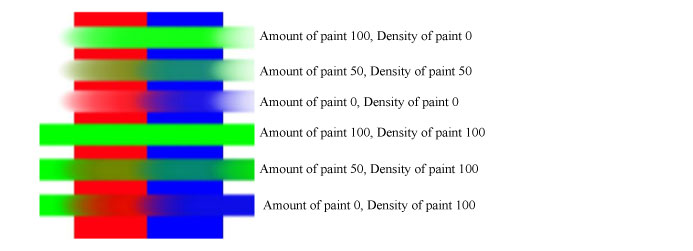
If Krita had a feature like this, with the new smudge engine smudge brushes can still mix the ““pigments”” of colors even if the color rate is set to 100% and the smudge length set to 20%. Turning off “smear alpha” creates a similar effect to this feature but requires the color rate to be set low.
6 Likes
It could be a request, the truth is that I feel that if this is missing in Krita so that the color mix has more options.
By the way I tried the advice you gave me and it worked very well but I think it can be improved.
2 Likes
so this is why rebelle 5 mixing is like that…
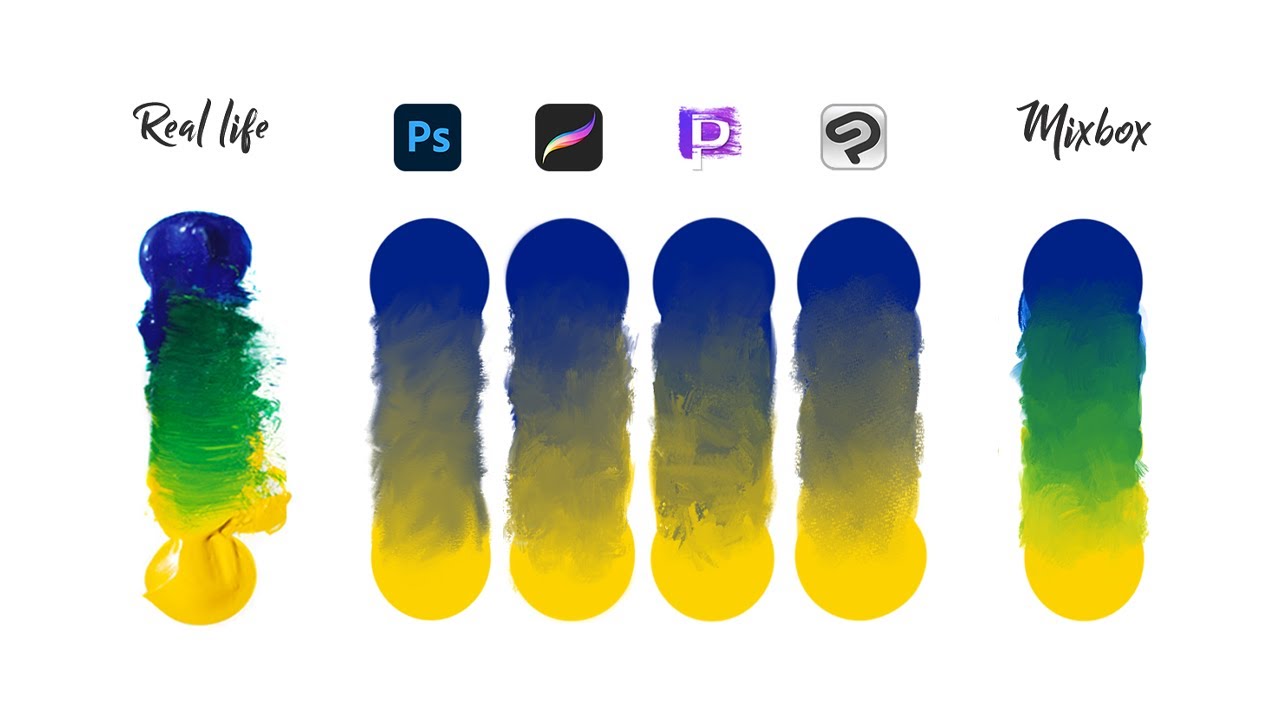
krita was one of them to do it first but now the rage for pigment is very hot  I know digital programs should focus on being digital but it still hurts a little
  the art i see done with photoshop can now be done in krita and csp and all other. will rebelle 5 artwork be done easier? better colors? i am curious.
7 Likes
There’s already some topics about this subject 
And some other:
https://krita-artists.org/t/finding-a-source-code-for-color-blending/33213?u=grum999
https://krita-artists.org/t/open-source-coding-color-model/31697?u=grum999
https://krita-artists.org/t/i-have-a-question/19117?u=grum999
Source code for mixbox seems to be provided here:
Also, it seems Krita a long time ago was able to do it (if I understood - Kubelka-Munk mixing code had gone after Krita 2.2.2) but it was removed from source code because of things (I’m not sure because of what, I’m not good enough with colors to understand the arguments provided while everyone seems to want it but it was implemented and then removed  )
)
You can read @halla explanations here:
https://twitter.com/hallarempt/status/1470054944640282629
Rather than having an additional topic about the subject, @raghukamath maybe this post can be joined to this one?
Grum999
2 Likes
Video is interesting, full of math and color theory.
But still too much for me 
Grum999
very interesting but still a bit odd.
just a plugin to mix colors seems easy to work with strangely by the looks of it.
I, for one, am glad that digital painting is additive. It’s how light behaves. If you have a yellow object in blue light, it will not appear green. So I view paints as kind of a special case.
It just happens to be that we have a long tradition of using pigments suspended in fluid media to represent things, that doesn’t mean they’re a superior medium.
6 Likes
Interesting info, we could be talking in a debate about how much we need that feature. I know artists who use even the RGB sliders to choose colors instead of HSB or similar.
At the end, i think the most important thing for “work” is to be fast, flexible, and solid. So if this is going to be a madness in terms of code…
Let see how things evolve. I want to see how much art is created in this way vs the normal way or standard digital.
2 Likes
The two light sources are “additive”. “A yellow object in blue light” is closer to “multiply”. The color of the object itself indicates what wavelength of light it reflects. RGB is equivalent to reflectivity. This is without considering the material.
@TheTwo right, and of course “colour” isn’t a physical property of anything in the first place, it’s just a psychological phenomenon.
I’m just trying to say that the way pigments mix is not some ground truth about what colour is like in the “real world”, nor is it objectively a superior way of representing things. It’s one approach.
1 Like
I would not mind to have the option to mix like pigments.
It would just be a new blending mode.
1 Like
Personally I like the Idea of being able to experiment with different options of color mixing and being able to do so similiarly as in the video would be quite fun to draw with!
1 Like
I finally got around to watching the demonstration explaining how Mixbox works and I see no reason why it couldn’t be implemented into Krita! I’d be the one to do it in a heart beat if I had even an ounce of programming ability. The fact this thread exists and that similar threads asking about it have been popping up for years now is proof enough there is a large enough niche of artists who would want to see this in Krita.
Coming from a traditional painting background, the dull and lifeless way colors interact on screen is blatantly apparent and I believe it ultimately bottlenecks your work flow. For a while now I’ve manually reproduced this using the Pigment.O plugin’s mixing tool to manually mix a number of color searches before painting to reproduce the practice of preparing a palette traditionally but this solution is obviously not efficient and doesn’t take into account how these colors interact when mixed on canvas.
Forgive my ignorance but I don’t understand how the lisence on the code released would even be applied. If you’re putting a copyright on a math equation, what level of deviation is required for it to become something original? The steps provided on the youtube demonstration to get to this point seems intuitive enough for someone unrelated to achieve the same conclusion on their own volition.
Fingers crossed some programmer out there will step up to the plate and make it happen. If anyone does, I will gladly be first in line to give feedback. Alternately if anyone wanted to provide pointers as to where to start, I’d more than happy to be that “enthusiast coder” to get this off the ground.
3 Likes
Hi
Looking the code, it’s not just “a math equation”
There’s a lot of data (Megabytes of data) used to apply the color mix.
Didn’t dig what exactly the data are and how they’re used, but it’s seems to be PNG data.
The things is you can’t just use the code “as this”, it’s not compatible with Krita license.
Like, I don’t know, ask a vegan to work at a butcher shop; even if it’s technically possible, it’s not really compatible 
Also, you can always try to understand the code, determinate the algorithm, and rewrite it in your own way.
But for what?
If you’ve read the topic, then you might be aware that behind the code, it’s seems to be a Kubelka-Munk implementation.
Then maths are known and available for everyone 
If you’ve read the topic, then you might be aware that long time ago Kubelka-Munk was implemented in Krita (at least it was available in version 2.2.2) and has been removed for some reason.
I can’t understand reasons why it has been removed, but I also still don’t understand why people want it…
Last time I’ve made a real painting, color mixing was very complicated for me
Grum999
1 Like
Yep. With time and mastery you begin to understand that feelings implemented through proper design are more way important than “correct” forms and brushwork things.
So, like @EyeOdin said, it is just nice additional blending mode to versatile brushwork in Krita.
 I tested the Kubelka-Munk implementation in Krita when it still had the feature and… believe me, it was very limited. No one missed anything. Afair, it was limited to an area inside a docker that could be used as a palette. You had only a fixed size rounded brushes, and a limited selection of color too. You can see it in action in this 14 y/o video under:
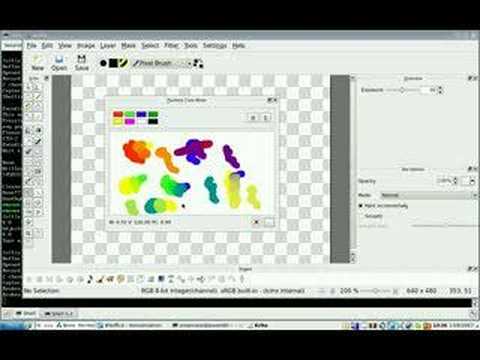
So very far of the fantasy that Kubelka-Munk existed to paint on the canvas, layer with any brush, any colors − far far from it. 
As soon as the docker started to get maintainance issue, you can understand why it was put aside (the very small userbase of that time wasn’t even using it).
5 Likes
Ah for sure it’s not really what I was thinking about when i read it was implemented
But a mixing docker like a real painter mixing palette is an interesting idea.
Thanks for the video
Grum999
1 Like
why is it mixing the color inside the brush instead of the color being mixed on the canvas?
like that it does not make much sense I guess…
1 Like
It’s actually not very difficult. My friend is not a programmer, but he quickly added it to the source code. And the effect is very good and the speed is very fast. When the diameter is 70, there is no difference in speed with ordinary brushes.
However, such code can only be used for experiments, and cannot be directly added to the backbone of krita. If you have a certain programming ability, you can compile it for your own use.
Otherwise, we can only wait for them to provide a GPL version of the mixbox, or some developers are willing to write the paper from scratch.
1 Like