Type setting looks amazing, almost feels like sculpting text. Feels like a truly Krita exclusive feature that even paid art programs lack. Great update!
Hi @wolthera ,
When translating the new Text Tool, I was unsure about the meaning of a few strings. Can you help me to understand them?
Subtract Shape from Text Flow Area
Subtract shapes from text flow.
Make shapes part of the subtracted shapes of the first selected text.
Question: What is Subtract, and what is Subtracted Shapes?
Remove Shapes from Text Flow
Remove shapes from text flow.
Remove shapes from text flow and add them to the layer.
Question: What is Remove, and why Add?
Make this flow shape be evaluated later.
Question: Evaluate by what, and Later comparing to what?
So, I have in-progress docs waiting for someone to read them through, but I’ll do my best.
Subtract Shape from Text Flow Area
Subtract shapes from text flow.
Make shapes part of the subtracted shapes of the first selected text.
Question: What is Subtract, and what is Subtracted Shapes?
Text in shape can have multiple flow shapes, as well as shapes that are subtracted from the flow. If you look at the complex example I posted earlier:
Here the center triangle is set to subtract. Notice how near the end of the video, the center triangle subtracts from the text flow areas.
Remove Shapes from Text Flow
Remove shapes from text flow.
Remove shapes from text flow and add them to the layer.
Question: What is Remove, and why Add?
Text contour shapes are currently children of their respective text. Remove removes a contour as a child of its text, and puts it on the layer globally.
Make this flow shape be evaluated later.
Question: Evaluate by what, and Later comparing to what?
That determines the order of the shapes in the flow. In the above example, upon creating the text, the rectangle is first, and the ellipse second. Then I set the ellipse to the first area. So that action does something similar, but it moves the selected shape later from its current position in the flow.
I was having a really hard time naming these actions, because while Inkscape does support multi-shape text flow, it doesn’t yet have these actions. And I don’t understand Scribus enough to figure out if it has such actions… (Update: I just double checked, it does not. You can only link and unlink text areas…)
Thanks! PDF is in itself even more of a headache, because, if I understand it correctly, the default metrics of most PDF files are those of Helvetica. Now, the problem there isn’t Helvetica itself: it’s a well respected font. But rather the fact that acquiring a copy of Helvetica is very very expensive. Because of that, PDF really is a format you don’t want to use without a library.
I might as well do an update now:
- MR 2470 got merged, so the paragraph and character tabs now both have character properties, and you can have both in a single style preset.
- I’m trying to fix bugs at the moment, but it’s a little slow going, as we’re having a final 5.2 release, and I had to write the release notes for those, as well as release notes for 5.3 and I’m also going through the long-neglected manual MRs.
- Carsten (@Drawpile ) has been working on getting the IME stuff to play nice on Android, though there’s still some issues with the selection menu on Android.
Thanks for the explanation @wolthera ! This cleared up quite some misunderstanings I had with the strings, and I’ve corrected them in the translation.
I can feel your struggle naming the terms too, especially when you are the first who ever did something like this. Do proprietary apps like Adobe Illustrator or CorelDRAW have something similar that you can borrow their names from? In that way it’s easier for us to translate and for users from those apps to understand what we do here.
Nope, illustrator calls it threaded text, and doesn’t have these actions, nor does corel draw where it is called linked text, in both cases they don’t have subtract flow shapes. Indesign calls subtract flow shapes “text wraps”, which is extremely ambiguous (Inkscape calls these subtraction frames).
In both cases it’s like Scribus, these instead assume you apply and undo the links one-by-one, and while that is a way you can do it in Krita as well (add flow shape/remove shape from flow), none of them seem to have reordering shapes inside the flow, which is what the last action is about. I guess I went a little too hard on the usability there.
I don’t know if it would be helpful, as it is a few years since I did tech pubs, but it seems like the idea of “chains” could be a useful metaphor, here, since the text is essentially chaining from one shape to another, and the shapes could be considered links in that chain. You already have “links” so the metaphor is hanging out there. So the concept would become “Move shape later (earlier) in chain.” I’m sorry, but I don’t believe “evaluate” is how end-users think about these things.
Not sure what would be best terminology for subtract flow shapes. In reality, it appears to be a Boolean operation, so it could be thought of as a flow invert shape, or flow exclusion shape (the Boolean term would be a “not” shape, which is amusing to me from a programming standpoint, but would bring out the torches and pitchforks).
It might seem like “usability overkill” but it’s extending the fundamental metaphor of text editing to a higher level. These days it’s a shock when I run into text entry boxes where the only possible action is backspace. That was copying the metaphor of erasing typewriters, which should have been dead and buried with the invention of full-screen editing terminals. Being able to move a cursor to the middle of a line of text and change it showed the power of nonlinear word processing. In the same way, having to delete all the shapes from a chain to reorder them will seem very clunky and antiquated when people get used to your way of doing it.
It’ll be very cool to see Krita getting features that OTHER software devs want to copy.
I’ve given it a try:
Unfortunately, today is the soft string freeze (that is, no futzing with names anymore after this, hard string freeze is 21st of jan). EDIT: actually, it’s the 21st of dec that soft string freeze is…
I’ve been spending most of my week on fixes for the glyph palette and type setting mode (look and feel got improved, there were some issues with moving the text too). There’s also some fixes to loading white spaces from xml (they were discarded, and we had code to prevent that, but then someone “helpfully” refactored that away  )
)
I’ve run into an issue, today… I recently downloaded a Nightly Next build (5.3.0-prealpha (git f71221a)) and was overly pleased with the additions of the Text Tool, in regard to the Text Flow and Path following. Everything worked great for the past few days. However, when I opened the program today, Krita freezes whenever I attempt to change the size of the shape, or alter a path in any way, for an object text has been attached. I don’t understand what’s happening, because everything was fine before. I can’t even edit previously created flows, in documents I had zero issues with before.
Any ideas?
(EDIT) - I did try downloading the latest Night Next version (5.3.0-prealpha-215812e2) which had the same results.
That sounds like it needs a bug report, I cannot reproduce it from this description, and that means that I need to look at the broken file in question (You can PM the file if necessary, but I definitely need a report in the tracker).
Similarly, I will need specific details on what actions you’ve tried and what they are not doing.
EDIT: It only happens in the appimage for me, which is very worrisome. I would still like that bug report!
Happy to send the file, though I’m not sure it’ll be worth anything, since it worked before things started going haywire. That’s what is confusing me about it all. For at least three days, everything worked great. Suddenly, I can’t alter the size of the shape, without a crash. Same workflow; same application version; different results… Very odd.
But I will try to PM you the file. I’ll also try to make a video of the issue and put it on my YouTube (unlisted), so you can see what I’m doing.
First time posting on this forum!
I previously filed a bug report for it and just recently added an attachment demonstrating the bug. Basically, the new text tool does not properly change the glyphs of a font to either its existing bold, italics, or bolded italics styles. Instead, it defaults to the synthesized bold or slant. When I turn both synthesized bold or slant off, the font style changes back to the unmodified “Regular” variant.
This affects older .KRA files made using older (development or release) versions of Krita where the dedicated bold/italics/bolded italics glyphs would be used as well, as a side affect.
@wolthera
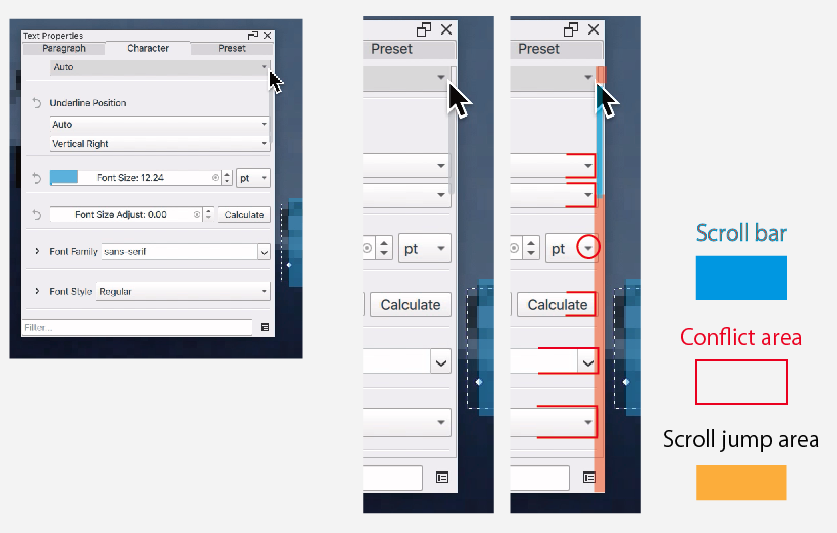
While using the interface, I experienced several accidental mis‑operations.
I was going through show multiple settings and checking each menu item in sequence, and that’s when I noticed the issue.
The problem occurs in the following order: 1) to 4).
- The scroll scrubber hides automatically.
- So,users cannot recognize which area will trigger a scroll jump.
- Meanwhile, the pull‑down menu mark (“▼”) is placed very close to the scroll‑jump area. It attract to user’s eye and natullary click near around.
- Users click the indicator, then the UI unexpectedly jumps and scrolls instead.
To make matters worse, several UI elements are visually subtle, which makes it difficult for users to return to their original location. This is not necessarily a design flaw, but it may unintentionally lead to user confusion.
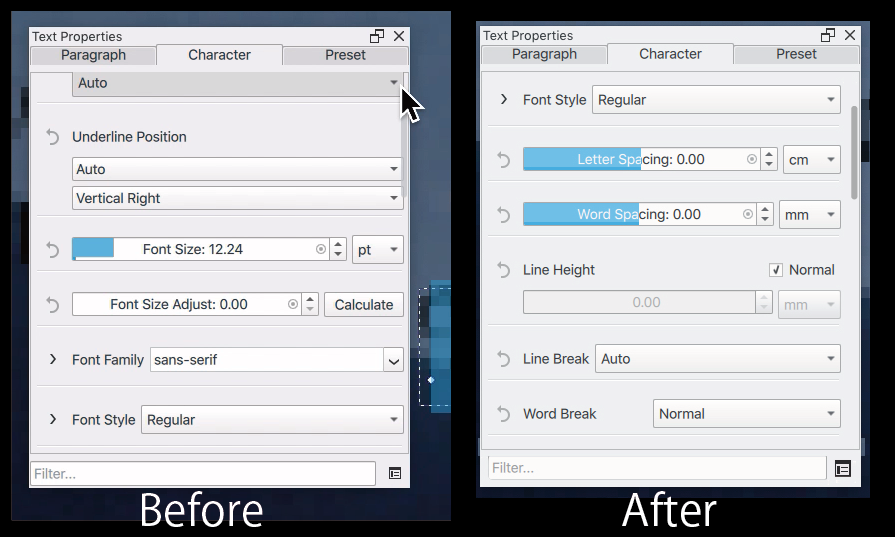
It may help to add a little more space on the right side to avoid overlap between the UI and the scroll components. This could potentially address the problem.
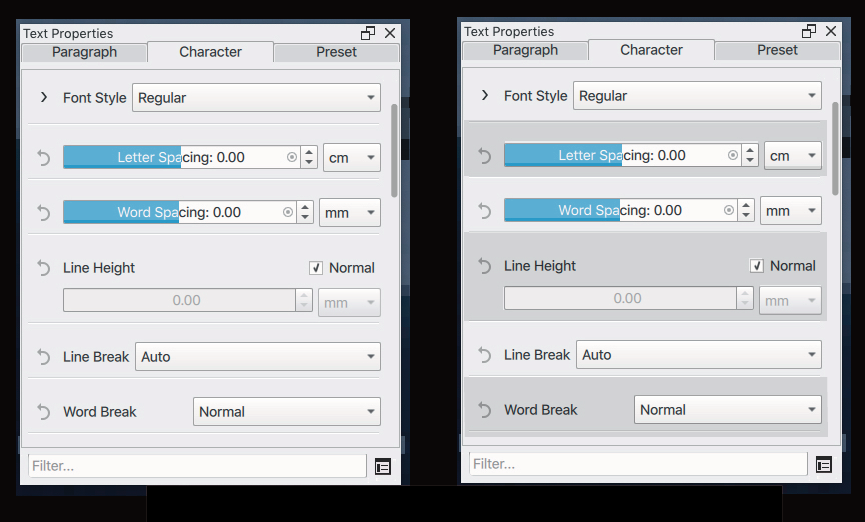
If possible, using alternating stripe colors for the items could make them easier to follow.
I understand how much effort you have put into this project over a long period of time. My intention is to respect your work, not to place any unreasonable demands on you.
The video may be a bit unclear,so I’m attaching a image as well
What is happning?
Yes, I’ve noticed this too, and have tried to fix the scrollbars several times already, but never got very far. Likely, the solution is to use KDE’s kirigami framework for this in the future, but we are too far in the current release cycle to do that.
Small update: I’ve been going over the bugzilla, and the previous two bugs (arial and the freeze) have been fixed among some other bugs. I tried to get PSD advanced text saving to work, but after several weeks I only got the barest bit further, so I’ve given up on that for now.
(The bugzilla work was also closing a whole bunch of bugs that I had implicitely fixed by rewriting the whole tool, and that ended up being a total of 42 bugs  )
)
I’m relieved to hear that.Thank you.
It looks like the project is steadily moving in a good direction.
I’m really looking forward to the release 
There is a bug report saying that sythesize bold is not working for variable fonts. I made a comment there, because I think this is not a bug.
Hello!
I’ve been waiting for this new version, mainly because I use text in some of my projects. The fonts previously did not work and 70% of them would look like some default font (I was using Krita 5.2.14). Now, with the version 6.0 the text tool was revamped. However, even picking the font doesn’t work, they’re not clickable:
https://i.imgur.com/YAgMcpT.png
The drop down menu shows fonts, yes, but they’re not clickable in any way. In order to choose a font You have to manually type in its name. Maybe it’s intended? If so it just seems very unintuitive.
Another problem is that Krita seems to be unable to detect certain fonts. Now, I use Adobe Fonts yes, but I make sure to install all fonts in the system so Krita and other programs can access them. For example: This font called Halcom: https://i.imgur.com/jwWIsRp.png

It’s in the system, yet Krita 6.0 can’t see it. Krita was able to detect Halcom in the previous version that I used: 5.2.14.
I’m not sure what’s going on. I understand that this is a Beta version, but I would like to report this before the full release, so maybe they can look into this. So far I’ve tried restarting Krita and my PC, no effect. Or maybe I’m using this tool wrong? I’m really sorry if that’s the case! D: Is there a way to fix these two issues or should I write a report?
That (unable to select a fonts from the dropdown) sounds like a Qt6 bug. I cannot reproduce it on Qt5 (Krita 5.3).
Please report both bugs to bugs.kde.org under the product krita and the component text.
Okay, thank You! :DD
There is a bug when adding style preset on the new text properties docker, the pop out menu turned into white block but some of the text is visible when moved.
When typing, the cursor will automatically jump to the back of the first character even when the text direction property is explicitly set to “left to right”.
There is another bug that makes space not working, but I couldn’t recreate the situation.
My device is Xiaomi Pad 7 running Android 16
report these bugs to bugs.kde.org under the product krita. I myself do not have an android device so I need to ask someone else to check them out.