Can’t believe the text tool is still stateless after so many years. Thanks for Krita, but maaan is it hard to use the text tool… I think the beta one is million times better than the official version. Please merge that beta code of Text tool into the Stable version please! I dont care if its buggy, its so good.
If you don’t care that it’s buggy then install the Krita Next version, which is “the stable version but with the buggy stuff merged in”.
The whole point of the Beta version is that it is on the home stretch to become the Stable version. There won’t be any need to roll any of its features into the Stable version, because 5.3 (and maybe 6.0, though I’m not sure how debugging QT6 will go) will BE the Stable version.
First of all big thank you to the developers for their work on updating the Text system.
I’ve just tested it in 5.3 and 6.0
In 6.0 - as someone already mentioned, you can’t select a font. The list opens, but clicking on it does nothing. (Ubuntu 22.04)
Then, I’m not sure if this is intended or something not working properly because of beta release - after placing new text in the canvas there are no text settings available. Text properties are hidden by default.
In 5.3 fonts work, but I must say the Text Properties panel is extremely unfunctional with all those dropdown menus. I wasn’t able to find line height and letter spacing options - I’m assuming this is still under works? The width parameter in Character tab doesn’t do anything.
As @eishiya already mentioned the text panel should be much simpler, like in Adobe. Libre Office also has this done pretty nicely:
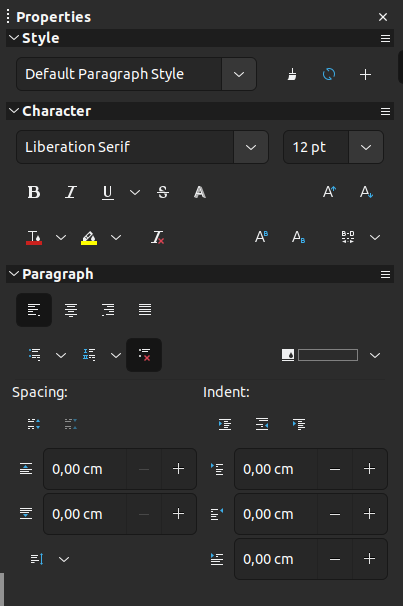
I very much appreciate the work, but if it goes to a stable release in this form, then it’s a regress not progress.
And one last thing, which is also about current text system - what I hate is when you have a text layer selected and then click to create new text, that text is being added on the same layer. For me personally each new text should be created as new layer.
I just want to say after a while of tinkering around and getting comfortable with the new text panel, I have absolutely fallen in love with the new text system. Keep up the great work.
I like having the option of having more than one text element on a layer without having to merge them. I’d hate to have that taken away. I’d have to test it in 5.3 (this is how it works in 5.2), but it seems like all it would take to force the text tool to create a new vector layer is to select a non-vector layer before creating the next text element.
This is because Krita has no dedicated text layers really just vector layers which all vector elements can share (no matter if shapes or text). What I would like is a way to “expand” a vector layer so you can see all individual shapes and can select them, similar to a group layer but that’s another feature altogether.
Then it could be a setting - whichever option you prefer.
I thought of having it as a setting, but is it really less effort to dig through a settings panel to find the switch than to click a layer? I can’t count how many years I used Krita before I learned how to paste the clipboard without creating a new layer. And I had to assign my own keyboard shortcut, since it doesn’t have one by default. Perhaps the keyboard shortcut for “create text on new layer” could be something like “shift-insert.”
Use the add properties dropdown at the bottom. The text tool was written to handle CSS based text layout, and thus has a lot of features for advanced typography (including a width slider that doesn’t do anything unless the font supports it). Most of the advanced features are hidden by default to avoid overwhelming newcomers. You are able to configure which properties to show by default with the button next to the “add properties” dropdown.
As for the text layers. I can’t change this without rewriting all of Krita’s vector code. At best I can make it so that the text tool always creates a new layer, but even then, that would not be possible for this release, as it would require a toggle, and that in turn requires a translatable label.
Furthermore, there’s other things that would be lost, like for example you can only flow text inside or onto a path when it’s in the same layer as the path. Similarly, when editing multiple texts at once with the shape selection tool, they all need to be on the same layer.
Thanks!
Been testing in 5.3 on windows. It’s a huge improvement to have the text on canvas instead of a separate window and i’m very grateful for solving my only complaint with the software (along with flawed vector operations).
For now however it’s unwieldy for an end user like me:
-The ”tool options” docker doesn’t have the options, requiring me to open and place a separate docker. It’s okay, but it should open by default. A docker opening another docker seems like bad practice. And it being a docker is in itself problematic for my setup as it has a lot of options and doesn’t fit anywhere, and stays open after i’m done with the text. Having a dedicated box open and close when you need to use the text tool would work much better for me. Visibility is “when relevant”, but it stays up even when it’s definitely not relevant as i’m not using the text tool.
-The interaction with the text positioning widget itself is uncomfortable. Widening the text area and moving the text require precise clicking and dragging. Moving the text reliably requires clicking on an arbitrary empty area above or below the text while the positioning widget is visible. It’s common in a rush to click away and have to reselect the text again. Takes a lot of focus in the middle of a complex workflow and feels slippery.
-The text has a text selection color around it that quickly stops matching the text during various operations like size changes. In general it’s in the way and it’s not clear which settings affect the selected text. For example changing text size in “Paragraph” with only a portion of the text selected changes the whole text, and suddenly you have a large text with a small selection in the middle that doesn’t match the scaled up text. Changing the size in “character” works to scale only the selected text as expected, yet the text selection color doesn’t scale correctly with it anyway. It’s all very confusing. While i can get used to it, it’s unwieldy and probably requires a clearer graphical solution and adjustments.
-It’s confusing that the option “Font style” is clickable when only “regular” is available. Also, when the font style list is expanded, the focus remains on the previous slider, if that has been interacted with before, so using keyboard arrow keys changes that other slider instead of scrolling through the font style list.
-Selecting the font family opens a non-resizable list. While the provided search function helps, having a longer list allows for visual selection of an appropriate font that’s currently not really feasible, it seems to me.
Hello,
In the new (and beta) Krita 6.0, I can’t make a part of my text bold (let’s say, just one word) without making the WHOLE of the text bold (same with italic). This was something you could do in the other versions. Is this a bug that can be easily fixed?
Thank you, and I look forward to the next improvements for the Text Tool!
As a comic artist using digital fonts, I would love to see the day where the text tool is as fluid as photoshop  (but I’m already thankful for the improvements made in Krita 6.0!)
clover
You should be able to highlight the text and use Ctrl + B, or select “Bold” from the Font Style section of the Character tab within the Text Properties Docker. I’ve been able to individually manipulate everything from style and letter spacing to color and size. If you’re editing the size, be sure it’s from the Character Tab, and not the Paragraph tab (as the Paragraph tab focuses on the entire paragraph, regardless of what you have selected).
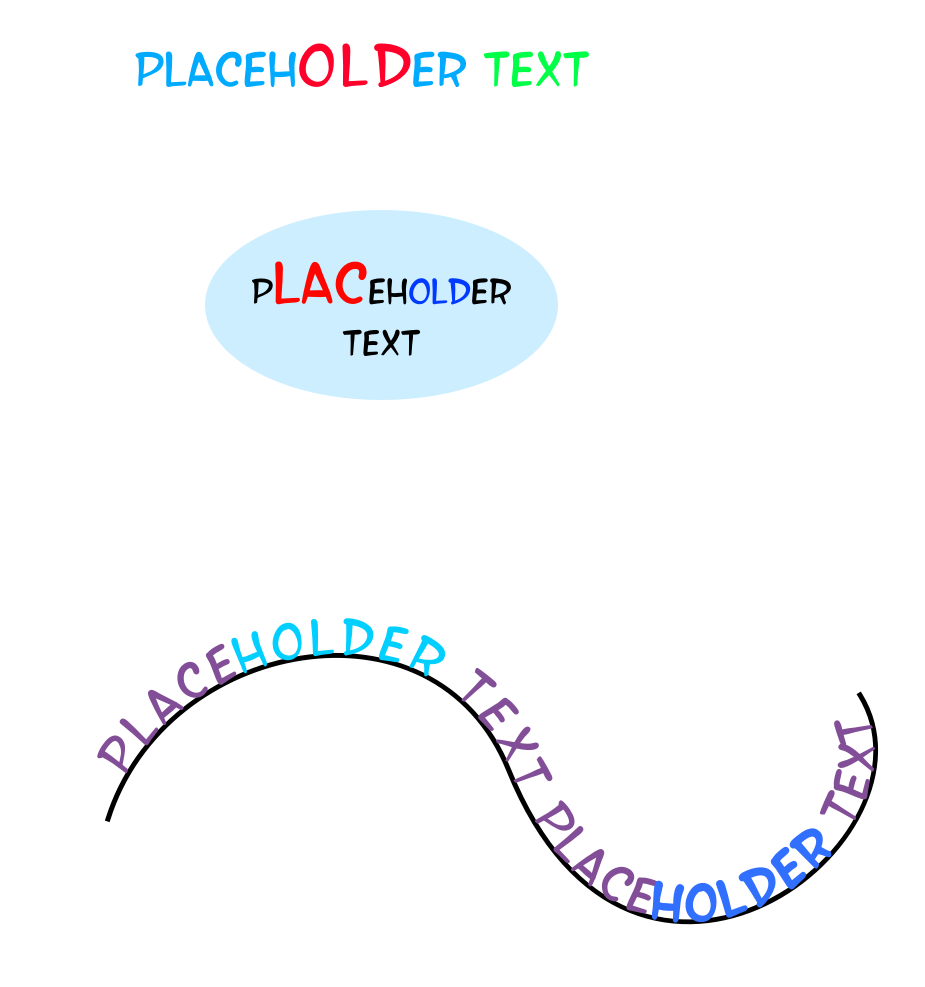
I found two minor bugs back in version 5.3.0 beta1 on android and at that time I couldn’t reproduce it, now I’ve tried the beta2 the bugs is still there but I’m not sure to report it to bugs.kde.org since these two are easily resolved with a few clicks.
first, whenever I create a new text and delete the placeholder text and after typing the first character the cursor will go to the left side but will act perfectly normal after that, moving from left to right, it only happened after typing the first character, so I need to manually move the cursor to the right.
second, the space will not working after I adjust anything on the docker without exiting the text tool and will go normal again after exiting the text tool and reselecting the text.
I wonder if anyone also encountered these on different Android devices.
my device is Xiaomi Pad 7 running Android 16
I’ve been checking out the latest beta - and ran smack dab into the new text formatting tools. This is major! Very nice! I can’t wait to start playing around with these new features. Thank you for the effort Krita rocksI
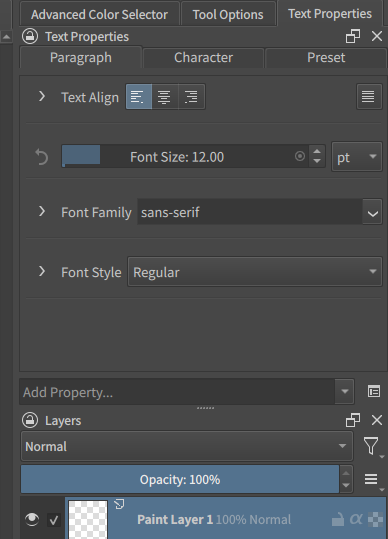
I would like to remind about the “Add Property…“ being very difficult to discover:
-
By default, the Text Property docker is placed next to the Tool Options docker above Layers docker. When there is not a lot options, there is a huge visual gap between other options and the Add Property… box. It makes people “unsee“ it because it’s visually grouped with the Layers docker below.
-
It has nothing to hint about it has anything to do with Text.
-
Add Property… is an input box. People expect a [+] button to add something, we don’t expect to add things by using an input box. It reminds me about a filter (it does that, actually, which I guess was why you used a input box here).
As a quick, dirty fix, I recommend to change the label to [+] Add Text Property… for now, until we find a better solution. Otherwise, I really worry people can’t find their way to this and leaves negative feedback as a result.
I would also like to point out about the new text tool lacking a way to pick a color from canvas.
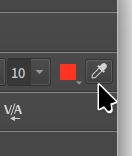
The old Text Tool has a color picker. This allows user to set text color by picking existing colors on canvas. This is a very important feature – when we do Text, we usually use the same colors on canvas. The canvas color picker can do this without the hassle of creating a new color palette for every new picture. Now without it, the new text tool is causing a huge productivity impact for me.
Another problem being the Font family droplist being too short, and each item taking up so much space, it’s borderline impossible to use like this:
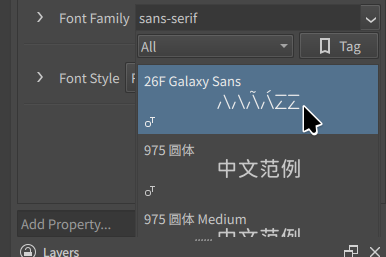
I also found out that the height of the Font family drop-list is limited by the Text Property panel’s height. It cannot go outside of it. This is very unfriendly to low-res screens. On my screenshot, I was actually using a 2.5K screen, and yet it only allowed me to show 2 fonts at a time. This is very difficult to use.
I think the new Text Tool can benefit from a floating tool bar like any word processor, showing everything the old Text tool had:
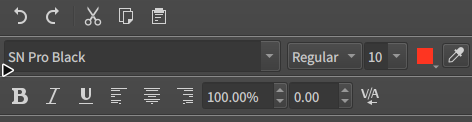
A floating tool bar is in-context, it doesn’t force the user to move away from the content. When using the new Text tool, I have to jump back-and-forth between the canvas and dockers, which has slowed me down significantly.
As I mentioned in the earlier comments, there is a reason a word processor usually puts these buttons/boxes on their tool bar, because they are ESSENTIAL. Now with the new Text tool, I have to search and add property first, or switch to another tab to create and load presets, which is not efficient or intuitive to use.
I would really like to see the old Text tool come back in the form of floating tool bar. We need buttons near the text, not a wall of text placed somewhere else that we have to scroll multiple times to do essential stuff.
Yeah, I just ran into this last night. Was surprised there wasn’t a simple way to grab the color I needed for my text. I ended up having to draw on my canvas with that color I needed, just to create a temporary swatch in the recently used colors, which I could then right click to apply to my texts outline (because I also discovered you can’t right click a swatch color to add it as a secondary).
Sorry for the radio silence, next to the text tool, I also am responsible for writing/proofreading the manual and making the release notes, so I had to spend last month getting those ready for 5.3/6.0.
I’ll be trying to get back to fixing bugs now. Thankfully it seems none of the bugs up till now are crash or data-loss bugs. A good number of them are caused by the qt6 port, which means I can’t fix them before 5.3 releases, as I don’t have a qt6 development system, so I will be focusing on non-qt6 related bugs.
For the mentioned topics just now:
- I cannot work on color setting for 5.3, as mentioned before I was blocked on this previously. If you need color picking in the text tool for 5.3, you can use the screen color picker in the foreground “select a color” dialog. This dialog is non-modal, so you can keep it open and also edit text on the canvas at the same time.
- A on-screen menu bar for text editing will not be possible for 5.3 either. I did have it in my design notes, and have sketches for it, but the main problem is, as mentioned previously, that we need to make sure it doesn’t conflict with the UI elements provided by IME and virtual keyboards. It is therefore non-trivial to implement, and I would like to have stablized the text tool a bit more before we try this.
- The font window cutting off is a QML limitation, I have a workaround for it, but the problem is again the Qt6 port, as I have to blindly make changes to stop it from crashing in Qt6, and then dmitry finds new ways for it to crash in Qt6. I have no clue if we’re going to see it in 5.3 either.