So krita’s autosave feature is only for when it crashes. If you save or close your project then the autosave gets deleted. I’ve never heard of an autosave feature that doesn’t actually save. It doesn’t make sense, why wouldn’t I want both a backup file and an autosave file in case I forget to save or accidentally close my project? Please just don’t delete autosaves. Would’ve saved me 2 months of work but I guess I’m stupid to think that an autosave would actually save like it does on every other platform. Thanks for reading, please change this. Clumsy artists will thank you
Erm… I don’t understand… I you saved the document, you have a real saved document instead of the autosave, why you may need one more file? More than that, there is a “Save backups” feature that allows preserving files to be overwritten by adding ~ symbol to them. I don’t really understand what the problem is. Could you elaborate?
And what platform/OS do you use?
 Hello
Hello Yes, but if I work on that document for six hours and then accidentally close the program then I just lost six hours of work. If the autosave actually saved then I would only lose 15 minutes of work. I think Takiro is right, if it doesn’t save your work then it shouldn’t be called an autosave. I’m on windows.
I’m not familiar with your save backups feature, could you explain?
I guess the Create a Backup File on Saving setting is meant, found here:
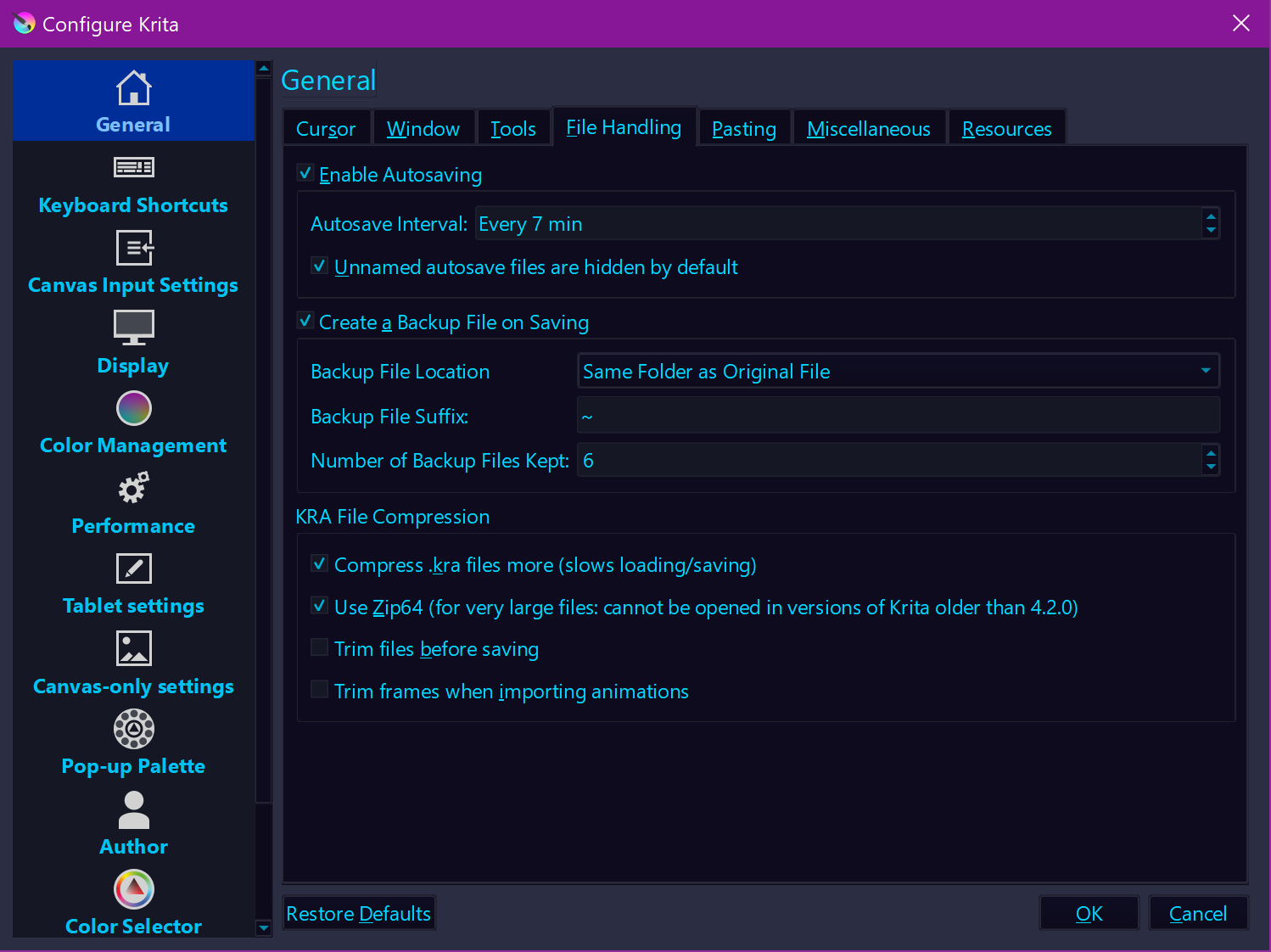
And I try to describe it here, including possible ways to prohibit the next disaster:
Closing Krita randomly on Windows is difficult because of the security prompts, but if you blindly click everything away, the culprit is easy to find in any mirror, but you certainly won’t see Krita there. And if you recklessly shut down programs with the Task Manager, you can look for the culprit in the same place.
In my eyes, everyone should follow a strategy like the one I describe in the linked posting above. And sorry for criticizing, but to work on something for more than a day and not making at least a daily backup to put it aside into a safe place is not very wise. Even these days, anyone should have heard about the importance of backups, but only a few do not believe in their infallibility and create them.
With Krita, you should at least create 4 incremental versions/backups per hour, that at least is my opinion, the drives are big enough these days to take tons of backups while you create something, and when you have finished a work, you can purge them to regain the space they needed for your next project, possible strategies can be found in above linked posting, if you want to go that route.
Michelist
When you close Krita with a file open that has unsaved changes it asks you if you want to save them. If you press No, then that’s on you.
Thanks for elaborating. I have gotten that popup before but not when I closed it this time. Could’ve been a glitch, that’s fine. Krita already makes a backup file when you save and I though that the autosave would save. So I thought I already had 2 backups. Also, what I think confused me is that I have opened Krita regularly, without it crashing and it asks if I want to continue my autosave file. So, again that’s why I assumed it was an regular autosave. Is there a reason why krita doesn’t have a regular autosave feature?
Also, wouldn’t it just be easier to save the autosave files instead of having to make like 7 backups? I imagine it would save a lot of stress and time. Even if you do press “No” that’s a harsh consequence for human error. I agree with Skess01, just having a final autosave would be helpful. If you don’t want the autosave then just delete the file, that seems way easier than creating 4 backups per hour and then deleting them
Would you be so kind to explain, how it is implemented?
- I have a new not yet safed file.
- I have automatic save activated with an interval of 5 minutes.
What happens?
As far as I understand, a file with the name ~autosave_{date}.kra will be generated every 5 minutes and overwrittes the autosave-file as long as I don’t save the file. Is that correct?
When I save my file, the autosave-file will be removed.
Now a backup-file will be generated every 5 minutes with the name ~{filename}.kra
I can increase the number of backup-files so that when I have 3 configured, I have 3 backup-files
for 5, 10 and 15 minutes. So I can go back in time if I wantet to.
Is that also a correct assumption?
What happens to the backup-files, If I close the image, without saving?
Will they also be lost?
Why is a backup-file generated, but the file I am working on is not updated simultaneously? ( I think that is the main point of the feature-request)
What technical difficulties do you have, when saving a file?
Could it be, that you can not access the file, to write while it is opend in krita?
If so, could you create a temporary file, the user works on, so that you can save the file, and the backup at the same time?
Cheers
About saving on exit, maybe a sort of “save a backup of the latest #n documents I didn’t save on exit” would be useful, no-one is perfect, so it’s possible to lose a lot of work, when in a hurry for example.
What platform you are on? The only possible explanation of your bug is that you are talking about Android version. Do you use android or something else?
Michelist
I have an android and it’s connected to my laptop but I’ve never used Krita on my phone.
Would you be so kind to explain, how it is implemented?
I have a new not yet safed file.
I have automatic save activated with an interval of 5 minutes.
As far as I understand, a file with the name ~autosave_{date}.kra will be generated every 5 minutes and overwrittes the autosave-file as long as I don’t save the file. Is that correct?
Yes, autosave file is created every 5 minutes after the last save operation.
When I save my file, the autosave-file will be removed.
Yes, as soon as you save your file, the autosave will be removed. The main purpose of autosave file is to let you survive a crash or a computer power failure. When you save your file manually, you do already have a hard copy of the document, so the autosave file is removed.
Now a backup-file will be generated every 5 minutes with the name ~{filename}.kra
No, not correct. A backup file is created on every “manual save” operation. When you save your file manually, instead of overwriting the previous file, Krita will copy the old file into a backup location, which is {filename}.kra~, afair.
I can increase the number of backup-files so that when I have 3 configured, I have 3 backup-files
for 5, 10 and 15 minutes.
No, it will store the state of your image before the last three save operations.
What happens to the backup-files, If I close the image, without saving?
Nothing. Backups are stored forever. They are rotated on every save operation.
What technical difficulties do you have, when saving a file?
In many cases the files are big and saving them is expensive and slow, which can interfere with user’s workflow.
I guess, the rest of the questions were based on assumption that backups are created automatically, which is not true, so I don’t know how to answer them.
tldr; the current design of autosave in Krita is the following: if the user closes Krita, Krita asks him if he would like to save the file and if the user rejects, then no traces of the file are left, i.e. no autosaves or something. If Krita somehow closed the document without asking, then this is a bug and should be fixed. If Krita asked and the user replied “No”, then we can do nothing about that, that is the user’s choice.
PS:
There is a little culprit of Android, where we are expected to store the document on the persistent memory all the time (but we don’t), and we will probably have to implement some kind of on-the-fly-saving feature. But that is a purely Android-specific issue, on desktops is it a feature, not a requirement, since on desktops no professional app works like that.