Thanks for the feedback!
Interesting about the buttons and sliders; would you prefer these as a separate button on the toolbox, or as an action on the subtool menu? Depends how accessible it is I suppose…
Cheers
Thanks for the feedback!
Interesting about the buttons and sliders; would you prefer these as a separate button on the toolbox, or as an action on the subtool menu? Depends how accessible it is I suppose…
Cheers
@Kapyia I’ve fixed the delayed menu problem so it’s quicker without a stutter. Should I have a setting where users can change the delay time?
PSA: I’ve made an addition to the code which customises the delay of the subtool menu. On line 48, the number can be changed, and represents the number of milliseconds delay.
To setup, download this file https://drive.google.com/file/d/1USyuNrj_NkzGGJF395acRadFqnglMzP9/view?usp=sharing , and replace the toolkitdocker.py file in C:\Users<user>\AppData\Roaming\krita\pykrita\toolkitdocker on Windows, or the equivalent location on other operating systems.
Once you have edited/replaced the file, reload Krita to see the change.
My question is, should I provide an input for the user to change this delay inside Krita?
Cheers
I just downloaded the tool today and was able to use it without a problem. I particularly love that I can compress the menu to reduce real estate and keep the tools as a floating menu rather than it being docked. The long button revealed the group of buttons as you designed it.
I’m excited about your future goal to customize groupings…
This is very cool.
Thank @fullerhill_art
I think it would be great to provide input to customize the delay since you are planning to customize the groups as well. It kinda makes sense to have both together. I assume you would have it placed in the general Krita configuration tab ?
I think i need to add I found I was able to use the long press for the groupings, but only with my mouse. The stylus would not generally allow the long press to work. More often than not (hit and miss), the stylus would just produce a spinning wheel. I managed to get it to work with my stylus sometimes when I double press the grouping option with it. The first time to select the group the second time to tell the menu that I want the drop down not the default. I think the problem is that when I press with my stylus the group automatically assumed I want the default option in that group. I wonder if you disable the default and automatically force the drop down without a delay.
I realise that you may alway need an active selection, but I am suggesting that the grouping icon not activate the selection unless the dropdown is first open.
It might make the menu more dynamic. Just a suggestion .
I wonder if that is what people were/are experiencing as well.
I know I had a problem like yours with hold pressing on stylus a while ago too. I’m attempting to add the user interface for customising the delay, I’ve heard from the Krita team that the settings page would need to be linked to Python before I can add anything to it.
Currently, I have a dialog box with options popping up on right click in the toolbox docker. Which would you prefer?
Cheers
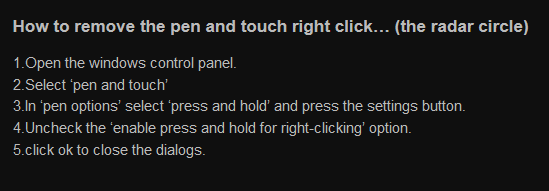
Is it the Wacom tablet ring?
That can luckily be disabled, here is a screenshot from designimage on how to remove it. Hope it helps!
I assume you mean the customization dialog box ? Generally speaking I like all my configs in one place so that it is intuitive to find for all my settings. I can easily see your plugin becoming a standard for the tool itself at some point. If the krita config is not an option for now, I am not sure i like the right button option since some people might have that option already configured for something else.
What about adding a settings group in your menu. that way you can customize on teh fly and you cant miss the settings.
btw, I saw the added code for the press time and plan to add it at some point so I can change the settings but I assime that is just temp solution.
Regards
Definitely temp. Now the interface works!
I might consider adding a settings button, I wouldn’t want the kit to become too crowded however.
Cheers
I’m unsure of how the custom categories interface could look, if anyone has ideas or mockups, they’re free to share!
Similar to the assign tags approach in brushes.
Thank you @Rakurri . This change helped a bit but the drop-down is still somewhat sporadic. I’m going to try downloading the wait time setting script to see how that might help.
If you want my latest revision, it’s here: https://drive.google.com/file/d/1tkbGW-nCYAAIPYO6hu1EQUWJ2MU4f19k/view?usp=sharing
Once you’ve installed and reloaded Krita, right-click on the toolbox, and open the ‘General’ tab. That should give you an input box. It’s very rudimentary right now though.
I just did a quick text and it seems pretty cool so far 
It would be even cooler if it had an option to display in canvas only mode - then it could be used alongside kanvasbuddy!
Then they could be like bestest friends, and kanvasbuddy would be happy because it would have another python tool to play with, and @Kapyia would see how happy his baby was and feel inspired to make kanvasbuddy mk.2 and fix the drag stutter on linux that makes poor old Mythmaker grind his teeth every time he activates it (which he’s starting to do frequently because it’s so cool having a massive canvas with minimal clutter!)… 
Aha, that seems like a good idea, I’ll have to ask @Kapyia how the plugin is enabled on canvas, or even check in his code myself  .
.
Oh, that reminds me.
@mankysee Kanvas Buddy by @Kapyia has an undo/redo button, with opacity sliders. Have you looked at that plugin? Here: KanvasBuddy - a Minimalist Toolbar
@fullerhill_art KanvasBuddy (as well as the “nuTools” module for the Redesign plugin) use their own custom widgets; not dockers. That’s why it’s not hidden along with other dockers, but it also means it can’t be “docked” in the UI.
Also, the undo/redo buttons aren’t part of the official release of KB. They’re a nice mod to the plugin provided by @malle_yeno  see his post here!
@Mythmaker I believe I’ve mentioned this already, but I’ve tried KB on a handful of distros and DEs and have not been able to reproduce any sort of “drag stutter”. It’s very difficult to fix a bug without being able to explore the issue or test potential fixes, otherwise I can promise you I would’ve fixed it by now. 
Ooh, I might have a setting then for canvas only mode that transfers the docker into a widget perhaps. That would be wishlist currently though I think.
Cheers!
As a further test to the one earlier, I used this plugin on an older model laptop with an older windows build and an older wacom 21UX. On that setup the drop-down long press does not work at all. If you are getting some feedback on dropdown not working, it might be due to older builds. By comparison, the kanvas buddy works on the old and new.
The good news is that the plugin is working on my newer model now though.