So I’ve been thinking of starting the works on a new vector library set.
Truthfully I feel like the previous one doesn’t address some things, and most importantly the bubbles are not of uniform line width if you try to make them of same size. Some of the bubbles are meant to be small and i think i didnt separate them well.
Also there is a lack of proper burst bubble, as well as the thought bubbles are not very good shapes. Maybe more angular shape, a little more landscape ones.
Is there any kind of speech bubbles i should check out for inspiration?
Yes .
Manga speech bubbles are versatile,but I would also love to have some basic speech bubbles from western and european comics.
Maybe in future,someday @kaichi1342 will add a few !
No pressure,I am willing to wait !
Im not very familiar with the style of western comic speech bubble, but i know them when i see them.
I guess they kinda have more rounder look and then to go landscape, also the end of the tail is sometimes thicker, something it looks more like its drawn with a fineliner. compare to manga ones that looks like its drawn with a maru or gpen.
I have checked my vector libraries again.
I found that David Revoy’s Pepper and carrot speech bubble set is also available in there,along with your V2 set. I can’t remember if that set came as pre-installed or I had added that separately.
But the main point is,combining these two sets,I can avail a huge range of speech bubbles( be it manga,european or western). Only problem is pepper and carrot speech bubble set doesn’t have stroked shapes,where within your set ,I can find both options.
So I am content with the current available resource and if you add anything more in future,it will be like a bonus for me !
pepper and carrot is pre-installed, i think its one of the first since the vector library is introduced.
It is what inspired me to do my first set by opening the svg file of that.
Okay.
I guess I was not attentive about that pre-installed part !
By the way,is there any easy way/ trick available to add strokes to these vector shapes,without converting them to paint layer ?
It can come handy while using pepper and carrot speech bubbles.
For pepper and carrot set with tails.
You need to Ungroup them 2x - till the accompanying shapes are individual vectors. 2x ungroup [one for symbol wrap, and another fro group wrap].
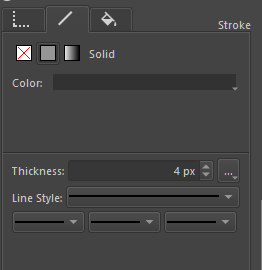
then select one of this shapes, and go to Tool options.
choose the line one, and select solid or gradient color.
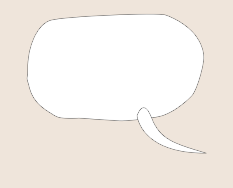
You can do the same for the tail. It will look like this.
You select them both and perform unite operation. ^-^
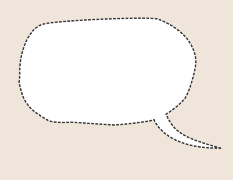
the nifty thing with this is that you can make the outline dashes - though selection is limited.
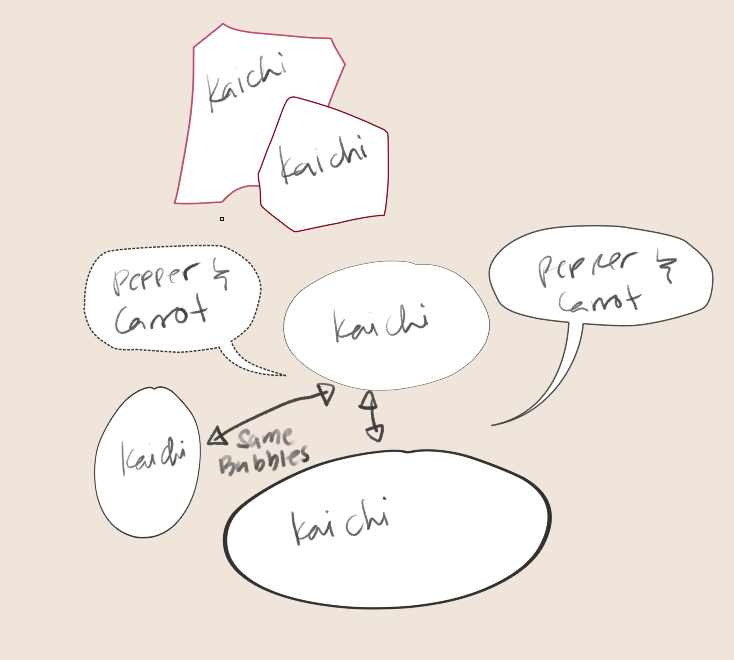
This can be done on my V2 -base sets, but only need to ungroup 1x. I wish you can assign line color without the need to ungroup.
the lines also make this thicken on side effect when you squish the shape that makes it looks like it is a pen lined.
@ari sorry if i sound kinda rude earlier, was just happy to share the inspiration for my first vector library. I love this feature and wish many more will utilize it
Thanks for the help.
It can be a nice workaround for 1-2 speech bubble conversion. Though in case of large number of speech bubble conversion, the whole process can be somewhat tedious !
but for now,have to cope with this method only.
true it can get tedious to do repeated ungroup.
I made my white only set for it to be assigned a line color by the tool but at the moment you can’t set line color on a group/ symbol wrapped shape so ungroup is needed.
I think I read somewhere that in inkscape a layer is actually a group. I have noticed that anything that I import from inkscape is grouped, if you combine this to the default layer as a group in inkscape it makes sense it will have two groups. May be a custom plain svg without layer will have only one group? May be we can optimise this part.
Vector is a different beast and my comfort level around vectors is quite limited.
But I like the endless and lossless modification options available in vector shapes.
So currently I am trying to go with a hybrid method,where I can save some time.
(I use this method in Medibang pro and it helps to save some time and energy !)
First I am creating vector shapes,which can be edited according to available text matter.
Then adding the vector tails, though it can be optional.
Lastly creating a new paint layer over it and adding whites (wherever required) to create different variations .Tails can be also be drawn separately here on paint layer as per need.
I was experimenting with some of the speech bubbles available in your set and this method is providing me some easily editable options.
i think any encapsulating tag is essentially a group. Though in inkscape i think layer are < g > tag so a group.
My set doesnt have the < g > group tag but since all symbols need to have the < symbol > tag to be recognize so it has 1 layer of group. thats its only 1x in mine .
Pepper and carrot has < symbol >< g /> so its 2x ungroup for that one.
OTH in inkscape < g /> group sets can be assigned a line style, symbols works different there…
edit: i realize none of the tag i wrote showed up XD
Yes, Inkscape layers are <g /> elements, with some attributes to indicate they’re layers to Inkscape.
Yeah, Inkscape’s symbol support is much better than Krita’s. The thing is that Krita right now has no good way to handle ‘shared’ shapes and styles inside a vector layer, and I currently have no idea how we’d go about tackling that (though I’d like the situation to improve because it’d improve the usability of text as well).
Would it be possible to make it so that if you assign a line style / or fill style to it that even if its grouped, all the member of that group get assigned the same style?
I think this will reduce alot of the frustration for symbol sets. since they are on the get go grouped due to the symbol tag even if they are just one shape, when you try to change their color - they dont change.
RM nature and scifi set also didnt have the inner < g > tag even if they are essentially one vector shape. So dropping them and trying to change their color can be frustrating to those who didn’t know that an ungroup is needed. It will also eliminate atleast one ungroup step.
one alternative is that when you drop an auto one ungroup is made so that the symbol outer tag is remove. i honestly don’t know im throwing ideas in the air lol.


 !
!


 !
! !
!

 , interesting work-around.