as the title says, a want a way to toggle size pressure and opacity, same feature found in csp and photoshop, and be able to assign it to a shortcut. like just checking the box in the brush menu in f5, so itd work in every brush, keeping the settings of course
1 Like
Hi @nekorar
This feature may or may not already exist – I’m not sure because you have described as “the same feature found in csp and photoshop.” That doesn’t describe it sufficiently.
Please read the instructions for creating a feature request:
1 Like
In Krita, you can toggle the size and opacity pressure for brushes, similar to what you’re asking. Here’s how you can do it and assign it to a shortcut:
- Toggle Size and Opacity Pressure:
- Open the “Brush Editor” by pressing F5.
- In the “Size” and “Opacity” sections, you’ll find checkboxes for “Pressure” under the “Size” and “Opacity” tabs. You can toggle these options to enable or disable pen pressure.
- Assigning a Shortcut:
Unfortunately, Krita doesn’t have a direct shortcut to toggle pressure for every brush like in Clip Studio Paint or Photoshop. However, you can create a custom brush preset with pressure toggled on or off and assign a shortcut to quickly switch between them:
- Customize the brush settings (with pressure on or off).
- Save it as a new brush preset.
- Go to Settings > Configure Krita > Keyboard Shortcuts.
- Search for “Switch to Brush Preset” and assign a shortcut to your new preset.
This will let you switch between brushes with and without pressure quickly, and you’ll be able to maintain your settings.
1 Like
Haven’t check the clip studio yet. but if you looking for toggle pressure effect, you can always find it in the “configure toolbar”
add the “Use Pen Pressure” icon to the desired toolbar section.
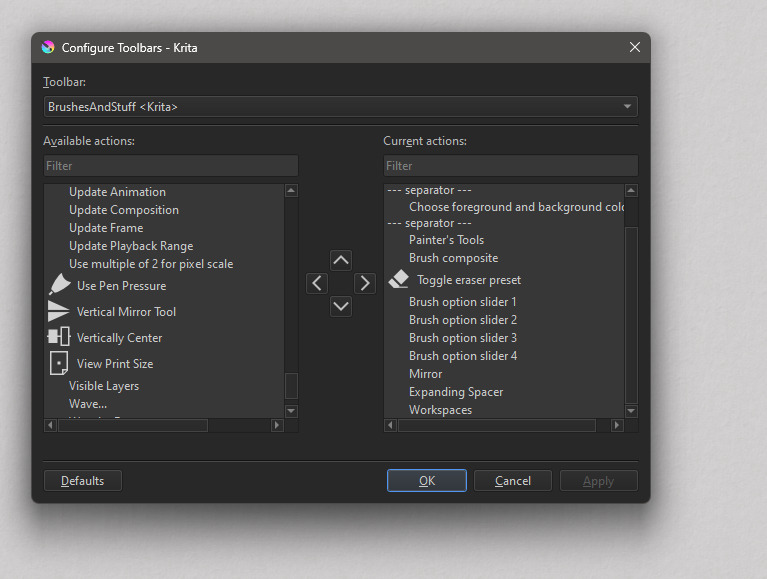
For other toggle options you can use this plugin
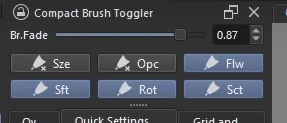
2 Likes
@TG_Link_Hub @mdfm28 Those are great tips! If @nekorar returns to the forum one day, hopefully one or some of these will be helpful to them.