Gap Closing Selection Script (WIP)

I created a script that automatically closes small gaps and performs continuous area selection. I made it with the help of many people on this site. Thanks to all of you.
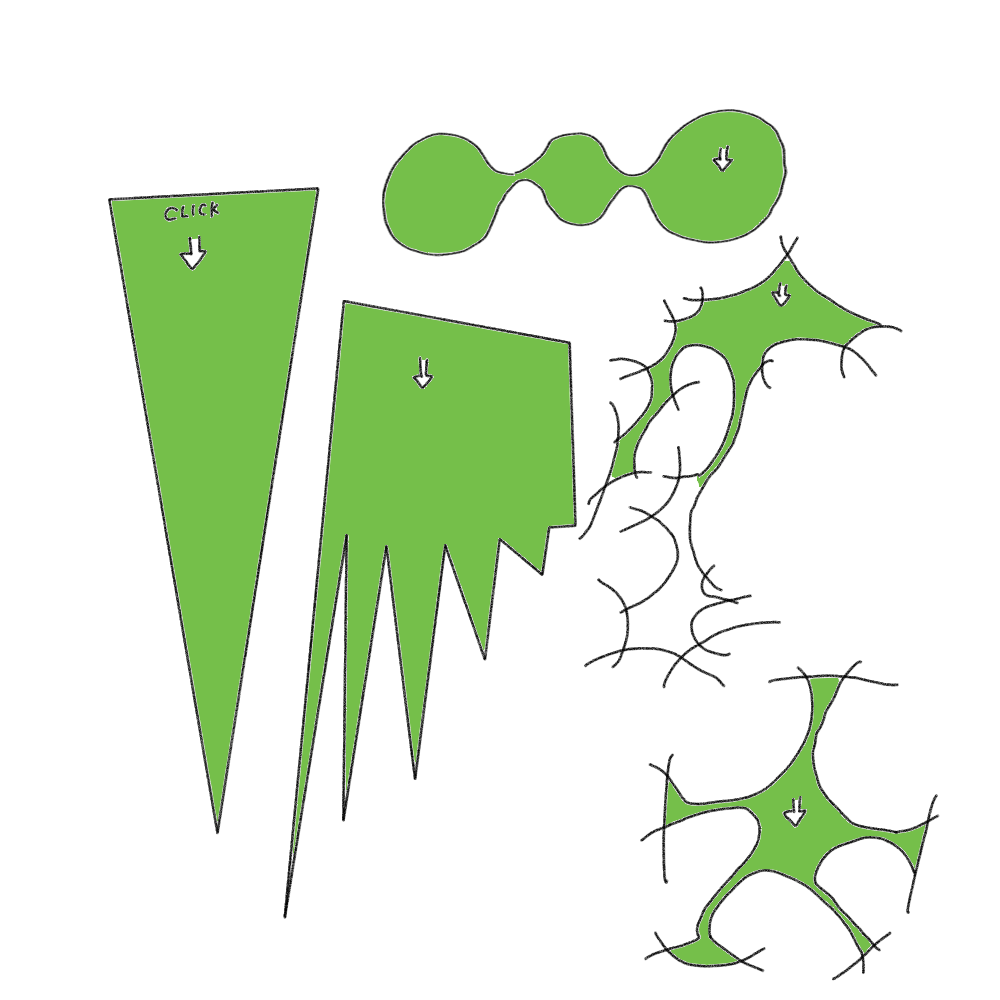
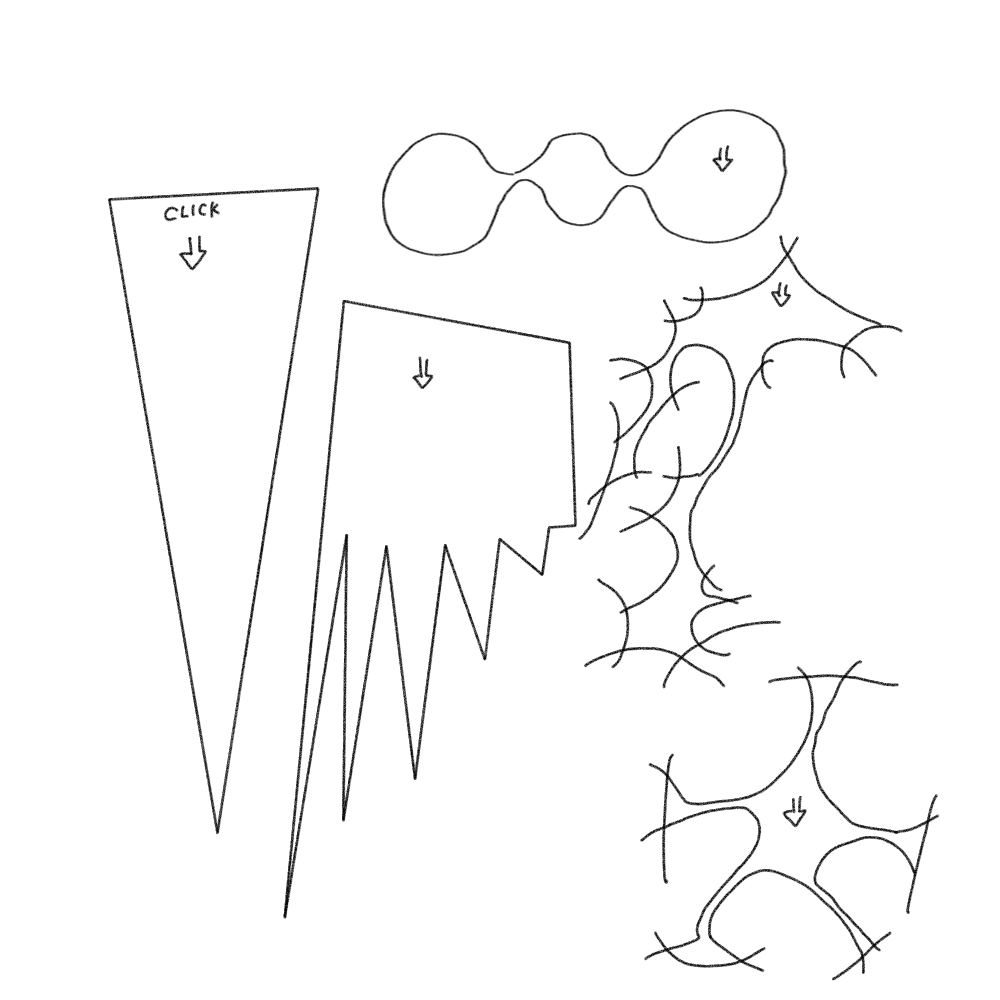
<test picture
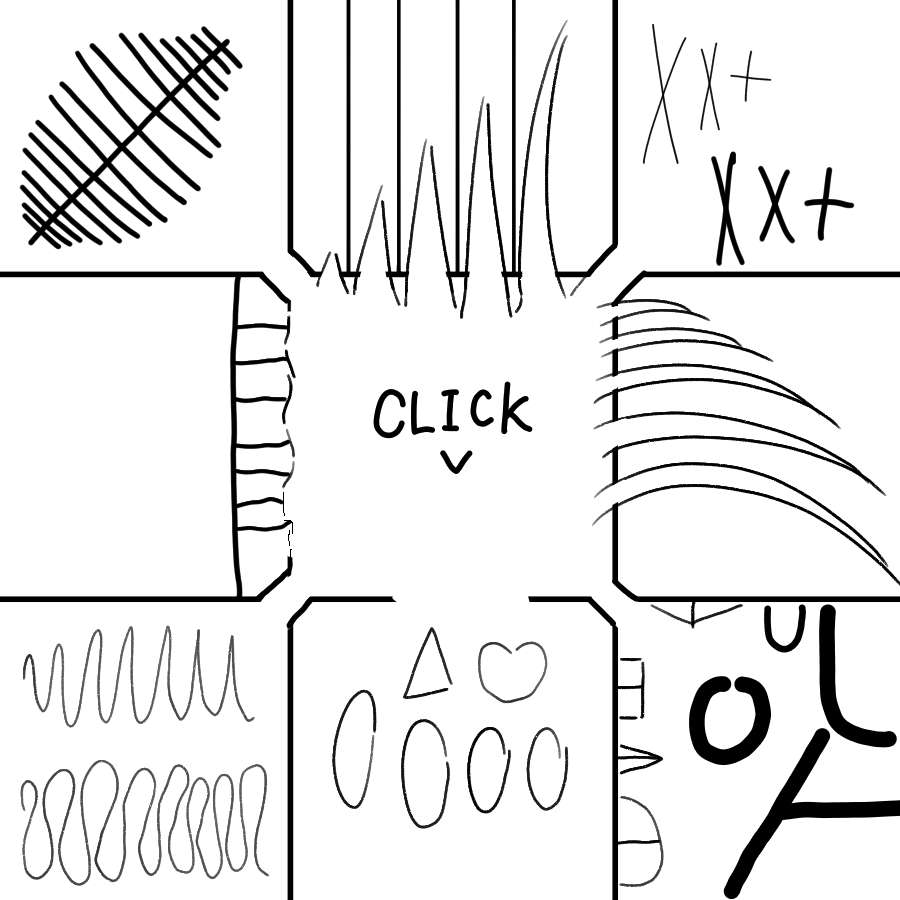
<Fill in the resulting selection
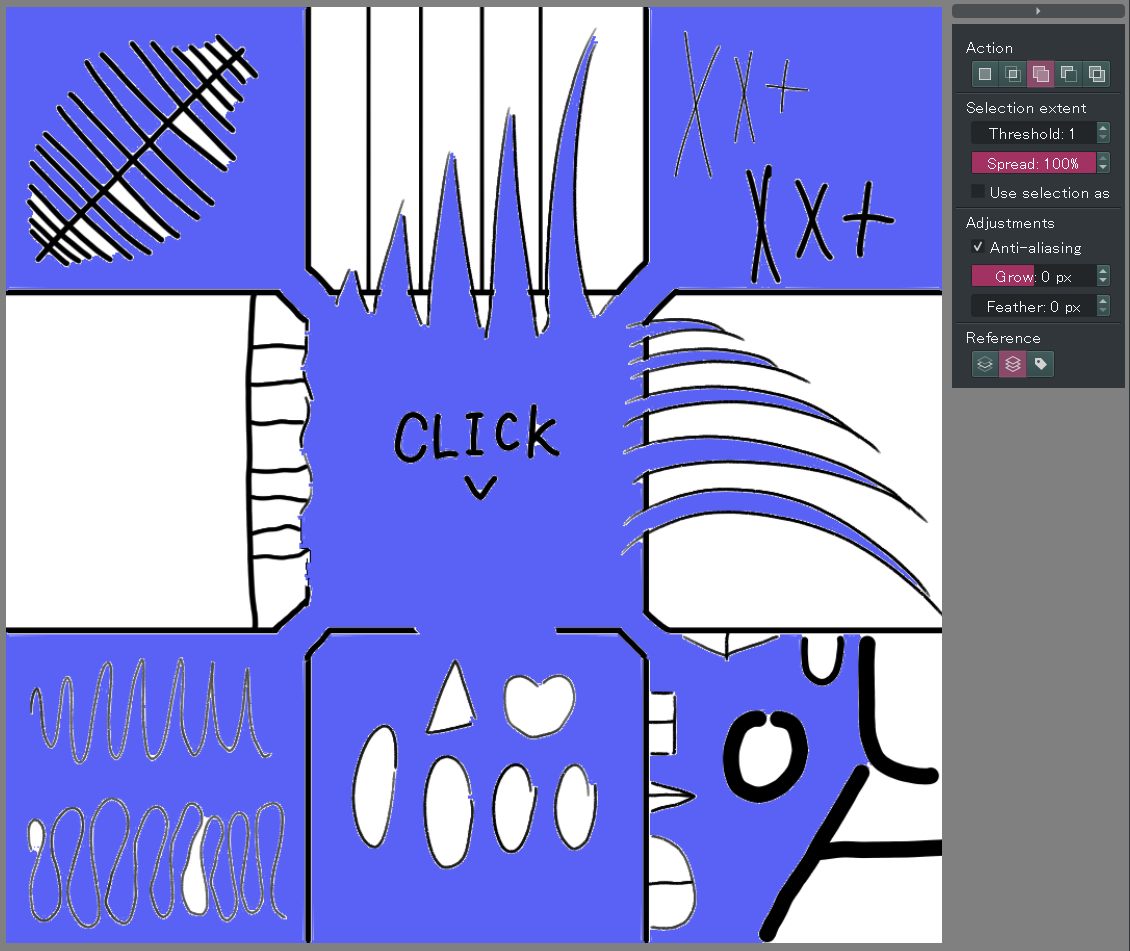
You can try it out by setting up this script in Ten Scripts and running the script at any cursor position. If it works correctly, you can make the selections shown in the image above. (coloring is not included in the code)

from struct import iter_unpack
from krita import *
from PyQt5.QtCore import (
        Qt,
        QPoint,
        QPointF,
        QTimer,
        QEvent)
from PyQt5.QtGui import (
        QImage,
        QPainter,
        QColor,
        QTabletEvent,
        QCursor)
from PyQt5.QtWidgets import (
        QWidget,
        QApplication)
import time


def find_current_canvas():

    q_window = application.activeWindow().qwindow()
    q_stacked_widget = q_window.centralWidget()
    q_mdi_area = q_stacked_widget.currentWidget()
    q_mdi_sub_window = q_mdi_area.currentSubWindow()
    view = q_mdi_sub_window.widget()
    for c in view.children():
        if c.metaObject().className() == 'KisCanvasController':
            viewport = c.viewport()
            canvas = viewport.findChild(QWidget)
            return canvas

def click_canvas(global_pos=None):#click action

    if global_pos is None:
        global_pos = pos#これが現在のカーソル位置
        global_posF = QPointF(global_pos)
        posF = QPointF(canvas.mapFromGlobal(global_pos))
    else:
        global_pos = pos
        global_posF = QPointF(global_pos)
        posF = QPointF(canvas.mapFromGlobal(global_pos))
    device = QTabletEvent.Stylus
    pointer_type = QTabletEvent.Pen
    pressure = 1
    x_tilt = 0
    y_tilt = 0
    tangential_pressure = 0.0
    rotation = 0.0
    z_pos = 0
    key_state = Qt.NoModifier
    unique_id = 1234
    button = Qt.LeftButton
    buttons = Qt.LeftButton

    table_press = QTabletEvent(
            QEvent.TabletPress,
            posF,
            global_posF,
            device,
            pointer_type,
            pressure,
            x_tilt,
            y_tilt,
            tangential_pressure,
            rotation,
            z_pos,
            key_state,
            unique_id,
            button,
            buttons)

    table_release = QTabletEvent(
            QEvent.TabletRelease,
            posF,
            global_posF,
            device,
            pointer_type,
            pressure,
            x_tilt,
            y_tilt,
            tangential_pressure,
            rotation,
            z_pos,
            key_state,
            unique_id,
            button,
            buttons)

    if not canvas.isActiveWindow():
        canvas.activateWindow()

    QApplication.sendEvent(canvas, table_press)
    QApplication.sendEvent(canvas, table_release)
    activeDoc.waitForDone()

def edgeDetectFilter(node):

    filt = application.filter('edge detection')
    configParameters = filt.configuration()
    configParameters.setProperties({
            'horizRadius': 1,
            'lockAspect': True,
            'output': 'pythagorean',
            'transparency': True,
            'type': 'prewitt',
            'vertRadius': 1})
    filt.setConfiguration(configParameters)
    filt.apply(node, 0, 0, w, h)
    activeDoc.waitForDone()

def createSelection(node, filterFunc):#Converting an image to  selection

    bounds = node.bounds()
    x, y = bounds.left(), bounds.top()
    width, height = bounds.width(), bounds.height()
    #プロジェクションを使ってるから画面に出さないといけない
    pixelData = bytes(node.projectionPixelData(x, y, width, height))
    selectionData = bytearray(width * height)

    for i, rgba in enumerate(iter_unpack('>BBBB', pixelData)):
        selectionData[i] = filterFunc(*rgba)

    newSelection = Selection()
    newSelection.setPixelData(selectionData, x, y, width, height)
    return newSelection

def transparentFilter(r, g, b, a):#不透明度の閾値を数値で決める
    return 255 if a > 1 else 0#aが何より大きかったら完全に選択するか
#使い方selection = createSelection(doc.activeNode(), transparentFilter)

def fillColor(node, colorx):#選択範囲に関係なく全面が色づく

    image = QImage(w, h, QImage.Format_ARGB32)
    image.fill(colorx)

    pixel_ptr = image.constBits()
    pixels = bytes(pixel_ptr.asarray(image.byteCount()))
    node.setPixelData(pixels, 0, 0, w, h)
    activeDoc.waitForDone()

def makeProcessedLine():
    #Make the entire image a line drawing
    lineNode = rootCopy.duplicate()
    edgeDetectFilter(lineNode)#エッジを出す
    #To Selection
    ProcessedLineSe = createSelection(lineNode, transparentFilter)

    return ProcessedLineSe

def reactsToGap():
    #Scope to fill in the gap location
    reactsToGapSe = processedLineSe.duplicate()
    eraseLineSe = processedLineSe.duplicate()

    reactsToGapSe.grow(1, 1)#この辺で調整
    reactsToGapSe.grow(1, 1)
    reactsToGapSe.grow(1, 1)

    activeDoc.setSelection(reactsToGapSe)
    reactsToGapSe.shrink(4, 4, True)

    reactsToGapSe.subtract(eraseLineSe)
    reactsToGapSe.grow(2, 2)

    return reactsToGapSe

def exclusionZone():
    #Scope for eliminating unwanted parts of the lid.
    selectionPL1 = processedLineSe.duplicate()
    selectionPL2 = processedLineSe.duplicate()
    selectionPL3 = processedLineSe.duplicate()

    #Apex
    activeDoc.setSelection(selectionPL1)
    selectionPL1.grow(3, 3)
    selectionPL1.shrink(6, 6, True)

    activeDoc.setSelection(selectionPL2)
    selectionPL2.grow(7, 7)#このへんの数字はいじりようがある
    selectionPL2.shrink(3, 3, True)

    selectionPL3.grow(1, 1)
    selectionPL2.subtract(selectionPL3)

    selectionPL1.add(selectionPL2)

    return selectionPL1

def fillExpantion():#Expand the selection inside the line

    s = activeDoc.selection()
    s2 = s.duplicate()

    for i in range(6):
        s2.subtract(processedLineSe)
        s2.grow(1, 1)

    s2.intersect(reactsToGapSe)#蓋と拡大する範囲の交錯部分をプラス
    s2.intersect(allSe)

    s.add(s2)
    activeDoc.setSelection(s)

def makeCloser():
    #赤いレイヤを用意 clip red layer
    redNode = activeDoc.createNode("redNode", "paintlayer")
    fillColor(redNode, Qt.red)
    allSe.copy(redNode)

    closerNode = activeDoc.createNode("closerNode", "paintlayer")
    closerNode.setBlendingMode("not_converse")#否定逆論理

    processedLineSe2 = processedLineSe.duplicate()
    activeDoc.setSelection(processedLineSe2)#最も狭い隙間を閉じるもの
    processedLineSe2.grow(1, 1)
    processedLineSe2.shrink(2, 2, True)

    reactsToGapSe.grow(1, 1)
    reactsToGapSe.add(processedLineSe2)
    reactsToGapSe.subtract(exSe)#フタ完成

    reactsToGapSe.paste(closerNode, 0, 0)#クローザーを設置
    rootNode.addChildNode(closerNode, topNode)

    application.action('deselect').trigger()#変な選択あるから一旦掃除
    activeDoc.waitForDone()

    click_canvas()

    fillExpantion()

    closerNode.remove()


application = Krita.instance()
activeDoc = application.activeDocument()
activeLayer = activeDoc.activeNode()
rootNode = activeDoc.rootNode()
topNode = activeDoc.topLevelNodes().pop()
w = activeDoc.width()
h = activeDoc.height()
allSe = Selection()
allSe.select(0, 0, w, h, 255)
# time.sleep(2)
pos = QCursor.pos()#起動時点のカーソル位置

#Avoid having the same tool twice in a row.
application.action('PanTool').trigger()#連続で同じツールを持たないよう回避
application.action('KisToolSelectContiguous').trigger()#select tool

rootCopy = activeDoc.createNode("rootCopy", "paintlayer")
rootNodepix = rootNode.projectionPixelData(0, 0, w, h)
rootCopy.setPixelData(rootNodepix,0, 0, w, h)#ノード全体に画像貼り付け

canvas = find_current_canvas()
processedLineSe = makeProcessedLine()
reactsToGapSe = reactsToGap()
exSe = exclusionZone()
makeCloser()

activeDoc.setActiveNode(activeLayer)

#Make an ant march appear.
application.action('invert_selection').trigger()#アリの行進
application.action('invert_selection').trigger()

(If you enable time.sleep(2) on line 246, you can also use it in the scripter, since execution will be after two seconds.)

However, it is not yet a practical script for the following reasons

Current problems and suggestions for improvement

  • Slow operation when targeting images larger than 1000Pix.
  • It does not respond when the active layer is a group layer.Why does it work when used in Scripter…?
  • There are small areas that fail to be painted.
  • Can’t I use shrink() for selections without activeDoc.setSelection()?
  • Is there a way to use continuous selection without click action? If there is another, the code might run faster.

I will continue to tweak and improve this script. If anyone has ideas on how to make this better, I would appreciate it if you would share them with me. I am a programming beginner so if you can share your code with me, that would be great.

Translated at DeepL

15 Likes

Really promising :smiley: I will go test this later tonight.

Thank you.

The code has been simplified slightly and an exception handling when clicking outside the canvas has been added. Selection accuracy remains the same.

from struct import iter_unpack
from krita import *
from PyQt5.QtCore import (
        Qt,
        QPoint,
        QPointF,
        QEvent)
from PyQt5.QtGui import (
        QImage,
        QPainter,
        QColor,
        QMouseEvent,
        QCursor)
from PyQt5.QtWidgets import (
        QWidget,
        QApplication)
import time


def find_current_canvas():

    q_window = application.activeWindow().qwindow()
    q_stacked_widget = q_window.centralWidget()
    q_mdi_area = q_stacked_widget.currentWidget()
    q_mdi_sub_window = q_mdi_area.currentSubWindow()
    view = q_mdi_sub_window.widget()
    for c in view.children():
        if c.metaObject().className() == 'KisCanvasController':
            viewport = c.viewport()
            canvas = viewport.findChild(QWidget)
            return canvas

def click_canvas():#click action

    global_pos = pos#これが現在のカーソル位置
    posF = QPointF(canvas.mapFromGlobal(global_pos))

    mouse_press = QMouseEvent(
            QEvent.MouseButtonPress,
            posF,
            Qt.LeftButton,
            Qt.LeftButton,
            Qt.NoModifier)

    mouse_release = QMouseEvent(
            QEvent.MouseButtonRelease,
            posF,
            Qt.LeftButton,
            Qt.LeftButton,
            Qt.NoModifier)

    if not canvas.isActiveWindow():
        canvas.activateWindow()
    QApplication.sendEvent(canvas, mouse_press)
    QApplication.sendEvent(canvas, mouse_release)

    activeDoc.waitForDone()

def edgeDetectFilter(node):

    filt = application.filter('edge detection')
    configParameters = filt.configuration()
    configParameters.setProperties({
            'horizRadius': 1,
            'lockAspect': True,
            'output': 'pythagorean',
            'transparency': True,
            'type': 'prewitt',
            'vertRadius': 1})
    filt.setConfiguration(configParameters)
    filt.apply(node, 0, 0, w, h)
    activeDoc.waitForDone()

def createSelection(node, filterFunc):#Converting an image to  selection

    pixelData = bytes(node.projectionPixelData(0, 0, w, h))
    selectionData = bytearray(w * h)

    for i, rgba in enumerate(iter_unpack('>BBBB', pixelData)):
        selectionData[i] = filterFunc(*rgba)

    newSelection = Selection()
    newSelection.setPixelData(selectionData, 0, 0, w, h)
    return newSelection
#使い方selection = createSelection(node, transparentFilter)
def transparentFilter(r, g, b, a):#不透明度の閾値を数値で決める
    return 255 if a > 1 else 0#aが何より大きかったら完全に選択するか

def fillColor(node):#選択範囲に関係なく全面が色づく

    image = QImage(w, h, QImage.Format_ARGB32)
    image.fill(Qt.red)

    pixel_ptr = image.constBits()
    pixels = bytes(pixel_ptr.asarray(image.byteCount()))
    node.setPixelData(pixels, 0, 0, w, h)
    activeDoc.waitForDone()

def makeProcessedLine():

    rootCopy = activeDoc.createNode("rootCopy", "paintlayer")
    rootNodepix = rootNode.projectionPixelData(0, 0, w, h)
    rootCopy.setPixelData(rootNodepix, 0, 0, w, h)#ノード全体に画像貼り付け
    #Make the entire image a line drawing
    edgeDetectFilter(rootCopy)#エッジを出す
    #To Selection
    ProcessedLineSe = createSelection(rootCopy, transparentFilter)

    return ProcessedLineSe

def reactsToGap():
    #Scope to fill in the gap location
    reactsToGapSe = processedLineSe.duplicate()
    eraseLineSe = processedLineSe.duplicate()

    reactsToGapSe.grow(1, 1)#この辺で調整
    reactsToGapSe.grow(1, 1)
    reactsToGapSe.grow(1, 1)

    activeDoc.setSelection(reactsToGapSe)
    reactsToGapSe.shrink(4, 4, True)

    reactsToGapSe.subtract(eraseLineSe)
    reactsToGapSe.grow(2, 2)

    return reactsToGapSe

def exclusionZone():
    #Scope for eliminating unwanted parts of the lid.
    selectionPL1 = processedLineSe.duplicate()
    selectionPL2 = processedLineSe.duplicate()
    selectionPL3 = processedLineSe.duplicate()

    #Apex
    activeDoc.setSelection(selectionPL1)
    selectionPL1.grow(3, 3)
    selectionPL1.shrink(6, 6, True)

    activeDoc.setSelection(selectionPL2)
    selectionPL2.grow(7, 7)#このへんの数字はいじりようがある
    selectionPL2.shrink(3, 3, True)

    selectionPL3.grow(1, 1)
    selectionPL2.subtract(selectionPL3)

    selectionPL1.add(selectionPL2)

    return selectionPL1

def fillExpantion():#Expand the selection inside the line

    s = activeDoc.selection()

    if s == None:
        pass

    else:
        s2 = s.duplicate()
        for i in range(6):
            s2.subtract(processedLineSe)
            s2.grow(1, 1)

        s2.intersect(reactsToGapSe)#蓋と拡大する範囲の交錯部分をプラス
        s2.intersect(allSe)

        s.add(s2)
        activeDoc.setSelection(s)

def makeCloser():
    #赤いレイヤを用意 clip red layer
    redNode = activeDoc.createNode("redNode", "paintlayer")
    fillColor(redNode)
    allSe.copy(redNode)

    closerNode = activeDoc.createNode("closerNode", "paintlayer")
    closerNode.setBlendingMode("not_converse")#否定逆論理

    processedLineSe2 = processedLineSe.duplicate()
    activeDoc.setSelection(processedLineSe2)#最も狭い隙間を閉じるもの
    processedLineSe2.grow(1, 1)
    processedLineSe2.shrink(2, 2, True)

    reactsToGapSe.grow(1, 1)
    reactsToGapSe.add(processedLineSe2)
    reactsToGapSe.subtract(exSe)#フタ完成

    reactsToGapSe.paste(closerNode, 0, 0)#クローザーを設置
    rootNode.addChildNode(closerNode, topNode)

    application.action('deselect').trigger()#変な選択あるから一旦掃除
    activeDoc.waitForDone()

    click_canvas()
    fillExpantion()

    closerNode.remove()


application = Krita.instance()
activeDoc = application.activeDocument()
activeLayer = activeDoc.activeNode()
rootNode = activeDoc.rootNode()
topNode = activeDoc.topLevelNodes().pop()

w = activeDoc.width()
h = activeDoc.height()

allSe = Selection()
allSe.select(0, 0, w, h, 255)
# time.sleep(2)
pos = QCursor.pos()#起動時点のカーソル位置

#Avoid having the same tool twice in a row.
application.action('PanTool').trigger()#連続で同じツールを持たないよう回避
application.action('KisToolSelectContiguous').trigger()#select tool

canvas = find_current_canvas()
processedLineSe = makeProcessedLine()
reactsToGapSe = reactsToGap()
exSe = exclusionZone()
makeCloser()

activeDoc.setActiveNode(activeLayer)

#Make an ant march appear.
application.action('invert_selection').trigger()#アリの行進
application.action('invert_selection').trigger()


This code makes the “closerNode” appear on the screen and temporarily closes the gap. The weakness of this code is that it works like a keyboard macro, automatically clicking the mouse to select a continuous area. It would be faster if the parts that fill the gap did not have to appear on the screen…
Also, I still don’t understand why it doesn’t work when the active node is a group layer.

5 Likes

When a large number of layers are overlapped, the lower the active layer is, the longer it seems to take to process contiguous selection.

However, it does not seem to make sense to temporarily activate the upper layer and perform a click action.

The processing time to create and display a closer and the processing time for contiguous selection each have difficulties to shorten.
This code seems to have hit an impasse…

1 Like

dk8 would you like to go visit the gap closing for fill tool currently active. deif_lou is thinking of developing that feature. You might me able to discuss with him your script - might help with your script.

I wonder if it is from krita 5.2 ? krita’s contiguous selection has become faster. I have coded the method differently due to this. Various problems have been solved and the selection can now be performed in about 1 second. Selection expansion, feathering, and selection modes such as “add” and “subtract” are also supported.
You can register it in ten scripts and start it at any position to try it out. (I recommend testing with krita 5.2 or later).

from krita import *
from PyQt5.QtCore import QPoint, QPointF, QEvent, QTimer
from PyQt5.QtGui import QImage,QMouseEvent,QCursor

def find_current_canvas():
    q_window = application.activeWindow().qwindow()
    q_stacked_widget = q_window.centralWidget()
    canvas = q_stacked_widget.findChild(QOpenGLWidget)

    return canvas

def click_canvas():

    mouse_press = QMouseEvent(
            QEvent.MouseButtonPress,
            posF,
            Qt.LeftButton,
            Qt.LeftButton,
            Qt.NoModifier)
    mouse_release = QMouseEvent(
            QEvent.MouseButtonRelease,
            posF,
            Qt.LeftButton,
            Qt.LeftButton,
            Qt.NoModifier)

    QApplication.sendEvent(canvas, mouse_press)
    QApplication.sendEvent(canvas, mouse_release)

def clipFillColor():
    def fillColor(node):
        image = QImage(w, h, QImage.Format_ARGB32)
        image.fill(Qt.red)
        pixel_ptr = image.constBits()
        pixels = bytes(pixel_ptr.asarray(image.byteCount()))
        node.setPixelData(pixels, 0, 0, w, h)
    # clip red color
    redNode = activeDoc.createNode("red", "paintlayer")
    fillColor(redNode)
    allSe.copy(redNode)
    redNode.remove()

def makeSelection():
    global lineSe

    startSe = activeDoc.selection()#selection by first Click
    application.action('deselect').trigger()

    invertSe = startSe.duplicate()
    invertSe.invert()

    lineSe = invertSe.duplicate()
    lineSe.border(1,1)#selection of line art

    # selection that close gaps
    gapSe = lineSe.duplicate()
    gapSe.grow(5,5)
    gapSe.shrink(5,5,True)
    gapSe.grow(1,1)
    gapSe.border(1,1)

    # selection that can make hole in the gap selection
    needleSe = lineSe.duplicate()
    needleSe.grow(5,5)
    needleSe.subtract(lineSe)
    needleSe.shrink(3,3,True)
    needleSe.grow(1,1)

    # make hole in the gapSelection
    gapSe.subtract(needleSe)

    gapSe.paste(closerNode, 0, 0)# gap closer

    if aaBool:# restore state and ready for secondClick
        aaBox.setChecked(True)

def expand():
    def parameter(selection):
        # grow of selectoin
        if box_grow_v >= 0:
            selection.grow(box_grow_v, box_grow_v)

        elif box_grow_v < 0:
            selection.shrink(abs(box_grow_v), abs(box_grow_v), True)
        
        # feathering of selection
        if box_feather_v > 0:
            selection.feather(box_feather_v)
        
        return selection

    global compSe

    if activeDoc.selection():
        currentSe = activeDoc.selection()

        se = currentSe.duplicate()
        se.subtract(lineSe)
        for i in range(3):# fill inside
            se.grow(1,1)
            se.subtract(lineSe)
        
        se.intersect(allSe)

        compSe = parameter(se)

def mixSelection():
    global compSe
    global preSe
    # Compatible with selection mode
    if preSe != None:
        if controlMode == 2:
            preSe = compSe

        elif controlMode == 3:
            preSe.intersect(compSe)

        elif controlMode == 4:
            preSe.add(compSe)

        elif controlMode == 5:
            preSe.subtract(compSe)

        elif controlMode == 6:
            preSe.symmetricdifference(compSe)

        compSe = preSe

def afterCare():
    # restore state
    buttons[controlMode].setChecked(True)
    closerNode.remove()
    activeDoc.setActiveNode(activeLayer)

    box_grow.setValue(box_grow_v)
    box_feather.setValue(box_feather_v)

def visualizer():
    # to visualize the selection(krita has bag?)
    if compSe == None:
        activeDoc.setSelection(preSe)
    else:
        activeDoc.setSelection(compSe)

    application.action('invert_selection').trigger()
    application.action('invert_selection').trigger()

def settingTimer(ms, func):

    timer = QTimer()
    timer.setInterval(ms)
    timer.setSingleShot(True)
    timer.timeout.connect(func)

    return timer

application = Krita.instance()
activeDoc = application.activeDocument()
activeLayer = activeDoc.activeNode()
rootNode = activeDoc.rootNode()
w = activeDoc.width()
h = activeDoc.height()

allSe = Selection()
allSe.select(0, 0, w, h, 255)
lineSe = Selection()
compSe = Selection()
compSe = None

if activeDoc.selection() != None:
    preSe = activeDoc.selection()# memory original selection
    application.action('deselect').trigger()
else:
    preSe = None

canvas = find_current_canvas()
if not canvas.isActiveWindow():
    canvas.activateWindow()

# click point
pos = QCursor.pos()
posF = QPointF(canvas.mapFromGlobal(pos))

# pick contiguous selection tool
tooldock = next((w for w in application.dockers() if w.objectName() == 'ToolBox'), None)
sebutton = tooldock.findChild(QToolButton,'KisToolSelectContiguous')
sebutton.click()

# the tool option docker
qdock = next((w for w in application.dockers() if w.objectName() == 'sharedtooldocker'), None)
wobj = qdock.findChild(QWidget,'KisToolSelectContiguousoption widget')
buttons = wobj.findChildren(QToolButton)
boxs = wobj.findChildren(QSpinBox)# input box
aaBox = wobj.findChild(QCheckBox)# antialiasing check box

n = 2
while n < 7:
    if buttons[n].isChecked():
        num = n
    n += 1
controlMode = num # original mode
buttons[2].setChecked(True)# pick "replace"

# input to the box
box_grow = boxs[0]
box_feather = boxs[1]

box_grow_v = box_grow.value()
box_feather_v = box_feather.value()
box_grow.setValue(0)
box_feather.setValue(0)

# check antiAliasing
aaBool = aaBox.isChecked()
if aaBool:
    aaBox.setChecked(False)# set AA "False" for running speed

timer1 = settingTimer(100, visualizer)# selection

closerNode = activeDoc.createNode("closerNode", "paintlayer")
closerNode.setBlendingMode("not_converse")
rootNode.addChildNode(closerNode, None)# add layer for closer

def runAll():

    clipFillColor()# clip red color
    # activeDoc.waitForDone()
    click_canvas()# firstClick
    activeDoc.waitForDone()

    if activeDoc.selection():
        makeSelection()
        activeDoc.waitForDone()
        click_canvas()# secondClick
        activeDoc.waitForDone()
        expand()
        # activeDoc.waitForDone()
        mixSelection()
    # activeDoc.waitForDone()
    afterCare()
    # activeDoc.waitForDone()
    timer1.start()# Time difference required to visualize the selection

runAll()

Problems

  • Selection takes a long time if the canvas size is over 2000px, and may not work well in some environments, since PC specs also affect the speed.

  • Selection can only be made on all visible layers. It is theoretically possible to select “only the current layer” or “only the color labels,” but this would be a complex operation and would be slow to execute.

  • To have the ability to change the gap size, I would need to work on creating a dedicated docker or adding a button to the selection tool options. This is also not impossible, but for me it would be time consuming.

I think it would be difficult to improve the speed any further, because the operation of forcing Krita to click to create a selection is slow. It might be faster if a function was added to the Python API to create a contiguous selection from an arbitrary cursor position, or if this code could be executed with C++, but that is not possible for me at this time.

Still, I think I’m at a more usable level than I was at first.

4 Likes

Well there are other ways to go about it. First way would be to work with the pixeldata, aka creating your own continuous selection. The other way which is possible with 5.2 is that you can now create colorizemasks via the api, you can also take advantage of the colorizemask features though not sure if it will be faster or not

I tried running the script in 5.2-rc1 with Ten Scripts, but it doesn’t seem to do anything, at least on my system. I’m out of luck :frowning:

But anyway, I was wondering, wouldn’t it make more sense to try to implement this directly in Krita? Given that this gap closing topic pops up every now and then, I started looking into it a bit but it’s been going slow :slight_smile: I don’t think there’s any documentation on how things work in Krita, so the painstaking trial and error seems like the only way to find out. Of course looking at the change history for other fill-related patches helps a lot.
If I understand it correctly, the fill tool is also relying on selections internally. There are a few algorithm of making a selection such as KisFillPainter::createFloodSelection and KisFillPainter::createSimilarColorsSelection.

So yeah, I thought I’ll bring it up when I saw your script.

from krita import *
from PyQt5.QtCore import QPoint, QPointF, QEvent, QTimer
from PyQt5.QtGui import QImage,QMouseEvent,QCursor

def find_current_canvas():
    q_window = application.activeWindow().qwindow()
    q_stacked_widget = q_window.centralWidget()
    canvas = q_stacked_widget.findChild(QOpenGLWidget)

    return canvas

def click_canvas():

    mouse_press = QMouseEvent(
            QEvent.MouseButtonPress,
            posF,
            Qt.LeftButton,
            Qt.LeftButton,
            Qt.NoModifier)
    mouse_release = QMouseEvent(
            QEvent.MouseButtonRelease,
            posF,
            Qt.LeftButton,
            Qt.LeftButton,
            Qt.NoModifier)

    QApplication.sendEvent(canvas, mouse_press)
    QApplication.sendEvent(canvas, mouse_release)

def clipFillColor():
    def fillColor(node):
        image = QImage(w, h, QImage.Format_ARGB32)
        image.fill(Qt.red)
        pixel_ptr = image.constBits()
        pixels = bytes(pixel_ptr.asarray(image.byteCount()))
        node.setPixelData(pixels, 0, 0, w, h)
    # clip red color
    redNode = activeDoc.createNode("red", "paintlayer")
    fillColor(redNode)
    allSe.copy(redNode)
    redNode.remove()

def makeSelection():
    global lineSe

    startSe = activeDoc.selection()#selection by first Click
    application.action('deselect').trigger()

    invertSe = startSe.duplicate()
    invertSe.invert()

    lineSe = invertSe.duplicate()
    lineSe.border(1,1)#selection of line art

    # selection that close gaps
    gapSe = lineSe.duplicate()
    gapSe.grow(5,5)
    gapSe.shrink(5,5,True)
    gapSe.grow(1,1)
    gapSe.border(1,1)

    # selection that can make hole in the gap selection
    needleSe = lineSe.duplicate()
    needleSe.grow(5,5)
    needleSe.subtract(lineSe)
    needleSe.shrink(3,3,True)
    needleSe.grow(1,1)

    # make hole in the gapSelection
    gapSe.subtract(needleSe)

    gapSe.paste(closerNode, 0, 0)# gap closer

    # if aaBool:# restore state and ready for secondClick
    #     aaBox.setChecked(True)

def expand():
    def parameter(selection):
        # grow of selectoin
        if box_grow_v >= 0:
            selection.grow(box_grow_v, box_grow_v)

        elif box_grow_v < 0:
            selection.shrink(abs(box_grow_v), abs(box_grow_v), True)
        
        # feathering of selection
        if box_feather_v > 0:
            selection.feather(box_feather_v)
        
        return selection

    global compSe

    if activeDoc.selection():
        currentSe = activeDoc.selection()

        se = currentSe.duplicate()
        se.subtract(lineSe)
        for i in range(3):# fill inside
            se.grow(1,1)
            se.subtract(lineSe)
        
        se.intersect(allSe)

        compSe = parameter(se)

def mixSelection():
    global compSe
    global preSe
    # Compatible with selection mode
    if preSe != None:
        if controlMode == 2:
            preSe = compSe

        elif controlMode == 3:
            preSe.intersect(compSe)

        elif controlMode == 4:
            preSe.add(compSe)

        elif controlMode == 5:
            preSe.subtract(compSe)

        elif controlMode == 6:
            preSe.symmetricdifference(compSe)

        compSe = preSe

def afterCare():
    # restore state
    buttons[controlMode].setChecked(True)
    closerNode.remove()
    activeDoc.setActiveNode(activeLayer)

    box_grow.setValue(box_grow_v)
    box_feather.setValue(box_feather_v)

def visualizer():
    # to visualize the selection(krita has bag?)
    if compSe == None:
        activeDoc.setSelection(preSe)
    else:
        activeDoc.setSelection(compSe)

    application.action('invert_selection').trigger()
    application.action('invert_selection').trigger()

def settingTimer(ms, func):

    timer = QTimer()
    timer.setInterval(ms)
    timer.setSingleShot(True)
    timer.timeout.connect(func)

    return timer

application = Krita.instance()
activeDoc = application.activeDocument()
activeLayer = activeDoc.activeNode()
rootNode = activeDoc.rootNode()
w = activeDoc.width()
h = activeDoc.height()

allSe = Selection()
allSe.select(0, 0, w, h, 255)
lineSe = Selection()
compSe = Selection()
compSe = None

if activeDoc.selection() != None:
    preSe = activeDoc.selection()# memory original selection
    application.action('deselect').trigger()
else:
    preSe = None

canvas = find_current_canvas()
if not canvas.isActiveWindow():
    canvas.activateWindow()

# click point
pos = QCursor.pos()#起動時点のカーソル位置
posF = QPointF(canvas.mapFromGlobal(pos))

# pick contiguous selection tool
tooldock = next((w for w in application.dockers() if w.objectName() == 'ToolBox'), None)
sebutton = tooldock.findChild(QToolButton,'KisToolSelectContiguous')
sebutton.click()

# the tool option docker
qdock = next((w for w in application.dockers() if w.objectName() == 'sharedtooldocker'), None)
wobj = qdock.findChild(QWidget,'KisToolSelectContiguousoption widget')
buttons = wobj.findChildren(QToolButton)
boxs = wobj.findChildren(QSpinBox)# input box
aaBox = wobj.findChild(QCheckBox)# antialiasing check box

n = 2
while n < 7:
    if buttons[n].isChecked():
        num = n
    n += 1
controlMode = num # original mode
buttons[2].setChecked(True)# pick "replace"

# input to the box
box_grow = boxs[0]
box_feather = boxs[1]

box_grow_v = box_grow.value()
box_feather_v = box_feather.value()
box_grow.setValue(0)
box_feather.setValue(0)

# # check antiAliasing
# aaBool = aaBox.isChecked()
# if aaBool:
#     aaBox.setChecked(False)# set AA "False" for running speed

closerNode = activeDoc.createNode("closerNode", "paintlayer")
closerNode.setBlendingMode("not_converse")
rootNode.addChildNode(closerNode, None)# add layer for closer

clipFillColor()# clip red color

timer1 = settingTimer(800, makeSelection)# selection
timer2 = settingTimer(1000, click_canvas)# selection
timer3 = settingTimer(1800, expand)# selection
timer4 = settingTimer(2200, mixSelection)# selection
timer5 = settingTimer(2400, afterCare)# selection
timer6 = settingTimer(2600, visualizer)# selection


def runAll():
    click_canvas()
    # timer0.start()# firstClick
    activeDoc.waitForDone()

    if activeDoc.selection():
        timer1.start()#makeSelection()
        # activeDoc.waitForDone()
        timer2.start()#click_canvas()# secondClick
        # activeDoc.waitForDone()
        timer3.start()#expand()
        # activeDoc.waitForDone()
        timer4.start()#mixSelection()
    # activeDoc.waitForDone()
    timer5.start()#afterCare()
    # activeDoc.waitForDone()
    timer6.start()# Time difference required to visualize the selection
runAll()

This script is designed to run very slowly. If the selection does not appear, it is probably an environmental issue. (Note that it is a script that creates a selection, not fills it). Does anyone besides me get this script to work correctly in the first place?

Implementing it directly in Krita is not possible with my current knowledge.

3 Likes

Thanks for an update! This version is working for me as well.

from krita import Selection
from PyQt5.QtCore import QPoint, QPointF, QEvent, QTimer, Qt
from PyQt5.QtGui import QImage, QMouseEvent, QCursor
from PyQt5.QtWidgets import QOpenGLWidget, QToolButton, QWidget, QSpinBox, QApplication

def find_current_canvas():
    q_window = application.activeWindow().qwindow()
    q_stacked_widget = q_window.centralWidget()
    canvas = q_stacked_widget.findChild(QOpenGLWidget)
    return canvas

def click_canvas():
    QApplication.sendEvent(canvas, mouse_press)
    QApplication.sendEvent(canvas, mouse_release)

def clipFillColor():
    image = QImage(activeDoc.width(), activeDoc.height(), QImage.Format_ARGB32)
    image.fill(Qt.red)
    QApplication.clipboard().setImage(image)

def makeSelection():
    global lineSe

    lineSe = activeDoc.selection()
    application.action('deselect').trigger()

    lineSe.invert()
    lineSe.border(1,1)

    gapSe = lineSe.duplicate()
    gapSe.grow(5,5)
    gapSe.shrink(5,5,True)
    gapSe.grow(1,1)
    gapSe.border(1,1)

    needleSe = lineSe.duplicate()
    needleSe.grow(5,5)
    needleSe.subtract(lineSe)
    needleSe.shrink(3,3,True)
    needleSe.grow(2,2)

    gapSe.subtract(needleSe)

    gapSe.paste(closerNode, 0, 0)

    # if aaBool:
    #     aaBox.setChecked(True)

def expand():
    def parameter(selection):
        if box_grow_v > 0:
            selection.grow(box_grow_v, box_grow_v)
        elif box_grow_v < 0:
            selection.shrink(abs(box_grow_v), abs(box_grow_v), True)
        
        if box_feather_v > 0:
            selection.feather(box_feather_v)
        
        return selection

    currentSe = activeDoc.selection()
    se = currentSe.duplicate()

    for i in range(2):
        se.grow(1,1)
        se.subtract(lineSe)

    global compSe
    compSe = parameter(se)

def mixSelection():
    global compSe, preSe

    if preSe:
        if controlMode == 2:
            preSe = compSe
        elif controlMode == 3:
            preSe.intersect(compSe)
        elif controlMode == 4:
            preSe.add(compSe)
        elif controlMode == 5:
            preSe.subtract(compSe)
        elif controlMode == 6:
            preSe.symmetricdifference(compSe)

        compSe = preSe

    activeDoc.setSelection(compSe)

def afterCare():
    buttons[controlMode].setChecked(True)
    box_grow.setValue(box_grow_v)
    box_feather.setValue(box_feather_v)

    closerNode.remove()
    activeDoc.setActiveNode(activeLayer)

    application.action('invert_selection').trigger()
    application.action('invert_selection').trigger()


application = Krita.instance()
activeDoc = application.activeDocument()
activeLayer = activeDoc.activeNode()

lineSe = None
compSe = None
preSe = activeDoc.selection()
application.action('deselect').trigger()

canvas = find_current_canvas()
if not canvas.isActiveWindow():
    canvas.activateWindow()

pos = QCursor.pos()
posF = QPointF(canvas.mapFromGlobal(pos))

mouse_press = QMouseEvent(
        QEvent.MouseButtonPress,
        posF,
        Qt.LeftButton,
        Qt.LeftButton,
        Qt.NoModifier)
mouse_release = QMouseEvent(
        QEvent.MouseButtonRelease,
        posF,
        Qt.LeftButton,
        Qt.LeftButton,
        Qt.NoModifier)

tooldock = next((w for w in application.dockers() if w.objectName() == 'ToolBox'), None)
sebutton = tooldock.findChild(QToolButton,'KisToolSelectContiguous')
sebutton.click()

qdock = next((w for w in application.dockers() if w.objectName() == 'sharedtooldocker'), None)
wobj = qdock.findChild(QWidget,'KisToolSelectContiguousoption widget')
buttons = wobj.findChildren(QToolButton)
boxs = wobj.findChildren(QSpinBox)
# aaBox = wobj.findChild(QCheckBox)

n = 2
while n < 7:
    if buttons[n].isChecked():
        num = n
    n += 1
controlMode = num 
buttons[2].setChecked(True)

box_grow = boxs[0]
box_feather = boxs[1]

box_grow_v = box_grow.value()
box_feather_v = box_feather.value()

box_grow.setValue(0)
box_feather.setValue(0)

# aaBool = aaBox.isChecked()
# if aaBool:
#     aaBox.setChecked(False)

closerNode = activeDoc.createNode("closerNode", "paintlayer")
closerNode.setBlendingMode("not_converse")
activeDoc.rootNode().addChildNode(closerNode, None)

clipFillColor()

def runAll():
    click_canvas()
    activeDoc.waitForDone()

    if activeDoc.selection():
        makeSelection()

        click_canvas()
        activeDoc.waitForDone()

        if activeDoc.selection():
            expand()
            mixSelection()

            QTimer.singleShot(200, afterCare)
    else:
        QTimer.singleShot(200, afterCare)

runAll()


This is a slightly refined version of the above code. The mechanism remains the same. I will try to convert it to a plugin from here.
If this code does not work well, there may be a reason in your environment, such as the processing speed of your PC. You can experience the same effect with the following slow-running code.

# slow ver
from krita import Selection
from PyQt5.QtCore import QPoint, QPointF, QEvent, QTimer, Qt
from PyQt5.QtGui import QImage, QMouseEvent, QCursor
from PyQt5.QtWidgets import QOpenGLWidget, QToolButton, QWidget, QSpinBox, QApplication

def find_current_canvas():
    q_window = application.activeWindow().qwindow()
    q_stacked_widget = q_window.centralWidget()
    canvas = q_stacked_widget.findChild(QOpenGLWidget)
    return canvas

def click_canvas():
    QApplication.sendEvent(canvas, mouse_press)
    QApplication.sendEvent(canvas, mouse_release)

def clipFillColor():
    image = QImage(activeDoc.width(), activeDoc.height(), QImage.Format_ARGB32)
    image.fill(Qt.red)
    QApplication.clipboard().setImage(image)

def makeSelection():
    global lineSe

    lineSe = activeDoc.selection()
    application.action('deselect').trigger()

    lineSe.invert()
    lineSe.border(1,1)

    gapSe = lineSe.duplicate()
    gapSe.grow(5,5)
    gapSe.shrink(5,5,True)
    gapSe.grow(1,1)
    gapSe.border(1,1)

    needleSe = lineSe.duplicate()
    needleSe.grow(5,5)
    needleSe.subtract(lineSe)
    needleSe.shrink(3,3,True)
    needleSe.grow(2,2)

    gapSe.subtract(needleSe)

    gapSe.paste(closerNode, 0, 0)

    # if aaBool:
    #     aaBox.setChecked(True)

def expand():
    def parameter(selection):
        if box_grow_v > 0:
            selection.grow(box_grow_v, box_grow_v)
        elif box_grow_v < 0:
            selection.shrink(abs(box_grow_v), abs(box_grow_v), True)
        
        if box_feather_v > 0:
            selection.feather(box_feather_v)
        
        return selection

    currentSe = activeDoc.selection()
    se = currentSe.duplicate()

    for i in range(2):
        se.grow(1,1)
        se.subtract(lineSe)

    global compSe
    compSe = parameter(se)

def mixSelection():
    global compSe, preSe

    if preSe:
        if controlMode == 2:
            preSe = compSe
        elif controlMode == 3:
            preSe.intersect(compSe)
        elif controlMode == 4:
            preSe.add(compSe)
        elif controlMode == 5:
            preSe.subtract(compSe)
        elif controlMode == 6:
            preSe.symmetricdifference(compSe)

        compSe = preSe

    activeDoc.setSelection(compSe)

def afterCare():
    buttons[controlMode].setChecked(True)
    box_grow.setValue(box_grow_v)
    box_feather.setValue(box_feather_v)

    closerNode.remove()
    activeDoc.setActiveNode(activeLayer)

    application.action('invert_selection').trigger()
    application.action('invert_selection').trigger()


application = Krita.instance()
activeDoc = application.activeDocument()
activeLayer = activeDoc.activeNode()

lineSe = None
compSe = None
preSe = activeDoc.selection()
application.action('deselect').trigger()

canvas = find_current_canvas()
if not canvas.isActiveWindow():
    canvas.activateWindow()

pos = QCursor.pos()
posF = QPointF(canvas.mapFromGlobal(pos))

mouse_press = QMouseEvent(
        QEvent.MouseButtonPress,
        posF,
        Qt.LeftButton,
        Qt.LeftButton,
        Qt.NoModifier)
mouse_release = QMouseEvent(
        QEvent.MouseButtonRelease,
        posF,
        Qt.LeftButton,
        Qt.LeftButton,
        Qt.NoModifier)

tooldock = next((w for w in application.dockers() if w.objectName() == 'ToolBox'), None)
sebutton = tooldock.findChild(QToolButton,'KisToolSelectContiguous')
sebutton.click()

qdock = next((w for w in application.dockers() if w.objectName() == 'sharedtooldocker'), None)
wobj = qdock.findChild(QWidget,'KisToolSelectContiguousoption widget')
buttons = wobj.findChildren(QToolButton)
boxs = wobj.findChildren(QSpinBox)
# aaBox = wobj.findChild(QCheckBox)

n = 2
while n < 7:
    if buttons[n].isChecked():
        num = n
    n += 1
controlMode = num 
buttons[2].setChecked(True)

box_grow = boxs[0]
box_feather = boxs[1]

box_grow_v = box_grow.value()
box_feather_v = box_feather.value()

box_grow.setValue(0)
box_feather.setValue(0)

# aaBool = aaBox.isChecked()
# if aaBool:
#     aaBox.setChecked(False)

closerNode = activeDoc.createNode("closerNode", "paintlayer")
closerNode.setBlendingMode("not_converse")
activeDoc.rootNode().addChildNode(closerNode, None)

clipFillColor()

def settingTimer(ms, func):
    timer = QTimer()
    timer.setInterval(ms)
    timer.setSingleShot(True)
    timer.timeout.connect(func)

    return timer

timer1 = settingTimer(800, makeSelection)
timer2 = settingTimer(1000, click_canvas)
timer3 = settingTimer(1800, expand)
timer4 = settingTimer(2200, mixSelection)
timer5 = settingTimer(2400, afterCare)

def runAll():
    click_canvas()
    activeDoc.waitForDone()

    if activeDoc.selection():
        timer1.start()#makeSelection()
        # activeDoc.waitForDone()
        timer2.start()#click_canvas()# secondClick
        # activeDoc.waitForDone()
        if activeDoc.selection():
            timer3.start()#expand()
            # activeDoc.waitForDone()
            timer4.start()#mixSelection()
            # activeDoc.waitForDone()
    timer5.start()#afterCare()
runAll()

This code still does not support continuous selection on a single layer. The nature of the mechanism is such that anti-aliasing is also lost. These are issues for the future.
In some cases, selections that should have been created do not appear on the screen, which is a bug that has existed in Krita for some time.

3 Likes

This script has been made easier to use.You can run it from the scripter.

from krita import *

def find_toolDocker():
    application = Krita.instance()
    qdock = next((w for w in application.dockers() if w.objectName() == 'sharedtooldocker'), None)
    toolDock = qdock.findChild(QWidget,'KisToolSelectContiguousoption widget')
    return toolDock

def find_current_canvas():
    application = Krita.instance()
    q_window = application.activeWindow().qwindow()
    q_stacked_widget = q_window.centralWidget()
    canvas = q_stacked_widget.findChild(QOpenGLWidget)
    return canvas

def find_toolBox():
    application = Krita.instance()
    toolBox = next((w for w in application.dockers() if w.objectName() == 'ToolBox'), None)
    return toolBox

class GapClosing:
    def __init__(self):

        self.canvas = gapCloser.canvas
        self.pos = gapCloser.pos
        self.wobj = gapCloser.toolDock
        self.closerNode = gapCloser.closerNode.duplicate()

        self.ready()

    def ready(self):
        self.application = Krita.instance()
        self.activeDoc = self.application.activeDocument()
        self.activeLayer = self.activeDoc.activeNode()

        self.lineSe = None
        self.compSe = None
        self.preSe = self.activeDoc.selection()

        self.application.action('deselect').trigger()

        posF = QPointF(self.canvas.mapFromGlobal(self.pos))
        self.mouse_press = QMouseEvent(
                QEvent.MouseButtonPress,
                posF,
                Qt.LeftButton,
                Qt.LeftButton,
                Qt.NoModifier)
        self.mouse_release = QMouseEvent(
                QEvent.MouseButtonRelease,
                posF,
                Qt.LeftButton,
                Qt.LeftButton,
                Qt.NoModifier)

        # 選択のパラメータに対応
        self.buttons = self.wobj.findChildren(QToolButton)
        boxs = self.wobj.findChildren(QSpinBox)# 拡大とフェザリングの入力ボックス

        # 選択のモードのボタン入力
        n = 2
        while n < 7:
            if self.buttons[n].isChecked():
                num = n
            n += 1
        self.controlMode = num #選択のモード
        self.buttons[2].setChecked(True)# 「置換」モードにする

        # スピンボックスの入力
        self.box_grow = boxs[0]
        self.box_feather = boxs[1]

        self.box_grow_v = self.box_grow.value()# 起動前の数値を記憶
        self.box_feather_v = self.box_feather.value()

        self.box_grow.setValue(0)# いったん初期値にして動かす
        self.box_feather.setValue(0)

        self.activeDoc.rootNode().addChildNode(self.closerNode, None)#topNode指定は不要

        self.clipFillColor()#クリップボードに赤色を記録

        if gapCloser.flag_slow == 0:
            self.runAll()
        elif gapCloser.flag_slow == 1:
            self.runAll_slow()

    def click_canvas(self):# posがクリック位置の引数
        QApplication.sendEvent(self.canvas, self.mouse_press)
        QApplication.sendEvent(self.canvas, self.mouse_release)

    def clipFillColor(self):
        image = QImage(self.activeDoc.width(), self.activeDoc.height(), QImage.Format_ARGB32)
        image.fill(Qt.red)
        QApplication.clipboard().setImage(image)

    def makeSelection(self):

        self.lineSe = self.activeDoc.selection()#原始範囲 #自動選択クリック後の範囲
        self.application.action('deselect').trigger()#掃除

        self.lineSe.invert()# ここで線画の選択になる

        borderSe = self.lineSe.duplicate()### 線画の境界線を選択する
        borderSe.border(1,1)# えぐりだした線

        # 溜まり1
        gapSe = borderSe.duplicate()
        gapSe.grow(5,5)
        gapSe.shrink(5,5,True)
        gapSe.grow(1,1)
        gapSe.border(1,1)

        # 溜まり2
        needleSe = borderSe.duplicate()
        needleSe.grow(5,5)
        needleSe.subtract(borderSe)
        needleSe.shrink(3,3,True)
        needleSe.grow(2,2)### 前は(1,1)だった

        # 破れ枠
        gapSe.subtract(needleSe)#穴があく
        gapSe.paste(self.closerNode, 0, 0)#クローザー設置

    def expand(self):
        def parameter(selection):
            # 選択の拡張
            if self.box_grow_v > 0:
                selection.grow(self.box_grow_v, self.box_grow_v)
            elif self.box_grow_v < 0:
                selection.shrink(abs(self.box_grow_v), abs(self.box_grow_v), True)
            
            # 塗り拡げ(フェザリング)
            if self.box_feather_v > 0:
                selection.feather(self.box_feather_v)
            
            return selection
        
        self.closerNode.remove()


        se = self.activeDoc.selection()

        for i in range(3):## 2~4?
            se.grow(1,1)
            se.subtract(self.lineSe)

        self.compSe = parameter(se)

    def mixSelection(self):
        if self.preSe:# 前の選択範囲が存在するのなら
            if self.controlMode == 2:
                self.preSe = self.compSe
            elif self.controlMode == 3:
                self.preSe.intersect(self.compSe)
            elif self.controlMode == 4:
                self.preSe.add(self.compSe)
            elif self.controlMode == 5:
                self.preSe.subtract(self.compSe)
            elif self.controlMode == 6:
                self.preSe.symmetricdifference(self.compSe)

            self.compSe = self.preSe

        self.activeDoc.setSelection(self.compSe)

    def afterCare(self):
        self.buttons[self.controlMode].setChecked(True)#選択モードを元に戻す
        self.box_grow.setValue(self.box_grow_v)
        self.box_feather.setValue(self.box_feather_v)

        self.activeDoc.setActiveNode(self.activeLayer)#前のアクティブに戻る

        # self.application.action('fill_selection_foreground_color').trigger()###
        self.application.action('invert_selection').trigger()#アリの行進
        self.application.action('invert_selection').trigger()#更新が表示されない?

    def runAll(self):
        self.click_canvas()
        self.activeDoc.waitForDone()###

        if self.activeDoc.selection():
            self.makeSelection()

            self.click_canvas()
            self.activeDoc.waitForDone()##

            if self.activeDoc.selection():

                self.closerNode.remove()

                self.expand()
                self.activeDoc.waitForDone()###
                self.mixSelection()
            
        self.activeDoc.waitForDone()
        # self.afterCare()
        QTimer.singleShot(100, self.afterCare)

    def settingTimer(self, ms, func):
        timer = QTimer()
        timer.setInterval(ms)
        timer.setSingleShot(True)
        timer.timeout.connect(func)
        return timer

    def runAll_slow(self):
        self.timer0 = self.settingTimer(50, self.click_canvas)
        self.timer1 = self.settingTimer(800, self.makeSelection)
        self.timer2 = self.settingTimer(1000, self.click_canvas)
        self.timer3 = self.settingTimer(1800, self.expand)
        self.timer4 = self.settingTimer(2000, self.mixSelection)
        self.timer5 = self.settingTimer(2200, self.afterCare)

        def run():
            self.timer0.start()
            self.timer1.start()
            self.timer2.start()
            self.timer3.start()
            self.timer4.start()
            self.timer5.start()
        run()

class GapCloseSelect(QObject):
    def __init__(self, parent=None):
        super().__init__(parent)

        def new():
            QTimer.singleShot(2500, self.getReady)

        appNotifier = Application.instance().notifier()
        appNotifier.setActive(True)
        appNotifier.imageCreated.connect(new)

        if Krita.instance().activeDocument():
            self.getReady()

    def setup(self):
        pass

    def getReady(self):
        self.application = Krita.instance()
        self.activeDoc = self.application.activeDocument()

        self.canvas = find_current_canvas()
        self.pos = None
        self.closerNode = self.makeCloserNode()
        self.closeObj = None

        self.makeCheckBox()
        self.addCheckBox()

    def makeCloserNode(self):
        closerNode = self.activeDoc.createNode("closerNode", "paintlayer")
        closerNode.setBlendingMode("not_converse")#否定逆論理
        return closerNode

    def makeCheckBox(self):
        self.checkBox = QCheckBox("GapClose")
        self.checkBox.setCheckable(True)#トグルの場合
        self.checkBox.toggled.connect(self.eventCheck)
        self.checkBox.setChecked(True)
        self.flag = 0
        
        self.checkBox_slow = QCheckBox("slowly")
        self.checkBox_slow.setCheckable(True)#トグルの場合
        self.checkBox_slow.toggled.connect(self.slowCheck)
        self.checkBox_slow.setChecked(False)
        self.flag_slow = 0

    def addCheckBox(self):

        toolBox = find_toolBox()

        toolButtonGroup = toolBox.findChild(QButtonGroup)
        for button in toolButtonGroup.buttons():
            if button.isChecked():
                activeToolButton = button# もとのツール

        # 連続選択ツールを持つ
        self.seConButton = toolBox.findChild(QToolButton,'KisToolSelectContiguous')
        self.seConButton.click()
        
        # 連続選択ツールドッカーのレイアウトにパーツを追加
        self.toolDock = find_toolDocker()
        layout = self.toolDock.layout()
        layout.addWidget(self.checkBox)
        layout.addWidget(self.checkBox_slow)

        # 元のツールに持ち替える
        activeToolButton.click()###

    def eventCheck(self, checked):
        if checked:#Trueの場合
            self.flag = 0
            self.hook_event()
        else:
            self.release_event()
    
    def slowCheck(self, checked):
        if checked:#Trueの場合
            self.flag_slow = 1
        else:
            self.flag_slow = 0

    def eventFilter(self, obj, event):
        def resetFlag():
            self.flag = 0
            
        def selectAction():
            self.closeObj = GapClosing()
        
        if isinstance(obj, QOpenGLWidget):
            if self.seConButton.isChecked():# 連続選択ツールを持っているか

                if event.type() == QEvent.KeyPress:## キー(すべて)押下中は起動しない
                    if event.isAutoRepeat():
                        self.flag = 2
                    return False
                elif event.type() == QEvent.KeyRelease:## キー(すべて)押下中は起動しない
                    self.flag = 0
                    return False

                if event.type() == QEvent.MouseButtonPress:
                    if self.flag == 0:
                        self.pos = QCursor.pos()
                        return True
                    else:
                        return False

                elif event.type() == QEvent.MouseButtonRelease:

                    if self.flag == 0:

                        self.flag = 1
                        QTimer.singleShot(250, selectAction)

                        if self.flag_slow == 0:
                            QTimer.singleShot(1200, resetFlag)
                        else:
                            QTimer.singleShot(2300, resetFlag)

                        return True
                    elif self.flag == 2:
                        return True
                    else:
                        return False

                elif event.type() == QEvent.TabletPress:
                    if self.flag == 0:
                        return True
                    else:
                        return False

                elif event.type() == QEvent.TabletRelease:
                    if self.flag == 0:
                        return True
                    else:
                        return False

                elif event.type() == QEvent.MouseButtonDblClick:
                    if self.flag == 0:
                        return True
                    else:
                        return False
                else:
                    return False
            else:
                return False
        else:
            return False

    def hook_event(self):
        qApp.installEventFilter(self)

    def release_event(self):
        qApp.removeEventFilter(self)

    def closeEvent(self, event):
        self.release_event()
        if self.closeObj:
            del self.closeObj

gapCloser =  GapCloseSelect()


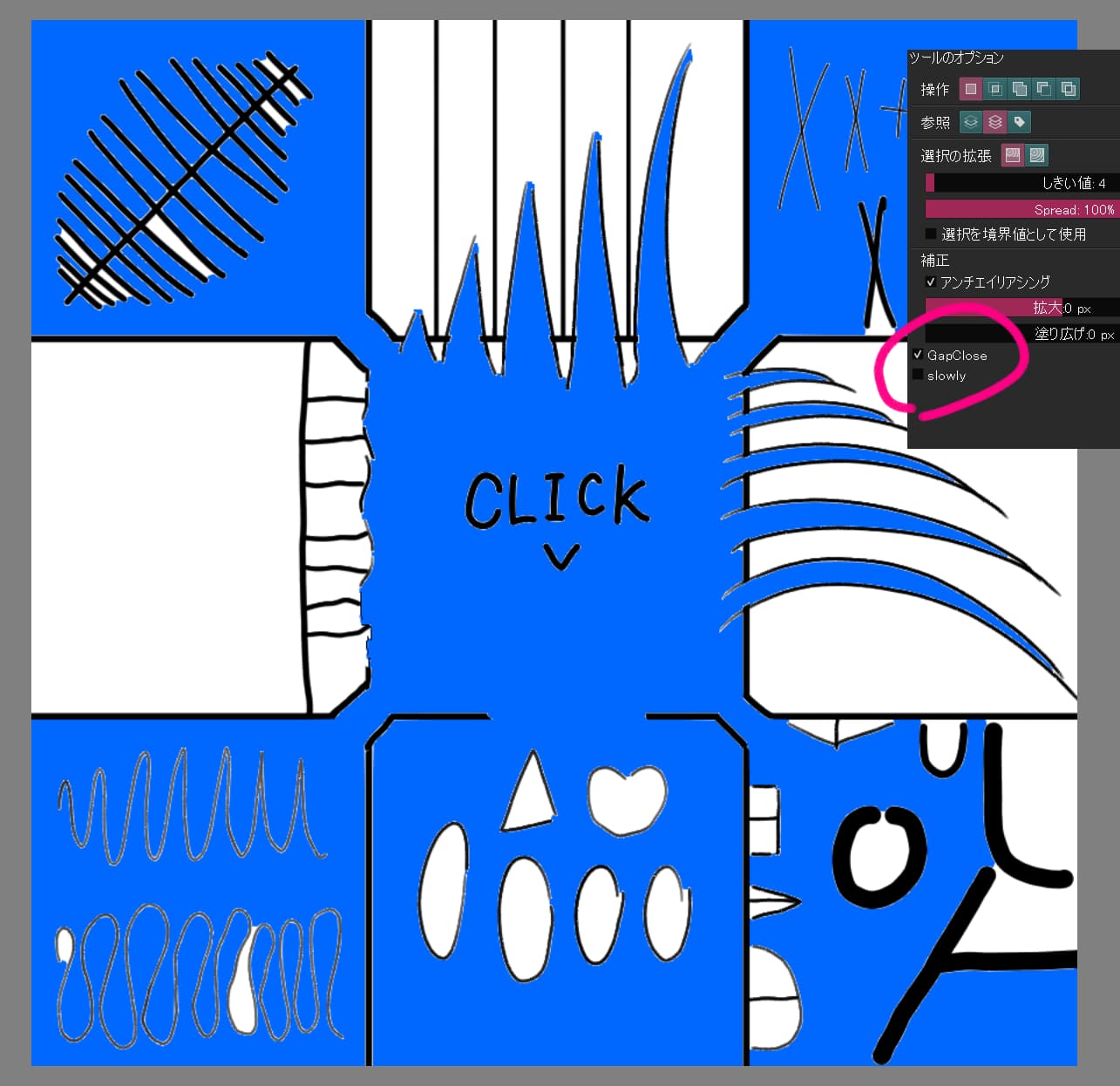
After running this script, the “gapClose” and “slowly” checkboxes should be added to the tool options of the contiguous selection tool.
If you click and release the canvas with these checkboxes on, a continuous selection with closed gaps will be made.

If you are having trouble making a good selection, checking “slowly” and executing it slowly may help.
If a bug in Krita prevents the selection from showing up, you may need to update the screen by adding a new layer.
Conflicts with other plug-ins may disrupt the operation.
Other operations, such as clicking repeatedly before the scripted selection is finished, may break the operation.

Current functional issues include…

  • Selection cannot be made on a single layer
  • Shift + click to change selection mode is not supported.
  • Gap size cannot be adjusted (this may be fixed in the future)

The script is unstable, to say the least, because it works in a way that hacks the Krita UI. At the same time, I am a novice in coding, so I am often unable to fix bugs when they appear. If you find a problem, I would appreciate it if you could tell me how to fix it with specific code. It is difficult for me to understand just the sentence, “You can fix it by doing A to B.” Of course, the bug report itself will help.
If it doesn’t cause any noticeable problems, I’ll make it into a Krita plugin and distribute it. I may not have to, though, since there are so few reports of this script being used in the first place.

Incidentally, I modified it a bit by changing the timing of erasing closerNode, so the selection is a bit more precise than the code shown above.

(Corrected ”viewCreated” to ”imageCreated” in the script)

3 Likes