DockerUnderCursor can make any docker float and display in the mouse position with keyboard shotcuts. Support Plugin Panel, E.g Pigment.O.

More introductions in github.
DockerUnderCursor can make any docker float and display in the mouse position with keyboard shotcuts. Support Plugin Panel, E.g Pigment.O.
More introductions in github.
well it works nice but there seems to be some odd things I am not sure if they are fixable even but:
Beyond that, it is a really cool plugin and seems very useful. thank yous.
Indeed, I will try to fix it. I had been using tablet so much that I didn’t notice it
this is a Known issues, it is krita’ bug. solution in README last part on github. you just need manual drag floating docker back mainwindow.
thx for your feedback.
I Updated plugin, brush outline now not offset. 
It is is working all good for what I can notice, now it feel very ergonomic. Thank you.
What I noticed was some of my panels not updating well while others updated good. I will try and fix them so it reacts better to yours.
omg  This looks super handy! With plugins like these Krita inches ever closer to the speed of light! Thanks for sharing!
One update, add function remember mouse position relative to docker.you can enable it in setting panel.
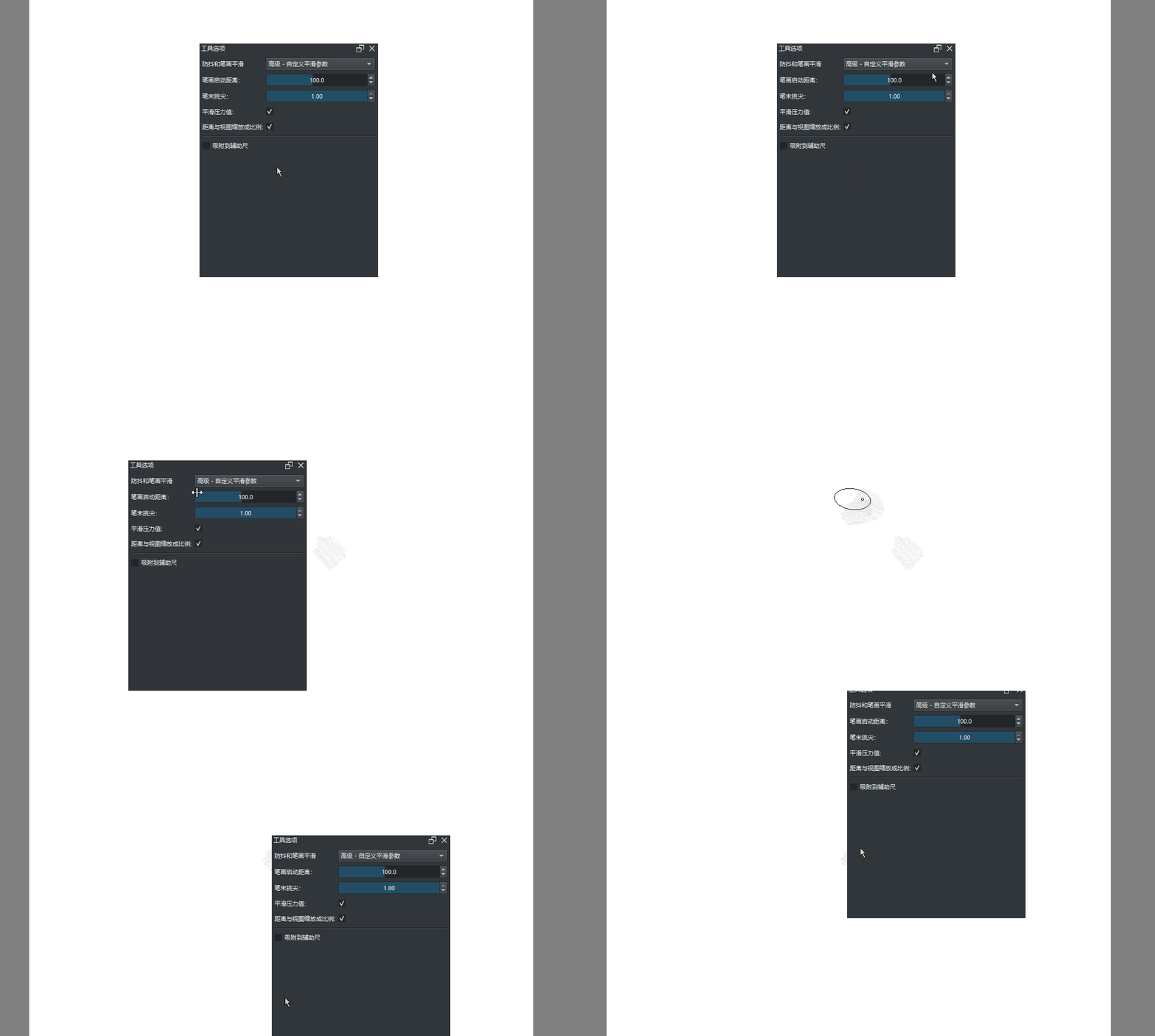
New function!
docker can auto-hide when mouse leaves the floating docker 

Thanks a lot, it’s really fun to work with the plug-in.
And it looks like you got joy in programming.

Michelist
yes,although I’m a beginner in python, it’s fun to implement the functions I want by myself. Hope it can help you too!
A fellow implementer myself.
I started in trying to implement features I wanted in blender. Now I’m kind of hooked and enjoy every moment when I force the computer to do whatever I wanted :).
If you like it…don’t give up when people criticize or just ignore your stuff(like with my addon  ). But one advice…don’t let it get in the way of your main field of work…this thing is really addictive
  .
.
Thanks for sharing. I will have a test with it, it looks very handy.
Thank you for making this. Its working great so far on macos.
I encountered an error
AttributeError
Python 3.8.1: C:\Program Files\Krita (x64)\bin\krita.exe
Thu Oct 27 22:46:31 2022

A problem occurred in a Python script.  Here is the sequence of
function calls leading up to the error, in the order they occurred.

 C:\Users\EyeOd\AppData\Roaming\krita\pykrita\dockerundercursor\dockertogglemanager.py in finalSetup(self=<dockerundercursor.dockertogglemanager.DockerToggleManager object>)
   26         self.widget = Krita.instance().activeWindow().qwindow().findChild(QWidget,self.name)
   27         self.monitor = DockerMonitor(self)
   28         self.setMonitor()
   29
   30     def setMonitor(self):
self = <dockerundercursor.dockertogglemanager.DockerToggleManager object>
self.setMonitor = <bound method DockerToggleManager.setMonitor of ....dockertogglemanager.DockerToggleManager object>>

 C:\Users\EyeOd\AppData\Roaming\krita\pykrita\dockerundercursor\dockertogglemanager.py in setMonitor(self=<dockerundercursor.dockertogglemanager.DockerToggleManager object>)
   32             self.widget.installEventFilter(self.monitor)
   33         if self.AUTOCONCEAL == "False":
   34             self.widget.removeEventFilter(self.monitor)
   35
   36     def targetPotion(self,pos):
self = <dockerundercursor.dockertogglemanager.DockerToggleManager object>
self.widget = None
self.widget.removeEventFilter undefined
self.monitor = <dockerundercursor.dockermonitor.DockerMonitor object>
AttributeError: 'NoneType' object has no attribute 'removeEventFilter'
    __cause__ = None
    __class__ = <class 'AttributeError'>
    __context__ = None
    __delattr__ = <method-wrapper '__delattr__' of AttributeError object>
    __dict__ = {}
    __dir__ = <built-in method __dir__ of AttributeError object>
    __doc__ = 'Attribute not found.'
    __eq__ = <method-wrapper '__eq__' of AttributeError object>
    __format__ = <built-in method __format__ of AttributeError object>
    __ge__ = <method-wrapper '__ge__' of AttributeError object>
    __getattribute__ = <method-wrapper '__getattribute__' of AttributeError object>
    __gt__ = <method-wrapper '__gt__' of AttributeError object>
    __hash__ = <method-wrapper '__hash__' of AttributeError object>
    __init__ = <method-wrapper '__init__' of AttributeError object>
    __init_subclass__ = <built-in method __init_subclass__ of type object>
    __le__ = <method-wrapper '__le__' of AttributeError object>
    __lt__ = <method-wrapper '__lt__' of AttributeError object>
    __ne__ = <method-wrapper '__ne__' of AttributeError object>
    __new__ = <built-in method __new__ of type object>
    __reduce__ = <built-in method __reduce__ of AttributeError object>
    __reduce_ex__ = <built-in method __reduce_ex__ of AttributeError object>
    __repr__ = <method-wrapper '__repr__' of AttributeError object>
    __setattr__ = <method-wrapper '__setattr__' of AttributeError object>
    __setstate__ = <built-in method __setstate__ of AttributeError object>
    __sizeof__ = <built-in method __sizeof__ of AttributeError object>
    __str__ = <method-wrapper '__str__' of AttributeError object>
    __subclasshook__ = <built-in method __subclasshook__ of type object>
    __suppress_context__ = False
    __traceback__ = <traceback object>
    args = ("'NoneType' object has no attribute 'removeEventFilter'",)
    with_traceback = <built-in method with_traceback of AttributeError object>

The above is a description of an error in a Python program.  Here is
the original traceback:

Traceback (most recent call last):
  File "C:\Users\EyeOd\AppData\Roaming\krita\pykrita\dockerundercursor\dockertogglemanager.py", line 28, in finalSetup
    self.setMonitor()
  File "C:\Users\EyeOd\AppData\Roaming\krita\pykrita\dockerundercursor\dockertogglemanager.py", line 34, in setMonitor
    self.widget.removeEventFilter(self.monitor)
AttributeError: 'NoneType' object has no attribute 'removeEventFilter'
its mean that you used wrong docker name. maybe some docker have disable or renamed. the simplest solution is click save button in settings panel, it will refresh .action file.
At the same time, i uploaded new code that block this error, you can update it.
Why can’t I edit my post  , I think it’s outdated.
@Aqao I think there’s a 30 day limit on editing posts. This has been noticed before.
Try now ! I enabled unlimited edit for owner in this particular category.
I’m getting an error with this addon in Krita 5.2:
TypeError
Python 3.10.7: C:\Program Files\Krita (x64)\bin\krita.exe
Fri Oct 13 09:47:27 2023

A problem occurred in a Python script.  Here is the sequence of
function calls leading up to the error, in the order they occurred.

 C:\Users\micha\AppData\Roaming\krita\pykrita\dockerundercursor\dockertogglemanager.py in toggleDockerStatus(self=<dockerundercursor.dockertogglemanager.DockerToggleManager object>)
  120     def toggleDockerStatus(self):
  121         if self.widget.isHidden():
  122             self.setToShow()
  123         elif self.widget.isFloating():
  124             self.dockerReturn()
self = <dockerundercursor.dockertogglemanager.DockerToggleManager object>
self.setToShow = <bound method DockerToggleManager.setToShow of <....dockertogglemanager.DockerToggleManager object>>

 C:\Users\micha\AppData\Roaming\krita\pykrita\dockerundercursor\dockertogglemanager.py in setToShow(self=<dockerundercursor.dockertogglemanager.DockerToggleManager object>)
   59         if not self.widget.isFloating():
   60             self.widget.setFloating(True)
   61         self.moveDocker()
   62         self.widget.show()
   63
self = <dockerundercursor.dockertogglemanager.DockerToggleManager object>
self.moveDocker = <bound method DockerToggleManager.moveDocker of ....dockertogglemanager.DockerToggleManager object>>

 C:\Users\micha\AppData\Roaming\krita\pykrita\dockerundercursor\dockertogglemanager.py in moveDocker(self=<dockerundercursor.dockertogglemanager.DockerToggleManager object>)
  111
  112     def moveDocker(self):
  113         dockerpos = self.targetPotion(QCursor.pos())
  114         if self.CLAMPPOSITION == "True":
  115             self.widget.move(self.checkPosition(dockerpos))
dockerpos undefined
self = <dockerundercursor.dockertogglemanager.DockerToggleManager object>
self.targetPotion = <bound method DockerToggleManager.targetPotion o....dockertogglemanager.DockerToggleManager object>>
global QCursor = <class 'PyQt5.QtGui.QCursor'>
QCursor.pos = <built-in function pos>

 C:\Users\micha\AppData\Roaming\krita\pykrita\dockerundercursor\dockertogglemanager.py in targetPotion(self=<dockerundercursor.dockertogglemanager.DockerToggleManager object>, pos=PyQt5.QtCore.QPoint(1303, 51))
   37         if self.mousepos:
   38             return QPoint(pos.x()-self.mousepos.x(),pos.y()-self.mousepos.y())
   39         return QPoint(pos.x()-self.widget.width()/2,pos.y()-self.widget.height()/2)
   40
   41     def setToFloating(self):
global QPoint = <class 'PyQt5.QtCore.QPoint'>
pos = PyQt5.QtCore.QPoint(1303, 51)
pos.x = <built-in method x of QPoint object>
self = <dockerundercursor.dockertogglemanager.DockerToggleManager object>
self.widget = <PyQt5.QtWidgets.QDockWidget object>
self.widget.width = <built-in method width of QDockWidget object>
pos.y = <built-in method y of QPoint object>
self.widget.height = <built-in method height of QDockWidget object>
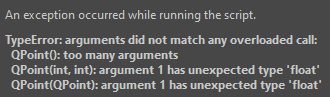
TypeError: arguments did not match any overloaded call:
  QPoint(): too many arguments
  QPoint(int, int): argument 1 has unexpected type 'float'
  QPoint(QPoint): argument 1 has unexpected type 'float'
    __cause__ = None
    __class__ = <class 'TypeError'>
    __context__ = None
    __delattr__ = <method-wrapper '__delattr__' of TypeError object>
    __dict__ = {}
    __dir__ = <built-in method __dir__ of TypeError object>
    __doc__ = 'Inappropriate argument type.'
    __eq__ = <method-wrapper '__eq__' of TypeError object>
    __format__ = <built-in method __format__ of TypeError object>
    __ge__ = <method-wrapper '__ge__' of TypeError object>
    __getattribute__ = <method-wrapper '__getattribute__' of TypeError object>
    __gt__ = <method-wrapper '__gt__' of TypeError object>
    __hash__ = <method-wrapper '__hash__' of TypeError object>
    __init__ = <method-wrapper '__init__' of TypeError object>
    __init_subclass__ = <built-in method __init_subclass__ of type object>
    __le__ = <method-wrapper '__le__' of TypeError object>
    __lt__ = <method-wrapper '__lt__' of TypeError object>
    __ne__ = <method-wrapper '__ne__' of TypeError object>
    __new__ = <built-in method __new__ of type object>
    __reduce__ = <built-in method __reduce__ of TypeError object>
    __reduce_ex__ = <built-in method __reduce_ex__ of TypeError object>
    __repr__ = <method-wrapper '__repr__' of TypeError object>
    __setattr__ = <method-wrapper '__setattr__' of TypeError object>
    __setstate__ = <built-in method __setstate__ of TypeError object>
    __sizeof__ = <built-in method __sizeof__ of TypeError object>
    __str__ = <method-wrapper '__str__' of TypeError object>
    __subclasshook__ = <built-in method __subclasshook__ of type object>
    __suppress_context__ = False
    __traceback__ = <traceback object>
    args = ("arguments did not match any overloaded call:\n  Q...t(QPoint): argument 1 has unexpected type 'float'",)
    with_traceback = <built-in method with_traceback of TypeError object>

The above is a description of an error in a Python program.  Here is
the original traceback:

Traceback (most recent call last):
  File "C:\Users\micha\AppData\Roaming\krita\pykrita\dockerundercursor\dockertogglemanager.py", line 122, in toggleDockerStatus
    self.setToShow()
  File "C:\Users\micha\AppData\Roaming\krita\pykrita\dockerundercursor\dockertogglemanager.py", line 61, in setToShow
    self.moveDocker()
  File "C:\Users\micha\AppData\Roaming\krita\pykrita\dockerundercursor\dockertogglemanager.py", line 113, in moveDocker
    dockerpos = self.targetPotion(QCursor.pos())
  File "C:\Users\micha\AppData\Roaming\krita\pykrita\dockerundercursor\dockertogglemanager.py", line 39, in targetPotion
    return QPoint(pos.x()-self.widget.width()/2,pos.y()-self.widget.height()/2)
TypeError: arguments did not match any overloaded call:
  QPoint(): too many arguments
  QPoint(int, int): argument 1 has unexpected type 'float'
  QPoint(QPoint): argument 1 has unexpected type 'float'
Here’s what’s displayed above the error message:
Looks like your plugin version is a bit old, try updating to the latest version. 