Hi Guys ! I notice a problem when creating storyboards in Krita. When I’d created several shots, I’d wanted to change the order of them. I tried to move one up or down in the sequence of the shots, but all the sudden, all the thumbnails of them just vanished and didn’t re-appear later, whatever times I hit cmd z (mac).
Does someone else have this issue or know how to fix it ? The only way is to shut down Krita (and lose everything, eventually). I tried to save my work anyway before closing the session, but when I restarted Krita, all my drawings and previews thumbnails were simply gone ! This is not stable at all. I hope a solution exists somewhere …
I’m also experiencing this issue and lost hours of progress because of it since the corruption was saved in my backups.
It’s like sometimes Krita loses pixel data in the animation frames when you do an undo (or something along the lines of it), which causes the thumbnails to vanish. When this happens, do not save the file or else you will lose your drawings.
I think the Storyboard Docker is too unstable too use. It might be better to create storyboard animatics using the Layer Comps feature instead.
think it’s a shame that flaws like this, which have been reported for so long, haven’t even been the subject of a simple response from the development team to the people who reported them. Quality software (even opensource) precisely requires greater responsiveness from the development team. I’m not a developer, so I don’t have any lessons to give in this area, but we do hope that they’ll consider putting this bug at the top of their list of future fixes. Storyboarding is too important to be done with lame tools. I’ve also noticed that the compositions docker is also faulty: it’s impossible to import an image in a new composition in any format on my Mac (?). This gives the impression of unfinished tools, but integrated anyway into the release all the same. In my opinion, this is counter-productive.
I’ve also noticed that the compositions docker is also faulty: it’s impossible to import an image in a new composition in any format on my Mac (?).
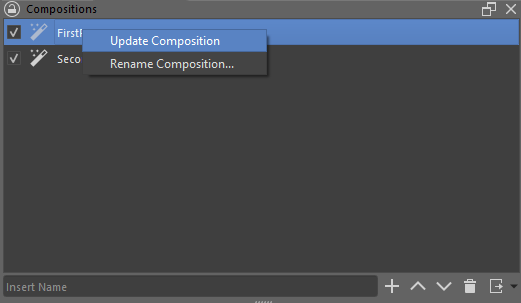
I don’t have a Mac since I’m mostly on Windows, but if you are talking about newly imported images not being included in a composition, that’s not a bug. You need to update the comp by right clicking it and selecting Update Composition so it can be included in it.
My pb was initially that when I wanted to import an image in a composition (or create a composition from an external image), all the source images were simply greyed in the selection menu and couldn’t be selected.
I think bug has been confirmed on the bugzilla so its a least somewhat known bug to the dev team. Right now though they are working on getting nightly builds service working again so I think thats taking priority (I believe its a requirement to do any releases in the future).
I’m not a dev but I’ve fixed some bugs before so maybe I’ll take a look after I finish what I’m working on now. Although I’m not a great programmer so often I can’t figure it out, we’ll have to see .
Hi Reinold ! Thanks for these precisions and kind proposition to help !-) I really hope Krita developps a bit more its animation block. For example , wouldn’t be cool that we cans easyly switch between animating frames on 1’s, 2’s or 3’s in a smooth way (on this, RoughAnimator is very versatile, for instance)? A better management of frames would be nice( and maybe free-hand deformation brush : liquify-ish). True inbetweening fonctions would greatly improve the experience. What do you think ?
One mostly works on animation and spent a long time to rewrite everything about audio synchronization.
Also, he spent a lot of time to fix and improve a long list of bugs/features I’ve opened: I can confirm animation is not put aside.
Next subject he’ll work on I think is audio waveform, if I understood.
So yes, animation is still under development improvement, there’s just a long list of bugs and new features asked by a lot of people; how all of this can be prioritized is quite complex (spoiler: everyone consider his own need as top priority and currently there’s around ~830 opened bugs…)
Concerning the storyboard, it has been implemented by a student during GSOC, I don’t know if the developer is still here working on Krita or not.
May be you can try to contact original developer.
On my side I’ve already got weird bugs with Storyboard but I think the only one I created for Storyboard is so weird that being able to understand what happen sounds complex and probably time consuming…
I see. Please find nothing else in my previous remarks than my deep interest for this part of the software. As you say, every single user hope to see brought up a solution to his need. So I think it’s maybe time for Krita team to grow (as Blender once did). There could be a wide appeal to developpers and sponsors to gather and improve these important functions.More and more creators seek opensource alternative to mainstream pipelines, they certainly would be happy to contribute. What do you think ?
There are such brushes in Krita, and several additional bundles have nice liquify, move and distortion brushes too, maybe you haven’t found them so far?
Here:
And here, I named most of them I know and own, including download-links in both posts:
In response to the original post, I have found this problem as well where layers/keyframes are deleted on save after re-ordering storyboard panels.
Here is how to recreate the problem:
Make a Krita file with storyboard panels
Save the file, everything is ok so far
Open the file and rearrange storyboard panels
BUG If you save “CTRL-S” the original Krita file “.kra”, then all of the storyboard panels go blank and if you save, it deletes all of the layers and keyframes - gone forever
The only way I have found around this is to:
Change the order of the storyboard panels
Move all of the keyframes on all layers one frame to the right
Move all of the keyframes on all layers back to where they were, one frame to the left
The storyboard panels now show up correctly and the file saves correctly
It’s like the storyboard and timeline fall out of sync and the storyboard needs a “refresh” after the rearrange. This is also a problems sometimes when moving frames and/or changing storyboard panel lengths/times. Frames fall “out of sync” with the storyboard and can sometimes disappear until manually refreshed by moving frames around and back, or by dragging the key frame to where the storyboard panel thinks/says it should be.
And many thanks for sharing your workaround with the community. I bet that not few are happy for a workaround till a solution is found and implemented. Thank you!
https://cdn.kde.org/ci-builds/graphics/krita/krita-5.2/
I encountered this issue a few days ago, and even until yesterday, the bug still existed. However, today’s version is working well, at least for the Linux version, I’ve tried it several times and there are no issues now.
 .
.
 Hello
Hello 