Temporarily change brush modes while holding modifier keys

In all art programs, holding down “ALT” or in Krita “CTRL”, brings up your color sample tool, so that you can quickly grab colors and paint unimpeded, and when you let go of that key, it goes right back to the tool you were using. When you hold “SPACE” you can pan or when you hold a combination of modifier keys you can zoom in or change brush size. But this functionality has yet been allowed to expand into different tools or subtools.

What I need in my workflow is the ability to create shortcut key combinations that will allow me to choose very specific tools or tool behaviors that will activate only when the button is held. For example, in CLIP STUDIO and using a rather unreliable hotkey tool, I was able to hold one button that would temporarily bring up my liquify tool so that I could paint, then nudge it around to get the shape I want and continue painting when I let go without ever having to select the tool and then the subtool on the UI, it was effectively just another mode to my main paint brush tool that I have open 99% of the time.

The same is true of the erase mode, by holding another button, I could temporarily turn my brush into an eraser while it was held down, there are so many different functions people need quickly and frequently that if set to a temp. held modifier key, would speed up workflow significantly.

So if there were changes to the shortcut’s, you could set the key you want, then choose “activate when held, deactivate when released” and then choose the exact tool you want, not just the general tool category. Say you even have two brushes that you switch back and forth frequently, while painting with your main brush, simply hold down your chosen modifier key shortcut you selected and it changes to that other brush, then right back when you let go. This is in contrast to having to open up a menu or even the quick select and choose it, then repeat the same action to return. It would save a considerable amount of time even over the quick select function in place now.

I can’t think of a feature more impactful for me as an artist right now, than this one. Its customizability that would make tool and tool functionality switching a breeze. I don’t know of any program that allows this and I think it would handily give the edge to Krita in terms of quality of life and would cement my decision to move to this program outright.

                                                                              Thank you for your time, I hope you consider my proposal and thanks for the work you do with Krita!
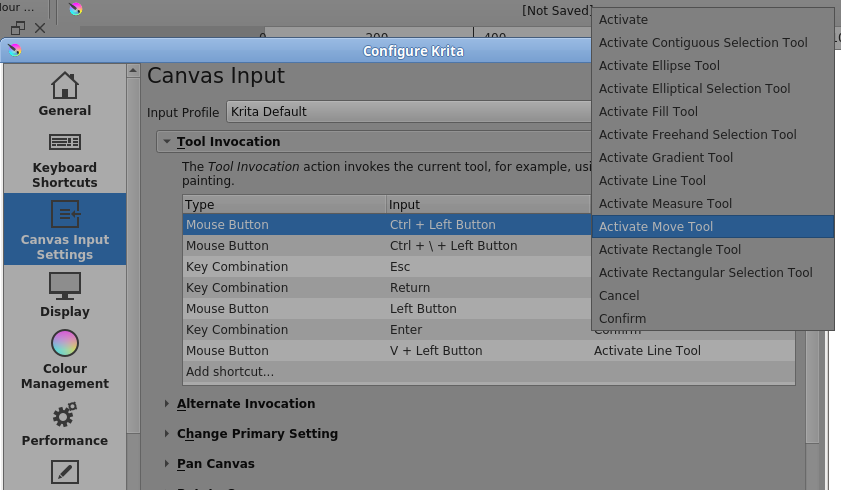
I think some of that can be dealt with by the Tool Invocation section of the Canvas Input Settings (but maybe not so much for brush swapping):

But see these comments by @angrymidget4728 when trying a similar thing in a different but related topic:
Enhanced Popup Palette (and more) for a complete UI-less & keyboard-less workflow - #14 by angrymidget4728

Go to the beginning of that topic to see how that particular situation started.

Correct me if I’m wrong but that appears to be just a hotkey that switches over to a general tool like brush tool right? Because what would be far more beneficial is a hotkey that activates while being held and allows you to select very specific tools, like you mentioned, different brushes within the brush tool.

When I have to choose hotkeys that change to a tool category like move, line, fill or select, I still have to stop and choose which function or tool within that tool in the menu’s and since I can’t set it to only activate while being held, I need another button to return me back to the previous tool and this can get all mixed up if you’re trying to consolidate it onto one button.

Type: Key combination > CTRL + B > Hold to activate > G) Dry Brush 01

Something like that, so in that way, specific tools could be used the same way pan and color sample is used with CTRL and SPACE respectively. A button that jumps to another tool and stays there is far less functional, even though you could argue its similar, in practice it’s a pain to be locked into other tools and have to return with other hotkeys.

The here presented plugin is able to temporarily switch a tool of your choice, maybe this could be helpful:

It can be downloaded from this GitHub-Page:

###############################################

For quick access to the eraser, the little-noticed “Krita Direct Eraser” script from the old Krita forum might come in handy.

Should the download no longer be available, I also have the script present in my cloud, bundled in a ZIP archive along with copies of the two associated forum pages in HTML and PDF formats.
Things apparently got heated in that topic, but we don’t have to worry about that.

If you have problems with the installation, we will be able to help you here, but you just have to open the resource folder in Krita via ‘‘Settings’’ >> ‘‘Manage Resources …’’ >> ‘‘Open Resource Folder’’ and copy the two directories, from the folder “krita” contained in the archive “JoannesJ - Krita Direct Eraser.zip” to it, restart Krita and then assign the two shortcuts after revive.

Link to the old forum:
https://forum.kde.org/viewtopic.php?f=137&t=151117&hilit=Direct+Eraser#p396917

Link to this plugin in my cloud, as described above:

###############################################

Furthermore, the experimental plugin from @Daishishi could fill the same gap, it is also an eraser plugin. To my shame, I must confess that I have not looked at it yet.

You’ll find it here:

###############################################

I almost forgot the “heavyweight” among the plugins that revolve around the “eraser question”. As far as I remember, it was created because of the eraser switching and assignment (and a lot of hype around it), it is, at least that’s how I felt it, very interesting for many users because of its range of functions, for me, not really, because of my way of working.

Buli Brush Switch:

Michelist

1 Like

In krita there is no subtool concept. Brushes are under brush tool so yo enable switching to a particular brush via a hote kya would need some reworking. Same with liquify it is a mode in transform tool rather than a tool itself and same with eraser there is no dedicated eraser tool ( there is a feature request request for this too)

This concept seems helpful and interesting, we need to discuss how to integrate such thing in krita. But it would probably need major refactoe of how tools work in krita and probably bofurcating lots of things into individual tools. Thanks for the feature request and initiating the thought for this.

Lastly I would like to give a general suggestion that I would give to anyone making feature request here on krita-artists is that when users here suggest you a workaround or alternative plugin it is not that they are rejecting your idea, they are just trying to make your life easier by some degree with a temporary workaround until the feauture is implemented which may take long time. I am saying this because some people think that this suggestion giving is annoying and tiresome and think we dismiss ideas.

5 Likes

Those Tool Invocation items do only activate while being held down.
An example is Ctrl which activates the colour picker while being held down.

For some other functions you mentioned, there are already toggle action keys (not press and hold) that will switch to them and then switch back, which may or may not be or use or interest to you at this time.

Yes for color sample, pan and the like, which is so useful. For that reason it would be so great to have that capability on any tool.

Well I may be speaking in Clip Studio terms, but that is to say instead of switching to b) for brush, I can hold CTRL + b and temporarily activate a specific brush of my choosing in the shortcut menu.

edit - I have seen that I can set specific brushes in the “ten brushes” and then set that to a button, so that’s a bit better though still I’m using a hotkey program to make one button switch back and forth with one button. It has the ability to hold to change, but it bugs out and gets it all backwards and I get stuck in the wrong main tool, so not an ideal 3rd party solution.

I understand people are giving workaround suggestions, I may also come off as unclear in my suggestion and be told “you can already do that”, so hopefully I outlined my idea well enough. It could be my idea is niche and thats just how I work, but I also think if the option were available to have modifier keys transform the brush temporarily, most people would probably use it and save time AND space on their shortcut controllers. I know I’d love it at least, so thanks for hearing me out, at least the idea is out there!

2 Likes