The impression after using it for months is that so far it’s overly complicated and extremely irritating to use; Especially having to reset every ‘property’ selection per every change and selection of text I make. But since OP stated that it has something to do with SVG mechanism, I’ll just wait without complaining for it to be further developed.
Is it possible to configure the text editor feature to use a default text setting? I’d like the font type, size, etc to be the default, every time I add text to my drawing.
Some of the 3rd-party fonts I’ve installed don’t seem to have a title that is displayed in the text editor search area. Can a title be added?
Is it possible to delete fonts from the system (entirely) through the text editor?
Some fonts names are really large. Some are really tiny. Can these be normalized such that all the names are the same size? Some of the names get cropped off in the search window. Can’t tell what they are.
@Jarro1 , I need a bug report to bugs.kde.org in the product Krita component Vector/Text, with a test file and the fonts you’ve tried. I cannot from here tell what is going on on your system.
@dk8 , for you, I think I understand what is going on, and I’ll tackle it after I get the fonts stuff finished (I want to overhaul some line-height and font-size related code then).
@larrycross , that would be solved by having text presets, which are planned, but I need to first get through the fonts stuff (both use the resource system, which is giving me a lot of trouble right now). For your font name problem, I need to know which fonts you’re having trouble with as well.
I cannot make it possible for Krita to deinstall fonts on the system, I wouldn’t even know where to begin with getting that to work, my best guess it would require specialized code for every single platform Krita installs on.
The font names should be much more readable in the branch where I’m working on making them resources, but I’m literally working on that right now.
State of the fonts stuff is that I’m still trying to finish it. Most of the problems is trying to get tagging to work seamlessly, and to ensure that the translated font-names work correctly and can be searched on (necessary for CJK fonts in particular). Krita didn’t have resources before that can hold translations, so this is a bit of work.
Woah! lol I knew there was some effort to overhaul font/text editing in Krita, didn’t realize there were so many issues at stake. I guess my questions pale in comparison to everything else lol. Anyway, I’ll respond to your comments…
Re: font names
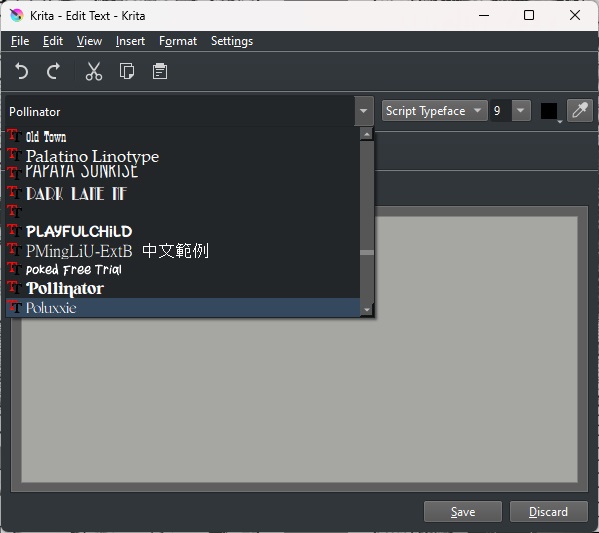
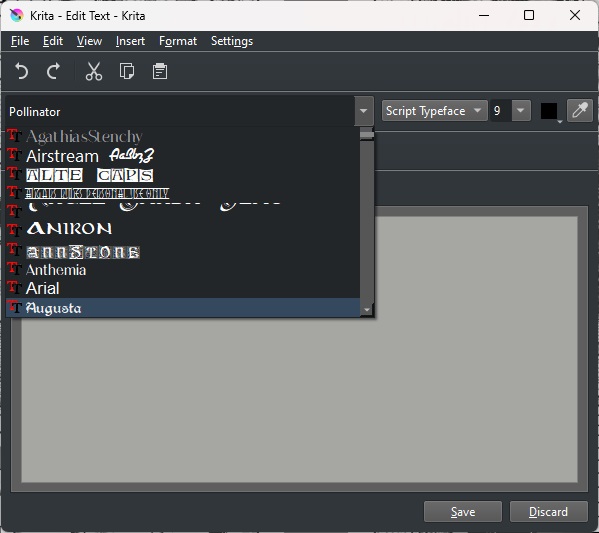
The two screenshot examples above show the problem. Sometimes the font name is cropped. Sometimes the name is missing completely. These are just two examples. I don’t know how many fonts I have loaded on my computer (PC, running Windows 11). Aside from the normal system/default fonts included with Windows, I probably have around a hundred more that were downloaded from various sources around the world wide web. I’m not all knowledgeable about font design, but it seems as though these display names are the result of work done by the original font designer. Some font designers do a better job than other font designers lol. I’m aware that there are literally thousands (maybe tens of thousands) of fonts available both as freebees and commercial packages. I’m doing comic work at the moment. I’m not a professional. My needs are rather small than those who might be doing professional illustration work for a living. I guess the solution would be to go to the system font directory and manually delete those fonts that are either not really needed, or aren’t displaying properly. Either that, or maybe, there is a font editor app that allows someone to make changes to a font package such that the display names are represented properly?
My first comment about having a default font/text setting: If I understood, you are currently working on something like that. As it stands, this is not a deal breaker for me. A few mouse clicks and I have what I need. I hoped maybe for a back-door workaround but if that’s not possible either, no problem, I can wait for you to finish your work. As I was typing this I thought an idea might be, copy text from one panel and paste it into another panel. The text is obviously wrong but the settings for that text are correct. I could just delete the text and start typing new text.
Gee - thanks so much for taking on all this work. You have my gratitude. PS - I’m going to take the time to read through all these posts, Fascinating stuff!
Yeah, so those cut-off images are caused by the fonts being drawn in a way that Qt’s text engine doesn’t know how to handle, and that’s part of the reason I am reworking the font selector (the other being that, if they’re resources, they can be tagged and disabled from Krita’s menu, which should help wrangling a big font collection, as well as trying to ensure that font selection is consistent, which is its own can of worms).
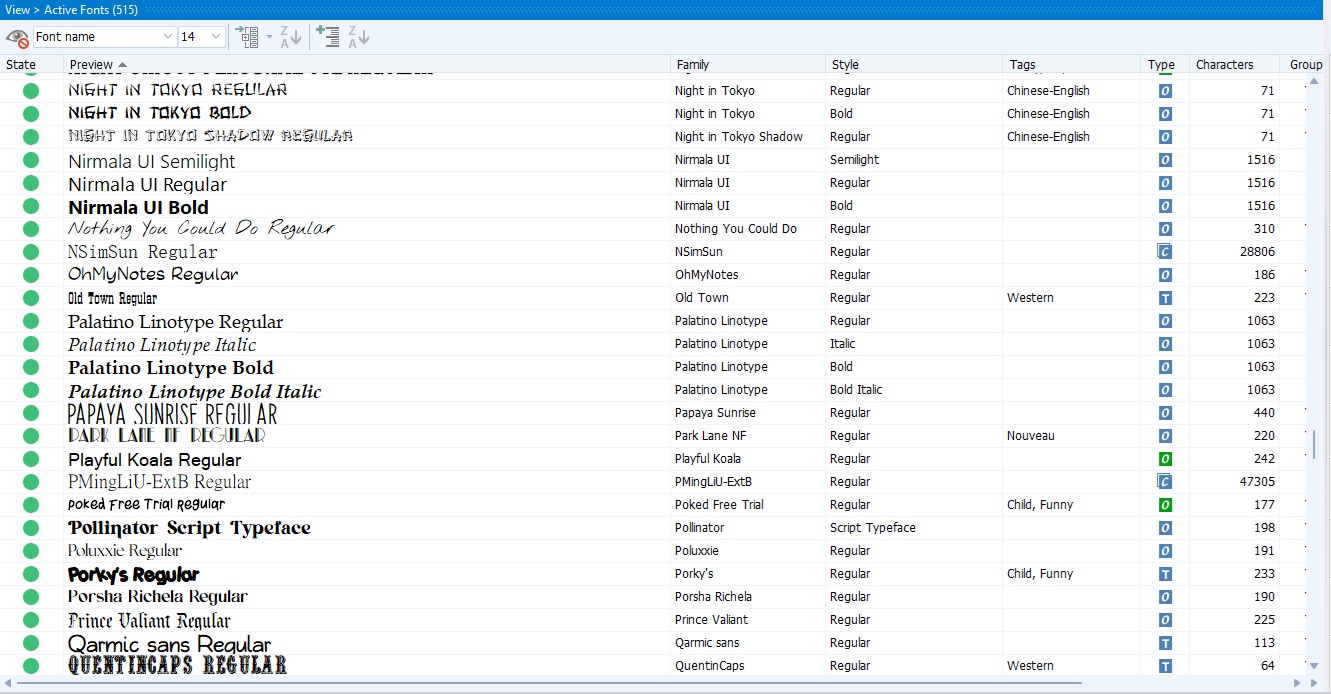
Here’s how the current work I’m doing displays Papaya Sunrise for example:
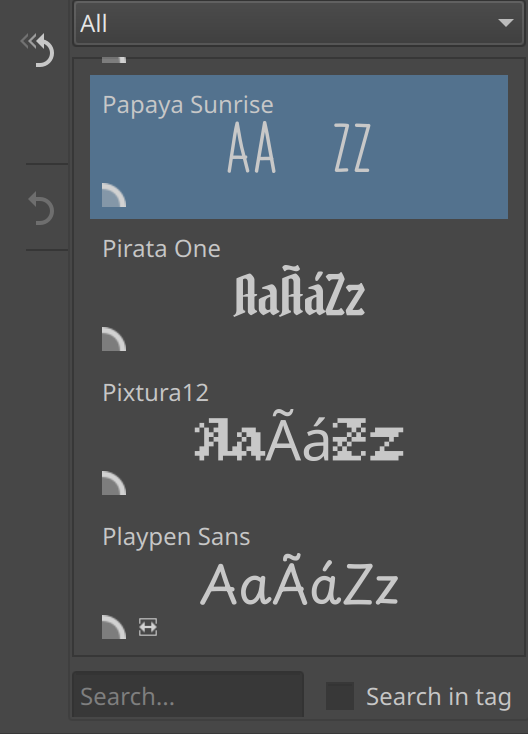
This font is “interesting”, as it decided to have empty glyphs for à and á instead of no glyphs (which means fallback won’t work, like it happening for Pixtura12 in the same image). Similarly, it seems its ascent and descent don’t correspond to its em-square, meaning it displays 2x bigger than other fonts at the same point sizes:
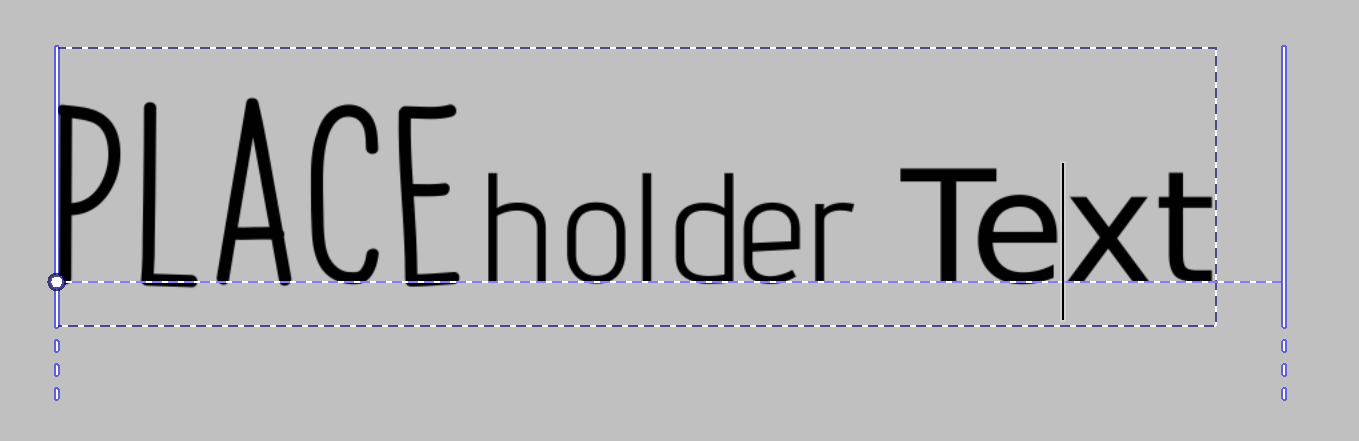
(other fonts are Advent Pro and DejaVu Sans, all at the same size)
This is not your fault, but rather a problem caused by there being about… 5? different ways to store the vertical metrics, and the person designing the font didn’t understand all of these different places. It’d be good if you can figure out the names of the other broken fonts (you should be able to select them and then a proper name is visible in the font selector), because there’s tons of fonts out there, and even though I am not a wizard, I do think we ought to do our best to get them working, especially as people using these fonts are not that technical.
The delicate looking fonts should be fixed as well with the new font selector, by virtue of having the font name at the top-left of the font sample in regular UI text.
Thx so much for your comments. I’ll take a look through the entire inventory and respond back. I don’t think this helps the cause but this is a screen shot of a program I had acquired a couple years ago called MainType. Here you can see a partial list (including Papaya Sunrise). There’s still some clipping on taller fonts but not nearly as severe as Krita’s current option. What’s kind of cool is you can tag each font with descriptive names (spooky, funny, medieval, etc). Makes searching for a certain font a lot easier. I had to enter those tags by hand. That could be a project all by itself lol.
Thanks! Looks like I’ll just roll back to 5.1 for now.
@wolthera A problem with converting text to a path has been reported here:
Texto Vectorial
I’ve done some quick tests and version 5.1.5 works.
The 5.2.0-prealpha-710e424a96 works
The 5.2.0 release does not work, nor do later versions.
(I did a very coarse search with what I had.)
Select a text object in 5.1.5 then switch to the Edit Shapes Tool.
In the Tool Options docker, press Convert to Path.
That will immediately show the nodes of the text paths that can be edited.
If you then select the text object and press Return, the path nodes will show and the Edit Shapes Tool will be activated.
In later versions, using the Convert to Path button seems to do nothing.
If you then select the text object and press Return, nothing happens but the text editor should be activated for text. So something has been done to the text.
Hey, I answered, but I also receive notifications when you mention me, so maybe do that instead? It may keep the thread a bit more focused.
I fixed this!
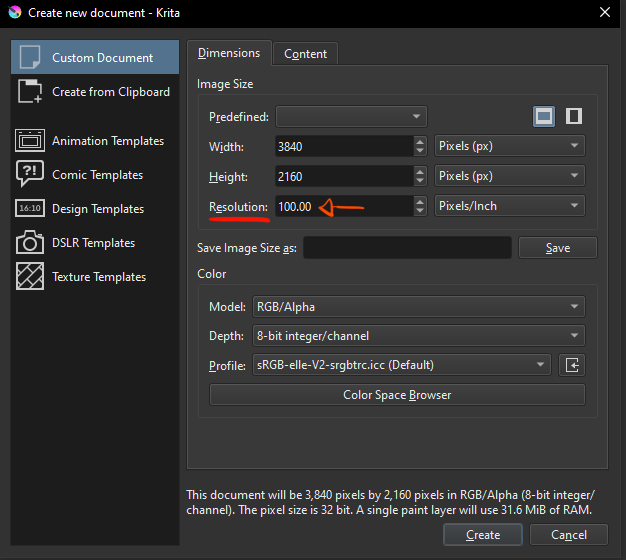
The problem is the PPI resolution, if its on 100 or greater it will work perfectly.
i had put it on 1, when normally its 100 by default, this interacted in a strange way with the text tool, im guessing due to it being a vector layer. And since it was a custom predefined template it wasnt affected by reinstalling Krita.
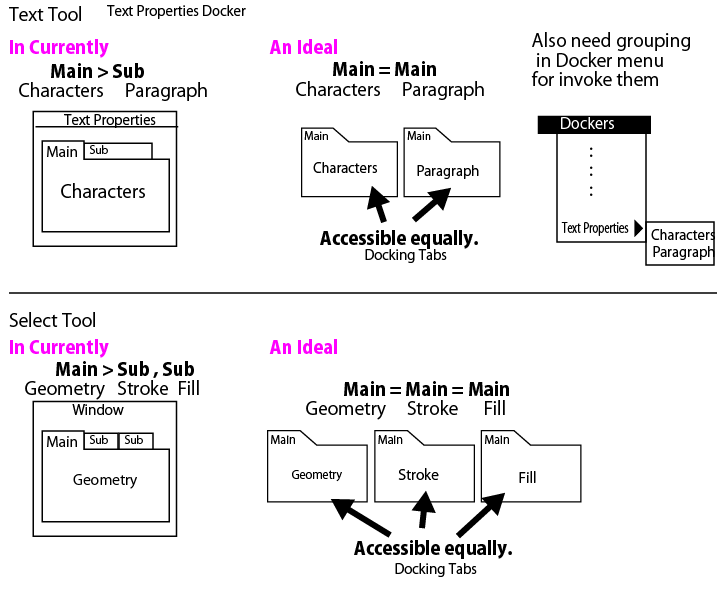
My main concern with this is that it is a significant amount of work, and I’d prefer to focus on getting the text tool finished.
Erm… I do have a small update: I’m still trying to get things finished up. I’ve made a seperate MR to have the bitmap fonts work when “Convert to shape” is used, which is useful from both a usability standpoint as well as actually allowing for generating nice previews for these fonts. Beyond that, I’ve been trying to to get tagging to work normally (the biggest delay I had was that the tagging menu just didn’t want to show correctly, and that’s fixed now), and we’ve got previews that localize, so that CJK fonts show CJK samples, though right now that’s locale dependant. I still have a bunch of things to do, including improved search, better icons and a bunch of code-specific issues.
is there a setting that needs to be switched on to enable these new features to edit text in a wysiwg mode inside the canvas?
I recently updated my krita and when I use the text tool a little window still pops up. I thought it would be possible to edit text directly now.
Anyway thanks for your work! Looking forward to the moment I am not kicked out of my flow every time I want to change a piece of text in krita
kthx bai
 Hello @spirobel, and welcome to the forum!
It is not in the recent release versions, only the development versions, so called nightlies, you can get them from here:
https://cdn.kde.org/ci-builds/graphics/krita/master/
If you use Windows as OS, then you should download the ZIP-File from the bottom for the portable version, because that can be used “beside” your release version, but you can only run one Krita at a time.
To use the portable version, you have to unzip it to any folder you want and have full read and write access to, then enter the folder you unzipped and start Krita using the shortcut krita.lnk.
If you choose the EXE-Version, it will overwrite your current installation of Krita.
Despite which version you use, portable or installation, both will use your current settings, so you do not have to set them up again.
Michelist
Holy Christ this is gonna be revolutionary when it comes out! Legitimately amazing job my dudes! I’m seriously wishing you all a ton of luck and can barely wait to see it finished! A huge thanks to the team for putting in blood, sweat and tears into what is essentially probably the most important text editor overhaul you could do.
legitimately, thanks a lot. I love this community so much, I’m glad you and your team are part of it!
In terms of what my expectations are for the text editor going into future…
I’d love to see the ability to add text boxes like in MSWord and actually have the added boundries be respected when writing (so for the text to continue into a new line when the boxboundry’s approached etc…). It’s immensly annoying trying to do it with the enter key as I have to constantly “save” the text just for it to preview properly. I assume most of it can be fixed by actually making it on-canvas editable, but you’re already working on it so I’m sure we’ll see it in the future!
Installed the latest Nightly build today btw, and I sadly can’t figure out a way to change the font. Am I being dumb or is it just a problem on my end? Aside from that the editing feels super smooth and works well with my workflow “:)”
Again: thanks a lot for putting in all the work for this, it’ll be absolutely awesome and a huge, much-needed improvement "'^ ^
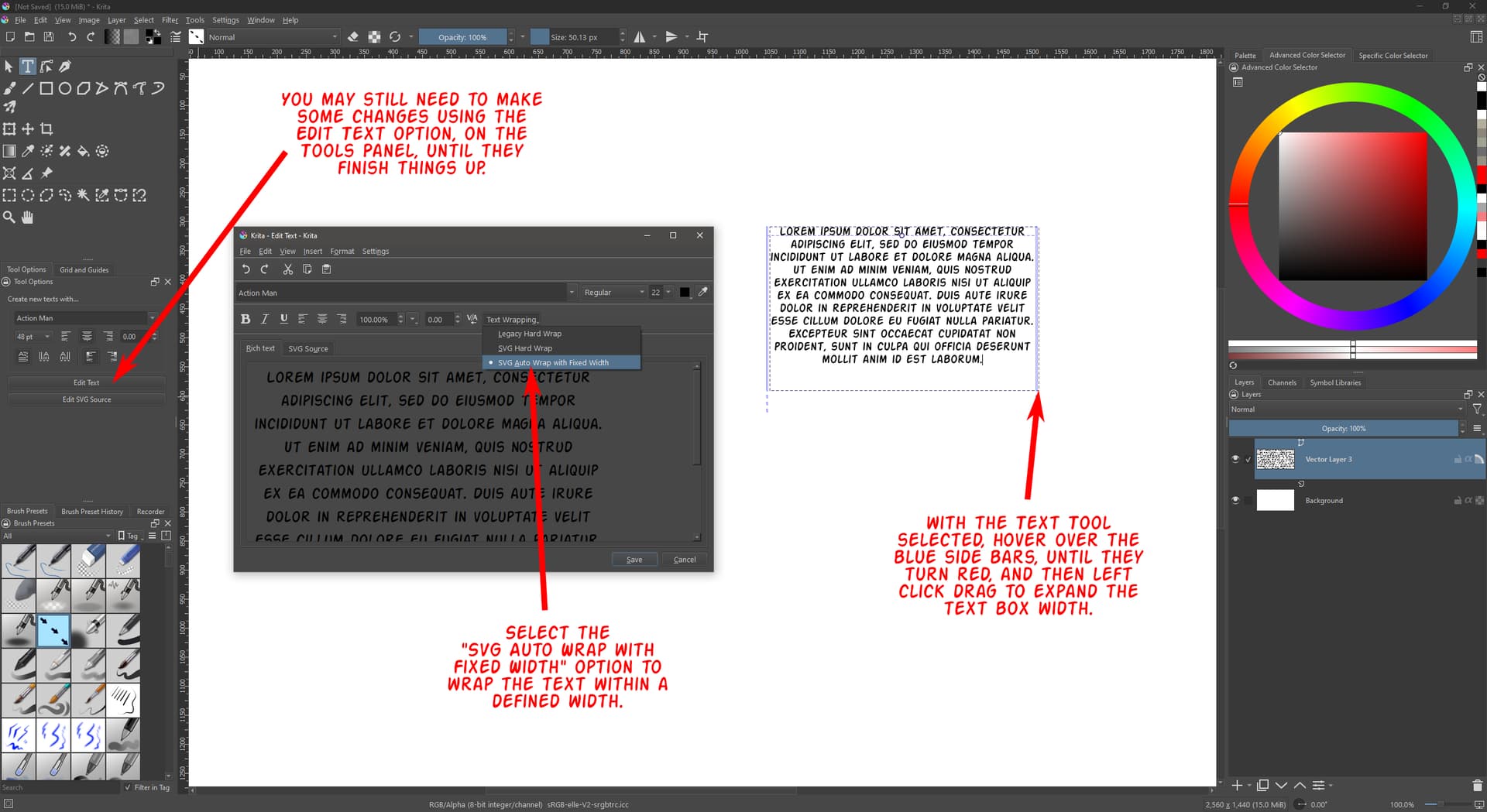
No no, no worries I know how to change it in the (currently) default editor. I was talking about the new nightly build with the improved on-canvas editor. It’s been moved to a docker now with a bunch more text customization options which really helps out with my workflow :D. Thanks for the tip anyways though, while it didn’t do anything for me it might just help someone :).
I see. I wasn’t aware of the secondary Text Docker. Spent some time tinkering with it. There is a drop-down menu (titled Font Family) on there to change the font, but it doesn’t allow you to jump to font by typing. You’ll need to scroll down with your mouse wheel, or fiddle with the cursor at the bottom of the menu to get the list to scroll downward.
Edit - I don’t see the Text Wrapping option on the new docker. Am I overlooking it?
I’m not done yet with the rich text editing. The fonts-branch (which has better fonts selection) took all my energy (I did take a break to fix softproofing), and after that I still have at the least a dozen more tasks to do.
For what its worth, the fonts branch is nearing completion. I hope to have database migrations (for the new fonts resource storage) and unit tests handled this week.
Appreciate all the hard work you’re doing on it. Even with it in its current state, it’s already been a huge advantage to my workflow.